
1. Introduction
Thank you for choosing the Pilipane LCD Display & Computer for your electric bike. This device is designed to provide essential riding data and enhance your e-bike experience. It is specifically compatible with BAFANG BBS01, BBS02, and BBSHD mid-drive motors that utilize the UART protocol. This manual provides detailed instructions for installation, operation, and maintenance to ensure optimal performance and longevity of your display.

Image 1.1: The Pilipane LCD Display & Computer for Electric Bikes.
2. Key Features
- Wide Compatibility: Suitable for Bafang BBS01, BBS02, and BBSHD mid-drive motors that adopt the UART protocol.
- Clear Readability: The LCD screen provides very clear information, easy to read and operate, even in direct sunlight.
- Durable Construction: Made of premium ABS material with an IP64 waterproof and dustproof rating, ensuring a long service life.
- Comprehensive Data Display: Indicates battery mileage, power output, current, error codes, various indicators, and real-time, average, and maximum speed.
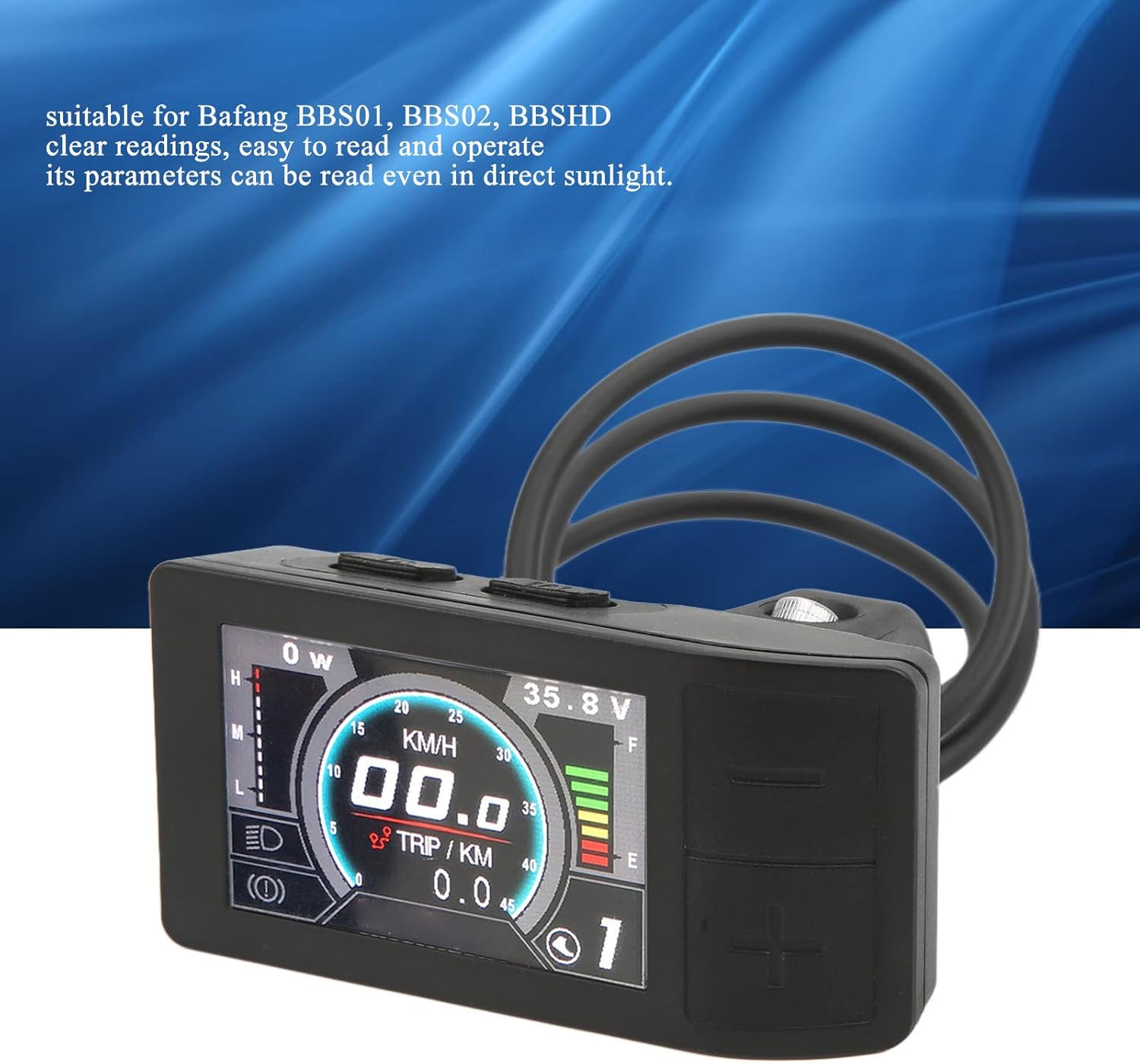
Image 2.1: The display screen offers clear readings, even in direct sunlight.

Image 2.2: The display is IP64 waterproof and shows various indicators including speed and battery.
3. Specifications
| Attribute | Detail |
|---|---|
| Item Type | Electric Bike Display |
| Material | ABS |
| Weight | Approx. 123g (4.34oz) |
| Voltage Compatibility | 24V, 36V, 48V |
| Maximum Operating Current | 100mA |
| Bracket Diameter | Approx. 22mm (0.87in) |
| Joint Type | 5-pin Internal Threads, Waterproof Joint |
| Display Type | LCD |
| Sensor Type | Cadence Sensor |
| Human Interface Input | Buttons |
| Mounting Type | Handlebar Mount |
| Model Number | Pilipanede5buhrwca |
4. Setup and Installation
Follow these steps to properly install your Pilipane LCD Display & Computer:
- Mounting the Display: Securely attach the display unit to your bicycle's handlebar using the integrated bracket. Ensure the bracket is tightened sufficiently to prevent movement during riding. The bracket is designed for approximately 22mm handlebars.
- Connecting the Cable: Locate the 5-pin waterproof joint on the display's cable. Connect this joint to the corresponding port on your BAFANG BBS01, BBS02, or BBSHD mid-drive motor system. Ensure the connection is firm and fully seated to maintain its waterproof integrity.
- Cable Management: Route the cable along your bike frame, securing it with cable ties or clips to prevent it from snagging or interfering with moving parts.

Image 4.1: Front and back views of the display, illustrating the handlebar mounting bracket and cable connection point.
5. Operating Instructions
The Pilipane LCD Display features intuitive button controls for easy navigation and data access.

Image 5.1: Top-down view of the display and a close-up of the control buttons on the back.
5.1. Power On/Off
- To power on the display, press and hold the power button (usually marked with a power symbol) for a few seconds until the screen illuminates.
- To power off, press and hold the power button again until the screen turns off.
5.2. Navigating Display Modes
Use the navigation buttons (typically '+' and '-' or 'M' for mode) to cycle through different information displays:
- Speed: Real-time, Average, Maximum speed (KM/H or MPH).
- Distance: Trip distance, Odometer (total distance).
- Battery Level: Visual indicator of remaining battery charge.
- Power Output: Current power being drawn by the motor.
- Current: Electrical current consumption.
- Error Codes: Displays specific codes if a system error is detected. Refer to the troubleshooting section for common codes.
5.3. Adjusting Settings
Specific settings such as unit conversion (KM/H to MPH) or backlight brightness may be adjustable through a dedicated settings menu. Consult the on-screen prompts or refer to the BAFANG motor system's general manual for advanced configurations, as some settings might be controlled by the motor controller itself.
6. Maintenance
Proper maintenance ensures the longevity and reliability of your Pilipane LCD Display.
- Cleaning: Wipe the display screen and body with a soft, damp cloth. Avoid using abrasive cleaners, solvents, or harsh chemicals, as these can damage the screen or casing.
- Water Exposure: While the display is IP64 waterproof, prolonged submersion or high-pressure water jets (e.g., from a power washer) should be avoided. Dry the unit thoroughly if it gets wet.
- Temperature: Store and operate the display within recommended temperature ranges. Extreme heat or cold can affect performance and battery life.
- Connections: Periodically check all cable connections to ensure they are secure and free from corrosion or damage.
- Physical Protection: Avoid dropping the display or subjecting it to strong impacts, which can cause internal damage or screen cracks.
7. Troubleshooting
If you encounter issues with your Pilipane LCD Display, refer to the following common problems and solutions:
| Problem | Possible Cause | Solution |
|---|---|---|
| Display does not power on. | No power from battery; Loose cable connection; Damaged cable/display. | Ensure e-bike battery is charged and turned on. Check the 5-pin waterproof connection is secure. Inspect cable for visible damage. |
| Incorrect speed/distance readings. | Wheel circumference setting incorrect; Speed sensor issue. | Verify wheel circumference setting in the display's menu (if available) or through the motor controller. Check speed sensor for proper alignment and cleanliness. |
| Display shows an error code. | System malfunction; Sensor error; Motor controller issue. | Note the error code. Consult your BAFANG motor manual for specific error code meanings and troubleshooting steps. Often, restarting the system can clear temporary errors. |
| Buttons are unresponsive. | Dirt/debris under buttons; Internal malfunction. | Clean around the buttons. If problem persists, contact support. |
For issues not listed here or if solutions do not resolve the problem, please contact Pilipane customer support.
8. Warranty and Support
This product is manufactured by Pilipane. For any product-related inquiries, technical support, or warranty claims, please refer to the contact information provided with your purchase or visit the official Pilipane store on Amazon:
Visit the Pilipane Store on Amazon
Please retain your proof of purchase for any warranty-related services.