
1. Introduction
Thank you for choosing the NEO TOOLS 99-028 Headlamp. This headlamp is designed for various applications, offering powerful illumination with its LED technology and a convenient rechargeable battery. Please read this manual carefully before using the product to ensure safe and optimal operation. Keep this manual for future reference.
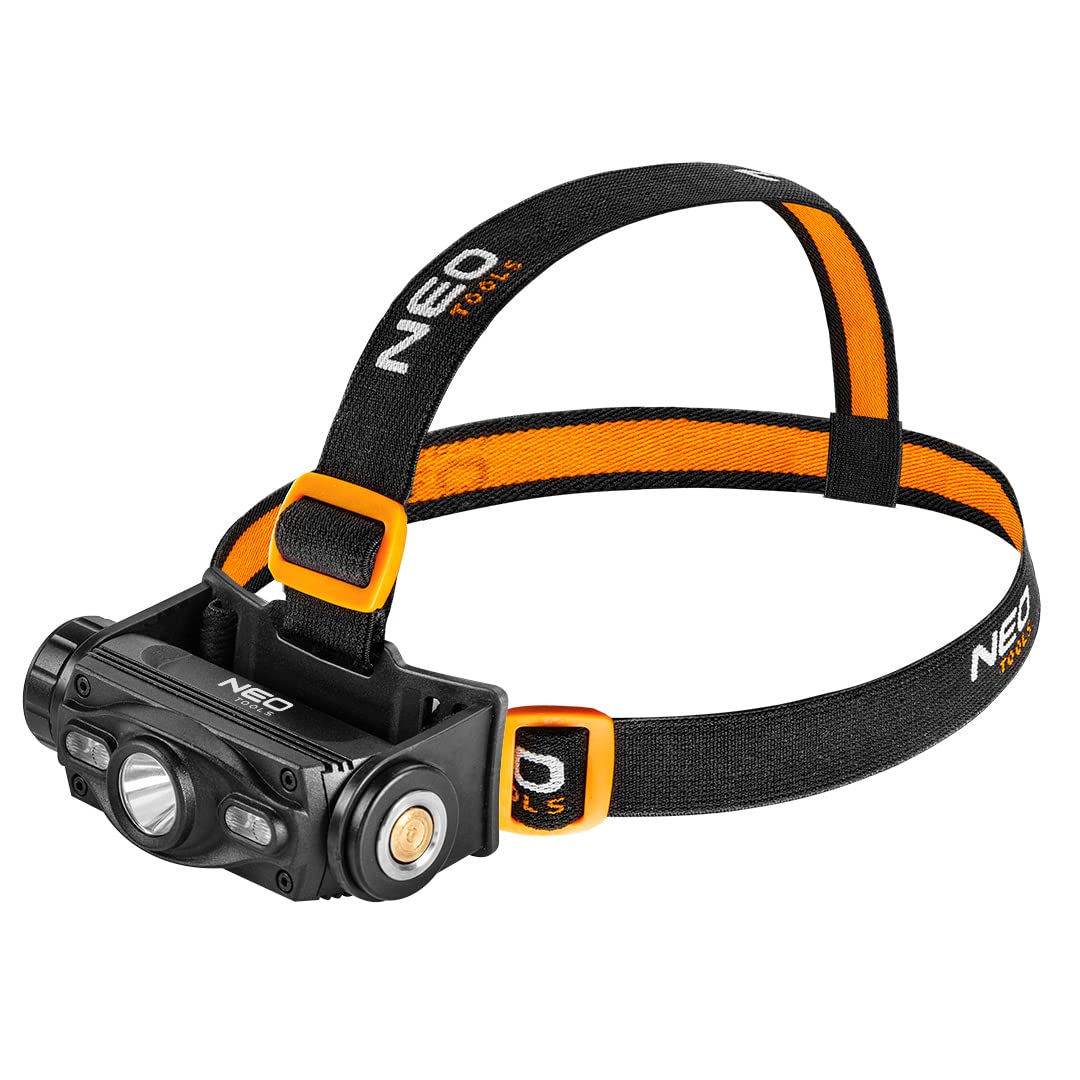
Image 1.1: Front view of the NEO TOOLS 99-028 Headlamp.
2. Safety Instructions
- Eye Safety: Do not look directly into the LED light or shine it directly into the eyes of others. The intense light can cause temporary vision impairment or permanent eye damage.
- Battery Safety: Use only the provided or recommended charging cable and power source. Do not expose the battery to extreme temperatures, direct sunlight, or fire. Do not puncture, disassemble, or short-circuit the battery.
- Water Resistance: This device has an IP20 protection rating, meaning it is protected against solid objects over 12.5mm (e.g., fingers) but has no protection against water. Avoid exposure to water, rain, or high humidity.
- Children: Keep the headlamp and its accessories out of reach of children.
- Maintenance: Do not attempt to repair the device yourself. Contact qualified service personnel for any repairs.
3. Package Contents
Ensure all items are present and in good condition upon unpacking:
- NEO TOOLS 99-028 Headlamp
- Rechargeable Lithium-ion Battery (integrated)
- USB Charging Cable
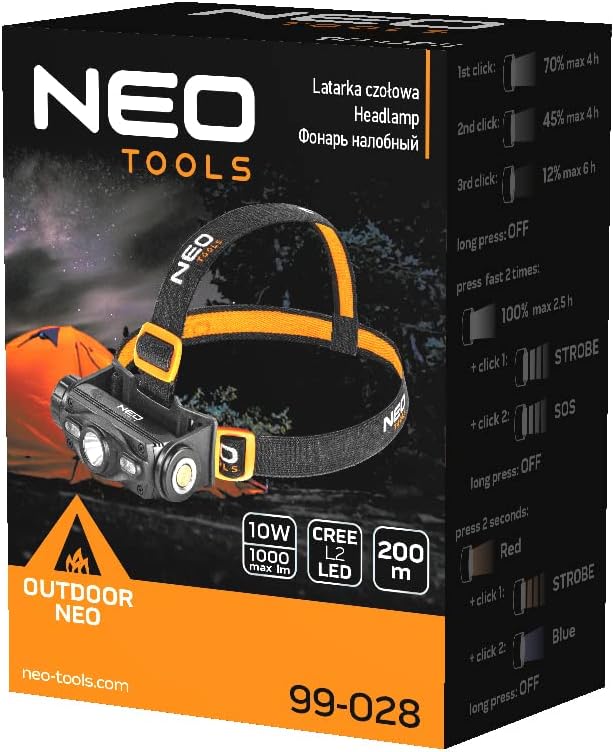
Image 3.1: Product packaging illustrating the headlamp and its key features.
4. Product Features
- High Brightness: Up to 1000 lumens for powerful illumination.
- Long Range: Light beam reaches up to 200 meters.
- Durable Construction: Aluminum casing for enhanced durability.
- Rechargeable Battery: Integrated 2000 mAh Lithium-ion battery for extended use.
- Multiple Light Modes: Various brightness levels and special modes (Strobe, SOS, Red, Blue) for different situations.
- Adjustable Headband: Comfortable and adjustable strap for secure fit.

Image 4.1: The headlamp's front, highlighting the main LED and auxiliary lights.
5. Setup
5.1 Initial Charging
Before first use, fully charge the headlamp battery. Refer to the 'Charging the Battery' section for detailed instructions.
5.2 Adjusting the Headband
Place the headlamp on your head. Adjust the elastic straps to ensure a snug and comfortable fit. The headlamp should be stable and not slip during movement.

Image 5.1: A user wearing the headlamp during an activity, demonstrating its practical use.
6. Operating Instructions
The headlamp features a single control button for power and mode selection.
- Power On/Off: Press the button once to turn on the headlamp. Press and hold the button for approximately 2 seconds to turn it off.
- Brightness Modes: While the headlamp is on, press the button repeatedly to cycle through different brightness levels (e.g., 70%, 45%, 12%).
- Special Modes (Strobe/SOS): From a specific brightness mode, a quick double-press or a long press (depending on the model's specific firmware) may activate Strobe or SOS modes. Refer to the product packaging or quick start guide for exact sequence.
- Red/Blue Light Modes: Some models offer red or blue light options. These are typically activated by a long press from the OFF state or a specific sequence of presses.

Image 6.1: Close-up of the headlamp on a user, showing the accessible control button.
7. Charging the Battery
The NEO TOOLS 99-028 Headlamp is equipped with an integrated rechargeable lithium-ion battery.
- Locate the charging port on the headlamp. It is typically covered by a rubber flap for protection.
- Open the rubber flap and insert the micro-USB end of the provided charging cable into the headlamp's charging port.
- Connect the standard USB-A end of the charging cable to a compatible USB power source (e.g., computer USB port, USB wall adapter, power bank).
- An indicator light on the headlamp will typically show the charging status (e.g., red for charging, green for fully charged).
- Once fully charged, disconnect the charging cable and securely close the rubber flap to protect the port from dust and moisture.

Image 7.1: The headlamp's charging port with the USB cable connected.

Image 7.2: The included USB charging cable.
8. Maintenance
- Cleaning: Wipe the headlamp with a soft, dry cloth. Do not use abrasive cleaners or solvents.
- Storage: Store the headlamp in a cool, dry place away from direct sunlight and extreme temperatures. If storing for an extended period, charge the battery to approximately 50% every 3-6 months to prolong its lifespan.
- Battery Care: Avoid fully discharging the battery frequently, as this can reduce its overall lifespan.
9. Troubleshooting
- Headlamp not turning on:
- Ensure the battery is charged. Connect to a charger and check the charging indicator.
- Check if the power button is functioning correctly.
- Light is dim or flickering:
- The battery might be low. Recharge the headlamp.
- Ensure the lens is clean and free from obstructions.
- Headlamp not charging:
- Verify the charging cable is securely connected to both the headlamp and the power source.
- Try a different USB power source or charging cable to rule out a faulty component.
- Ensure the charging port is clean and free of debris.
If these steps do not resolve the issue, please contact customer support.
10. Specifications
| Feature | Specification |
|---|---|
| Model Number | 99-028 |
| Casing Material | Aluminum |
| Lamp Type | LED |
| Luminous Flux | 1000 lumens (max) |
| Light Range | 200 meters |
| Battery Type | Lithium-ion |
| Battery Voltage | 3.7 V |
| Battery Capacity | 2000 mAh |
| Max Service Time | Up to 6 hours |
| Power | 10 W |
| Protection Type (IP Code) | IP20 |
| Weight | 250 g |
11. Warranty and Support
NEO TOOLS products are manufactured to high-quality standards. For warranty information, please refer to the warranty card included with your purchase or visit the official NEO TOOLS website. If you encounter any issues or require technical assistance, please contact NEO TOOLS customer support through their official channels.