Introduction
The HXSJ L900 is a 96-key 2.4G wireless keyboard designed for versatile use with computers and laptops. It features vibrant RGB backlighting, durable ABS dual-color injection keycaps, and a rechargeable battery, providing a comfortable and efficient typing experience for various applications including gaming, office work, and everyday use.

Image: The HXSJ L900 2.4G Wireless Keyboard, showcasing its full layout and RGB backlighting.
Setup
Follow these steps to set up your HXSJ L900 wireless keyboard:
- Charging the Keyboard: Connect the provided USB-TYPE-C charging cable to the keyboard's TYPE-C interface and the other end to a USB power source. The keyboard has a 2000 mAh battery capacity.
- Connecting via 2.4G Wireless:
- Locate the 2.4G wireless receiver (USB dongle) that comes with the keyboard.
- Plug the receiver into an available USB port on your computer or laptop.
- Code Pairing: If the keyboard does not connect automatically, press the "~" key and the "K" key simultaneously. The low voltage indicator will flash, indicating it has entered code pairing mode. Once the receiver is plugged into the host's USB port, the LED will stop flashing, confirming successful pairing.
- Compatibility: The keyboard is compatible with Win XP, Win7, Win8, Win10, Android, and Mac OS operating systems.

Image: The HXSJ L900 keyboard shown with its 2.4G USB wireless receiver.
Operating Instructions
Understand the various functions and features of your HXSJ L900 keyboard:
- RGB Backlighting: The keyboard features RGB glow lighting. The specific controls for changing lighting modes or brightness are typically accessed via function key combinations (e.g., FN + specific keys). Refer to the quick start guide for detailed lighting controls.
- Multimedia Functions: The keyboard supports FN+12 key combinations for various multimedia controls. These combinations allow you to control volume, playback, and other functions directly from the keyboard.
- Automatic Sleep Power-Saving Mode: To conserve battery life, the keyboard is equipped with an automatic sleep power-saving mode. If there is no operation for 6 to 8 minutes, the backlight will automatically turn off, and the keyboard will enter a sleep state. To wake the keyboard, simply press any key.
- Ergonomic Design: The keyboard features an adjustable tripod and water-like ABS curved keycap design, providing an ergonomic and comfortable typing experience.

Image: A hand demonstrating the comfortable typing posture on the HXSJ L900 keyboard, highlighting its ergonomic curved keycaps.

Image: Close-up view of the HXSJ L900 keyboard's floating keycaps, emphasizing their soft feel and durability.
Maintenance
Proper maintenance ensures the longevity and performance of your keyboard:
- Cleaning: Regularly clean the keyboard with a soft, dry cloth. For dust and debris between keys, use compressed air. Avoid using harsh chemicals or abrasive materials.
- Battery Care: To maximize battery life, avoid fully discharging the keyboard frequently. Recharge the keyboard when the low voltage indicator appears. Store the keyboard in a cool, dry place when not in use for extended periods.
- Storage: Keep the keyboard away from extreme temperatures, direct sunlight, and high humidity.

Image: The HXSJ L900 keyboard highlighting its 2000 mAh battery capacity and 2.4G wireless receiver for extended use.
Troubleshooting
If you encounter issues with your HXSJ L900 keyboard, refer to the following common problems and solutions:
- Keyboard Not Responding:
- Ensure the keyboard is charged.
- Verify the 2.4G wireless receiver is securely plugged into a working USB port on your computer.
- Try re-pairing the keyboard by pressing "~" + "K" simultaneously and re-inserting the USB receiver.
- Test the keyboard on a different USB port or computer to rule out port or system issues.
- Backlight Not Working:
- Check if the keyboard is in sleep mode; press any key to wake it up.
- Ensure the battery has sufficient charge.
- Consult the quick start guide for specific key combinations to activate or adjust the backlight.
- Keys Not Registering or Lagging:
- Ensure there are no obstructions under the keycaps.
- Move the keyboard closer to the USB receiver to improve signal strength.
- Check for interference from other wireless devices.
Specifications
| Feature | Description |
|---|---|
| Product Type | 96-KEY RGB LIGHTING 2.4G Wireless Keyboard (Membrane Keyboard) |
| Number of Keys | 96 Keys |
| Connection Method | 2.4G Wireless Transmission |
| Luminous Type | RGB Glow |
| Keycap Material | ABS Two-Color Injection |
| Button Life | 50 million times or more |
| Battery Capacity | 2000 mAh |
| Charging Interface | TYPE-C |
| Charging Cable Length | 1.8M (USB-TYPE-C) |
| Operating Voltage | 3.0V |
| Working Current | 300mA (MAX) |
| Product Weight | 709g |
| Product Dimensions | 38.9 x 13.8 x 3.8 cm (15.3 x 5.4 x 1.5 inches) |
| Compatible Operating Systems | Win XP/Win7/Win8/Win10/Android/Mac OS |
| Multimedia Support | FN+12 key combinations |
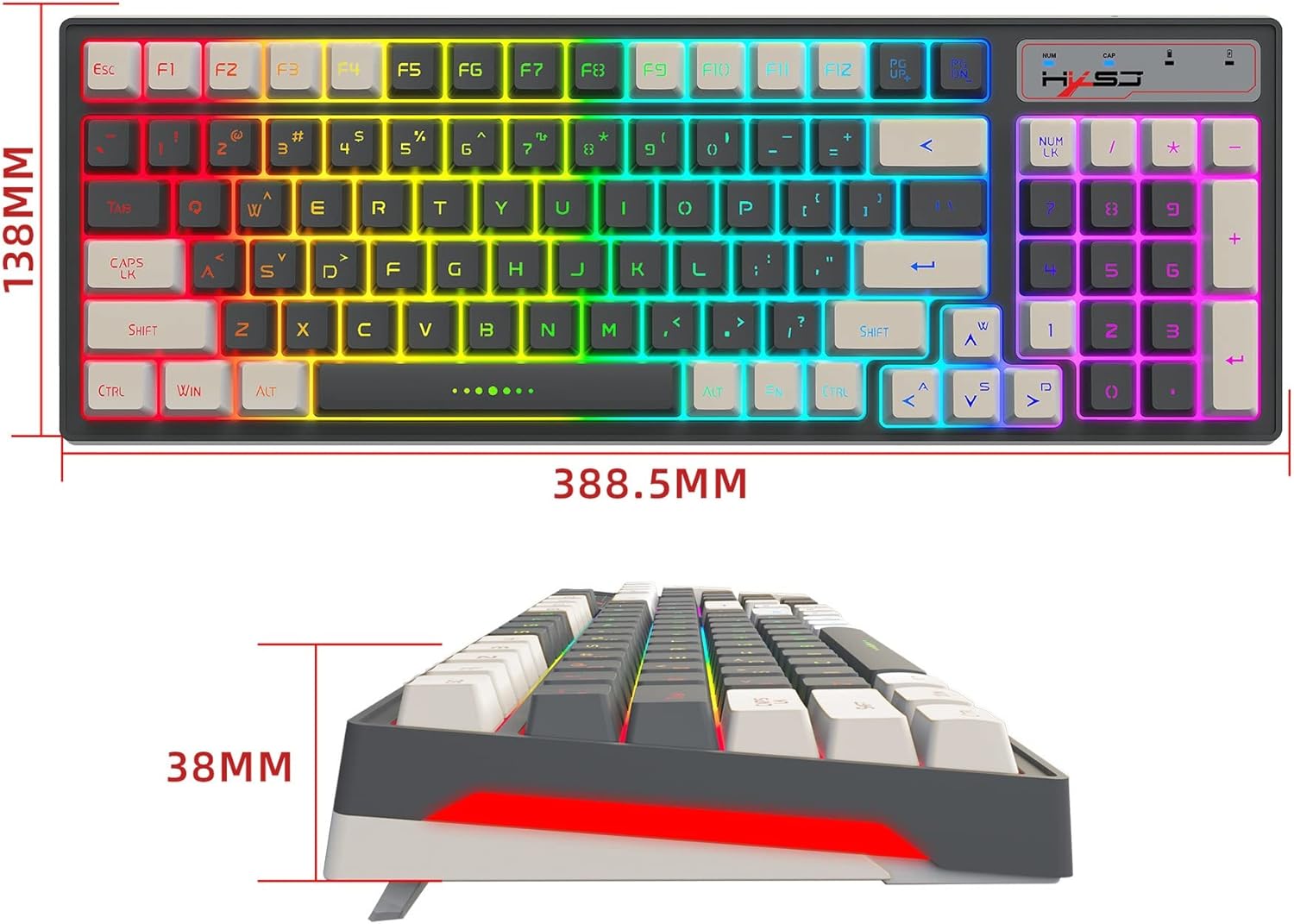
Image: Technical drawing showing the dimensions of the HXSJ L900 keyboard (388.5mm length, 138mm width, 38mm height).
Warranty
This product is covered by a standard manufacturer's warranty. Please refer to the product packaging or the seller's terms and conditions for specific warranty duration and details. Keep your proof of purchase for any warranty claims.
Support
For further assistance, technical support, or inquiries regarding your HXSJ L900 keyboard, please contact the seller or manufacturer directly through their official support channels. You may find contact information on the product packaging or the retailer's website where you purchased the item.


