
JSAUX JSUSCD0040SL6M
Contents
JSAUX Link Cable User Manual
Model: JSUSCD0040SL6M
Introduction
This manual provides instructions for the JSAUX Link Cable, designed to connect your Meta/Oculus Quest 2 or Quest 1 VR headset to a gaming PC. This enables access to PC VR experiences, including Oculus Rift applications and Steam VR games, with high-speed data transfer and simultaneous charging capabilities.
Product Features
- Compatibility: Connects Meta/Oculus Quest 2/1 to a gaming PC for Oculus Rift and Steam VR games.
- High-Speed Data Transfer: Supports up to 5 Gbps data transfer for a lag-free gaming experience.
- Fast Charging: Provides 3A charging speed, allowing you to play and charge simultaneously (requires sufficient port output power).
- Extended Length: 20-foot (6-meter) cable for unrestricted movement in VR.
- User-Friendly Design: Features an L-shaped Type-C connector for comfortable use with the VR headset.
- Secure Connection: Includes a Velcro strap to prevent accidental disconnection during gameplay.
- Durable Construction: Braided cable design for enhanced durability and flexibility.

Image: Close-up of the JSAUX Link Cable showcasing its reinforced L-shaped USB-C connector and durable braided exterior.
Setup Instructions
- Prepare your PC: Ensure your gaming PC meets the minimum system requirements for Oculus Link or Steam VR. This typically includes a compatible GPU, sufficient RAM, and a USB 3.0 port.
- Connect to PC: Plug the standard USB-A end of the JSAUX Link Cable into an available USB 3.0 port on your PC. It is crucial to use a USB 3.0 port (often blue or marked with 'SS' for SuperSpeed) for optimal performance.
- Connect to VR Headset: Plug the L-shaped USB-C end of the cable into the USB-C port on your Meta/Oculus Quest 2 or Quest 1 headset.
- Secure the Cable: Use the included Velcro strap to secure the cable to your headset, preventing accidental disconnections during active use.
- Software Setup: Follow the on-screen prompts within the Oculus PC app or Steam VR software to complete the connection and setup process.
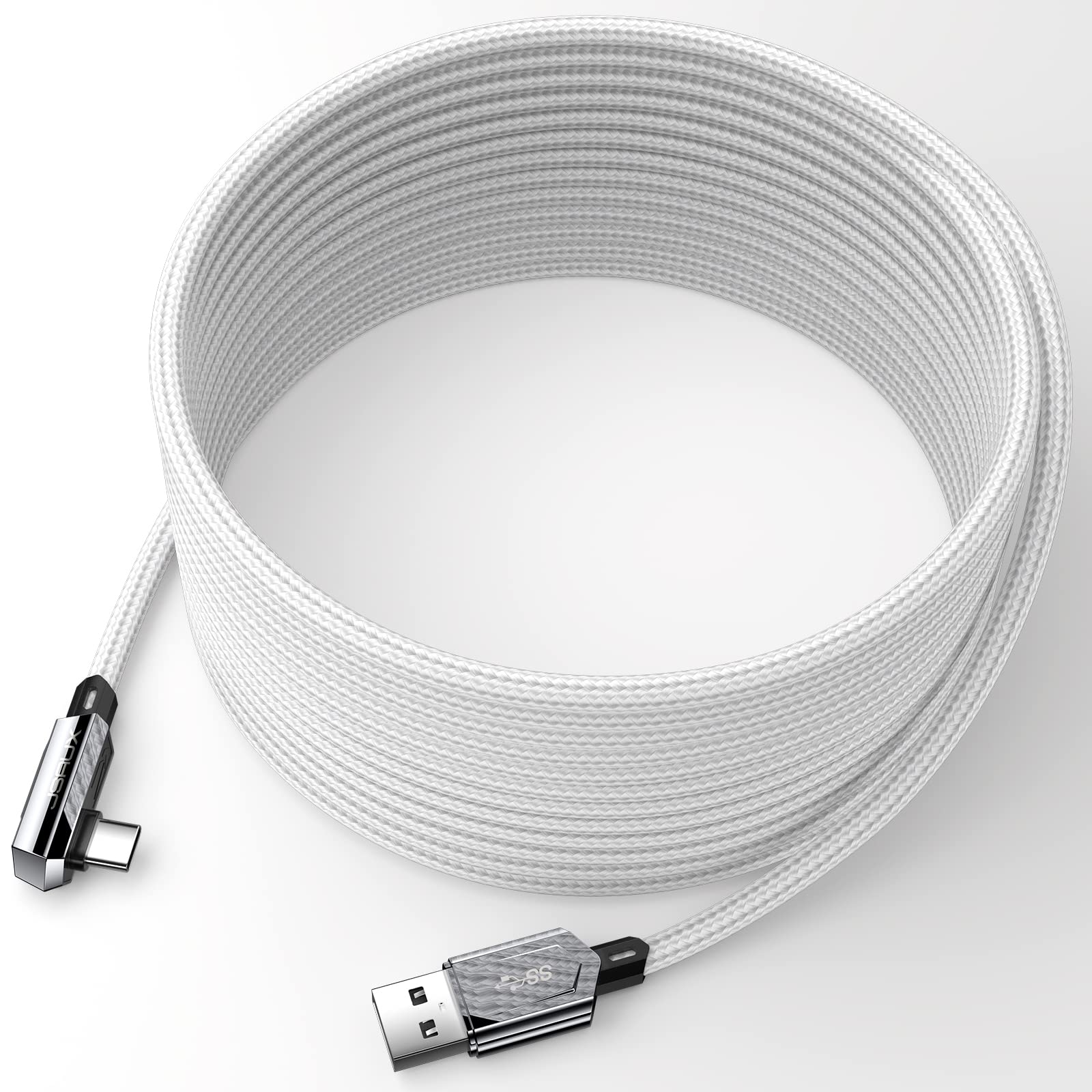
Image: The JSAUX Link Cable properly connected between an Oculus Quest 2 headset and a gaming PC.

Image: A close-up view of the JSAUX Link Cable's USB-A connector inserted into a USB 3.0 port on a PC, indicating compatibility with USB 3.0, 3.1 Gen 1, and 3.2 Gen 2.
Operating Instructions
Once the JSAUX Link Cable is connected and recognized by your PC and VR software, you can begin your PC VR experience:
- Launch VR Content: Open the Oculus PC app or Steam VR on your computer and select the desired game or application.
- Enjoy Seamless Gameplay: The cable's 5 Gbps data transfer rate ensures minimal latency and a smooth VR experience.
- Simultaneous Charging: The cable supports 3A fast charging, allowing your headset to charge while you play, provided your PC's USB port can supply sufficient power.

Image: A user enjoying a VR gaming session with the JSAUX Link Cable, illustrating the extended reach and freedom of movement provided by the 20ft cable.

Image: The JSAUX Link Cable connected to a laptop, demonstrating its capability for 5Gbps data synchronization and 3A charging.
Maintenance
To ensure the longevity and optimal performance of your JSAUX Link Cable, follow these maintenance guidelines:
- Storage: When not in use, coil the cable loosely. Avoid tight coiling or sharp bends, which can damage internal wires.
- Cleaning: Wipe the cable with a soft, dry cloth to remove dust and dirt. Avoid using harsh chemicals or abrasive materials.
- Handling: Always grasp the connector ends when plugging or unplugging the cable. Do not pull directly on the cable itself.
- Protection: The braided nylon exterior provides excellent durability. However, avoid exposing the cable to extreme temperatures, direct sunlight, or moisture.
Troubleshooting
If you encounter issues with your JSAUX Link Cable, consider the following:
- Connection Not Detected:
- Ensure both ends of the cable are securely plugged in.
- Verify that the USB-A end is connected to a USB 3.0 port on your PC. USB 2.0 ports are not compatible for Link functionality.
- Try a different USB 3.0 port on your PC.
- Restart your PC and VR headset.
- Poor Performance/Lag:
- Confirm your PC meets the minimum specifications for Oculus Link or Steam VR.
- Ensure your GPU is supported. Refer to the compatibility table below.
- Close any unnecessary background applications on your PC.
- Update your graphics drivers and VR software to the latest versions.
- Headset Not Charging or Slow Charging:
- The charging speed depends on the output power of your PC's USB port. Some ports may not provide enough power for fast charging while playing.
- Try connecting to a powered USB hub if available, or a different USB 3.0 port.
- Accidental Disconnections:
- Ensure the Velcro strap is used to secure the cable to your headset, reducing strain on the USB-C port.
- Avoid sudden movements that might tug on the cable.
PC Compatibility Requirements

Image: A table detailing PC component requirements (Processor, Graphics Card, Memory, OS, USB Port) and specific NVIDIA and AMD GPU models that are supported or not currently supported for use with the Link Cable.
Note: If your GPU is not listed as supported, compatibility cannot be guaranteed.
Specifications
| Feature | Detail |
|---|---|
| Brand | JSAUX |
| Model Number | JSUSCD0040SL6M |
| Connector Type | USB 3.0 (Type-A) to USB Type-C (L-shaped) |
| Cable Type | USB |
| Compatible Devices | Meta/Oculus Quest 2, Oculus Quest 1, Gaming PCs, Laptops |
| Special Feature | Braided, L-shaped USB-C connector |
| Connector Gender | Male-to-Male |
| Data Transfer Rate | Up to 5 Gigabits per second (5 Gbps) |
| Charging Wattage | Up to 20 Watts (3A) |
| Connectivity Technology | USB |
| Color | White |
| Length | 20 feet (6 meters) |
Warranty and Support
For information regarding product warranty, returns, or technical support, please visit the official JSAUX website or contact their customer service directly. Details can typically be found on the product packaging or the manufacturer's official online channels.
Official JSAUX Store: JSAUX Amazon Store
Documents and downloads
Ask a question about this manual
Ask about setup, troubleshooting, compatibility, parts, safety, or missing instructions. Manuals+ will review the question and use this page’s manual context to help answer it.