
Onvian KS-SF31
ONVIAN Smart Bicycle Tail Light with Turn Signals and Alarm
Model: KS-SF31 | Brand: Onvian
Introduction
Thank you for choosing the ONVIAN Smart Bicycle Tail Light. This multi-functional device integrates a bright tail light, turn signals, an anti-theft alarm, and an electric horn, all controllable via a wireless remote. Designed to enhance your cycling safety and security, this manual provides detailed instructions for installation, operation, and maintenance to ensure optimal performance.

The ONVIAN Smart Bicycle Tail Light, shown with its wireless remote control. The tail light features bright red and amber LEDs for visibility and signaling.
Key Features
- Multi-functional Design: Combines tail light, brake light, turn signals, warning light, electric horn, and anti-theft alarm in one unit.
- Ultra-Bright Illumination: Features 31 high-brightness COB LEDs with 160 lumens output and 200-degree wide-angle design for enhanced visibility.
- 6 Lighting Modes: Includes Slow Flashing, Breathing, Fast Flashing, Constant Light, Emergency Light, and Stop.
- Left/Right Turn Signals: Wireless remote control activates turn signals with an audible beep for safety.
- Smart Brake Detection: Automatically highlights the brake light for 2 seconds upon braking to alert following traffic.
- Intelligent Auto On/Off: In 'Slow Flashing' and 'Breathing' modes, the light automatically adjusts to ambient brightness and turns off after 30 seconds of inactivity in dark environments, reactivating upon vibration.
- 110dB Wireless Anti-Theft Alarm: High-sensitivity alarm deters theft with a loud 110dB sound, triggered by even slight movement.
- USB Rechargeable & IP65 Waterproof: Built-in 2000mAh battery provides over 70 hours of operation. IP65 rating ensures resistance to rain and snow.
- Easy Installation: Simple mounting for both tail light (0.98-1.38 inch seat post) and remote control (0.8-0.95 inch handlebar).
- Adjustable Sensitivity Horn: Equipped with 3 electric bell sounds and 7 levels of alarm sensitivity.

This image highlights the multi-functional capabilities of the ONVIAN Smart Bicycle Tail Light, comparing it to other tail lights. It emphasizes features like six light modes, left/right signals, anti-theft alarm, remote control, and electric bell.
Package Contents
Please check the package contents to ensure all items are present:
- 1 x Bicycle Alarm Tail Light Unit
- 1 x Wireless Remote Control
- 1 x USB Charging Cable
- Mounting Accessories (Brackets, Straps)
- User Manual (This document)
Specifications
| Feature | Detail |
|---|---|
| Model Number | KS-SF31 |
| Brand | Onvian |
| Color | Black |
| Material | Plastic (PC + Anti-UV) |
| Light Source | 31 COB LEDs |
| Brightness | 160 Lumens |
| Light Modes | 6 (Slow Flashing, Breathing, Fast Flashing, Constant Light, Emergency Light, Stop) |
| Alarm Volume | 110 dB |
| Battery Capacity | 2000 mAh (Built-in) |
| Charging Time | Approx. 7 hours for full charge |
| Operating Time | Up to 70+ hours (depending on mode) |
| Waterproof Rating | IP65 |
| Remote Control Range | Up to 70 meters |
| Tail Light Mount Diameter | 1 - 1.3 inches (25.4 - 33 mm) seat post |
| Remote Control Mount Diameter | 0.8 - 0.95 inches (20.3 - 24.1 mm) handlebar |
| Dimensions (L x W x H) | 12.5 x 9.7 x 3.3 cm |
| Weight | 260 grams |
Setup and Installation
1. Installing the Tail Light Unit
- Select a suitable position on your bicycle's seat post. The tail light is designed for seat posts with a diameter of 1 to 1.3 inches (25.4 to 33 mm).
- Attach the provided mounting bracket to the seat post using the rubber straps or screws, ensuring it is securely fastened and the light faces backward.
- Slide the tail light unit onto the bracket until it clicks into place. Ensure it is firmly attached to prevent accidental detachment during rides.
2. Installing the Wireless Remote Control
- Choose a convenient location on your bicycle's handlebar. The remote control is suitable for handlebars with a diameter of 0.8 to 0.95 inches (20.3 to 24.1 mm).
- Secure the remote control bracket to the handlebar using the provided straps or clamp.
- Attach the remote control to its bracket. Ensure it is within easy reach for safe operation while cycling.

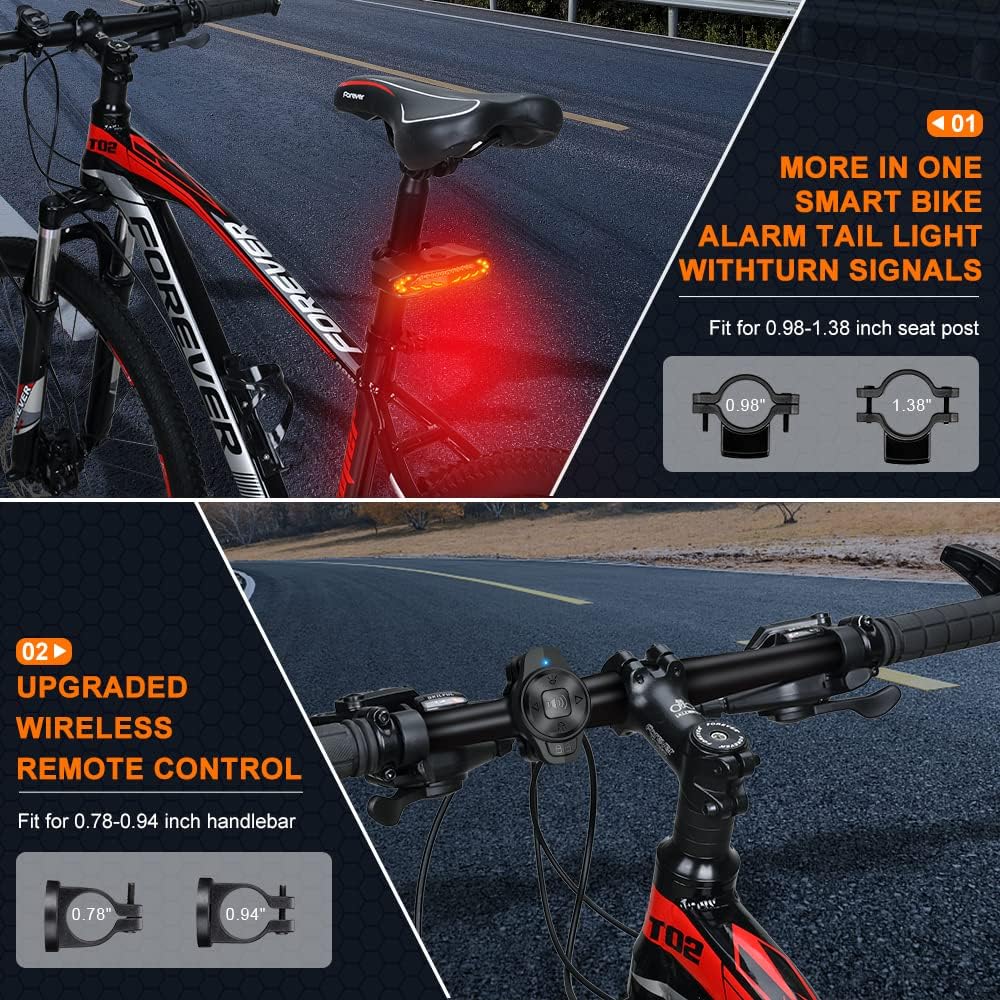
This image illustrates the installation process for the ONVIAN Smart Bicycle Tail Light on a seat post (suitable for 0.98-1.38 inch posts) and the wireless remote control on a handlebar (suitable for 0.78-0.94 inch handlebars). It shows the light mounted at the rear and the remote on the front handlebars.
Charging Instructions
The ONVIAN Smart Bicycle Tail Light has a built-in 2000mAh rechargeable battery. It is recommended to fully charge the device before first use.
- Locate the USB charging port on the tail light unit.
- Connect the provided USB charging cable to the tail light's port and the other end to a standard USB power adapter (not included) or a computer USB port.
- The charging indicator light will show the charging status. A full charge typically takes about 7 hours.
- Important Note: Avoid using fast chargers as the tail light does not support fast charging. Use the original USB cable provided or a non-fast charging cable to prevent potential damage.

This image shows the ONVIAN Smart Bicycle Tail Light being charged via a USB-C cable connected to a wall adapter. It also displays battery level indicators (25%, 50%, 75%, 100%) and notes that a full charge can provide over 70 hours of use with a standby time of 4-8 months.
Operation Guide
1. Power On/Off
Press and hold the power button on the top of the tail light unit for a few seconds to turn it on or off. Alternatively, you can use the remote control to activate the light.
2. Switching Light Modes
The tail light offers 6 different lighting modes. Use the wireless remote control to cycle through these modes:
- Slow Flashing: Gentle, slow blinking. (Intelligent auto on/off mode)
- Breathing: Light fades in and out smoothly. (Intelligent auto on/off mode)
- Fast Flashing: Rapid blinking for high visibility.
- Constant Light: Steady illumination.
- Emergency Light: Special flashing pattern for urgent situations.
- Stop: Turns off the main light, but brake detection and alarm functions remain active.

This image illustrates the six distinct light modes available on the ONVIAN Smart Bicycle Tail Light. It shows examples of red taillight modes (slow flashing, breathing, blinking, steady light) and yellow taillight modes (emergency light, and the light flash when it turns on/off). It also depicts the left and right turn signals.
3. Turn Signals (Left/Right)
To activate the turn signals:
- Press the left arrow button on the remote control for a left turn signal.
- Press the right arrow button on the remote control for a right turn signal.
- The tail light will emit an audible beep while the turn signal is active. The signal will remain active for 2 minutes or until you press the corresponding turn button again to cancel.
4. Smart Brake Detection
The intelligent brake sensor automatically detects when you slow down or brake. The tail light will illuminate brightly for 2 seconds to alert drivers behind you, significantly reducing the risk of rear-end collisions. This function is active in all modes except 'Emergency Light'.
This image demonstrates the intelligent induction brake feature, showing the tail light automatically highlighting when the cyclist brakes or slows down. It also illustrates the warning light function, which activates automatically when passing through a tunnel or during night rides.
5. Anti-Theft Alarm
To arm the anti-theft alarm:
- With the light off, press the lock button on the remote control. You will hear a confirmation sound, indicating the alarm is armed.
- If the bicycle is moved or vibrated, the 110dB alarm will sound to deter potential thieves.
- To disarm the alarm, press the unlock button on the remote control.
- The alarm sensitivity can be adjusted to 7 levels. Refer to the advanced settings section (if applicable, or contact support for details on adjustment).

This image shows a cyclist securing their bike, with the ONVIAN Smart Bicycle Tail Light prominently displayed. Text overlays highlight the 110dB wireless anti-theft bike alarm, emphasizing its loudness to deter thieves and keep the vehicle safe.
6. Electric Horn
The tail light also functions as an electric horn with 3 distinct bell sounds. Press the horn button on the remote control to activate the horn and alert pedestrians or other cyclists.
7. Intelligent Auto On/Off (for Slow Flashing & Breathing Modes)
In 'Slow Flashing' and 'Breathing' modes, the tail light features intelligent auto on/off functionality:
- The light will initially turn on for 30 seconds.
- It will then detect the ambient brightness. If the environment is bright, it will automatically turn off to conserve energy. If it's dark, it will remain on.
- In a dark environment, if the bicycle remains stationary for more than 30 seconds, the light will turn off to save power. It will automatically reactivate upon detecting vibration.
Maintenance
- Cleaning: Wipe the tail light and remote control with a soft, damp cloth. Do not use abrasive cleaners or solvents.
- Storage: When not in use for extended periods, store the device in a cool, dry place away from direct sunlight. Ensure the battery is partially charged (around 50%) before storage to prolong battery life.
- Battery Care: Recharge the battery regularly, even if not in use, to maintain its health. Avoid fully discharging the battery frequently.
- Water Resistance: While IP65 waterproof, avoid submerging the device in water. Ensure the USB charging port cover is securely closed when not charging.

This image shows a cyclist riding in the rain, highlighting the waterproof and dustproof nature of the ONVIAN Smart Bicycle Tail Light. The light is made from PC+Anti UV material, designed to withstand wind, rain, and severe cold and heat.
Troubleshooting
| Problem | Possible Cause | Solution |
|---|---|---|
| Light does not turn on. | Battery is low or depleted. | Charge the tail light fully. |
| Remote control not responding. | Remote control battery is low or depleted; Remote is out of range; Remote not paired. | Replace the remote control battery (CR2032). Ensure remote is within 70m range. Re-pair the remote if necessary (refer to specific pairing instructions or contact support). |
| Alarm triggers too easily/not easily enough. | Alarm sensitivity setting. | Adjust the alarm sensitivity level (7 levels available). Refer to specific instructions for sensitivity adjustment. |
| Turn signal beep continues for too long. | Turn signal was not manually cancelled. | Press the corresponding turn signal button again to cancel the signal and stop the beep. |
| Brake light not activating. | Light is in 'Emergency Light' mode; Sensor obstruction or malfunction. | Ensure the light is not in 'Emergency Light' mode. Check for any obstructions around the sensor. If problem persists, contact support. |
Safety Information
- Always ensure the tail light is securely mounted before riding.
- Do not look directly into the light source when it is on, as it may cause temporary vision impairment.
- Keep the device away from children.
- Do not disassemble, repair, or modify the device yourself. Contact qualified personnel for service.
- Dispose of the product and its battery responsibly according to local regulations. Do not dispose of in general waste.
- While waterproof, avoid prolonged exposure to heavy rain or submersion.
Warranty and Support
ONVIAN products are designed for reliability and performance. For warranty information, technical support, or service inquiries, please contact your retailer or visit the official Onvian website. Please have your model number (KS-SF31) and purchase details ready when contacting support.
Ask a question about this manual
Ask about setup, troubleshooting, compatibility, parts, safety, or missing instructions. Manuals+ will review the question and use this page’s manual context to help answer it.