
1. Introduction
The PRISM+ ARC LITE Dual Monitor VESA Monitor Arm is designed to enhance your workspace by securely holding two monitors, freeing up valuable desk space and allowing for ergonomic adjustments. This manual provides essential information for the safe and efficient installation, operation, and maintenance of your monitor arm.

Figure 1: Front view of the PRISM+ ARC LITE Dual Monitor VESA Monitor Arm, showing the desk clamp and dual articulating arms.
2. Safety Information
- Weight Capacity: Do not exceed the maximum weight capacity of 6.5 kg per monitor. Overloading can cause instability and damage.
- VESA Compatibility: Ensure your monitors are VESA compatible (75x75mm or 100x100mm).
- Desk Thickness: Verify your desk thickness is within the specified range for the clamp mechanism.
- Installation: Follow all installation steps carefully. Improper installation may result in equipment damage or personal injury.
- Pinch Points: Be aware of pinch points during adjustment to avoid injury.
- Stability: Ensure all screws are tightened securely before use. Periodically check for loose connections.
3. Package Contents
Please check that all components are present and undamaged. If any parts are missing or damaged, contact customer support.
- Dual Monitor Arm Assembly
- Desk Clamp Base
- VESA Monitor Plates (2x)
- Hardware Kit (screws, washers, spacers)
- Hex Key Set (for adjustments)
- Cable Management Clips
4. Specifications
| Model Number | ARCLITEDUAL |
| Mounting Type (Arm to Desk) | Desk Clamp |
| Movement Type | Articulating |
| Material | Metal |
| Color | Black |
| Compatible Devices | Monitors |
| Monitor Weight Capacity | Up to 6.5 kg per monitor |
| VESA Compatibility | 75x75mm, 100x100mm |
| Minimum Supported Screen Size | 21.5 Inches |
5. Setup Instructions
Follow these steps to install your PRISM+ ARC LITE Dual Monitor Arm.
5.1 Attaching the Desk Clamp
- Place the desk clamp base on the edge of your desk.
- Insert the main pole of the monitor arm into the opening on the desk clamp base.
- Tighten the clamp screw firmly until the arm is securely attached to the desk. Ensure it is stable and does not wobble.
5.2 Attaching VESA Plates to Monitors
- Carefully lay your monitor face down on a soft, clean surface.
- Align a VESA monitor plate with the mounting holes on the back of your monitor.
- Use the appropriate screws and washers from the hardware kit to secure the VESA plate to the monitor. Do not overtighten.
- Repeat for the second monitor.
5.3 Mounting Monitors to the Arm
- With the VESA plate attached to your monitor, carefully slide the monitor onto one of the arm's VESA mounting heads.
- Ensure the monitor clicks into place or is secured with the provided locking mechanism (if applicable).
- Repeat for the second monitor on the other arm.
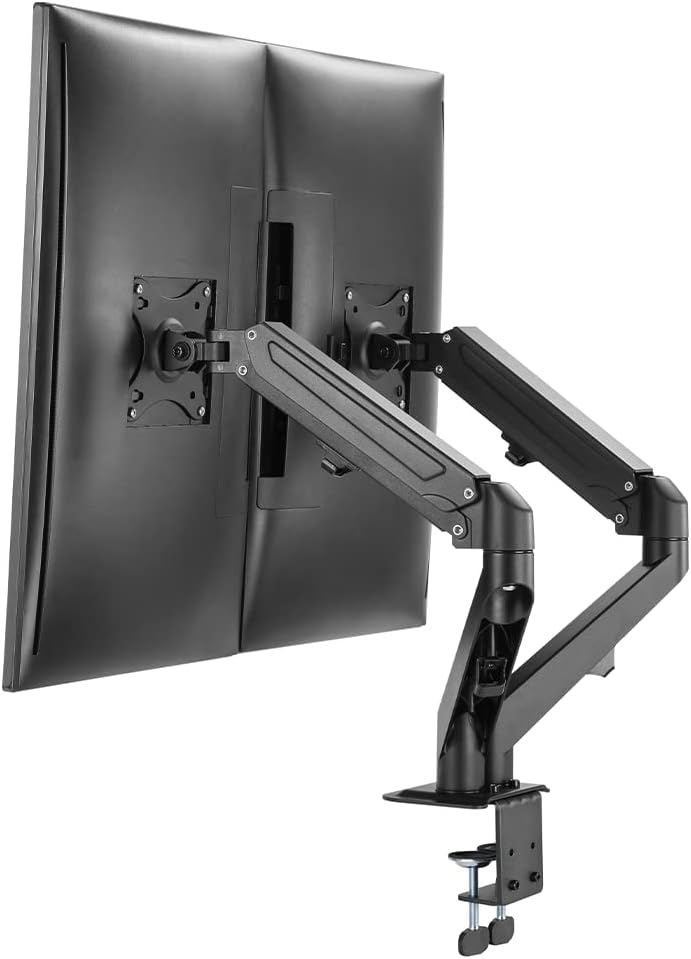
Figure 2: The PRISM+ ARC LITE Dual Monitor Arm with two monitors mounted, viewed from the rear.
5.4 Cable Management
Utilize the integrated cable management clips or channels on the arm to route your monitor cables neatly. This helps maintain a clean and organized workspace.
6. Operating Instructions (Adjustments)
The PRISM+ ARC LITE monitor arm offers five ways to adjust your monitors for optimal viewing comfort:
- Height Adjustment: Use the main pole and arm joints to raise or lower the monitors to eye level. Adjust the tension screws on the arm joints with the provided hex key if the arm does not hold its position.
- Tilt: Tilt the monitor screen up or down to reduce glare and find your preferred viewing angle.
- Swivel: Swivel the monitor left or right to share your screen or adjust your viewing position.
- Orientation (Rotation): Rotate the monitor 360 degrees to switch between landscape and portrait modes.
- Forward/Backward: Extend or retract the arm to adjust the distance of the monitors from your eyes.
Note: Adjust the tension of the arm joints using the provided hex key to ensure the arm holds the monitor's weight securely while still allowing smooth movement. Turn clockwise to increase tension for heavier monitors, counter-clockwise to decrease tension for lighter monitors.
7. Maintenance
- Cleaning: Wipe the monitor arm with a soft, damp cloth. Avoid abrasive cleaners or solvents.
- Periodic Checks: Regularly check all screws and connections to ensure they remain tight and secure. Re-tighten if necessary.
- Tension Adjustment: If the arm begins to sag or becomes too stiff, adjust the tension screws as described in the operating instructions.
8. Troubleshooting
- Arm does not hold position: The tension may be too low for the monitor's weight. Use the hex key to increase the tension at the arm joints.
- Monitor is not level: Check that the VESA plate is securely attached to the monitor and the arm. Adjust the tilt mechanism if necessary.
- Arm is difficult to move: The tension may be too high. Use the hex key to decrease the tension at the arm joints.
- Arm wobbles: Ensure the desk clamp is securely tightened to the desk. Check all connections on the arm assembly.
9. Warranty and Support
The PRISM+ ARC LITE Dual Monitor VESA Monitor Arm comes with a 1 Year Labour, Parts & Transport warranty.
For technical support, warranty claims, or further assistance, please contact PRISM+ customer service through their official website or the retailer where the product was purchased.