
Introduction
Thank you for choosing the truke Yoga Mystic Wireless In-Ear Earphones. This manual provides essential information for setting up, operating, maintaining, and troubleshooting your device. Please read it carefully to ensure optimal performance and longevity of your earphones.
Package Contents
- truke Yoga Mystic Wireless Earphones
- USB-C Charging Cable
- User Manual
Setup
1. Charging the Earphones
Before first use, fully charge your truke Yoga Mystic earphones. Use the provided USB-C charging cable to connect the earphones to a power source.
- A full charge provides up to 50 hours of playtime.
- Fast charging: 10 minutes of charge provides approximately 10 hours of playtime.
- The digital battery indicator on the neckband displays the current charge level.

Image: Earphones highlighting 50 hours playtime, digital battery indicator, and USB-C fast charge.
2. Pairing with a Device
- Ensure the earphones are charged and powered off.
- Press and hold the multi-function button until the LED indicator flashes, indicating pairing mode.
- On your device (smartphone, tablet, laptop), enable Bluetooth and search for available devices.
- Select "truke Yoga Mystic" from the list of devices.
- Once connected, the LED indicator will stop flashing.
Dual Pairing: The truke Yoga Mystic supports simultaneous connection to two devices via Bluetooth 5.2. This allows you to seamlessly switch between audio sources, for example, listening to music on a tablet and taking a call on your phone.
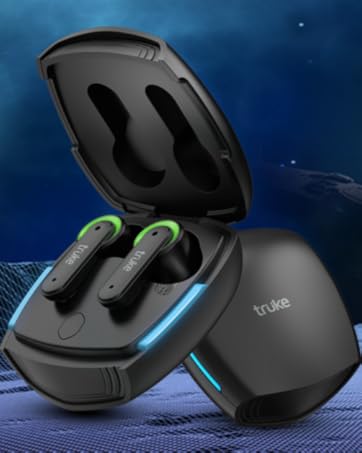
Image: Earphones illustrating Bluetooth 5.2 connectivity, magnetic lock, and integrated controls.
3. Ergonomic Fit
The earphones feature an ergonomic unibody design with premium real silicon for comfortable wear. Adjust the earbuds to fit securely in your ears for optimal sound quality and comfort.
Operating Instructions
Power On/Off
- Power On: Press and hold the multi-function button until the LED indicator lights up.
- Power Off: Press and hold the multi-function button until the LED indicator turns off.
Music Playback
Control music playback using the integrated touch controls on the earphones.
- Play/Pause: Single tap the multi-function button.
- Next Track: Double tap the multi-function button.
- Previous Track: Triple tap the multi-function button.
- The earphones are equipped with 13mm Titanium Drivers and AAC Codec for high-quality audio.
- Access 20 EQ modes via the dedicated smart application for personalized sound.

Image: Earphones emphasizing 13mm Titanium Drivers for an immersive audio experience.

Image: Smart app interface demonstrating 20 EQ modes and other features.
Calling
The earphones feature Environmental Noise Cancellation (ENC) and an inbuilt microphone for clear calls.
- Answer/End Call: Single tap the multi-function button.
- Reject Call: Press and hold the multi-function button.
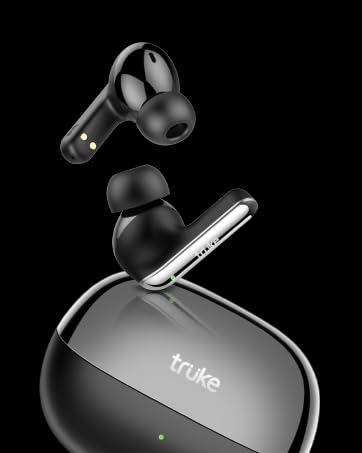
Image: Earphone illustrating Environmental Noise Cancellation (ENC).
Gaming Mode (Ultra Low Latency)
Activate Gaming Mode for a lag-free experience with 40ms ultra-low latency.
- Activate Gaming Mode: Press the multi-function button 3 times.
- This mode synchronizes audio to video, enhancing competitive gaming.

Image: Earphones and smartphone demonstrating the dedicated gaming mode with 40ms low latency.
Maintenance
Cleaning
- Regularly clean the earbuds and neckband with a soft, dry cloth.
- Avoid using harsh chemicals or abrasive materials.
- Ensure no moisture enters the charging port or speaker grilles.
Water Resistance
The earphones are IPX4 sweatproof, meaning they can withstand light rain and dripping sweat. They are not designed for submersion in water or heavy water exposure.
Storage
When not in use, the earbuds can be clipped together using their built-in magnets to prevent tangling and secure storage.
Troubleshooting
No Power / Not Charging
- Ensure the USB-C cable is securely connected to both the earphones and the power source.
- Try a different USB-C cable or power adapter.
- Check the digital battery indicator for charge status.
Pairing Issues
- Ensure Bluetooth is enabled on your device.
- Make sure the earphones are in pairing mode (LED flashing).
- Move the earphones closer to your device.
- Forget/remove "truke Yoga Mystic" from your device's Bluetooth list and attempt to pair again.
- Restart both the earphones and your device.
Poor Sound Quality
- Ensure the earbuds are properly seated in your ears.
- Check the audio source for quality.
- Adjust the EQ settings via the smart application.
- Clean the speaker grilles if they appear obstructed.
Microphone Issues
- Ensure the microphone is not obstructed.
- Verify that the earphones are selected as the audio input device on your connected device.
- Check for any software updates for your device or the truke smart app.
Gaming Mode Not Activating
- Ensure you are pressing the multi-function button 3 times in quick succession.
- Check the smart application for gaming mode settings or indicators.
Finding Earbuds
Use the "Find Earbuds" feature within the truke smart application to locate misplaced earbuds.
Specifications
| Brand | truke |
| Model Name | Yoga Mystic |
| Model Number | YB-12 |
| Color | Dark Black |
| Ear Placement | In Ear |
| Form Factor | In Ear (Neckband) |
| Noise Control | Environmental Noise Cancellation (ENC) |
| Playtime | Up to 50 Hours |
| Fast Charge | 10 Mins for 10 Hours Playtime (USB-C) |
| Speaker Driver | 13mm Titanium Driver |
| EQ Modes | 20 (via Smart App) |
| Low Latency | 40ms Ultra Low Latency (Gaming Mode) |
| Bluetooth Version | 5.2 |
| Dual Pairing | Supported |
| Design | Ergonomic Unibody, Premium Real Silicon |
| Water Resistance | IPX4 Sweatproof |
| Control Method | Touch |
| Weight | 100 Grams |
| Frequency Range | 20Hz - 20kHz |
| Compatible Devices | Tablets, Cellphones, Laptops, Desktops |
Warranty and Support
Warranty Information
The truke Yoga Mystic earphones come with a 1-Year Warranty from the date of purchase. This warranty is valid across 200+ active service centers. Mandatory registration is required on the truke website within 10 days of purchase to avail warranty services.
Customer Support
For any support or warranty claims, please contact:
Importer: Eccentric Enterprises Private Limited
Address: 1st Floor, UNIT NO 137, Building No 1 Edison Tesla Industrial Park, Raheja Plot No Gen -2/1 Industrial Area, MIDC Thane Juinagar Navi Mumbai, Thane, Maharashtra, 400705
Contact Number: +91 93541 70767
Email: support@eccentricindia.com