
1. Introduction
The Skazeke UPS Battery Backup (Model UP15) is designed to provide an uninterruptible power supply for your 12V DC devices. With a 15000mAh capacity, it ensures that essential equipment like routers, CCTV cameras, and LED light strips continue to operate during unexpected power outages, maintaining connectivity and security.
2. Package Contents
Please verify that all items are present in your package:
- 1x Skazeke 15000mAh UPS Power Bank
- 1x AC Power Adapter
- 4x DC Output Conversion Heads (various sizes)
- 1x User Manual

Image: Contents of the Skazeke UPS Battery Backup package, including the UPS unit, AC adapter, various DC conversion heads, and the instruction manual.
3. Setup Instructions
Follow these steps to properly set up your UPS Battery Backup:
- Verify Device Voltage: Before connecting, confirm that your device (e.g., router) requires a 12V DC input. This information is typically found on your device's power adapter or label. The Skazeke UPS supports 12V devices.
- Connect AC Adapter to UPS: Plug the provided AC power adapter into a wall outlet. Connect the DC output of the AC adapter to the input port of the Skazeke UPS Battery Backup. The UPS will begin charging.
- Connect UPS to Device: Select the appropriate DC conversion head that matches your device's power input port. Connect one end of the UPS output cable to the UPS, and the other end (with the conversion head) to your device.
- Power On: Ensure your device is powered on. The UPS will now provide continuous power, switching seamlessly to battery backup during a power outage.
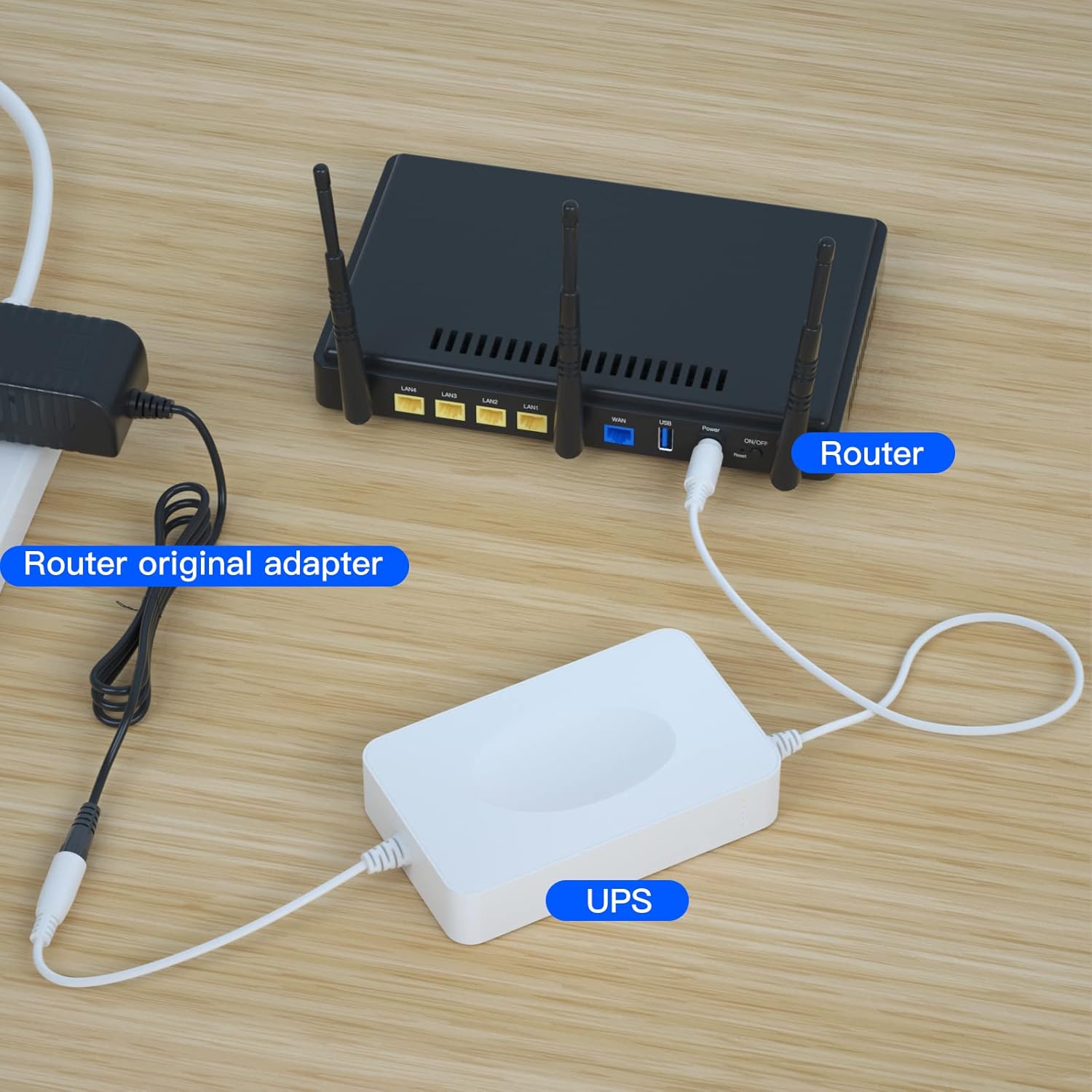
Image: A visual representation of connecting the Skazeke UPS between your router's original power adapter and the router itself.
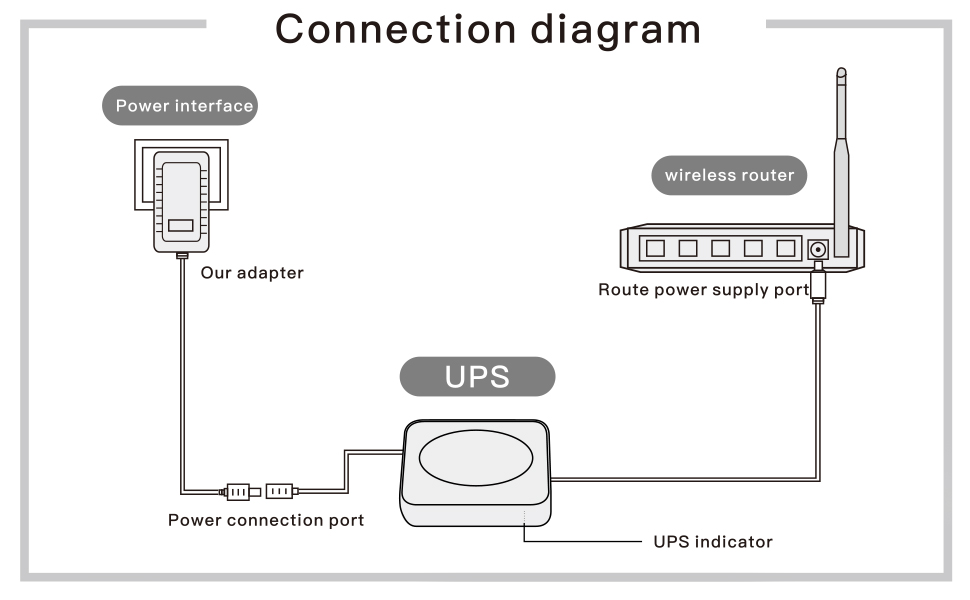
Image: A simplified connection diagram illustrating the flow of power from the wall adapter to the UPS, and then to the wireless router.
Video: Official Skazeke guide demonstrating the installation and usage of the UPS Battery Backup.
4. Operating Instructions
Once properly connected, the Skazeke UPS Battery Backup operates automatically. When grid power is available, it charges its internal battery while simultaneously powering your connected device. In the event of a power failure, the UPS seamlessly switches to battery power, ensuring your device remains operational without interruption. The LED indicators on the unit display the remaining battery charge.
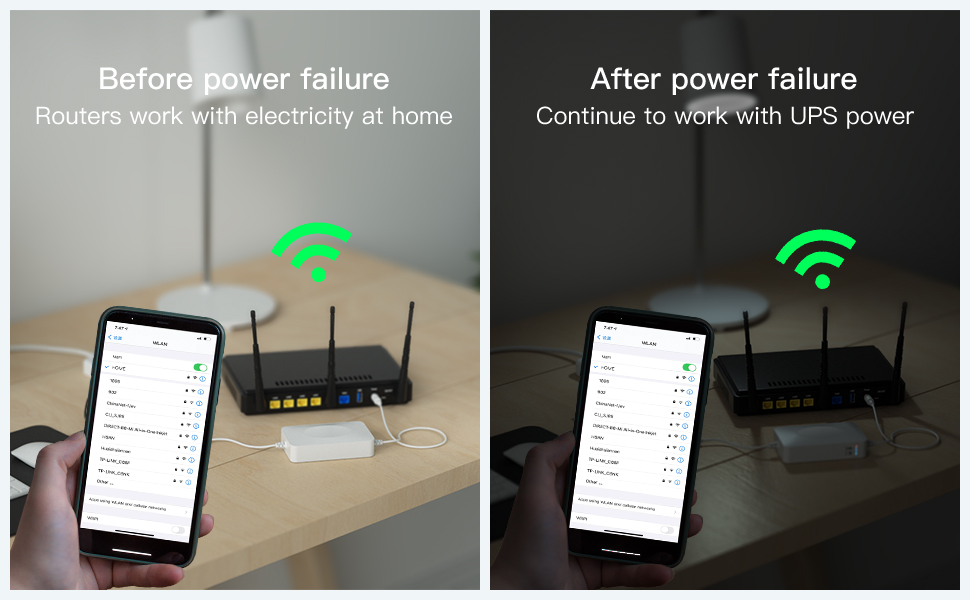
Image: Illustrates continuous Wi-Fi connectivity from a router before and after a power failure, thanks to the UPS.
5. Applications
The Skazeke UPS Battery Backup is compatible with a variety of 12V DC devices, including but not limited to:
- Routers and Modems
- CCTV Cameras and Network Cameras
- LED Light Strips and LED Panels
- Amplifiers and Speakers
- Car DVRs
- Card Readers
- Other 12V DC devices requiring up to 2A

Image: Examples of devices that can be powered by the Skazeke UPS, such as routers, modems, security cameras, and small lamps.
6. Troubleshooting
If you encounter issues with your Skazeke UPS Battery Backup, consider the following:
- Device Not Receiving Power:
- Ensure all cables are securely connected.
- Verify that the wall outlet is functional.
- Check if the UPS is charged (LED indicators).
- Confirm your device's voltage requirement is 12V and its current draw does not exceed 2A.
- UPS Not Charging:
- Ensure the AC adapter is correctly plugged into both the wall and the UPS input port.
- Check for any visible damage to the adapter or cables.
- Short Backup Time:
- The actual backup time depends on the power consumption of the connected device. Devices with higher power draw will deplete the battery faster.
- Ensure the UPS is fully charged before relying on it for extended periods.
If problems persist, please contact Skazeke customer support for assistance.
7. Specifications
| Model Number | UP15 |
| Battery Capacity | 15000mAh |
| Output Voltage | 12V DC |
| Output Amperage | 2A |
| Battery Cell Composition | Lithium Polymer |
| Item Dimensions | 5.12 x 3.15 x 0.98 inches (13 x 8 x 2.5 cm) |
| Item Weight | 456 g |
| GTIN / UPC | 766246638734 |

Image: Detailed dimensions of the UPS unit.
8. Warranty and Support
The Skazeke UPS Battery Backup (Model UP15) comes with a 6-month warranty from the date of purchase. This warranty covers manufacturing defects and ensures proper functioning under normal use.
For any questions, technical support, or warranty claims, please contact Skazeke customer service. We are committed to assisting you with any product-related inquiries.