
ILIFE V7s Plus
ILIFE V7s Plus Robotic Vacuum Cleaner User Manual
Model: V7s Plus
1. Introduction
Welcome to the user manual for your ILIFE V7s Plus Robotic Vacuum Cleaner. This smart 2-in-1 device is designed to provide efficient dry vacuuming and wet mopping for various floor types. Featuring auto-docking, schedule cleaning, and advanced cliff detection, the V7s Plus simplifies your cleaning routine. Its 4-layer filter system is effective in clearing pollen and other allergens, making it suitable for allergy sufferers. Please read this manual thoroughly to understand the proper operation, maintenance, and troubleshooting of your robotic cleaner.

Figure 1.1: The ILIFE V7s Plus Robotic Vacuum Cleaner and its remote control. The robot features a sleek, round design with a rose gold finish on top, while the remote has a clear LCD screen and navigation buttons.
2. Setup
2.1 Unpacking and Initial Charge
- Carefully remove all components from the packaging. Ensure all accessories are present: main unit, charging dock, power adapter, remote control, cleaning tools, side brushes, high-performance filter, dustbin, and water tank.
- Place the charging dock against a wall in an open, uncluttered area, ensuring there are no obstacles within 1 meter (3 feet) to the sides and 2 meters (6 feet) in front.
- Connect the power adapter to the charging dock and plug it into a power outlet. The indicator light on the charging dock will illuminate.
- Place the V7s Plus onto the charging dock, ensuring the charging contacts align. Allow the robot to fully charge before first use (approximately 3-5 hours). The indicator light on the robot will change when fully charged.

Figure 2.1: The V7s Plus automatically returns to its charging dock for recharge. Ensure the dock is placed in an accessible area for seamless operation.
2.2 Installing Side Brushes and Dustbin/Water Tank
- Gently press the side brushes onto the square posts at the bottom of the robot until they click into place.
- For dry vacuuming, ensure the dustbin is properly inserted into the robot. For wet mopping, fill the water tank with clean water and attach the microfiber mop cloth, then insert the water tank into the robot.
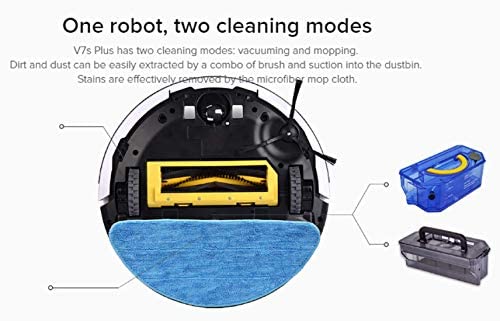
Figure 2.2: The underside of the V7s Plus, illustrating its two cleaning modes. The central brush and suction port are for vacuuming, while the rear attachment point is for the water tank and microfiber mop cloth for wet cleaning.
3. Operating Your V7s Plus
The ILIFE V7s Plus offers multiple cleaning modes to suit your needs. You can control the robot using the remote control or the buttons on the robot itself.
3.1 Cleaning Modes
- Auto Mode: The robot automatically cleans the entire floor area, adjusting its path based on obstacles and room layout. Press the "CLEAN" button on the robot or remote to start.
- Edge Mode: The robot cleans along walls and furniture edges. Activate this mode for thorough edge cleaning.
- Spot Mode: The robot focuses on a specific dirty area, cleaning in a spiral pattern. Place the robot in the center of the area to be cleaned and activate Spot Mode.
- Schedule Mode: Set a specific time for the robot to start cleaning automatically each day. Refer to the remote control section for setting schedules.

Figure 3.1: The four primary cleaning modes of the V7s Plus: Auto Mode for general cleaning, Edge Mode for perimeter cleaning, Schedule Mode for pre-set cleaning times, and Spot Mode for concentrated cleaning of specific areas.
3.2 Dry Vacuuming vs. Wet Mopping
The V7s Plus is equipped for both dry vacuuming and wet mopping. Ensure the correct accessory (dustbin for vacuuming, water tank with mop cloth for mopping) is installed before starting a cleaning cycle.
- Dry Vacuuming: The robot uses its side brushes, main brush, and powerful suction to collect dust, dirt, and debris into the dustbin. This mode is ideal for daily cleaning of various floor types.
- Wet Mopping: The i-Dropping technology ensures water is sprinkled only when the robot is moving, minimizing water consumption and preventing floor damage. The microfiber mop cloth effectively removes stains and dirt. Use this mode for hard floors only.

Figure 3.2: The i-Dropping water tank and microfiber mop cloth for wet cleaning. The system is designed to sprinkle water only when the robot is in motion, optimizing water usage and preventing puddles.
3.3 Smart Features
- Smart Sensors: The V7s Plus is equipped with smart sensors that enable it to navigate under furniture and prevent falls from stairs or ledges (cliff detection).
- Smart Dustbin Detector: This feature alerts you if the dustbin is not properly installed, preventing the robot from operating without it and avoiding potential mechanical damage.

Figure 3.3: The V7s Plus utilizes smart sensors to navigate effectively, cleaning under furniture and detecting cliffs to prevent falls, ensuring comprehensive and safe cleaning.
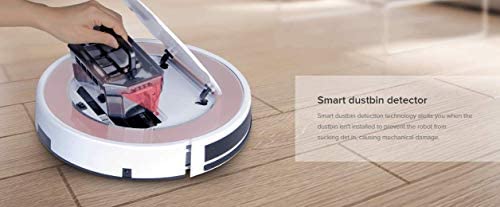
Figure 3.4: The V7s Plus features a smart dustbin detector that ensures the dustbin is correctly installed before operation, preventing mechanical damage and ensuring effective cleaning.
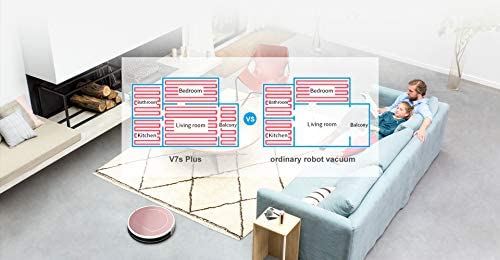
Figure 3.5: An illustration comparing the systematic cleaning path of the V7s Plus (left) which covers rooms thoroughly, versus the less organized path of an ordinary robot vacuum (right), highlighting the V7s Plus's efficiency.
4. Maintenance
Regular maintenance is crucial for the optimal performance and longevity of your ILIFE V7s Plus. Always turn off the robot and disconnect it from the charging dock before performing any maintenance.
4.1 Dustbin and Filter Cleaning
- Empty the dustbin after each use.
- Clean the high-performance filter and sponge filter regularly using the provided cleaning brush. Filters should be replaced every 3-6 months depending on usage.
4.2 Main Brush and Side Brush Cleaning
- Remove the main brush cover and main brush. Use the cleaning tool to remove hair and debris tangled around the brush.
- Remove the side brushes and clean any hair or debris. If brushes are worn or damaged, replace them.
4.3 Water Tank and Mop Cloth Cleaning
- After wet mopping, empty any remaining water from the tank.
- Remove the microfiber mop cloth and wash it thoroughly. Allow it to air dry completely before reattaching or storing.
4.4 Sensor and Charging Contact Cleaning
- Wipe the cliff sensors (located on the bottom of the robot) and charging contacts (on the robot and charging dock) with a clean, dry cloth. This ensures proper navigation and charging.
5. Troubleshooting
If your V7s Plus encounters an issue, refer to the following common problems and solutions:
| Problem | Possible Cause | Solution |
|---|---|---|
| Robot does not turn on. | Low battery; Power switch off. | Charge the robot; Ensure power switch is ON. |
| Robot does not charge. | Charging contacts dirty; Charging dock not powered. | Clean charging contacts on robot and dock; Ensure power adapter is plugged in. |
| Robot gets stuck frequently. | Obstacles on floor; Wheels tangled. | Clear clutter; Clean wheels and main brush. |
| Poor cleaning performance. | Full dustbin; Clogged filter; Worn brushes. | Empty dustbin; Clean/replace filter; Clean/replace brushes. |
| Robot makes unusual noise. | Debris in main brush or side brushes. | Inspect and clean all brushes. |
| Water tank leaks or doesn't dispense water. | Improper installation; Clogged water outlet. | Ensure tank is correctly installed; Clean water outlet. |
If the problem persists after trying these solutions, please contact ILIFE customer support for further assistance.
6. Specifications
| Feature | Detail |
|---|---|
| Model | V7s Plus |
| Product Dimensions | 33L x 33W x 9H Centimeters |
| Item Weight | 5 kg 180 g |
| Battery Life | Up to 130 Minutes |
| Power Source | Battery Powered |
| Filter Type | Multi-layer |
| Special Feature | Filter, Auto Docking, Schedule Cleaner, Cliff Detection, Remote Control |
| Cleaning Modes | Auto, Edge, Spot, Schedule |
| Cleaning Functions | Dry Vacuuming, Wet Mopping |
7. Warranty and Support
For warranty information, please refer to the warranty card included with your product or visit the official ILIFE website. If you require technical assistance or have questions not covered in this manual, please contact ILIFE customer support. Keep your purchase receipt as proof of purchase for warranty claims.
You can find more information and support resources on the official ILIFE Store: ILIFE Official Store.
Related documentsV7s Plus


Ask a question about this manual
Ask about setup, troubleshooting, compatibility, parts, safety, or missing instructions. Manuals+ will review the question and use this page’s manual context to help answer it.