
Introduction
This manual provides essential information for the safe and efficient operation of your Epson EB-972 XGA 3LCD Projector. Please read this manual thoroughly before using the projector and keep it for future reference.
The Epson EB-972 is designed for educational and office environments, offering 4100 lumens of color and white brightness, XGA resolution (1024 x 768), and a long-lasting lamp with up to 17,000 hours in Eco Mode. It features 3LCD, 3-chip technology for vivid and accurate color reproduction, dual HDMI connectivity, and network capabilities for wireless sharing from multiple devices.
Safety Information
- Power Source: Use only the power cord supplied with the projector. Connect to a grounded outlet.
- Ventilation: Do not block ventilation openings. Ensure adequate space around the projector for proper airflow.
- Heat: The projector lamp becomes very hot during operation. Allow the projector to cool down before moving or performing maintenance.
- Lamp: Do not look into the lens while the lamp is on. The bright light can damage your eyes.
- Liquid and Moisture: Do not expose the projector to rain, moisture, or excessive humidity. Do not place objects filled with liquids on or near the projector.
- Cleaning: Disconnect the power cord before cleaning. Use a soft, dry cloth. Do not use liquid or aerosol cleaners.
- Servicing: Do not attempt to service the projector yourself. Refer all servicing to qualified service personnel.
Package Contents
Verify that all items are included in the package:
- Epson EB-972 Projector
- Power Cable
- Remote Control with Batteries
- Computer Cable (VGA)
- USB Cable
- CD-ROM (Software and Documentation)
- Warranty Card
- Quick Setup Guide
Product Overview
Front View

Figure 1: Front view of the Epson EB-972 Projector. This image displays the projector's front, highlighting the central lens, the large ventilation grille on the left, and the Epson branding. The design is sleek and white.
Top View and Control Panel
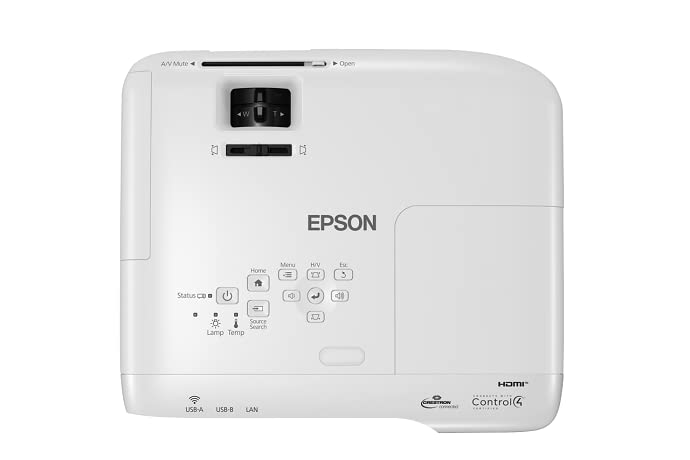
Figure 2: Top view of the Epson EB-972 Projector. This image shows the top surface of the projector, featuring the control panel with various buttons for power, menu navigation, source selection, and keystone correction. The focus and zoom rings are visible near the lens area.
Rear View and Connection Ports

Figure 3: Rear view of the Epson EB-972 Projector. This image provides a clear view of the projector's rear panel, detailing all the connectivity options including HDMI 1, HDMI 2, Computer 1 (VGA), Computer 2 (VGA), Video (RCA), Audio In/Out, USB-A, USB-B, LAN, and RS-232C ports. The power input and a speaker grille are also visible.
Angled Views

Figure 4: Angled front-right view. Shows the lens and front ventilation.

Figure 5: Angled rear-left view. Highlights the rear connectivity panel and side ventilation.
Setup
1. Projector Placement
Place the projector on a stable, flat surface or mount it securely to a ceiling. Ensure there is sufficient space around the projector for ventilation (at least 30 cm from walls or other objects).
2. Connecting Power
- Connect the supplied power cord to the projector's AC inlet.
- Plug the other end of the power cord into a grounded electrical outlet.
- The power light on the projector will illuminate, indicating it is in standby mode.
3. Connecting Input Sources
The EB-972 supports various input sources. Choose the appropriate cable for your device:
- HDMI: For high-definition digital video and audio. Connect an HDMI cable from your computer, Blu-ray player, or other device to one of the projector's HDMI ports (HDMI1 or HDMI2).
- Computer (VGA): For analog computer signals. Connect a VGA cable from your computer to the Computer1 or Computer2 port. For audio, connect a 3.5mm audio cable to the corresponding Audio1 or Audio2 port.
- Video (RCA): For standard definition video. Connect RCA cables (yellow for video, red/white for audio) to the Video and Audio L/R ports.
- USB-B: For USB Display function (requires Epson software installation on computer).
- LAN (RJ-45): For network connectivity and control.
4. Initial Power On and Adjustment
- Press the Power button on the projector's control panel or remote control. The projector will start up, and the lamp will illuminate.
- Focus Adjustment: Rotate the focus ring on the projector lens until the projected image is sharp and clear.
- Zoom Adjustment: Rotate the zoom ring to adjust the size of the projected image.
- Keystone Correction: If the image appears trapezoidal, use the Vertical Keystone slider or the Horizontal Keystone buttons on the control panel/remote to square the image. The EB-972 features auto vertical keystone correction.
- Adjusting Feet: Use the adjustable feet at the bottom of the projector to fine-tune the projection angle and level the image.
Operating
Power On/Off
- To Power On: Press the Power button on the projector or remote control.
- To Power Off: Press the Power button twice. The first press will display a confirmation message; the second press will shut down the projector. Allow the projector to cool down completely before unplugging it.
Source Selection
To switch between input sources:
- Press the Source Search button on the control panel or remote control to cycle through available inputs.
- Alternatively, use the dedicated input buttons (e.g., HDMI1, Computer1) on the remote control.
Menu Navigation
To access and adjust projector settings:
- Press the Menu button on the control panel or remote.
- Use the arrow buttons (Up, Down, Left, Right) to navigate through menu options.
- Press Enter to select an option or confirm a setting.
- Press Esc to go back to the previous menu or exit the menu.
Advanced Features
- Split Screen: Allows projection of two different sources simultaneously. Refer to the on-screen menu for detailed setup.
- Network Connectivity (Wi-Fi/LAN): Connect the projector to a network for remote control, monitoring, and wireless projection from compatible devices (computers, iOS, Android). Requires Epson iProjection software.
- A/V Mute: Temporarily turns off the image and sound. Press the A/V Mute button on the remote or slide the A/V Mute lever on the projector.
Maintenance
Regular maintenance ensures optimal performance and extends the life of your projector.
Lamp Replacement
The lamp has a lifespan of up to 17,000 hours in Eco Mode. When the lamp indicator lights up or the image becomes dim, it's time to replace the lamp.
- Turn off the projector and unplug the power cord.
- Allow the projector to cool down for at least 30 minutes. The lamp is extremely hot.
- Locate the lamp cover (usually on the top or side) and remove the screw(s) securing it.
- Carefully pull out the old lamp module.
- Insert the new genuine Epson replacement lamp module, ensuring it clicks into place.
- Replace the lamp cover and secure the screw(s).
- Reset the lamp timer through the projector's menu system (Menu > Reset > Lamp Hours).
Air Filter Cleaning/Replacement
Clean the air filter regularly (e.g., every 100 hours of use) to prevent overheating and maintain image quality.
- Turn off the projector and unplug the power cord.
- Locate the air filter cover (usually on the side).
- Remove the filter cover and carefully pull out the air filter.
- Use a small vacuum cleaner or a soft brush to remove dust from the filter. If the filter is heavily soiled or damaged, replace it with a new one.
- Reinsert the clean filter and replace the cover.
General Cleaning
- Projector Casing: Wipe the casing with a soft, dry, lint-free cloth. For stubborn marks, dampen the cloth slightly with water, then wipe dry. Do not use abrasive cleaners or solvents.
- Lens: Gently wipe the lens with a lens cleaning cloth or lens tissue. Do not use abrasive materials or excessive force.
Troubleshooting
| Problem | Possible Cause | Solution |
|---|---|---|
| No image projected |
|
|
| Image is blurry |
|
|
| Image is trapezoidal |
|
|
| Projector overheats and shuts down |
|
|
| Lamp indicator light is red |
|
|
Specifications
| Feature | Detail |
|---|---|
| Brand | Epson |
| Model | EB-972 |
| Projection System | 3LCD, 3-chip technology |
| Native Resolution | 1024 x 768 (XGA) |
| Color Brightness | 4100 lumens |
| White Brightness | 4100 lumens |
| Aspect Ratio | 4:3 |
| Lamp Life | Up to 17,000 hours (Eco Mode) |
| Connectivity | HDMI (x2), VGA (x2), Video (RCA), Audio In/Out, USB-A, USB-B, LAN (RJ-45), Wi-Fi |
| Special Features | 3D-Ready, Split Screen, Auto Vertical Keystone |
| Product Dimensions | 30.9 x 9 x 28.2 cm |
| Item Weight | 3.1 kg |
| Power Consumption | 16 Watts (Operating, typical) |
| Mounting Type | Tabletop Mount |
Warranty and Support
Warranty Information
Your Epson EB-972 projector comes with a warranty. Please refer to the included Warranty Card for specific terms, conditions, and duration of the warranty coverage. Keep your purchase receipt as proof of purchase for warranty claims.
Customer Support
For technical assistance, troubleshooting beyond this manual, or warranty service, please contact Epson customer support. You can find contact information on the Epson official website or on the warranty card provided with your product.
It is recommended to have your product model number (EB-972) and serial number ready when contacting support.


