1. Product Overview
The SEAOURA SR-616 LED Aquarium Light is a full-spectrum lighting solution designed to promote healthy growth for aquatic plants and enhance the visual appeal of freshwater fish tanks. It features adjustable brightness, multiple color modes, and an integrated timer for automated operation.

Figure 1: SEAOURA SR-616 LED Aquarium Light
2. What's in the Box
- SEAOURA LED Aquarium Light (Model SR-616)
- Power Cable
- Extendable Mount Brackets
- User Manual
3. Setup Instructions
3.1 Attaching Extendable Brackets
The light comes with adjustable extendable metal brackets designed to fit various tank sizes. Slide the brackets into the slots on each end of the light fixture. Adjust the length of the brackets to securely rest on the edges of your aquarium.

Figure 2: Extendable Metal Brackets
3.2 Power Connection
Connect the power cable to the light fixture and then plug the adapter into a standard electrical outlet. Ensure the connection is secure.
4. Operating Instructions
The SEAOURA SR-616 features an inline controller for easy adjustment of light settings.

Figure 3: Inline Controller Buttons
4.1 Controller Functions
- W Button: Adjusts the brightness of White, Red, Green, and Pink LEDs.
- On/Off & Brightness Button (Sun/Power Icon): Turns the light on/off and adjusts the overall brightness across 10 levels.
- Timer Button (Clock Icon): Sets the lighting duration to 6, 10, or 12 hours.
- B Button: Adjusts the brightness of the Blue LEDs.
4.2 DIY Mode: Time, Color, and Brightness Settings
The light offers flexible customization through its DIY mode:
- Setting Timing: Press the Timer button to cycle through 6-hour, 10-hour, or 12-hour durations. The light will gradually ascend over 15 minutes at the start of the cycle and gradually descend during the final 15 minutes, simulating natural sunrise and sunset.
- Adjusting Brightness: Use the On/Off & Brightness button to select one of 10 brightness levels for the entire light.
- Selecting Color Modes:
- All Lights On: This is the default full spectrum mode.
- White/Red/Green/Pink Mode: Press the W button to activate and adjust the brightness of these colors.
- Only Blue Mode: Press the B button to activate and adjust the brightness of the blue lights.

Figure 4: Available Color Modes
4.3 Memory Function
In the event of a power failure, the light will retain your last settings. Once power is restored, the timer function will restart its counting cycle from the moment the light turns back on.
5. Maintenance
5.1 Cleaning the Light Fixture
To maintain optimal performance and light output, regularly wipe the light fixture with a soft, damp cloth. Ensure the light is unplugged before cleaning. Avoid using abrasive cleaners or solvents that could damage the surface or LEDs.
5.2 Water Resistance
Important: This product is NOT water resistant. Do not immerse the light in water. Avoid direct contact with water to prevent damage and ensure safety.
6. Troubleshooting
6.1 Light Not Turning On
- Check if the power cable is securely connected to both the light fixture and the electrical outlet.
- Ensure the power outlet is functional by testing it with another device.
- Verify that the On/Off button on the inline controller has been pressed to turn the light on.
6.2 Timer Function Issues
- If the timer appears to be inaccurate or has stopped working, it may need to be reset. This can sometimes occur after a power outage.
- To reset, unplug the light, wait a few seconds, then plug it back in and re-program your desired timer setting.
6.3 Inconsistent Brightness or Color
- Ensure the light fixture and LEDs are clean and free from debris or mineral buildup.
- Re-adjust the brightness levels using the On/Off & Brightness button and the specific color buttons (W and B) to achieve your desired output.
7. Specifications
| Feature | Specification |
|---|---|
| Model Name | Aquarium light |
| Model Number | SR-616 |
| Size | 36W for 48-54 inch tank |
| Wattage | 36 watts |
| Product Dimensions | 3.4"D x 45.27"W x 0.47"H |
| Item Weight | 3.4 Pounds |
| Light Source Type | LED |
| Light Color | White, Blue, Pink, Red, Green |
| Brightness | 2190 Lumen |
| Color Temperature | 6500 Kelvin |
| Color Rendering Index (CRI) | 89.00 |
| Power Source | Corded Electric |
| Voltage | 20 Volts (DC) |
| Control Method | Push Button |
| Special Feature | Corded, Timer, Blue Light |
| Water Resistance Level | Not Water Resistant |
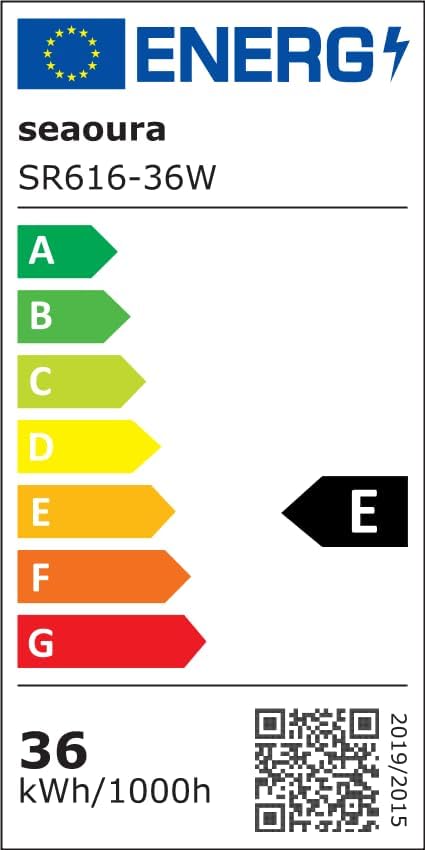
Figure 5: Energy Label for SR616-36W. For more details, visit EPREL Database.
8. Warranty and Support
For any questions, technical assistance, or warranty inquiries regarding your SEAOURA LED Aquarium Light, please contact SEAOURA customer support. Refer to the product packaging or the official SEAOURA store on Amazon for contact information.
Visit the official SEAOURA Store: SEAOURA Amazon Store