Product Overview
The ATOTO P8 is a portable car stereo designed to integrate wireless Apple CarPlay and Android Auto into your vehicle without requiring a head unit replacement. It features a 7-inch QLED glare-suppressing touchscreen, WDR (Wide Dynamic Range), auto-dimmer functionality, Bluetooth connectivity, a wireless remote control, and multiple audio output options.

Image: The ATOTO P8 portable car stereo displaying the CarPlay interface, accompanied by icons for Wireless CarPlay and Wireless Android Auto, and the included wireless remote control.
Key Features
- Wireless CarPlay & Android Auto: Seamless smartphone integration for navigation, music, and communication.
- 7-inch QLED Glare-Suppressing Touchscreen: Provides clear visibility even in direct sunlight with a wide viewing angle.
- Auto-Dimmer: Automatically adjusts screen brightness based on ambient light conditions for safer driving.
- Wireless Remote Control (AC-44F6): Offers convenient access to functions without reaching the screen.
- Multiple Audio Outputs: Bluetooth (upgrade needed), FM transmitter, AUX (stereo type), and built-in speaker.
- Broad Compatibility: Works with any vehicle featuring a 12V/24V power supply.
Setup and Installation
The ATOTO P8 is designed for intuitive and straightforward installation, eliminating the need for complex car stereo replacement.
What's in the Box
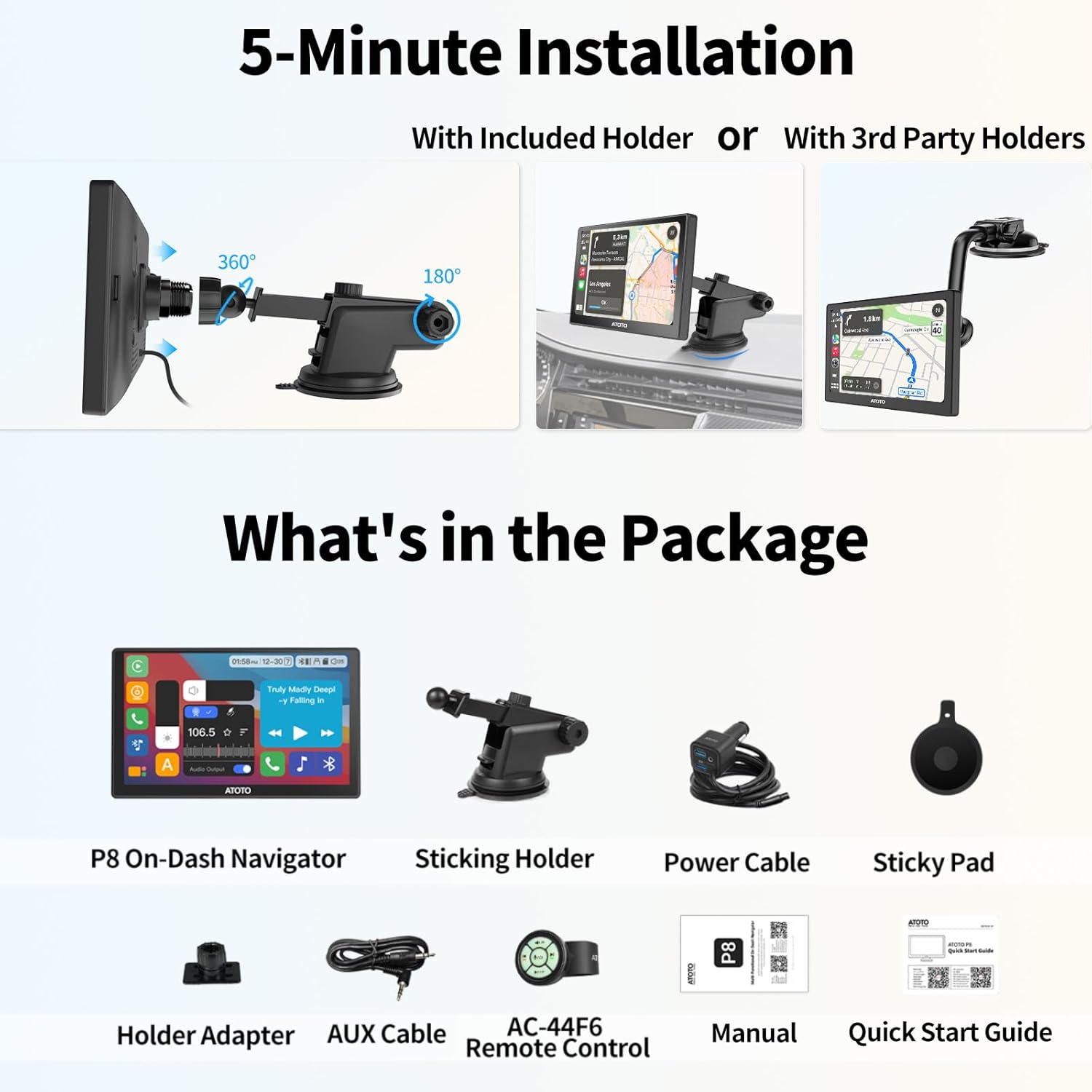
Image: A visual representation of the ATOTO P8 package contents, including the P8 On-Dash Navigator, sticking holder, power cable, sticky pad, holder adapter, AUX cable, AC-44F6 remote control, manual, and quick start guide.
The package typically includes:
- P8 On-Dash Navigator
- AC-44F6 Steering Remote Control
- Power Cable
- Sticky Pad
- AUX Cable
- Holder Adapter
- User Manual
- Quick Start Guide
Installation Steps

Image: A four-panel graphic illustrating the installation process: 1. Mounting the P8, 2. Plugging into the cigarette lighter, 3. Outputting audio to the head unit, and 4. Connecting to P8's Bluetooth and Wi-Fi for CarPlay/Android Auto.
- Mount the P8: Secure the P8 unit to your dashboard or windshield using the provided sticking holder and sticky pad. Ensure a stable position that does not obstruct your view.
- Power Connection: Plug the power cable into the P8 and connect the other end to your vehicle's cigarette lighter socket. The innovative cigarette lighter design requires only one cable for AUX function.
- Audio Output: Select your preferred audio output method (FM transmitter, AUX, or Bluetooth - upgrade needed) to route sound to your car's stereo system.
- Connect to Smartphone: Enable Bluetooth and Wi-Fi on your smartphone and connect to the ATOTO P8 to initiate Wireless CarPlay or Android Auto.

Image: A visual comparison showing the ATOTO P8's clean dashboard setup with a single power cable from the cigarette lighter adapter, contrasted with other brands that may require two tangled cables.
Operating Instructions
Wireless CarPlay and Android Auto
The P8 provides seamless wireless integration with Apple CarPlay and Android Auto, allowing access to navigation, music, calls, and messages directly from the P8's screen.
Video: An official product video demonstrating the ATOTO P8 Portable Car Stereo's features, including wireless CarPlay and Android Auto functionality, auto-dimmer, quick charge, and remote control.
- Voice Control: Utilize Siri or Google Voice Control for hands-free operation, such as making calls or getting directions.
- Navigation: Access real-time navigation and traffic information through your preferred map applications.
- Music & Media: Stream music, podcasts, and audiobooks from your smartphone.
- Communication: Make and receive calls, and send messages safely while driving.
Display and Auto-Dimmer
The 7-inch QLED screen offers excellent visibility. The built-in light sensor automatically adjusts screen brightness to match ambient light, enhancing safety and comfort.

Image: A three-panel graphic demonstrating the ATOTO P8's auto-dimming feature, showing the screen brightness adjusting automatically from bright daylight to twilight and dark night conditions.
Audio Output Options
The P8 offers several ways to output audio to your car's sound system:
- Bluetooth Audio Output: Connect to your car's stereo via Bluetooth for clear and powerful sound (requires system upgrade).
- FM Transmitter: Transmit audio to your car's FM radio by tuning to a specific frequency.
- AUX Audio Output: Use the provided AUX cable to connect to your car's AUX input.
- Built-in Speaker: The P8 has an integrated speaker for direct audio playback.

Image: A graphic illustrating the four audio output options for the ATOTO P8: Bluetooth Audio Output, FM Transmitter, AUX Audio Output, and the Built-in Speaker.
Wireless Remote Control (AC-44F6)
The included wireless remote control provides convenient access to various functions, allowing you to manage media playback, calls, and voice assistants without touching the screen.
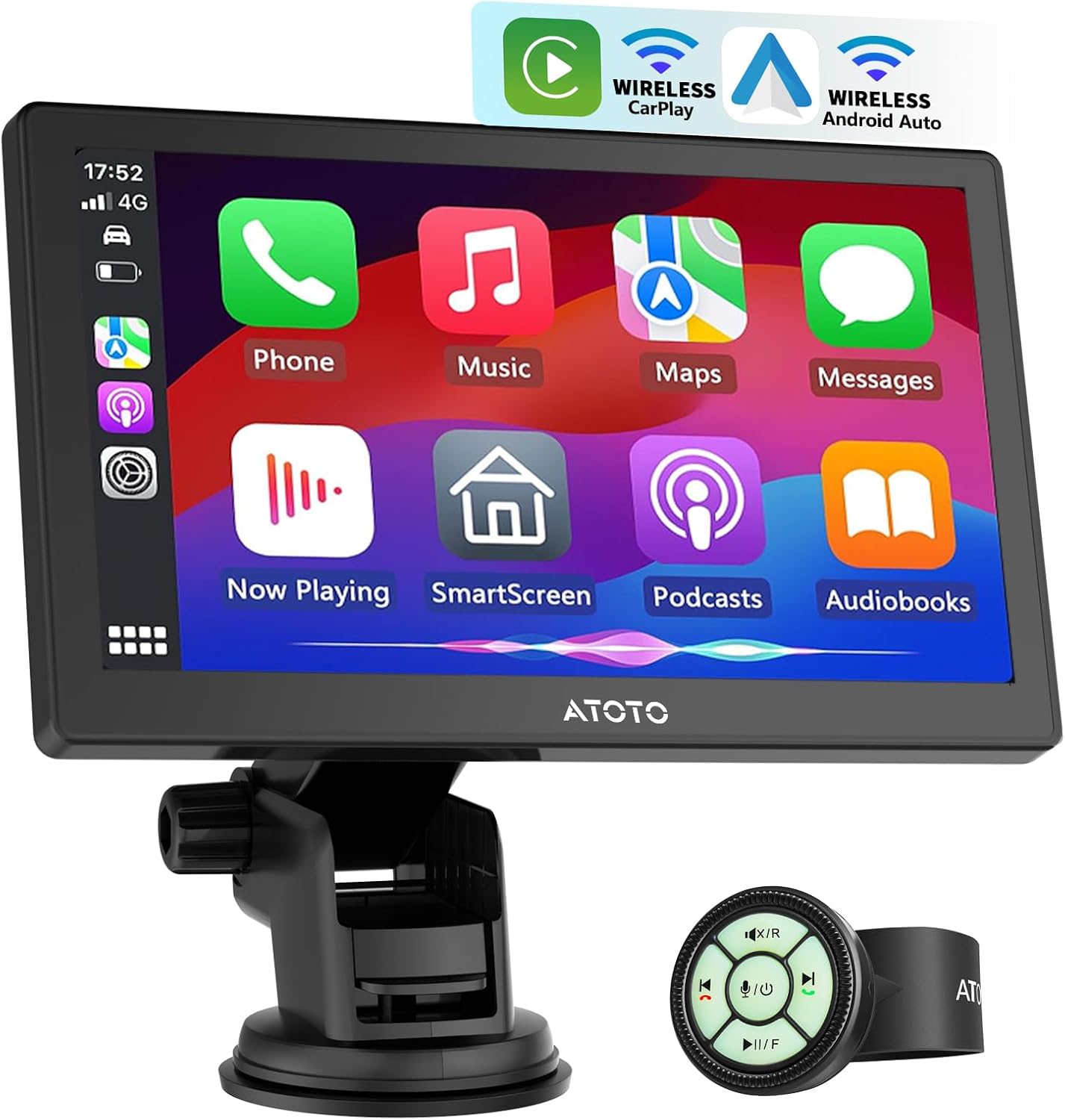
Image: A driver's hand operating the ATOTO AC-44F6 Wireless Steering Remote Control, which is attached to the steering wheel, demonstrating effortless control of the P8 unit mounted on the dashboard.
Screen Mirroring (AutoLink)
For applications not supported by CarPlay or Android Auto, use AutoLink to project your smartphone's screen onto the P8's larger display (requires system upgrade).

Image: A smartphone wirelessly mirroring its display content, showing a racing game, onto the larger screen of the ATOTO P8 portable car stereo.
Camera Inputs (Optional)
The P8 supports optional front and rear camera inputs for enhanced driving safety and recording. This feature is available on selected P8 models.
- Front Camera Input: Supports automatic recording and saving of footage, useful for preserving evidence in case of incidents.
- Rear Camera Input: Provides adjustable guidelines for safer reversing and parking.
- G-Sensor & Parking Monitor: The built-in G-sensor detects unusual gravitational changes (e.g., collisions) and automatically locks the video, saving it to an emergency list. The parking monitor function automatically starts recording in the event of severe vibrations while parked (requires connection to ATOTO AC-P8AC12 Fast Boot Connector, sold separately).

Image: The ATOTO P8 screen displaying both front and rear camera views, indicating its capability to connect multiple external cameras for comprehensive vehicle monitoring.
Maintenance
To ensure the longevity and optimal performance of your ATOTO P8, follow these general maintenance guidelines:
- Cleaning: Use a soft, dry cloth to clean the screen and exterior. Avoid abrasive cleaners or solvents that may damage the surface.
- Temperature: Avoid exposing the unit to extreme temperatures, both hot and cold, for extended periods.
- Cable Management: Ensure all cables are properly routed and secured to prevent damage or interference.
- Software Updates: Regularly check for and install Over-The-Air (OTA) software updates to benefit from new features and performance improvements.
Troubleshooting
If you encounter issues with your ATOTO P8, refer to the following common solutions:
| Problem | Possible Cause | Solution |
|---|---|---|
| Screen too bright at night | Auto-dimmer not functioning optimally or manual brightness setting too high. | Ensure the auto-dimmer switch is enabled. Check for software updates as improvements to dimmer functionality may be available. Manually adjust brightness if needed. |
| Wireless CarPlay/Android Auto connection issues or freezing | Interference, software glitch, or phone compatibility. | Restart both the P8 and your smartphone. Ensure your phone's operating system is up to date. Check for P8 software updates. Try a wired connection if wireless persists. |
| Poor microphone quality during calls | Microphone obstruction or software issue. | Ensure the microphone on the P8 is not obstructed. Test with another phone if possible. Check for software updates. |
| Mount not adhering properly | Surface not clean, suction cup worn, or lever not fully engaged. | Clean the mounting surface thoroughly. Ensure the suction cup lever is fully engaged. Consider using the sticky pad for enhanced adhesion or an alternative mounting solution. |
| No audio output | Incorrect audio output setting, volume too low, or cable issue. | Verify the selected audio output method (FM, AUX, Bluetooth) is correctly configured and connected. Check volume levels on both the P8 and your car stereo. Ensure cables are securely connected. |
Over-The-Air (OTA) Updates
The ATOTO P8 features a dedicated online update system. You can update the P8 over the air without needing a PC or SD card. Regularly checking for updates ensures you have the latest features and bug fixes.

Image: The ATOTO P8 screen showing an Over-The-Air (OTA) update interface with a QR code, indicating the process for updating the device's software.
Specifications
| Feature | Detail |
|---|---|
| Item Weight | 2.53 pounds |
| Product Dimensions | 7 x 7 x 7 inches |
| Item Model Number | A6 |
| Display Size | 7 Inches |
| Voice Command | Touchscreen |
| Brand | ATOTO |
| Connectivity Technology | Bluetooth, USB, Wi-Fi |
| Controller Type | Hand Control (Remote) |
| Special Features | Anti-Glare, Auto-Dimmer, Camera Input, Steering Remote Control, Wireless CarPlay and Android Auto |
| Compatible Devices | Smartphone, iPhone |
| Connector Type | 3.5mm Jack |
| Audio Output Mode | Stereo |
| Control Method | App, Remote, Touch, Voice |
| Manufacturer | ATOTO |
| Date First Available | June 23, 2022 |
Warranty and Support
ATOTO is committed to providing reliable customer support and product care.
Warranty Information
The ATOTO P8 comes with a standard 12-month warranty. Customers can extend their product care by an additional 180 days by contacting ATOTO customer service. This extended care allows for prioritized support by accessing your initial order and serial number.

Image: A graphic illustrating the 18-month product care, combining a standard 365-day warranty with an additional 180 days of extended care.
Customer Support
For quick and responsible customer support, you can reach ATOTO via email at support@myatoto.com. You can also find useful tools and resources, including manuals, by scanning the QR code provided in the quick start guide or on the product packaging.

Image: An illustration of a customer support expert wearing a headset, symbolizing available assistance for product inquiries.

Image: A smartphone scanning a QR code from a manual, indicating access to useful tools and resources for the product.


