
ROMOSS PEA40-282
ROMOSS 65W Power Bank 40000mAh User Manual
Brand: ROMOSS
Model: PEA40-282
Introduction
This manual provides detailed instructions for the safe and efficient use of your ROMOSS 65W Power Bank 40000mAh. Designed for fast charging of laptops, phones, and other devices, this portable external battery offers high capacity and universal compatibility, ensuring you stay powered on the go.
Its compact design and robust protection features make it an ideal companion for travel, remote work, and daily use.
Product Features
- 65W High Capacity 40000mAh: Portable laptop power bank with fast charging USB-C for laptops and phones. Fully charges in approximately 5 hours using a 65W wall charger (not included).
- Enhanced Mobility: Provides a week's worth of power in a compact 65W 40000mAh design, easily fitting into your bag for on-the-go charging.
- Fast Charging and Universal Compatibility: Supports 65W PD and 22.5W QC output, compatible with major fast charging protocols for Apple, Google Pixel, Galaxy devices, and more.
- Multiple Charging Options: Features 3 outputs/inputs, supporting 2-way charging and simultaneous charging of multiple devices. Can recharge an iPhone 14/15 up to 9 times or an S23 up to 8 times.
- Compact Design: Dimensions of 6 x 3.18 x 1.72 inches (16.5 x 8 x 4.37 cm) and a lightweight of 30 oz (895g) for easy portability.
- Advanced Protection: Equipped with 9 layers of protection for safe and reliable charging.

Figure 1: ROMOSS 65W Power Bank 40000mAh and included cables.
Package Contents
Please check the package for the following items:
- ROMOSS 65W Power Bank (1 unit)
- Fast Charging Type-C Cable (1 unit)
Setup
Initial Charging of the Power Bank
Before first use, it is recommended to fully charge your ROMOSS Power Bank. Connect the power bank to a 65W wall charger (not included) using the provided Type-C cable. The LED display will show the charging progress. To enable 65W charging mode, press the power button several times.
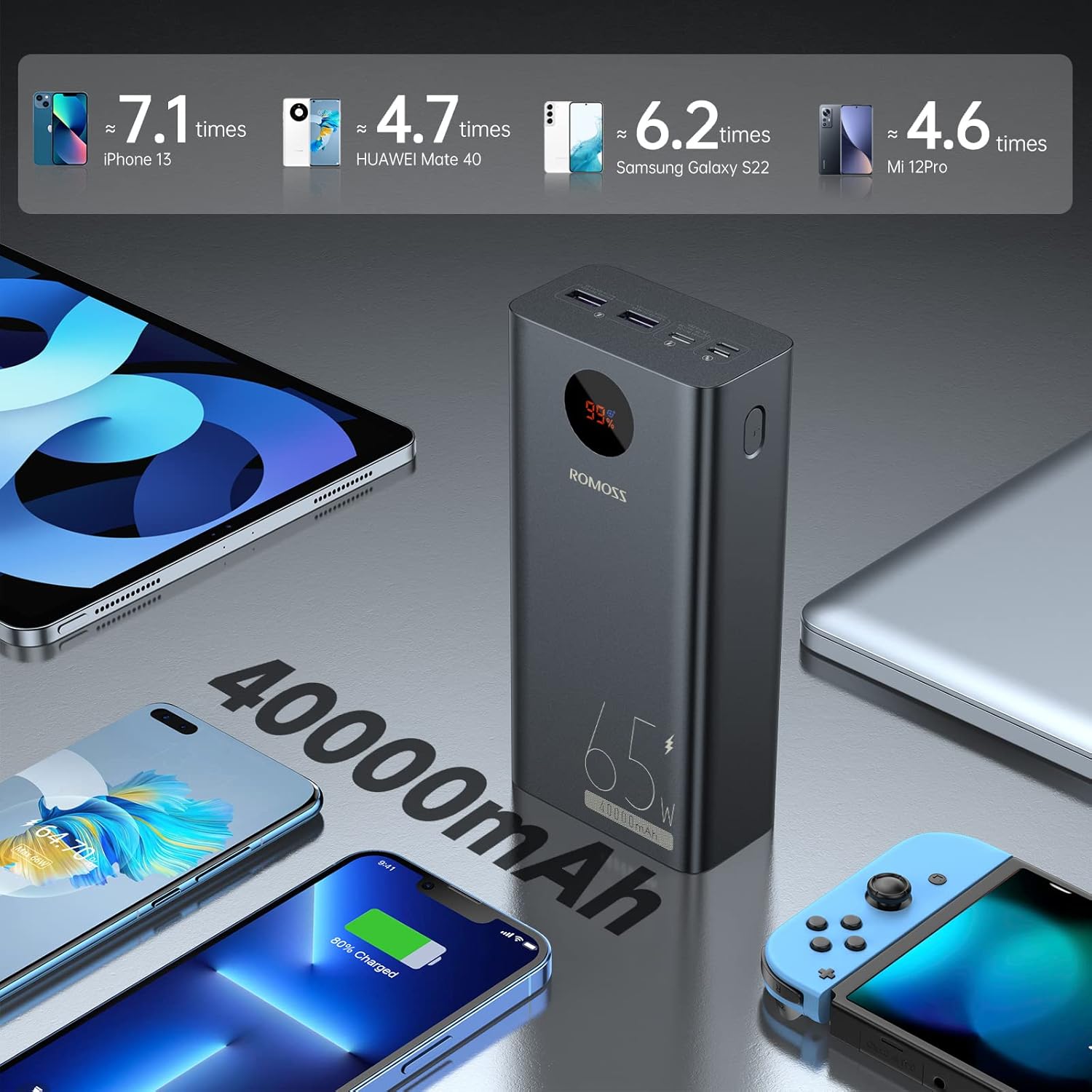
Figure 2: The 40000mAh capacity allows for multiple device charges.
Understanding the LED Display and Ports
The power bank features an LED display that shows the current battery percentage. Press the power button located on the side to activate the display and check the charge level. The power bank is equipped with multiple input and output ports for versatile charging:
- Inputs: Type-C (65W Max), Lightning, Micro USB.
- Outputs: Type-C (65W Max), USB 1/2 (22.5W Max).

Figure 3: Detailed view of the power bank's input and output ports.
Operating Instructions
Charging Your Devices
To charge a device, connect it to one of the power bank's output ports using an appropriate charging cable. The power bank will automatically detect the device and begin charging. For optimal fast charging, use the USB-C PD port for compatible laptops and phones.

Figure 4: Fast charging a laptop with the ROMOSS Power Bank.
Simultaneous Charging
The power bank supports charging multiple devices simultaneously. Connect up to three devices to the available output ports. Note that charging multiple devices at once may slightly reduce the charging speed for each individual device, especially if one device requires high power (e.g., a laptop).

Figure 5: Charging three devices concurrently.
Universal Compatibility
This power bank is designed for broad compatibility, supporting various devices including MacBooks, Dell laptops, iPads, other tablets, iPhones, Samsung Galaxy devices, Huawei phones, and AirPods.

Figure 6: Broad device compatibility of the power bank.
Maintenance
To ensure the longevity and optimal performance of your ROMOSS Power Bank, please follow these maintenance guidelines:
- Keep the power bank dry and away from moisture.
- Avoid exposing the device to extreme temperatures (hot or cold).
- Do not drop or subject the power bank to strong impacts.
- Clean the exterior with a soft, dry cloth. Do not use harsh chemicals or abrasive materials.
- For optimal battery health, fully charge the power bank at least once every three months if not in regular use.

Figure 7: The power bank features reliable battery cells designed to extend battery life.
Troubleshooting
Power Bank Not Charging / Not Charging Devices
- Ensure all cables are securely connected to both the power bank and the device/charger.
- Verify that the wall charger used for the power bank provides sufficient power (e.g., 65W for optimal charging).
- Press the power button on the power bank to ensure it is active and displaying a charge percentage.
- Try using different cables and devices to isolate the issue.
Reduced Charging Speed
When charging multiple devices simultaneously, especially if one device is connected to a USB-A port while a high-power device is connected to the USB-C port, the power output may adjust. This can result in slower charging speeds for all connected devices. To achieve maximum charging speed for a single device, ensure only that device is connected to the appropriate high-power port (e.g., USB-C PD).
Other Issues
If you encounter any other issues not covered here, please refer to the Warranty and Support section for contact information.
Specifications
| Feature | Detail |
|---|---|
| Product Dimensions | 6.5 x 3.18 x 1.72 inches |
| Item Weight | 1.87 pounds |
| ASIN | B0B4SJTXZD |
| Item Model Number | PEA40-282 |
| Batteries | 1 Lithium Polymer batteries required (included) |
| Special Features | Digital Display, Auto Shut-Off, Fast Charging |
| Color | Black |
| Manufacturer | ROMOSS |
| Date First Available | June 22, 2022 |
| Connector Type | USB Type C, Lightning |
| Battery Capacity | 40000 Milliamp Hours |
Warranty and Support
Your ROMOSS 65W Power Bank 40000mAh comes with a 12 Months Worry-Free Warranty.
For any questions, technical support, or warranty claims, please contact ROMOSS Customer Service. You may also refer to the official user manual PDF for additional details: ROMOSS User Manual (PDF).
Related documentsPEA40-282

Ask a question about this manual
Ask about setup, troubleshooting, compatibility, parts, safety, or missing instructions. Manuals+ will review the question and use this page’s manual context to help answer it.