
1. Introduction
Thank you for choosing the MAIDeSITe Rollator Walker with Seat, Model 901-HD. This instruction manual provides essential information for the safe assembly, operation, and maintenance of your new mobility aid. Please read this manual thoroughly before using the rollator and retain it for future reference.
This rollator is designed to provide support and stability for individuals requiring assistance with walking, offering a comfortable seat for resting, and convenient storage for personal items. Its lightweight yet robust aluminum alloy frame and foldable design make it suitable for both indoor and outdoor use.
2. Safety Information
Your safety is paramount. Please adhere to the following guidelines:
- Weight Capacity: Do not exceed the maximum weight capacity of 400 lbs (181 kg). Exceeding this limit can compromise the stability and safety of the rollator.
- Braking System: Always engage the parking brakes before sitting on the rollator. Ensure the brakes are functioning correctly before each use.
- Stability: The rollator features a triangular structure for enhanced stability. Always ensure the rollator is fully open and locked before use.
- Surface Use: While designed for various terrains, exercise caution on uneven, slippery, or inclined surfaces. Avoid sudden turns on rough ground.
- Adjustments: Ensure all adjustable components, such as handles, are securely locked in place before use.
- Maintenance: Regularly inspect the rollator for any signs of wear, damage, or loose parts. Do not use if any components are damaged or missing.
- Children: This rollator is not a toy. Keep children away from the device, especially during assembly and folding.
3. Parts List
Before assembly, please verify that all the following components are present:
- Main Rollator Frame (pre-assembled with wheels, handles, and seat)
- Padded Backrest
- Breathable Seat Cushion
- Large Capacity Storage Bag
- Cane Holder
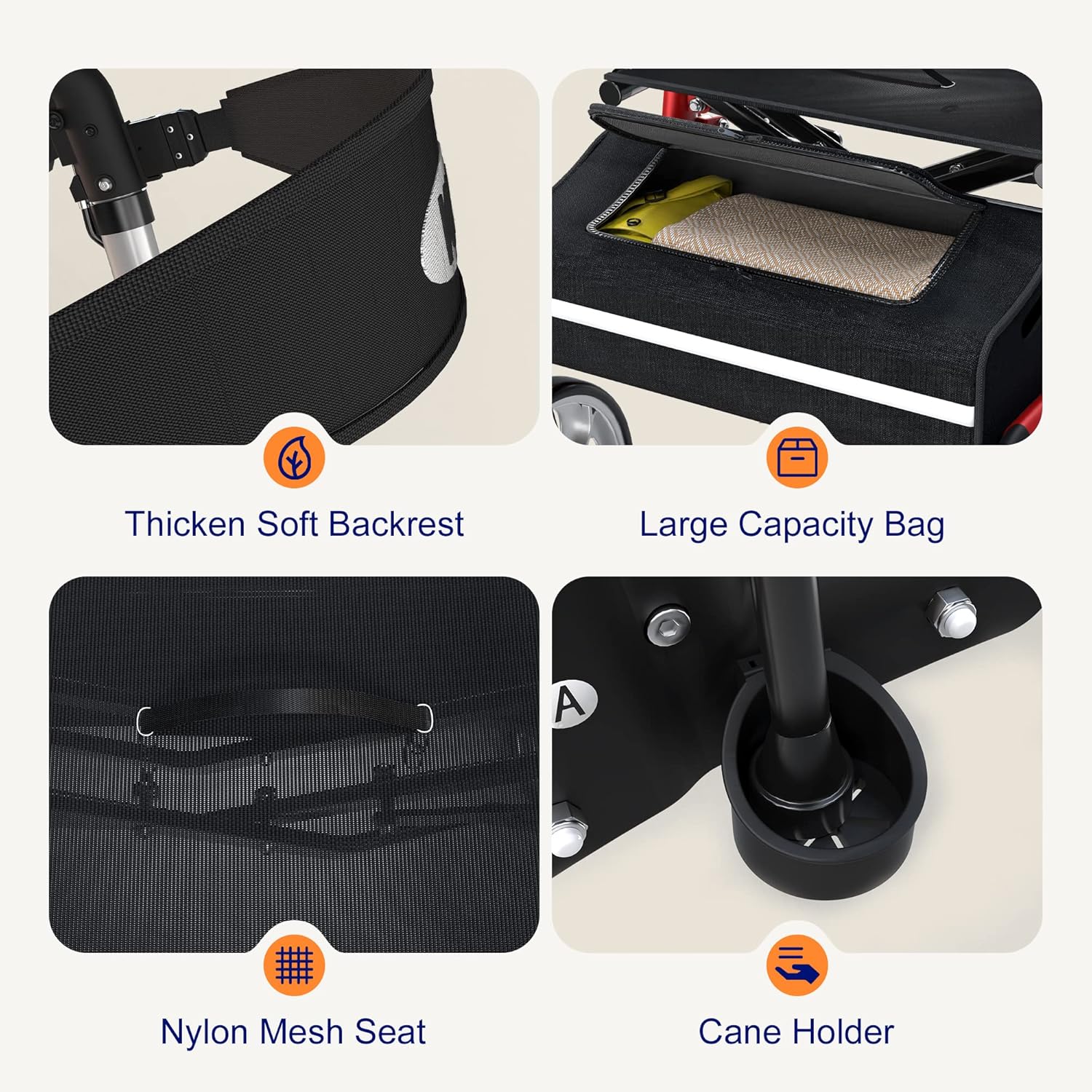
Image: Detailed view of the rollator's components, including the thicken soft backrest, large capacity bag, nylon mesh seat, and cane holder. These accessories enhance comfort and utility.
4. Setup & Assembly
The MAIDeSITe Rollator Walker comes largely pre-assembled. Follow these steps for final setup:
- Unfolding the Rollator: Gently pull the sides of the rollator apart until the frame fully extends and locks into its open position. Ensure the seat is flat and secure.
- Attaching the Backrest: Slide the padded backrest onto the designated supports at the rear of the seat. Ensure it is firmly attached.
- Attaching the Storage Bag: Hook the large capacity storage bag onto the frame beneath the seat.
- Installing the Cane Holder: Attach the cane holder to the side of the frame as desired.
- Adjusting Handle Height: Press the white button located below each handle. While holding the button, slide the handle up or down to your desired height. Release the button to lock the handle in place. Ensure both handles are at the same height and securely locked. The adjustable range is 31.5 to 37 inches, suitable for users between 5ft and 6ft tall.

Image: Illustration demonstrating the adjustable handle height feature, ranging from 31.5 to 37.4 inches, to accommodate users of different heights.

Image: Visual representation of the rollator's foldable design, showing the transition from an open, ready-to-use state to a compact, folded state for storage or transport.
5. Operating Instructions
5.1. Walking with the Rollator
Push the rollator forward at a comfortable pace, keeping it close to your body. The 10-inch front wheels are universal and rotate 360°, allowing for easy maneuvering across various indoor and outdoor surfaces.

Image: A person using the rollator outdoors, illustrating its suitability for various terrains with 10-inch front wheels and 8-inch rear wheels.
5.2. Dual Braking System
The rollator is equipped with a dual braking system for safety and control:
- To Slow Down: Pull the brake handles upwards towards you. This applies a gradual braking force, useful for controlling speed, especially when going downhill.
- To Lock (Parking Brake): Push the brake handles downwards until they click into the locked position. This engages the parking brake, preventing the rollator from moving. Always engage the parking brake before sitting or standing.

Image: A visual guide to the dual braking system, showing how to pull the handles up to slow down and push them down to lock the wheels for parking.
5.3. Using the Seat
When you need to rest, ensure the rollator is on a flat, stable surface. Engage both parking brakes by pushing the handles down until they lock. Carefully turn around and sit on the breathable mesh seat, using the padded backrest for support.
5.4. Folding the Rollator
To fold the rollator for storage or transport, pull up the handle located on the seat cushion. The rollator will fold inwards, becoming compact for easy storage in a car trunk or narrow spaces.
6. Maintenance
Regular maintenance ensures the longevity and safe operation of your rollator:
- Cleaning: Wipe down the frame and seat with a damp cloth and mild detergent. Avoid abrasive cleaners. Ensure all parts are dry before storage.
- Brake Inspection: Periodically check the brake cables for wear or damage. Ensure the brakes engage smoothly and effectively. If the parking brake does not engage fully, the brake cable tension may need adjustment. This is similar to bicycle brakes and may require professional assistance if you are unsure.
- Wheel Inspection: Check wheels for debris, wear, and proper rotation. Ensure all wheel fasteners are secure.
- Frame Inspection: Regularly inspect the aluminum alloy frame for any cracks, bends, or loose fasteners. Tighten any loose screws or bolts.
- Storage: Store the rollator in a dry place, away from extreme temperatures and direct sunlight.
7. Troubleshooting
If you encounter any issues with your rollator, refer to the following common problems and solutions:
- Problem: Brakes not engaging or too loose.
Solution: The brake cable tension may need adjustment. Locate the brake cable adjusters (often near the handles or wheels) and turn them to increase or decrease tension. If unsure, consult a professional. - Problem: Rollator is difficult to fold or unfold.
Solution: Ensure no items are obstructing the folding mechanism. Check that the seat cushion handle is pulled firmly upwards when folding. Lubricate moving parts if necessary. - Problem: Rollator feels unstable or wobbly.
Solution: Verify that the rollator is fully unfolded and locked. Check all screws and bolts for tightness, especially those on the frame and handle adjustments. Ensure wheels are securely attached. - Problem: Wheels are not rolling smoothly.
Solution: Check for debris (hair, lint) wrapped around the wheel axles. Clean the wheels and ensure they are free to rotate.
8. Specifications
| Feature | Detail |
|---|---|
| Model Number | 901-HD |
| Material | Aluminum Alloy |
| Weight Capacity | Up to 400 lbs (181 kg) |
| Product Weight | 9.98 kg (Approx. 22 lbs) |
| Handle Height Adjustment | 31.5 - 37 inches |
| Front Wheel Size | 10 inches |
| Rear Wheel Size | 8 inches |
| Product Dimensions (L x W x H) | 70 x 51.99 x 93.98 cm |
| Foldable | Yes |
| Color | Red |

Image: A user seated on the rollator, emphasizing the robust aluminum alloy frame and its capacity to support up to 400 lbs (note: image text states 265 lbs, but product description confirms 400 lbs).

Image: A detailed view of the shock absorber, designed to provide cushioning and stability on uneven surfaces and when sitting.
9. Warranty & Support
MAIDeSITe is committed to providing high-quality products. For specific warranty information, please refer to the documentation included with your purchase or contact MAIDeSITe customer service. If you have any questions, require assistance with assembly, or need troubleshooting support, please reach out to our customer support team through the retailer where you purchased the product.