
Bose 870730-0010
Bose QuietComfort Earbuds II User Manual
Model: 870730-0010
1. Introduction
Welcome to the user manual for your Bose QuietComfort Earbuds II. These wireless earbuds are designed to provide personalized noise cancellation and immersive sound, adapting to your unique ear shape for optimal performance. This manual will guide you through the setup, operation, maintenance, and troubleshooting of your earbuds.
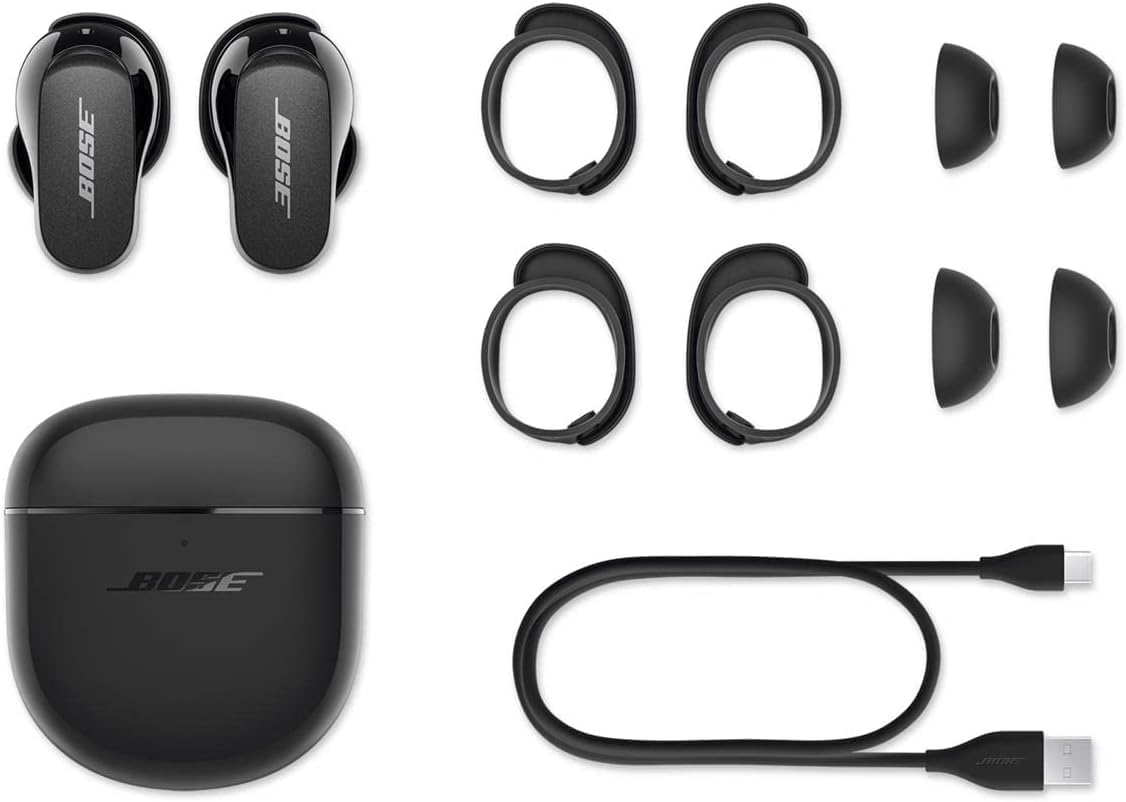
What's in the Box
- Bose QuietComfort Earbuds II (Left and Right Earbuds)
- Charging Case
- Bose Fit Kit (3 pairs of soft, silicone ear tips and 3 pairs of stability bands)
- USB-C to USB-A Charging Cable
2. Product Overview
Earbuds

The earbuds feature a sleek, compact design. Each earbud is marked with 'L' for left and 'R' for right. The outer surface includes touch-sensitive controls for managing audio and calls.

The bottom of each earbud contains charging contacts that align with the charging case. Ensure these contacts are clean for proper charging.
Charging Case

The compact charging case protects your earbuds and provides additional battery life. It features an LED indicator for battery status and a USB-C port for charging.

3. Achieving the Best Fit
Proper fit is crucial for optimal sound quality and noise cancellation. The Bose Fit Kit includes three sizes of ear tips and three sizes of stability bands to ensure a secure and comfortable fit for your ears.

Selecting Your Fit
- Experiment with different ear tip sizes (Small, Medium, Large) to find the one that creates a comfortable seal in your ear canal.
- Choose the stability band size (1, 2, 3) that fits snugly into the ridge of your ear, providing stability without discomfort.
- The earbuds come with one set of stability bands pre-installed.
Note: If the size of the earbud tips does not match the size of your ear canals or the headset is not worn properly in your ears, you may not obtain the correct sound qualities or call performance. Change the earbud tips to ones that fit more snugly in your ear.
4. Setup and Pairing
Initial Setup
- Charge the Earbuds: Before first use, place both earbuds into the charging case and connect the case to a power source using the provided USB-C cable. The LED indicator on the case will show charging status.
- Download the Bose Music App: For the best experience and to unlock all features, download the Bose Music app from your device's app store.

Bluetooth Pairing
- Open the charging case. The earbuds will automatically enter pairing mode if it's their first time being used.
- On your device, go to Bluetooth settings and select "Bose QC Earbuds II" from the list of available devices.
- Once connected, the earbuds will announce "Connected to [Device Name]".
5. Operating Your Earbuds
Touch Controls
The outer surface of each earbud is touch-sensitive, allowing you to control various functions without needing your device.
- Play/Pause: Tap once on either earbud.
- Skip Forward: Double-tap on the right earbud.
- Skip Backward: Triple-tap on the left earbud.
- Volume Up: Swipe up on the right earbud.
- Volume Down: Swipe down on the left earbud.
- Answer/End Call: Tap once on either earbud.
- Decline Call: Double-tap on either earbud.
- Access Voice Assistant: Press and hold on either earbud (customizable in the Bose Music app).
Noise Cancellation and Aware Mode
The QuietComfort Earbuds II feature CustomTune sound calibration technology, which personalizes noise cancellation and sound performance to your ears. You can switch between different noise control modes using the Bose Music app or the earbud controls.
- Quiet Mode: Provides maximum noise cancellation, ideal for blocking out distractions.
- Aware Mode: Allows you to hear your surroundings while still enjoying your audio, useful for situational awareness.
- Custom Modes: Create and save personalized noise cancellation levels via the Bose Music app.
Making and Receiving Calls
The earbuds are equipped with built-in microphones for clear phone calls. Use the touch controls as described above to manage your calls.
Battery Status
You can check the battery level of your earbuds and charging case through the Bose Music app. The LED indicator on the charging case also provides a quick visual reference:
- Solid White: Fully charged.
- Pulsing White: Charging.
- Solid Amber: Low battery.
6. Care and Maintenance
To ensure the longevity and optimal performance of your Bose QuietComfort Earbuds II, follow these care guidelines:
- Cleaning: Regularly clean the ear tips, stability bands, and charging contacts with a dry, soft cloth. Avoid using harsh chemicals or abrasive materials.
- Storage: Always store the earbuds in their charging case when not in use to protect them and keep them charged.
- Water Resistance: The earbuds have an IPX4 rating, meaning they are resistant to sweat and splashes. Do not submerge them in water or expose them to heavy rain. Ensure they are dry before placing them back in the charging case.
- Temperature: Avoid exposing the earbuds and case to extreme temperatures (hot or cold) or high humidity.
7. Troubleshooting
If you encounter any issues with your Bose QuietComfort Earbuds II, try the following solutions:
- No Sound: Ensure earbuds are charged, properly seated in your ears, and connected to your device. Check volume levels on both the earbuds and your device.
- Pairing Issues: Make sure Bluetooth is enabled on your device. Try unpairing and re-pairing the earbuds. Ensure no other devices are interfering with the Bluetooth connection.
- Noise Cancellation Not Effective: Verify that the ear tips and stability bands provide a secure seal. Adjust the noise cancellation level in the Bose Music app.
- Earbuds Not Charging: Clean the charging contacts on both the earbuds and the case. Ensure the USB cable is securely connected to a power source.
For more detailed troubleshooting, please refer to the Troubleshooting Guide (PDF).
8. Technical Specifications
| Feature | Detail |
|---|---|
| Model Name | QuietComfort Earbuds II |
| Model Number | 870730-0010 |
| Connectivity Technology | Bluetooth 5.3 |
| Noise Control | Active Noise Cancellation (CustomTune) |
| Battery Life (Earbuds) | Up to 6 hours (with ANC) |
| Battery Life (with Charging Case) | Up to 24 hours total |
| Water Resistance Level | IPX4 (Sweat and Water Resistant) |
| Item Weight (Earbuds) | 9 Grams (each) |
| Charging Case Dimensions | 2.34 x 1.05 x 2.61 inches |
| Included Components | Earbuds, Charging Case, 3 pairs of stability bands, Ear Cushions, Eartip, USB Cable |
9. Warranty and Support
Your Bose QuietComfort Earbuds II are covered by a limited warranty. Please refer to the warranty information provided with your product packaging for details on coverage and duration.
For further assistance, product registration, or to explore additional accessories, please visit the Bose Store on Amazon or refer to the official documentation below:
Related documents870730-0010


Ask a question about this manual
Ask about setup, troubleshooting, compatibility, parts, safety, or missing instructions. Manuals+ will review the question and use this page’s manual context to help answer it.