
Introduction
This instruction manual provides essential information for the proper setup, operation, and maintenance of your HamiltonBuhl Smart-Trek Deluxe Stereo Headset, model ST2BK. Please read this manual thoroughly before using the product to ensure optimal performance and longevity.
Product Overview
The HamiltonBuhl Smart-Trek Deluxe Stereo Headset is designed for durability and comfort, suitable for various environments including educational and professional settings. It features a noise-canceling microphone and in-line volume control for clear communication and ease of use.
Key Features:
- Rugged and comfortable design for extended use.
- Cushioned ear cups and headband for user comfort.
- Adjustable headband to fit various head sizes.
- High-quality, durable leatherette ear cups for easy cleaning.
- Exclusive Dura-Cord: a chew, kink, and knot-resistant, PVC-jacketed, braided nylon cord.
- In-line volume control for convenient audio adjustment.
- Noise-canceling microphone for clear voice transmission.
Included Components:
- Smart-Trek Deluxe Stereo Headset (Model ST2BK)
- Ear Cushions
Note: This product is typically supplied in a 50-pack configuration.

Figure 1: Front view of the HamiltonBuhl Smart-Trek Deluxe Stereo Headset.

Figure 2: HamiltonBuhl Smart-Trek Deluxe Stereo Headset shown with its 50-pack packaging.
Setup
- Connect the Headset: Locate the 3.5mm audio jack on your device (computer, tablet, smartphone, gaming console, etc.). Insert the 3.5mm plug from the headset firmly into the audio jack.
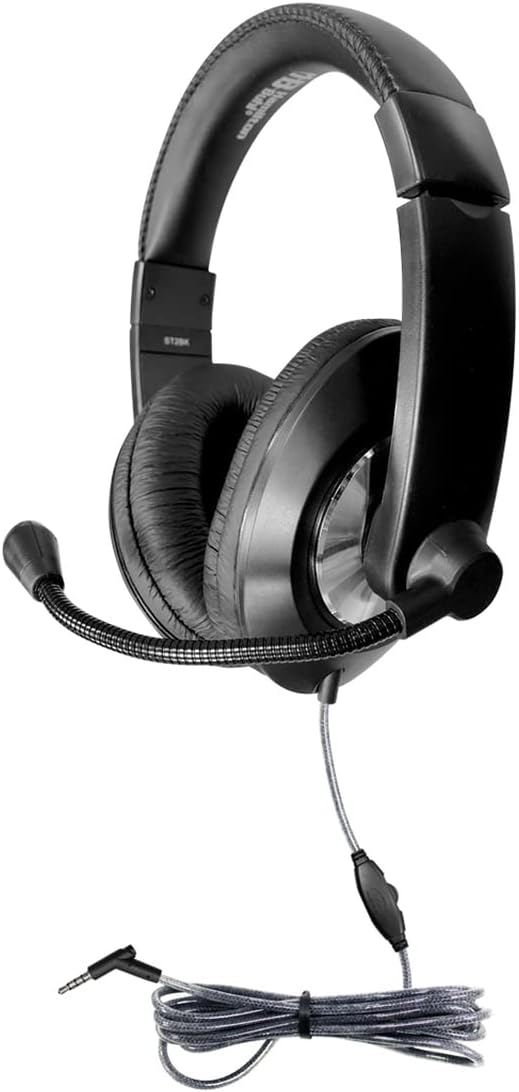
Figure 3: Headset showing the 3.5mm plug and in-line volume control.
- Adjust the Headband: Gently slide the earcups up or down along the headband until they rest comfortably over your ears. The headband is designed to snap into place for a secure fit.

Figure 4: Adjustable headband and cushioned earcups for comfortable fit.
- Position the Microphone: Bend the flexible microphone boom to position the microphone approximately 1-2 inches (2.5-5 cm) from your mouth for optimal voice pickup. Ensure it is not directly in front of your mouth to avoid breath noises.
Operating Instructions
Volume Control:
The headset features an in-line volume control located on the cable. Use the slider or dial on this control to adjust the audio output level to your preference. Turn the control towards '+' to increase volume and towards '-' to decrease volume.
Microphone Usage:
The integrated noise-canceling microphone is designed to reduce background noise, providing clear voice transmission. Ensure the microphone is properly positioned as described in the Setup section. Some devices may require you to select the headset as the default audio input device in their sound settings.
Device Compatibility:
This headset is compatible with a wide range of devices that feature a standard 3.5mm audio jack, including:
- Laptops
- Desktops
- Tablets
- Smartphones
- Gaming Consoles
- Telephones (with compatible 3.5mm jack)
Maintenance
Cleaning:
- Ear Cups: The leatherette ear cups can be easily cleaned with a damp cloth and mild soap. Ensure the ear cups are completely dry before use. Do not immerse the headset in water.
- Headband and Exterior: Wipe the headband and other exterior surfaces with a soft, dry, or slightly damp cloth.
- Dura-Cord: The braided nylon Dura-Cord is designed to be durable. Keep it free from excessive dirt and avoid sharp bends or knots to maintain its integrity.
Storage:
When not in use, store the headset in a clean, dry place away from extreme temperatures and direct sunlight. Avoid wrapping the cord too tightly around the headset.
Troubleshooting
| Problem | Possible Cause | Solution |
|---|---|---|
| No sound from headset. |
|
|
| Microphone not working. |
|
|
| Sound quality is poor or distorted. |
|
|
Specifications
| Model Name | Smart-Trek |
| Item Model Number | ST2BK |
| Brand | HamiltonBuhl |
| Connectivity Technology | Wired |
| Headphones Jack | 3.5 mm Jack |
| Noise Control | Passive Noise Cancellation |
| Control Type | Volume Control |
| Ear Placement | Over Ear |
| Form Factor | Over Ear |
| Material | Nylon (for cord), Leatherette (for earcups) |
| Impedance | 32 Ohm |
| Compatible Devices | Laptops, Desktops, Tablets, Telephones, Gaming Consoles |
| Item Weight | Approximately 25.5 pounds (for 50-pack) |
| Product Dimensions | Approximately 28 x 16 x 14 inches (for 50-pack packaging) |
| UPC | 681181628582 |
Warranty and Support
For warranty information, technical support, or service inquiries regarding your HamiltonBuhl Smart-Trek Deluxe Stereo Headset, please contact HamiltonBuhl customer service directly. Refer to the official HamiltonBuhl website or product packaging for the most current contact details and warranty terms.
You can visit the HamiltonBuhl store on Amazon for more information: HamiltonBuhl Store


