
Introduction
Thank you for choosing the YHO Mini Portable Charger USB-C Power Bank 5200mAh. This ultra-compact power bank is designed to provide convenient on-the-go charging for your USB-C compatible devices. Please read this manual carefully before use to ensure proper operation and to maximize the lifespan of your device.
Important Safety Information
- Do not expose the power bank to extreme temperatures, direct sunlight, or fire.
- Avoid dropping, impacting, or disassembling the device.
- Keep away from water and high humidity.
- Do not use if the device is damaged or swollen.
- Keep out of reach of children.
- Dispose of the power bank according to local regulations.
Package Contents
- 1 x YHO 5200mAh USB-C Power Bank
- 1 x USB-C Cable
- 1 x User Manual (this document)
Product Overview
Familiarize yourself with the components of your YHO Mini Portable Charger.
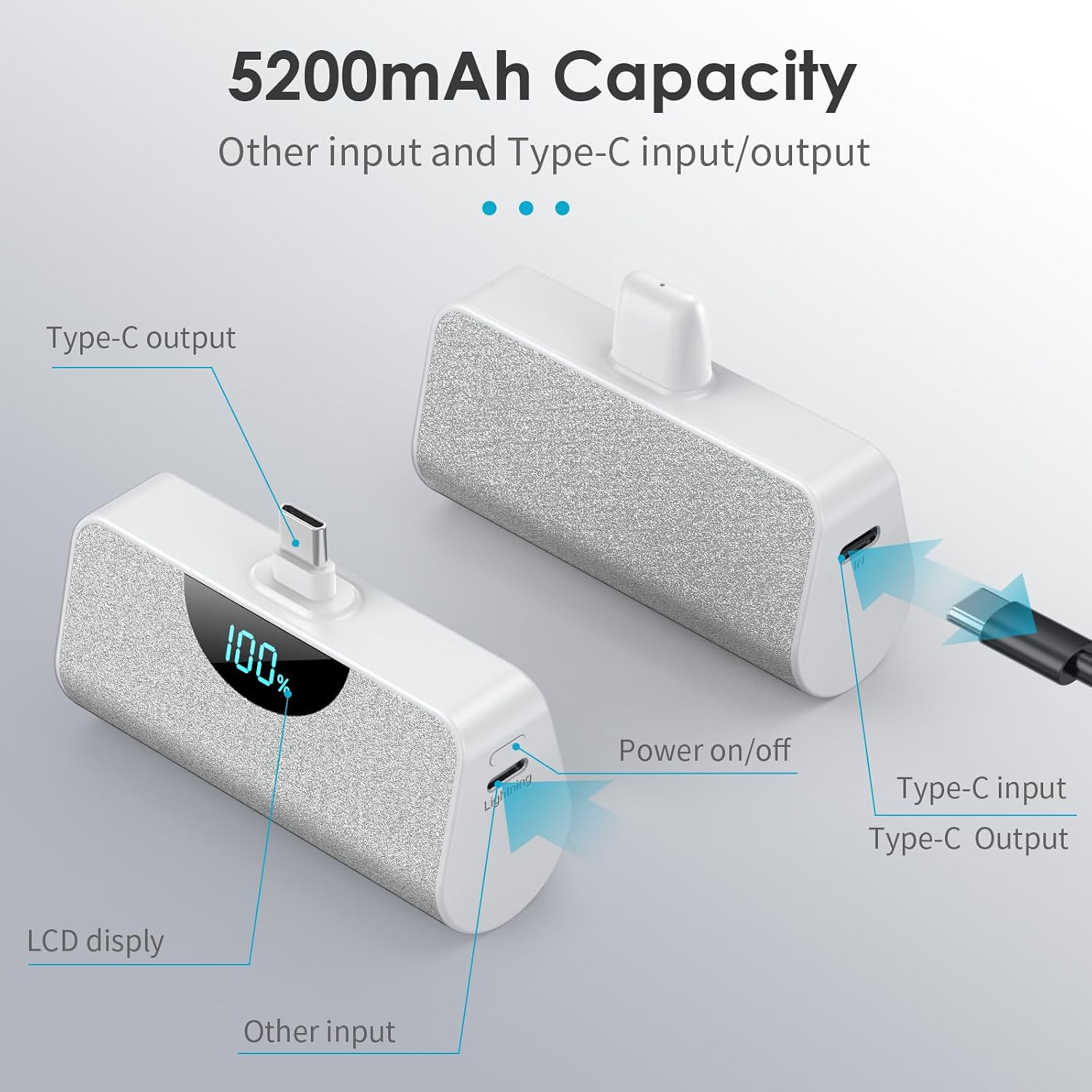
Image: This diagram illustrates the various ports and features of the YHO Mini Portable Charger. It highlights the Type-C output connector, LCD display, an additional input port, the power on/off button, and the Type-C input/output port for charging the power bank itself.
- USB-C Output Connector: Directly plugs into your USB-C device for charging.
- LCD Digital Display: Shows the remaining battery percentage of the power bank.
- Power Button: Activates the LCD display to show battery percentage.
- USB-C Input/Output Port: Used to recharge the power bank via a USB-C cable.
- Other Input Port: An additional input port for recharging the power bank, compatible with other cable types (e.g., Lightning cable).
Specifications
| Feature | Detail |
|---|---|
| Model Name | Mini Portable Charger USB-C Power Bank 5200mAh |
| Model Number | HX45K8 |
| Brand | YHO |
| Battery Capacity | 5200 Milliamp Hours (mAh) |
| Battery Cell Type | Lithium Polymer |
| Connector Type | USB Type C (Output) |
| Input Ports | USB Type C, Other (e.g., Lightning compatible) |
| Voltage | 5 Volts |
| Item Weight | 0.13 Kilograms |
| Item Dimensions (L x W x H) | 2.36 x 0.79 x 1.18 inches |
| Special Features | Mini size, Lightweight, Cordless Portable, LCD Display, Pass-Through Charging, Airplane allowed |
Setup and Initial Use
1. Charging the Power Bank
Before first use, fully charge your YHO Mini Portable Charger.
- Connect the provided USB-C cable to the USB-C input port on the side of the power bank.
- Connect the other end of the USB-C cable to a compatible USB power adapter (not included) or a computer's USB port.
- Alternatively, if your device uses a Lightning cable, you can use that cable with the "Other Input" port to charge the power bank.
- The LCD display will show the charging progress. Once it reaches 100%, the power bank is fully charged.

Image: This image demonstrates how to recharge the power bank. A USB-C cable is connected to the power bank's input port and then to a laptop, indicating the power bank is being charged. The LCD screen displays "100%", signifying a full charge.
2. Charging Your Device
The YHO Mini Portable Charger features a direct plug-in USB-C connector for convenience.
- Ensure your device has a USB-C charging port at the bottom.
- Carefully align and plug the USB-C output connector of the power bank directly into your device's charging port.
- The power bank will automatically begin charging your device. The LCD display on the power bank will show its remaining charge.
- To stop charging, simply unplug the power bank from your device.

Image: This image illustrates the power bank directly connected to a smartphone via its built-in USB-C connector. The phone is actively charging, and the power bank's display shows its full charge, indicating it's ready to provide power.
Operating Instructions
Checking Battery Level
To check the remaining battery percentage of the power bank, simply press the power button located on the side. The LCD digital display will illuminate and show the current charge level.

Image: This close-up shows the YHO Mini Portable Charger being held, with its LCD screen clearly displaying "100%", indicating a full battery charge. This feature allows users to quickly check the power bank's status.
Pass-Through Charging
The YHO Mini Portable Charger supports pass-through charging. This means you can recharge the power bank while it is simultaneously charging your device.
- Plug the power bank into your USB-C compatible device.
- Connect a USB-C charging cable to the power bank's USB-C input port and then to a power source.
- Both your device and the power bank will charge simultaneously.

Image: This image illustrates the pass-through charging feature. A smartphone is connected to the power bank, and the power bank itself is connected to a laptop via a USB-C cable, allowing both devices to charge simultaneously.
Maintenance
- Clean the power bank with a soft, dry cloth. Do not use harsh chemicals or abrasive materials.
- Store the power bank in a cool, dry place when not in use.
- Recharge the power bank at least once every three months to maintain battery health, even if not in regular use.
- Avoid exposing the connectors to dust or debris.
Troubleshooting
| Problem | Possible Cause | Solution |
|---|---|---|
| Power bank not charging. | Low battery in power bank; incorrect connection; faulty cable/adapter. | Ensure power bank is charged. Check all cable connections. Try a different USB-C cable or power adapter. |
| Device not charging from power bank. | Power bank low on charge; incorrect connection; device incompatibility; phone case interference. | Recharge power bank. Ensure the USB-C connector is fully inserted into your device. Verify device compatibility. Remove phone case if thickness exceeds 4mm. |
| LCD display not working. | Power bank completely drained; malfunction. | Charge the power bank for at least 30 minutes. If still unresponsive, contact customer support. |
Device Compatibility
This power bank is designed for devices with a USB-C charging port. Compatible models include, but are not limited to:
- iPhone: 17/17 Air/17 Pro/17 Pro Max, 16/16 Plus/16 Pro/16 Pro Max, 15 Series (USB-C models)
- Samsung Galaxy: S23, S22, S21, S20 FE, S10 Plus, S10, S10e, S9 Plus, S9, S8 Plus, S8, Note 20 Ultra, Note 10 Plus, Note 9, Note 8, A53, A52, A51, Z Flip, Z Fold, F52, W22, W21.
- Google Pixel: Pixel 3, Pixel 3XL, and other USB-C Pixel models.
- LG: G2, G3, G6, G6 Plus, V30, V60 ThinQ, G7 ThinQ, V40 ThinQ, G8 ThinQ, V50 ThinQ.
- Motorola: Edge, Moto G Power, Moto G Stylus, Moto G100, Moto G Play, Moto G Fast, P50, Z4, G7 Plus, G7, One.
- Other USB-C enabled Android phones.
Note on Phone Cases:
This portable charger is generally compatible with phone cases less than 4mm thick. For thicker cases, it may be necessary to remove the case for a secure connection and optimal charging.
Warranty and Customer Support
Your YHO Mini Portable Charger comes with a 24-month warranty policy. If you encounter any issues or have questions regarding your product, please contact our customer service team. We are available 24 hours a day to provide friendly and efficient support.
For support, please refer to the contact information provided on the product packaging or the seller's platform.