1. Product Overview
The COSTWAY 25L/Day Dehumidifier is designed to effectively reduce humidity in various indoor environments, including homes, offices, and basements. With a dehumidification capacity of 25 liters per day and a 6.5-liter water tank, it helps maintain a healthy and comfortable atmosphere in spaces up to 50 square meters. This unit features multiple operating modes, adjustable fan speeds, and user-friendly controls for optimal performance.

Image: The COSTWAY 25L/Day Dehumidifier operating in a living room, demonstrating its high efficiency in covering up to 50m².

Image: A visual representation of the dehumidifier's benefits, including preventing mold on walls and floors, drying clothes, eliminating musty odors, and improving respiratory comfort.
2. Setup and Installation
Before operating your dehumidifier, ensure it is placed on a stable, level surface. The unit is designed for portability, featuring side handles and wheels for easy relocation between rooms.
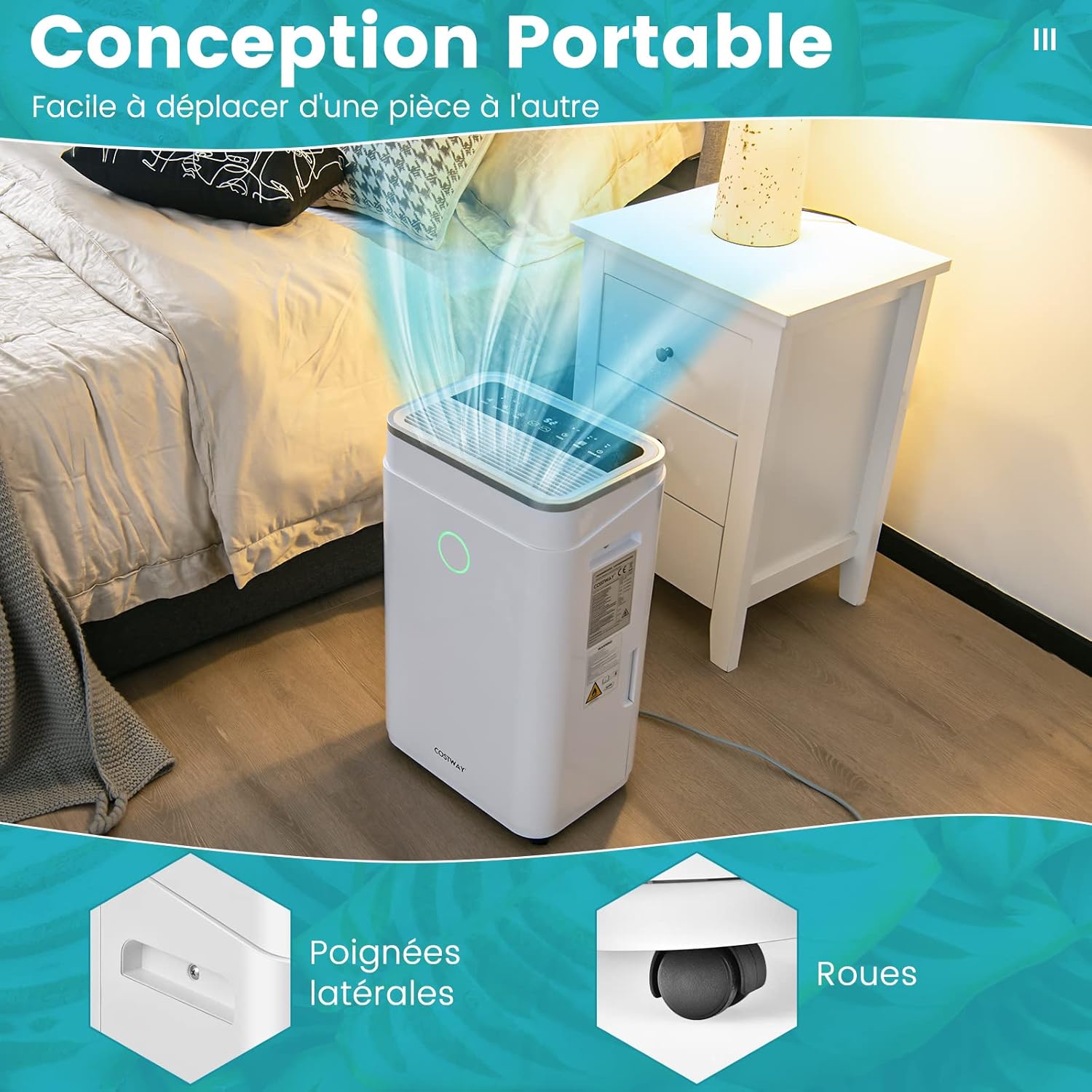
Image: The dehumidifier being easily moved using its integrated side handles and smooth-rolling wheels, highlighting its portable design.
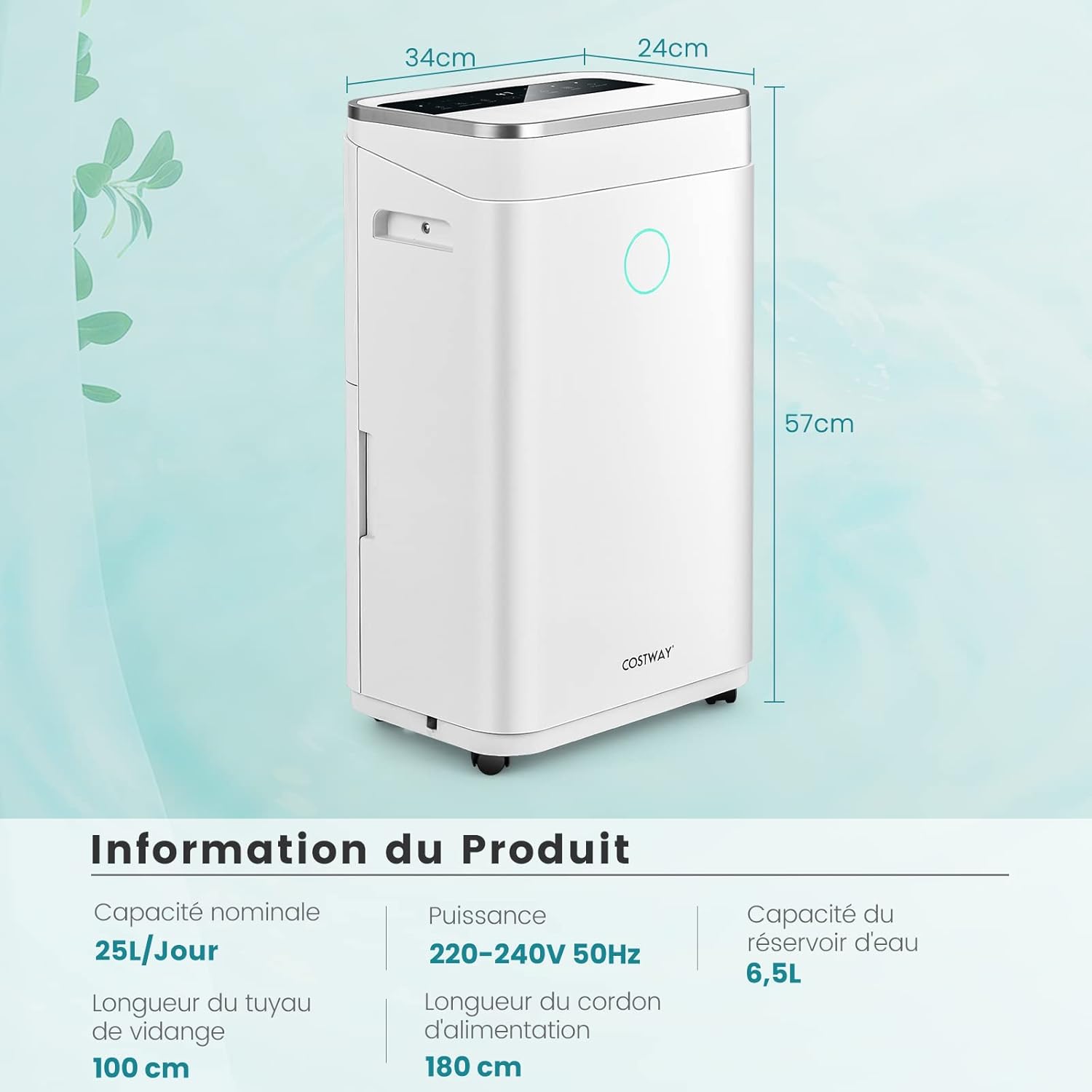
Image: A detailed view of the dehumidifier's dimensions (34 cm length, 24 cm width, 57 cm height) and core product information such as nominal capacity, power, and water tank volume.
Initial Setup Demonstration
Video: This video demonstrates the initial setup and basic usage of the dehumidifier, including power connection and drainage options.
3. Operating Instructions
The dehumidifier features an intuitive control panel with an LED display for easy operation. You can adjust humidity levels, select operating modes, set timers, and control fan speeds.

Image: A detailed view of the control panel, featuring an LED display and touch buttons for various functions including speed, sleep/reset, lock, timer, mode, and standby.
Operating Modes:
- Automatic Mode: The unit automatically adjusts its operation to maintain the set humidity level, which is adjustable from 30% to 80%.
- Drying Mode (Laundry Dry): Designed to accelerate the drying of clothes, making it ideal for humid days.
- Sleep Mode: Operates at a lower fan speed and reduced noise level to ensure a quiet and comfortable sleeping environment.
- Blowing Mode: The fan operates without engaging the dehumidification function, circulating air in the room.
Fan Speeds:
- High
- Low
Humidity Indicator:
The dehumidifier is equipped with a 3-color LED indicator that visually represents the ambient humidity level:
- Blue: Humidity is ≤45%
- Green: Humidity is between 45% and 65%
- Red: Humidity is ≥65%

Image: A close-up of the dehumidifier's side, showing the 3-color LED indicator for humidity levels and the removable air filter.
Timer Function:
Set the 24-hour timer to automatically turn the unit on or off, helping to conserve energy and operate according to your schedule.
Child Lock:
Activate the child lock function to prevent unintended changes to settings, ensuring safe operation around children.
4. Water Drainage
The dehumidifier offers two convenient methods for water drainage:
Manual Drainage:
The unit features a 6.5-liter water tank. When the tank is full, an audible alarm will sound, and the unit will automatically shut off to prevent overflow. Simply remove the tank, empty the collected water, and reinsert it to resume operation.
Continuous Drainage:
For continuous operation without the need to frequently empty the water tank, connect the included drainage hose to the designated outlet on the back of the unit. Ensure the hose is properly positioned to drain water into a suitable receptacle or floor drain.

Image: A comparison showing the manual drainage method (removing and emptying the 6.5L water tank) and the continuous drainage method (connecting the 100 cm drainage hose).
5. Maintenance and Care
Regular maintenance ensures the longevity and efficiency of your dehumidifier.
Air Filter Cleaning:
The air filter is removable and washable for convenient cleaning. A reminder light will illuminate after approximately 600 hours of operation to prompt you to clean the filter. Regularly cleaning the filter helps maintain optimal air quality and dehumidification performance.
To clean the filter:
- Turn off and unplug the dehumidifier.
- Remove the air filter from its housing.
- Wash the filter with warm, soapy water.
- Rinse thoroughly and allow it to air dry completely before reinserting.
6. Troubleshooting Guide
If you encounter any issues with your dehumidifier, please refer to the following common troubleshooting steps:
- Unit not turning on: Ensure the power cord is securely plugged into a functional electrical outlet. Check if the water tank is full and needs emptying.
- No dehumidification: Verify that the desired humidity setting is lower than the current room humidity. Ensure the air filter is clean and not obstructed.
- Water tank full indicator: Empty the water tank. If using continuous drainage, ensure the hose is properly connected and not kinked.
- Unusual noise: Check for any obstructions in the air intake or outlet. Ensure the unit is placed on a stable, level surface.
For further assistance, please contact customer support.
7. Technical Specifications
| Feature | Specification |
|---|---|
| Brand | COSTWAY |
| Color | White |
| Dimensions (L x W x H) | 34 x 24 x 57 cm |
| Weight | 14.5 Kilograms |
| Dehumidification Capacity | 25 Liters/Day |
| Water Tank Capacity | 6.5 Liters |
| Power | 230 Watts |
| Number of Fan Speeds | 2 |
| Recommended Floor Area | 50 square meters |
| Drainage Hose Length | 100 cm |
| Power Cord Length | 180 cm |
8. Warranty and Customer Support
For detailed warranty information, product registration, or technical support, please refer to the documentation included with your purchase. You may also visit the official COSTWAY website for frequently asked questions and customer service contact details. Please retain your proof of purchase for any warranty claims.


