
1. Introduction
This manual provides essential information for the proper installation, operation, and maintenance of your uxcell SUS304 Knurled Ball Head Long Stem Watch Crown. This component is designed for watch repair and customization, offering durability and resistance to rust.
The watch crown is made from high-quality SUS304 stainless steel, ensuring strength, wear resistance, and ease of maintenance. It is suitable for replacing old or damaged watch crowns and can be used across a wide range of watch models.

Figure 1: Two uxcell Watch Crowns. This image displays two units of the watch crown, illustrating their knurled ball head design and long stem.
2. Installation Instructions
Proper installation of the watch crown is crucial for the watch's functionality and water resistance. A broach tool is required for installation; no wrench driver is needed.
- Preparation: Ensure your workspace is clean and well-lit. Gather necessary tools, including a watchmaker's broach and any tools required to access the watch movement.
- Crown Stem Attachment: Carefully attach the watch crown to the watch stem. The crown is designed to be installed onto the stem using a broach, which allows for a secure fit without threading.
- Movement Insertion: Once the crown is securely attached to the stem, carefully insert the stem into the watch movement. Follow the specific procedure for your watch movement to avoid damage.
- Sealing: After insertion, ensure that the crown and stem assembly creates a proper seal with the watch case to maintain water resistance. Incorrect installation can compromise the watch's sealing.
- Functionality Check: Gently pull and rotate the crown to verify that it engages correctly with the movement for time setting or winding.

Figure 2: Watch Crown Stem Detail. This image shows a close-up of the watch crown's stem, indicating the point where it connects to the watch movement.

Figure 3: Watch Crowns in Context. This image shows several watch crowns, including the uxcell model, positioned near a watch, demonstrating their application in watch repair or customization.
3. Operation
The watch crown serves as the primary interface for adjusting your watch. Its operation depends on the specific watch movement it is installed in.
- Winding: For mechanical watches, rotate the crown clockwise in its pushed-in position to wind the mainspring.
- Time Setting: Pull the crown out to the first or second position (depending on the watch model) and rotate it to set the time. Push it back in to resume normal operation.
- Date/Day Setting: If your watch has a date or day function, pull the crown out to an intermediate position and rotate it to adjust the date or day.
Always ensure the crown is fully pushed in after adjustments to maintain the watch's water resistance.
4. Maintenance
The uxcell watch crown is constructed from SUS304 stainless steel, known for its durability and resistance to rust. Regular maintenance will ensure its longevity and proper function.
- Cleaning: Periodically wipe the crown with a soft, damp cloth to remove dirt and grime. Avoid harsh chemicals that could damage the watch case or seals.
- Inspection: Regularly inspect the crown for any signs of wear, damage, or looseness. Ensure it rotates smoothly and pulls out and pushes in securely.
- Water Resistance: If your watch is water-resistant, ensure the crown is always fully pushed in when exposed to water. If the crown feels loose or damaged, have the watch's water resistance checked by a professional.
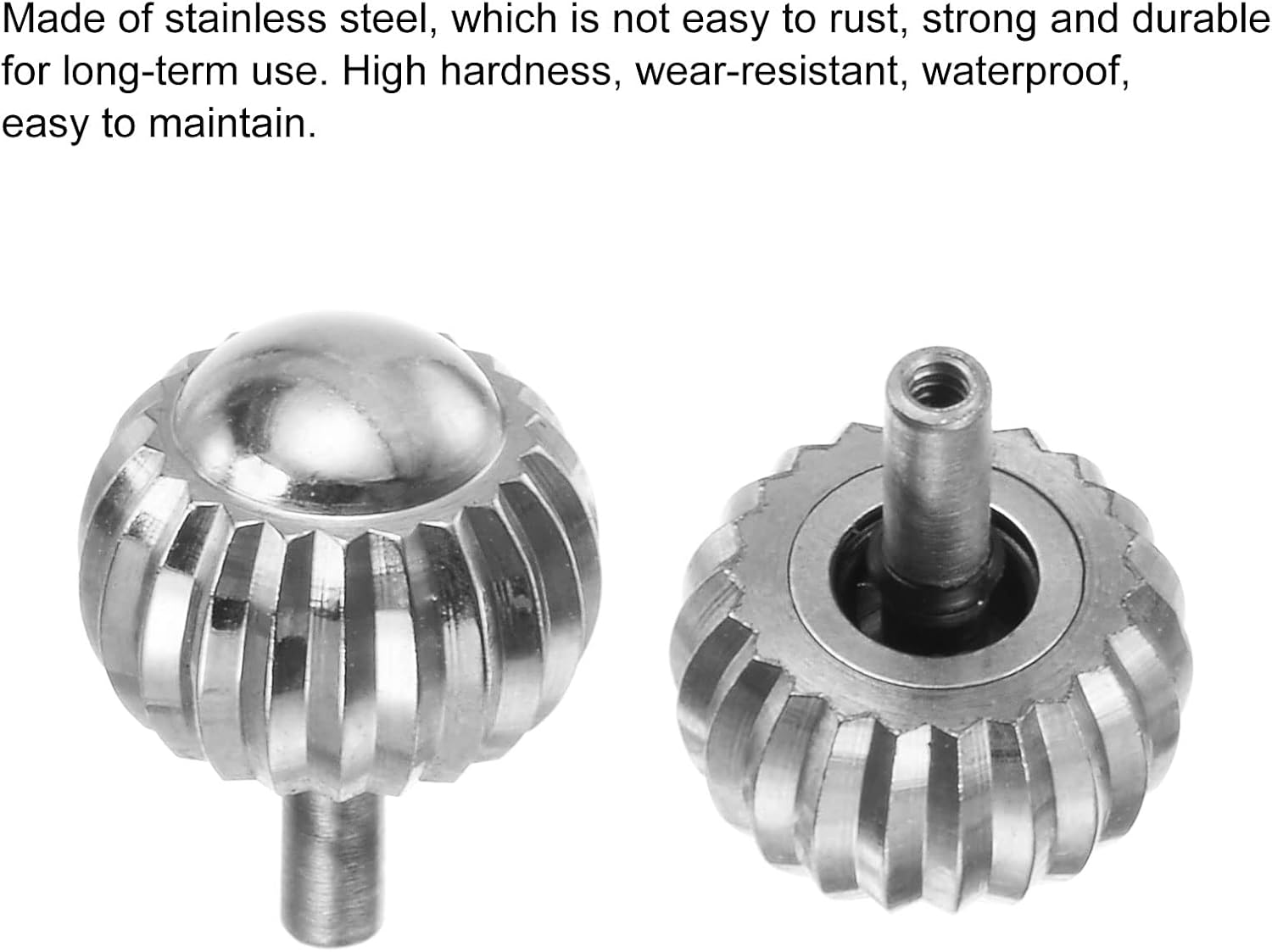
Figure 4: Material and Design. This image provides a detailed view of the watch crown's SUS304 stainless steel construction and knurled texture, emphasizing its robust design.
5. Troubleshooting
If you encounter issues with your watch crown, refer to the following common problems and solutions:
| Problem | Possible Cause | Solution |
|---|---|---|
| Crown does not fit the watch stem. | Incorrect crown size or stem diameter. | Verify the dimensions of the crown and stem. Ensure compatibility before attempting installation. |
| Crown is loose or falls off. | Improper attachment to the stem or damaged stem. | Re-attach the crown to the stem using a broach, ensuring a secure fit. If the stem is damaged, it may need replacement. |
| Crown does not engage with movement (cannot set time/wind). | Stem not fully inserted, bent stem, or internal movement issue. | Ensure the stem is fully and correctly inserted. If the problem persists, consult a professional watchmaker. |
| Watch loses water resistance after crown replacement. | Crown not fully pushed in, damaged crown gasket, or improper installation. | Always ensure the crown is fully pushed in. Inspect the crown gasket for damage. Seek professional assistance for water resistance testing and sealing. |
6. Specifications
Key specifications for the uxcell Watch Crown:
- Brand: uxcell
- Model Number: 84b9144b-ca8a-4bb9-91a7-b7254c11c1e0
- Material: SUS304 Stainless Steel
- Crown Diameter: 9mm / 0.35 inches
- Crown Height: 7mm / 0.28 inches
- Stem Hole Diameter: 2.5mm / 0.1 inches
- Water Resistance Depth: 30 Meters (when properly installed and sealed in a compatible watch case)
- Color: Silver

Figure 5: Product Dimensions. This image illustrates the precise measurements of the watch crown, including its diameter, height, and the diameter of the stem hole.
7. Warranty and Support
Information regarding specific warranty terms for this product is not provided in the available documentation. For warranty inquiries or technical support, please contact uxcell directly through their official website or authorized retailers.
For further assistance, you may visit the uxcell Store on Amazon.