Introduction
The Gecko Covers EasyClick 2.0 Tablet Cover (Model V10T60C7) is designed to provide comprehensive protection and enhanced functionality for your 10.9-inch Apple iPad Air 2020/2022. This cover features a durable hard shell for secure tablet placement, multiple viewing angles, and precise cutouts for full access to all ports and buttons. An integrated magnet supports the tablet's automatic wake/sleep function.
Setup
Follow these steps to properly install your tablet into the EasyClick 2.0 cover:
- Prepare Your Tablet: Ensure your 10.9-inch Apple iPad Air 2020/2022 is clean and free of debris.
- Align the Tablet: Carefully align your iPad with the hard plastic shell inside the cover. Ensure the camera, buttons, and ports align with the corresponding cutouts in the shell.
- Click into Place: Gently press the tablet into the shell, starting from one corner and working your way around. You should hear a soft "click" as the tablet securely seats into the shell. Do not force the tablet.
- Verify Fit: Once installed, check that all edges of the tablet are fully enclosed by the shell and that all ports, buttons, and the camera are accessible through their respective openings.

Image: The tablet cover opened, revealing the custom-fit hard plastic shell designed to securely hold the iPad Air 2020/2022. This image illustrates the internal structure where the tablet is clicked into place.
Operating Instructions
The EasyClick 2.0 cover offers several features to enhance your tablet experience:
- Automatic Wake/Sleep Function: The cover features an embedded magnet that automatically wakes your iPad when opened and puts it to sleep when closed. This helps conserve battery life.
- Multiple Viewing Angles: The front flap of the cover can be folded to create various stand positions, allowing for comfortable viewing, typing, or drawing.

Image: The tablet cover folded into a stand, presenting the iPad screen at an optimal angle for viewing content such as videos or presentations.
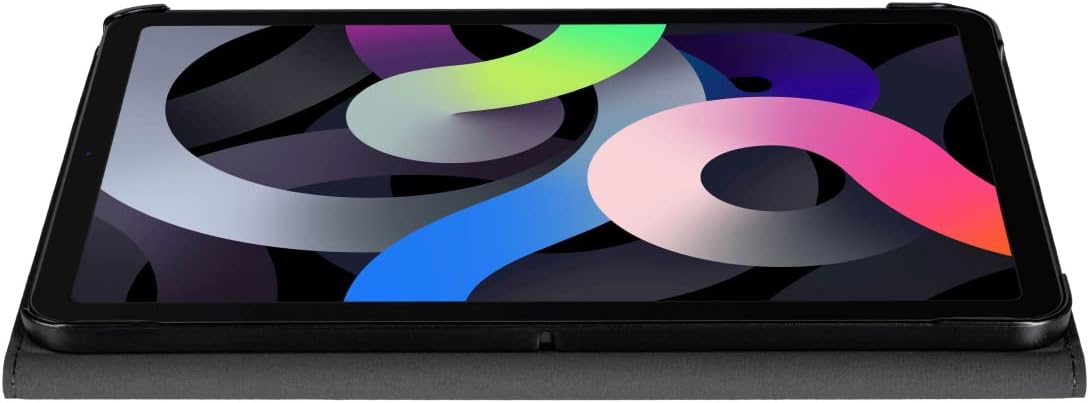
Image: The tablet cover configured into a lower stand position, ideal for comfortable typing or drawing on the iPad.
- Full Port and Button Access: Precision cutouts ensure that all ports, buttons, speakers, and the camera remain fully accessible without needing to remove the cover.

Image: A rear view of the tablet cover in stand mode, highlighting the precise cutout for the iPad's camera, ensuring unobstructed use.
- Apple Pencil Compatibility: The cover includes a dedicated slot for securely holding an Apple Pencil (2nd generation), allowing for convenient storage and charging.

Image: The tablet cover closed, displaying the integrated side slot designed to securely hold and charge an Apple Pencil.

Image: A close-up side view of the tablet cover, showing an Apple Pencil perfectly fitted and secured within its designated storage slot.
Maintenance
To ensure the longevity and appearance of your EasyClick 2.0 Tablet Cover, follow these maintenance guidelines:
- Cleaning: Wipe the exterior of the cover with a soft, damp cloth. For stubborn marks, a mild soap solution can be used, followed by wiping with a clean, damp cloth and then drying thoroughly. Avoid harsh chemicals or abrasive cleaners.
- Avoid Extreme Conditions: Do not expose the cover to extreme temperatures, direct sunlight for prolonged periods, or excessive moisture, as this may cause material degradation or discoloration.
- Handle with Care: While the cover provides protection, avoid dropping the tablet or subjecting it to strong impacts, as this can still cause damage to both the cover and the device.
Troubleshooting
If you encounter any issues with your EasyClick 2.0 Tablet Cover, consider the following:
- Tablet Does Not Fit Securely:
- Ensure you have the correct model of iPad (10.9-inch Apple iPad Air 2020/2022). This cover is specifically designed for these models.
- Verify that the tablet is aligned correctly with the shell's cutouts before pressing it into place.
- Remove any existing screen protectors or thin films that might interfere with the fit, although most should not cause an issue.
- Automatic Wake/Sleep Function Not Working:
- Ensure the cover is fully closed and aligned properly with the tablet screen.
- Check your iPad settings: Go to Settings > Display & Brightness and ensure "Lock/Unlock" (or "Lock/Unlock with Cover") is enabled.
- Confirm there are no foreign objects between the cover and the tablet screen that might prevent proper magnetic contact.
- Ports or Buttons Not Accessible:
- Re-check the tablet's seating within the hard shell. It might be slightly misaligned.
- Ensure you have the correct iPad model for this cover.
Specifications
| Feature | Detail |
|---|---|
| Brand | Gecko Covers |
| Model Number | V10T60C7 |
| Compatible Devices | 10.9-inch Apple iPad Air 2020/2022 |
| Color | Fresh Green |
| Item Weight | 12.5 ounces (approx. 354 grams) |
| Product Dimensions (LxWxH) | 7.4 x 7.49 x 0.82 inches (approx. 18.8 x 19.0 x 2.1 cm) |
| Special Features | Automatic Wake/Sleep, Multiple Stand Positions, Apple Pencil Slot, Full Port Access |
Warranty and Support
For information regarding warranty coverage, product support, or to contact customer service, please refer to the official Gecko Covers website or the retailer from whom you purchased this product. Keep your proof of purchase for warranty claims.
Gecko Covers Official Website: www.geckocovers.com


