
RovyVon A8U
Contents
RovyVon Aurora A8 EDC Flashlight User Manual
Model: A8U
Introduction
Welcome to the RovyVon Aurora A8 EDC Flashlight user manual. This compact and powerful flashlight is designed for everyday carry, offering versatile lighting options and convenient features. Please read this manual thoroughly to understand its functions and ensure optimal performance and longevity of your device.

Figure 1: RovyVon Aurora A8 EDC Flashlight
Product Features
- New Lock Mode: Prevents accidental activation. Unlock by charging or 5 quick clicks.
- Momentary On Mode: Long press for instant 650 lumen high output; release to turn off.
- Removable Magnetic Accessories: Includes a magnetic clip and tail base buckle for hands-free use on metal surfaces.
- 10 Lighting Modes:
- Front LED: Moonlight, Low, Medium, High
- Side LED: 365nm UV, Red, Red Beacon, Red Flash, White (Low), White (High)
- New 6500K Cool White LED: Provides a more focused beam for extended illumination range.
- USB-C Rechargeable: Fully charges in approximately 60 minutes. Features a secure USB cover.

Figure 2: Versatile Sidelights including 365nm UV for banknote checking, Red for signal, and White for reading.

Figure 3: Magnetic tail base and pocket clip allow for hands-free attachment to metal surfaces.
Setup and Initial Use
Charging the Device
The Aurora A8 is equipped with a built-in rechargeable battery. Before first use, or when the battery is low, charge the device using a USB-C cable (not included).
- Locate the USB-C charging port on the flashlight.
- Carefully open the USB-C cover.
- Connect a USB-C cable to the port and the other end to a 5V power source (e.g., computer USB port, wall adapter).
- The indicator light will show "breathing blue" during charging and turn "solid green" when fully charged. Charging takes approximately 60 minutes.
- Once charging is complete, securely close the USB-C cover to protect the port.

Figure 4: USB-C Charging Port and Indicator Lights.
Unlocking the Flashlight
The Aurora A8 features a lock mode to prevent accidental activation. Upon first use, or after the device has been locked, you will need to unlock it.
- Method 1 (Charging): Connect the flashlight to a USB-C charger. This will instantly unlock the device.
- Method 2 (Button Press): Rapidly click the main button five (5) times. The front LED will flash three times to indicate it is unlocked.
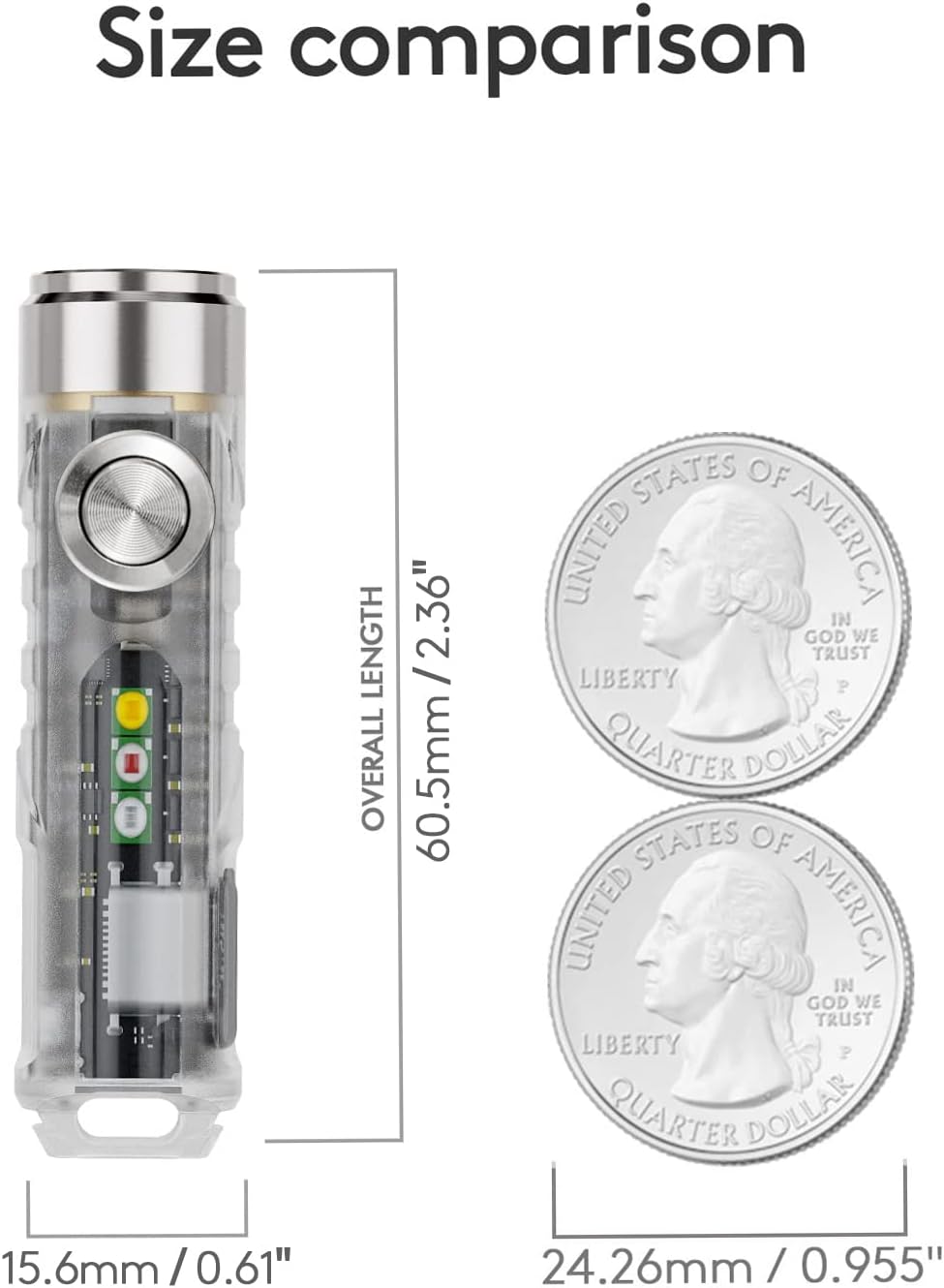
Figure 5: Lockout Feature and Unlock Methods.
Attaching Accessories
The Aurora A8 comes with several accessories to enhance its usability.
- Magnetic Clip: Attach the magnetic clip to the body of the flashlight for securing it to pockets, straps, or metal surfaces.
- Magnetic Tail Base Buckle: This can be attached to the tail of the flashlight, providing a strong magnetic base for hands-free operation.
- Key Ring: Use the included key ring to attach the flashlight to your keys or other gear for easy access.

Figure 6: Included Accessories: Magnetic clip, magnetic detachable base, USB-C cover, and key rings.
Operating Instructions
The Aurora A8 features a single button interface for all functions. Familiarize yourself with the click patterns for different modes.
Main LED Operation (Front Light)
- Momentary On: From the OFF state, long press and hold the button. The flashlight will activate in High mode (650 lumens). Release the button to turn off.
- Constant On: From the OFF state, double-click the button to turn on the main LED.
- Single clicks will cycle through brightness levels: Moonlight (0.5 lumens) → Low (25 lumens) → Medium (200 lumens) → High (650 lumens).
- To turn off, press and hold the button.
- Mode Memory: The flashlight will remember the last used constant-on brightness level if left on for more than 3 minutes before turning off.

Figure 7: Momentary On function for quick bursts of light.
Side LED Operation
- Activate Side LEDs: From the OFF state, triple-click the button to turn on the side LED.
- Cycle Side LED Modes: Once the side LED is on, single clicks will cycle through the following modes:
- 365nm UV Light (for banknote checking, etc.)
- Red Light
- Red Beacon (slow flash)
- Red Flash (fast flash)
- White Light (Low)
- White Light (High)
- To turn off the side LED, press and hold the button.
Lock/Unlock Function
- To Lock: From the OFF state, rapidly click the button five (5) times. The front LED will flash twice to confirm it is locked.
- To Unlock: As described in the Setup section, either connect to a USB-C charger or rapidly click the button five (5) times. The front LED will flash three times to confirm it is unlocked.
Demonstration Video
Video 1: A demonstration of the RovyVon Aurora A8's various features and modes, including pocket clip usage, white reading light, red signal light, and hat lamp functionality.
Maintenance
- Cleaning: Use a soft, damp cloth to clean the exterior of the flashlight. Do not use harsh chemicals or abrasive materials.
- Charging: To maintain battery health, charge the flashlight regularly, even if not in frequent use. Avoid completely draining the battery for extended periods.
- Storage: Store the flashlight in a cool, dry place away from direct sunlight and extreme temperatures.
- Water Resistance: The Aurora A8 has an IPX6 water resistance rating, meaning it is protected against powerful water jets. It is not designed for submersion. Ensure the USB-C cover is securely closed to maintain water resistance.
Troubleshooting
| Problem | Possible Cause | Solution |
|---|---|---|
| Flashlight does not turn on. | Device is in lock mode. | Unlock the device by charging or by rapidly clicking the button 5 times. |
| Flashlight does not turn on. | Battery is depleted. | Charge the flashlight using a USB-C cable. |
| Light output is dim or inconsistent. | Low battery. | Recharge the flashlight. |
| Light output is dim or inconsistent. | Dirt or debris on the lens. | Gently clean the lens with a soft cloth. |
| USB-C cover does not close securely. | Improper alignment or debris. | Ensure the cover is aligned correctly and free of debris before pressing firmly to seal. |
Specifications
| Feature | Detail |
|---|---|
| Model | A8U |
| Light Source Type | LED (6500K Cool White) |
| Max Brightness (Front LED) | 650 Lumens |
| Side LED Functions | 365nm UV, Red, Red Beacon, Red Flash, White (Low/High) |
| Power Source | Battery Powered (Lithium Ion) |
| Charging Port | USB-C (5V) |
| Charging Time | Approx. 60 minutes |
| Runtime (Moonlight) | Up to 72 hours |
| Material | Plastic |
| Product Dimensions (L x W x H) | 2.38" x 0.62" x 0.62" (60.5mm x 15.6mm x 15.6mm) |
| Item Weight | 0.6 Ounces (17g) |
| Water Resistance Level | IPX6 |
| Included Components | USB-C Cover, Battery (internal), Key Ring, Magnetic Base, Magnetic Clip |

Figure 8: Size comparison of the Aurora A8 with a US Quarter for scale.
Warranty and Support
The RovyVon Aurora A8 EDC Flashlight comes with a 2-year warranty from the date of purchase, covering manufacturing defects.
For technical support, warranty claims, or general inquiries, please contact RovyVon customer service through their official website or the retailer from whom you purchased the product. Please have your purchase receipt and product model number (A8U) ready when contacting support.
For more information, visit the official RovyVon Store: RovyVon Official Store
Documents and downloads
Ask a question about this manual
Ask about setup, troubleshooting, compatibility, parts, safety, or missing instructions. Manuals+ will review the question and use this page’s manual context to help answer it.