
Introduction
This user manual provides detailed instructions for the installation, operation, and maintenance of your Yale Electronic Safe YSV/200/DB2. Please read this manual thoroughly before using the safe to ensure proper function and security. Keep this manual for future reference.
The Yale Electronic Safe is designed to protect sensitive information and valuable personal belongings with its solid steel construction and electronic locking mechanism. It offers a programmable 3 to 8 digit code for access, along with emergency key override.

Image: Front view of the Yale Electronic Safe YSV/200/DB2, showing the electronic keypad and the manual key override cylinder.
Setup
1. Battery Installation
Your safe requires 4 AA batteries (included). These power the electronic keypad. Ensure batteries are inserted with correct polarity.
- Open the safe using the emergency key (refer to the "Emergency Key Access" section if needed).
- Locate the battery compartment on the inside of the door.
- Insert 4 AA batteries, ensuring correct polarity (+/-).
- Close the battery compartment cover.

Image: Interior view of the safe door, highlighting the battery compartment and the locking bolts.
2. Setting Your Personal PIN Code
The safe comes with a factory default code. It is crucial to change this to a personal code immediately after battery installation.
- With the safe door open, press the red reset button located on the inside of the door, near the hinge. You will hear a beep.
- On the keypad, enter your desired 3 to 8 digit PIN code.
- Press the '#' or 'E' button to confirm. You will hear a confirmation beep.
- Test the new code with the door open before closing it.

Image: A close-up of the electronic keypad, demonstrating a finger pressing a button to enter a code.
3. Mounting the Safe
For enhanced security, the safe can be securely mounted to a wall or floor using the provided fixing bolts.
- Choose a suitable location for mounting.
- Mark the drilling points through the pre-drilled holes inside the safe.
- Drill pilot holes into the wall or floor.
- Position the safe and secure it using the provided fixing bolts.
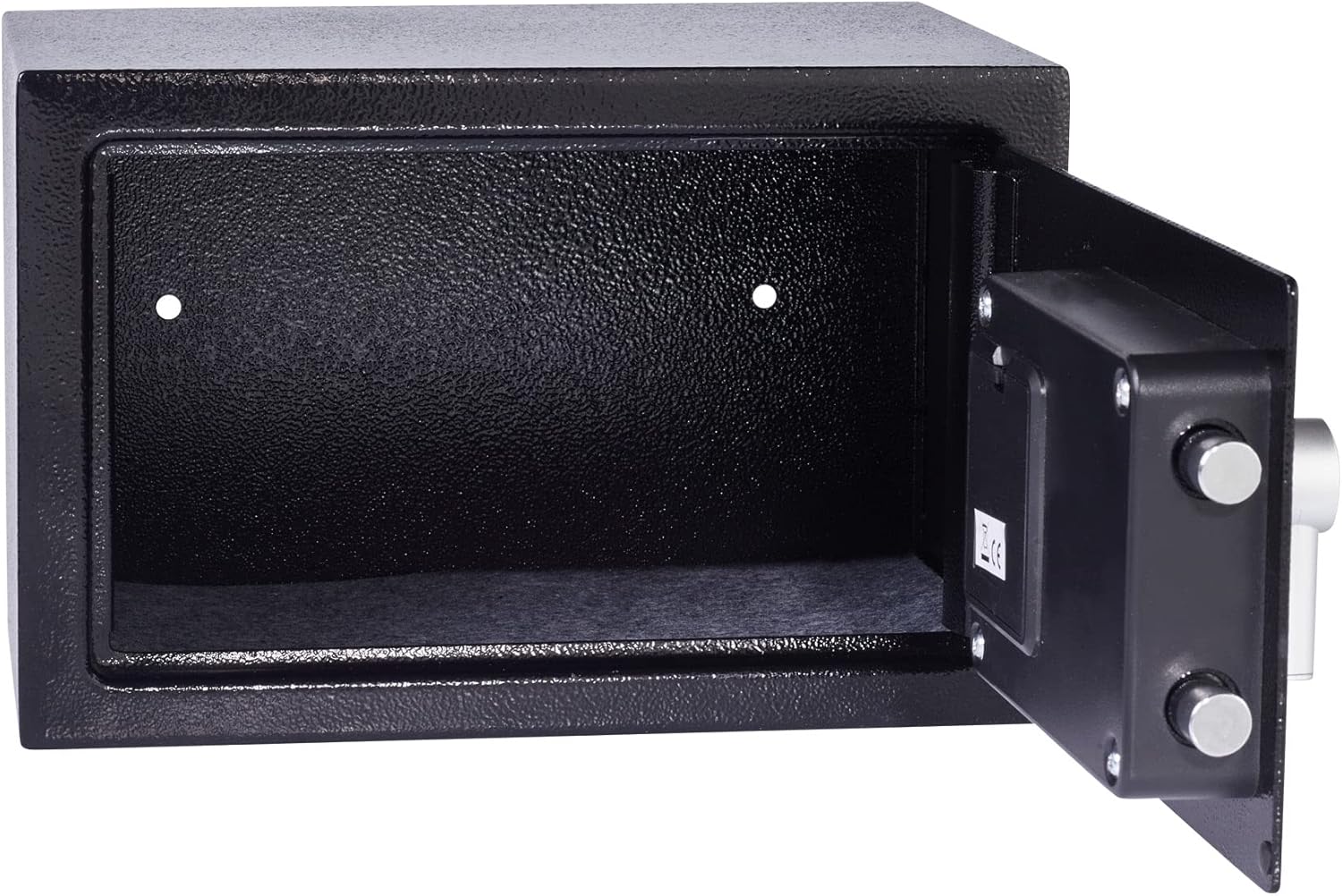
Image: Interior view of the safe, showing the pre-drilled holes for wall or floor mounting.
Operating Instructions
1. Opening the Safe with PIN Code
- Enter your 3 to 8 digit PIN code on the keypad.
- Press the '#' or 'E' button.
- If the code is correct, the green light will illuminate, and you will hear a beep.
- Within 5 seconds, turn the knob clockwise to open the safe door.

Image: A hand interacting with the electronic keypad to enter the access code.
2. Closing and Locking the Safe
- Close the safe door.
- Turn the knob counter-clockwise to engage the locking bolts. The safe is now locked.
3. Emergency Key Access
In case of forgotten PIN code or battery failure, the safe can be opened using the emergency key.
- Remove the cover plate over the keyhole, usually located near the knob.
- Insert the emergency key into the keyhole and turn it clockwise.
- While holding the key turned, turn the knob clockwise to open the safe door.
- Once open, you can replace batteries or reset the PIN code.
Maintenance
1. Battery Replacement
When the batteries are low, the keypad indicator light may flash red or the safe may emit a warning sound. Replace all 4 AA batteries promptly to ensure continuous operation.
- Open the safe using your PIN or the emergency key.
- Open the battery compartment on the inside of the door.
- Remove old batteries and insert new 4 AA batteries, observing correct polarity.
- Close the battery compartment.
Note: Replacing batteries does not erase your programmed PIN code.
2. General Care
- Clean the exterior of the safe with a soft, damp cloth. Avoid abrasive cleaners.
- Do not lubricate the electronic keypad or internal locking mechanism.
- Keep emergency keys in a secure location away from the safe.
Troubleshooting
| Problem | Possible Cause | Solution |
|---|---|---|
| Safe does not open with PIN. | Incorrect PIN entered. | Re-enter the correct PIN code carefully. |
| Safe does not open with PIN. | Batteries are low or dead. | Use the emergency key to open the safe and replace all 4 AA batteries. |
| Keypad is unresponsive or locked. | Multiple incorrect PIN attempts (lockout mode). | Wait for the lockout period to expire (20 seconds after 3 incorrect attempts, 5 minutes after 6 incorrect attempts). Alternatively, use the emergency key. |
| Cannot set a new PIN code. | Reset button not pressed correctly or code not confirmed. | Ensure the red reset button is pressed firmly and the new code is confirmed with '#' or 'E'. |
Specifications
| Feature | Detail |
|---|---|
| Model Number | YSV/200/DB2 |
| Dimensions (External) | 33 x 23 x 22 cm (L x W x H) |
| Dimensions (Internal) | Approximately 30.7 x 19.7 x 20 cm (L x W x H) |
| Capacity | 8.6 Litres |
| Weight | 3.6 Kilograms |
| Lock Type | Electronic Combination Lock with Emergency Key |
| PIN Code Length | 3 to 8 digits |
| Power Source | 4 AA Batteries (included) |
| Material | Steel |
| Mounting Type | Wall or Floor Mount (fixing bolts included) |
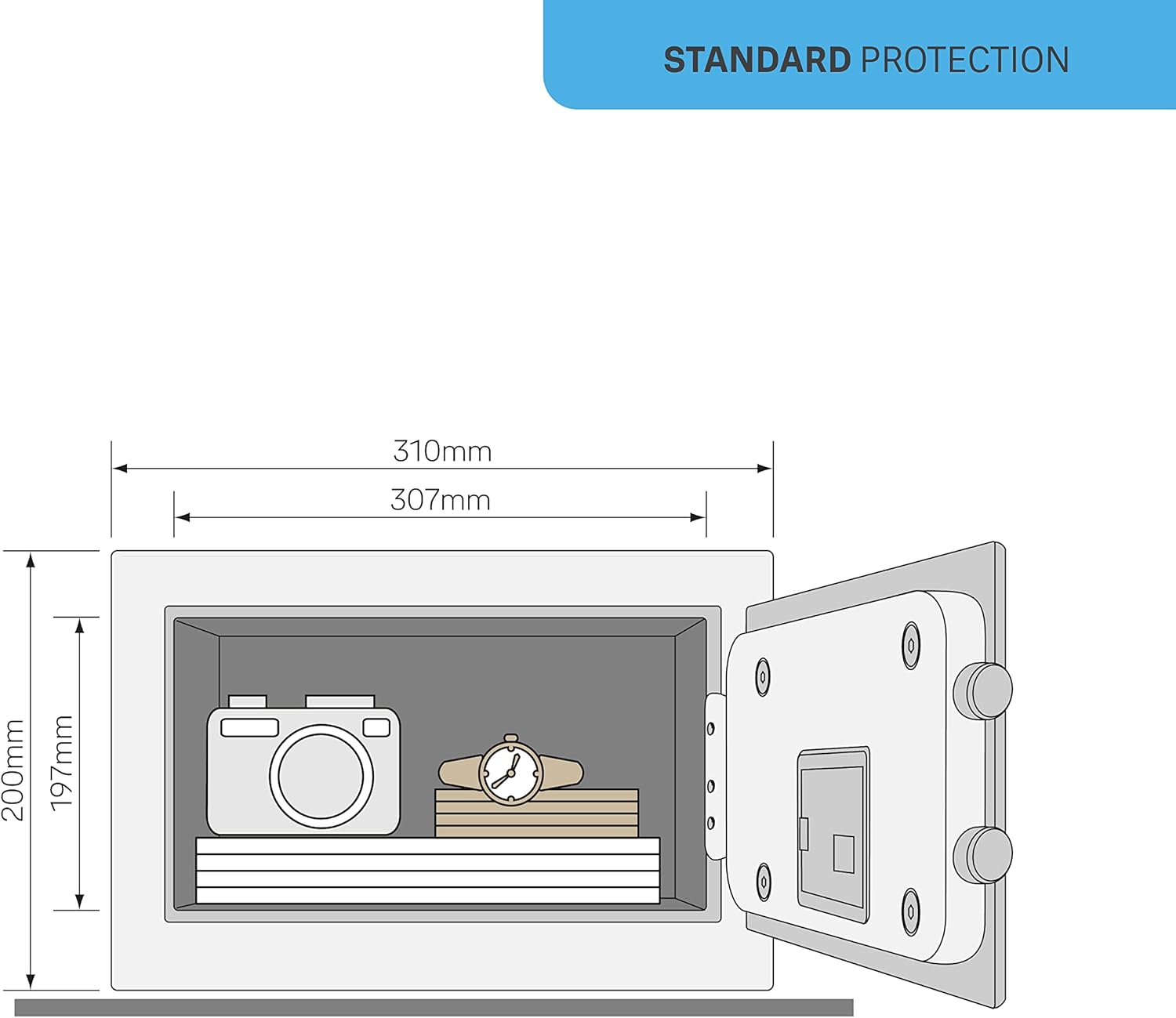
Image: Technical diagram illustrating the dimensions of the safe, including internal capacity.
Warranty and Support
This Yale Electronic Safe YSV/200/DB2 comes with a 1-year availability for spare parts. For further assistance, technical support, or warranty claims, please refer to the official Yale Home website or contact their customer service.
For more information, visit the official Yale Home website: Yale Home Privacy and Legal Center

Image: QR code for quick access to Yale Home's online resources.


