
Introduction
This manual provides instructions for the proper use and maintenance of your Alecto AK-20 Alarm Clock with Thermometer. Please read these instructions carefully before operating the device and retain them for future reference. The AK-20 is designed to display time, date, day, and indoor temperature, featuring multiple alarms, a snooze function, and radio-controlled time synchronization.
Safety Information
- Do not expose the device to extreme temperatures, direct sunlight, or high humidity.
- Avoid dropping the device or subjecting it to strong impacts.
- Do not attempt to disassemble or repair the unit yourself. Refer all servicing to qualified personnel.
- Dispose of used batteries responsibly according to local regulations.
Package Contents
Ensure all items are present and in good condition upon unpacking:
- Alecto AK-20 Alarm Clock
- User Manual (NL/EN/DE/FR)
Product Overview
The Alecto AK-20 features a clear digital display and intuitive controls for easy operation.

Figure 1: Front view of the Alecto AK-20 Alarm Clock, showing the large digital display with time, date, day, and temperature, along with control buttons at the bottom.

Figure 2: Angled view of the Alecto AK-20, highlighting the main display and the alarm ON/OFF switches on the right side.
Controls and Display Elements:
- Large Digital Display: Shows time (AM/PM indicator), date, day of the week, and indoor temperature.
- TIME SET Button: Used to enter time setting mode.
- - / + Buttons: Used to adjust values (decrease/increase).
- ALARM SET Button: Used to enter alarm setting mode.
- ALARM 1-4 ON/OFF Switches: Located on the side for individual alarm activation.
- SNOOZE / LIGHT Button: Located on top, activates backlight and snooze function.
- AUTO LIGHT Switch: Located on the back, controls automatic backlight.
- RESET Button: Located on the back, for factory reset.

Figure 3: Right side view of the alarm clock, showing the physical ON/OFF switches for Alarm 3 and Alarm 4.

Figure 4: Back view of the alarm clock, showing the battery compartment, RESET button, and AUTO LIGHT switch.
Setup
1. Battery Installation
- Locate the battery compartment on the back of the alarm clock (refer to Figure 4).
- Open the battery compartment cover.
- Insert two AA batteries, ensuring correct polarity (+ and -).
- Close the battery compartment cover securely.
The display will light up, and the clock will begin searching for the DCF radio signal for automatic time synchronization.
2. Initial Time and Date Synchronization (DCF)
The AK-20 is a radio-controlled clock. Upon battery installation, it will automatically attempt to synchronize with the DCF signal. This process may take several minutes. A signal icon on the display indicates successful reception.
- Place the clock near a window for better signal reception.
- Avoid placing it near electronic devices that may cause interference.
3. Manual Time and Date Setting (Optional)
If DCF synchronization is not desired or unsuccessful, you can set the time and date manually:
- Press and hold the TIME SET button until the hour digits start flashing.
- Use the - or + buttons to adjust the hour.
- Press TIME SET again to confirm the hour and move to minutes.
- Repeat the process for minutes, year, month, and day.
- Press TIME SET one last time to exit the setting mode.
4. Language Selection
The device supports multiple languages for day display. To change the language:
- While in normal time display mode, press the - button repeatedly.
- The day of the week will cycle through available languages (Dutch, French, German, English, Spanish, Italian, Danish, Russian).
- Stop when your desired language is displayed.
Operating Instructions
1. Setting Alarms
The AK-20 allows setting up to four independent alarms.
- Press and hold the ALARM SET button until the alarm time (e.g., ALARM-1) starts flashing.
- Use the - or + buttons to adjust the desired alarm hour.
- Press ALARM SET again to confirm the hour and move to minutes.
- Use the - or + buttons to adjust the desired alarm minutes.
- Press ALARM SET to confirm and move to the next alarm (ALARM-2, ALARM-3, ALARM-4).
- Repeat steps 2-4 for each alarm you wish to set.
- After setting all desired alarms, press ALARM SET to exit the alarm setting mode.
2. Activating/Deactivating Alarms
Each alarm has a dedicated ON/OFF switch on the side of the unit (refer to Figure 3).
- Slide the corresponding switch to ON to activate an alarm. An alarm icon will appear on the display.
- Slide the switch to OFF to deactivate an alarm. The alarm icon will disappear.
3. Snooze Function
When an alarm sounds, press the SNOOZE / LIGHT button on top of the clock. The alarm will temporarily stop and sound again after a few minutes (typically 5-10 minutes, depending on the model's default setting).
4. Backlight Function
The display features a backlight for visibility in low-light conditions.
- Manual Backlight: Briefly press the SNOOZE / LIGHT button to activate the backlight for a few seconds.
- Automatic Backlight: On the back of the unit, slide the AUTO LIGHT switch to ON. The backlight will automatically illuminate in dark environments. Slide to OFF to disable this feature.
5. Temperature Display
The integrated thermometer displays the indoor temperature.
- To switch between Celsius (°C) and Fahrenheit (°F), press the + button while in normal time display mode.
Maintenance
- Clean the device with a soft, dry cloth. Do not use abrasive cleaners or solvents.
- If the device will not be used for an extended period, remove the batteries to prevent leakage.
Troubleshooting
| Problem | Possible Cause | Solution |
|---|---|---|
| Display is blank or dim. | Batteries are low or incorrectly inserted. | Replace batteries with new AA batteries, ensuring correct polarity. |
| Time is incorrect. | DCF signal not received or manual time not set. | Ensure the clock is in an area with good signal reception. Manually set the time if necessary. |
| Alarm does not sound. | Alarm is not activated or set incorrectly. | Check the alarm ON/OFF switch on the side. Verify alarm time settings. |
| Backlight not working. | AUTO LIGHT switch is OFF or batteries are low. | Check the AUTO LIGHT switch on the back. Replace batteries if needed. |
If the problem persists after attempting these solutions, please contact customer support.
Specifications
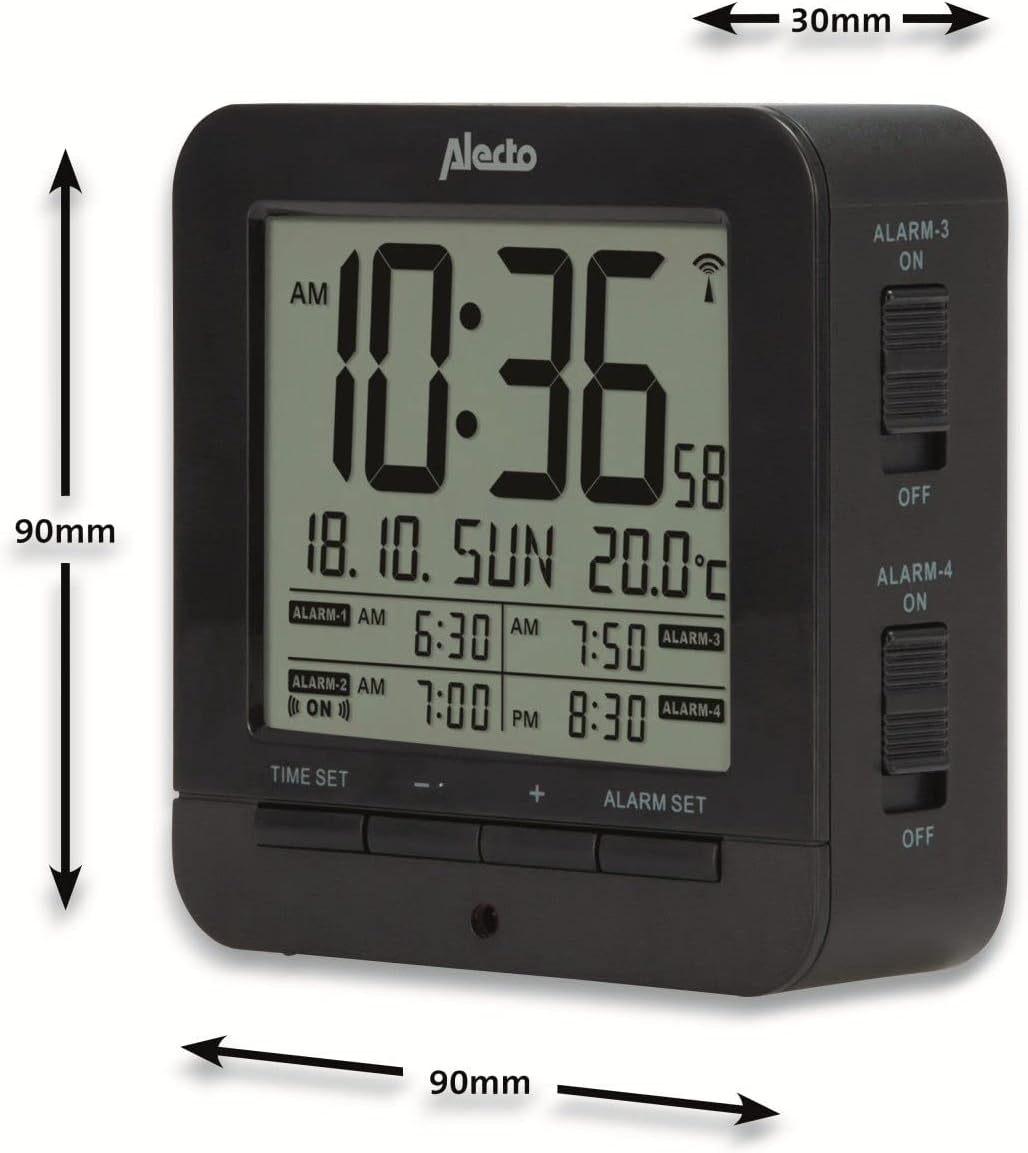
Figure 5: Alecto AK-20 Alarm Clock showing its approximate dimensions: 90mm height, 90mm width, and 30mm depth.
| Feature | Detail |
|---|---|
| Model Number | AK-20 (A003319) |
| Brand | Alecto |
| Color | Black |
| Material | Acrylonitrile Butadiene Styrene (ABS) |
| Dimensions (H x W x D) | 9 x 9 x 3 cm (approx. 3.54 x 3.54 x 1.18 inches) |
| Screen Dimensions | 6.4 x 5.4 cm (approx. 2.52 x 2.13 inches) |
| Weight | 231 g (approx. 0.51 lbs) |
| Power Source | 2 x AA Batteries (not included) |
| Display Type | Digital |
| Special Features | Temperature Display, 4 Alarms, Snooze Function, Backlight, DCF Radio Control |
| Temperature Units | °C / °F selectable |
| Supported Languages | Dutch, French, German, English, Spanish, Italian, Danish, Russian |
Warranty and Support
Alecto products are manufactured to high quality standards. For information regarding warranty terms and conditions, please refer to the documentation provided with your purchase or visit the official Alecto website. For technical support or service inquiries, please contact your retailer or the Alecto customer service department.


