
Aramox Aramoxf30w8vu1h56329-11
Contents
Aramox SBC Repair Tool User Manual
For Mercedes-Benz W211 E-Class and R230 SL-Class Vehicles
1. Introduction
This manual provides essential instructions for the safe and effective use of the Aramox SBC Repair Tool. This device is specifically designed for Mercedes-Benz W211 E-Class and R230 SL-Class vehicles equipped with the Sensotronic Brake Control (SBC) system. It facilitates the deactivation and activation of the SBC system, which is crucial for performing brake maintenance and addressing specific fault codes like C249F.
2. Safety Information
Always observe the following safety precautions when using this tool:
- Read and understand all instructions before operation.
- Ensure the vehicle's ignition is off and the parking brake is engaged before connecting or disconnecting the tool.
- Wear appropriate personal protective equipment, such as safety glasses and gloves.
- Do not attempt to perform brake maintenance without first deactivating the SBC system. The system operates at high pressure (140 bar) and can cause serious injury.
- Keep the tool dry and clean. Avoid exposure to moisture or extreme temperatures.
- This tool is intended for professional use or by individuals with adequate automotive repair knowledge.
3. Package Contents
Verify that all items are present in your package:
- 1 x Aramox ABS SBC Repair Tool
- 1 x OBD2 Harness
- 1 x CD (containing software/drivers, if applicable)
4. Product Overview
The Aramox SBC Repair Tool is a compact diagnostic device designed for specific Mercedes-Benz models. It features a main unit with control buttons and an OBD2 harness for vehicle connection.
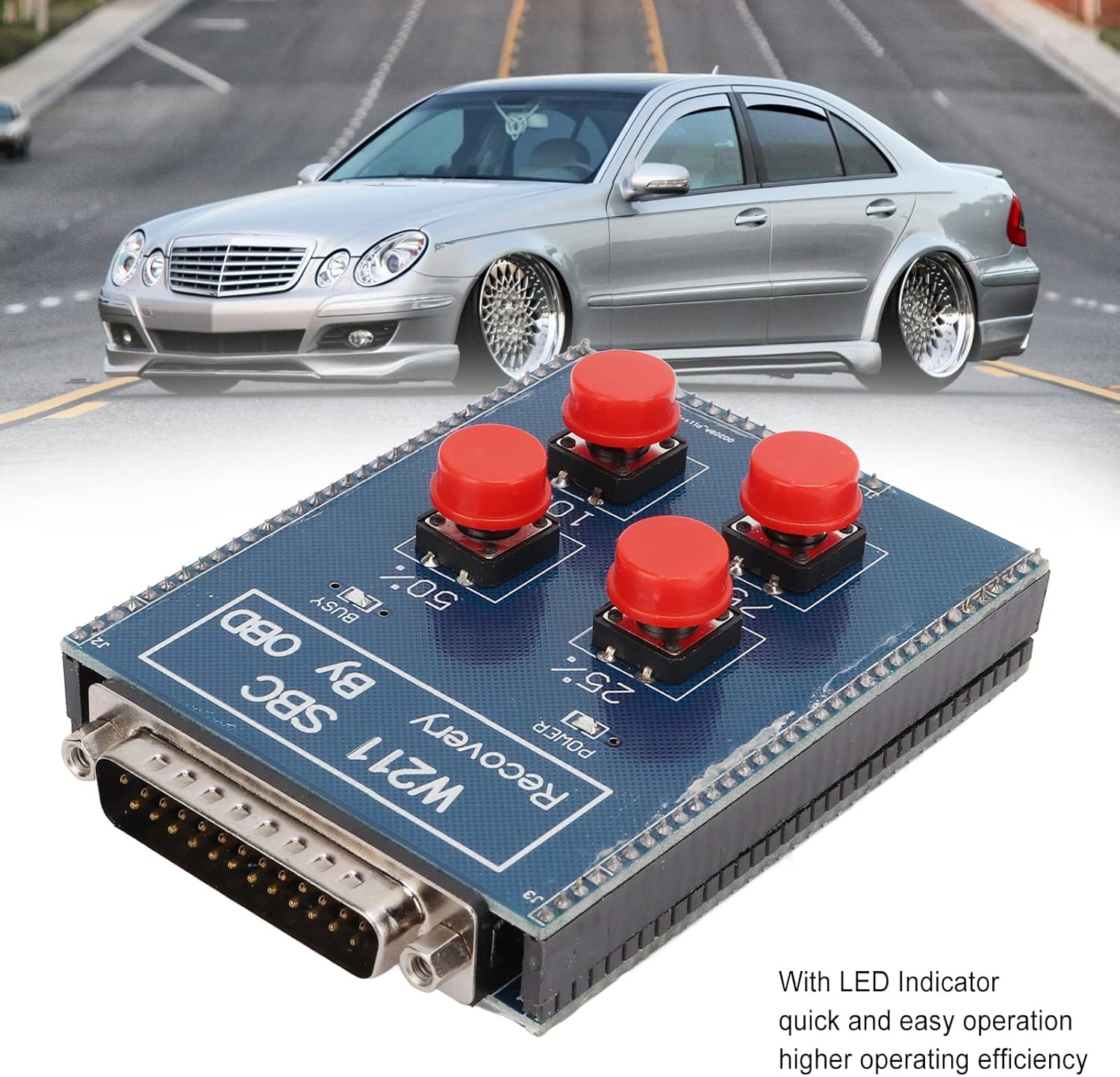
Figure 4.1: Aramox SBC Repair Tool main unit. This image shows the blue circuit board with four red buttons and a multi-pin connector, positioned in front of a silver Mercedes-Benz E-Class vehicle on a road.
The tool includes LED indicator lights for quick and easy operation, enhancing efficiency during use. The main unit connects to the vehicle's OBD2 port via the provided harness.

Figure 4.2: Detail of the multi-pin connector on the SBC Repair Tool. This image provides a close-up view of the silver multi-pin connector, which is used to interface with the OBD2 harness.
5. Setup
Follow these steps to prepare the SBC Repair Tool for use:
- Ensure the vehicle's ignition is turned off.
- Locate the vehicle's OBD2 diagnostic port, typically found under the dashboard on the driver's side.
- Connect one end of the provided OBD2 harness to the vehicle's OBD2 port.
- Connect the other end of the OBD2 harness to the multi-pin connector on the Aramox SBC Repair Tool. Ensure a secure connection.
- The tool should power on, indicated by an LED light.

Figure 5.1: OBD2 harness connector. This image shows the standard black OBD2 connector, which plugs into the vehicle's diagnostic port.
6. Operating Instructions
The primary function of this tool is to safely deactivate and activate the SBC system for maintenance procedures.
6.1. Deactivating the SBC System
Before performing any maintenance work on the brakes (e.g., replacing brake pads, brake discs, or hydraulic fluid), it is absolutely necessary to deactivate the SBC system. Failure to do so can result in serious injury due to the high operating pressure of the system.
- Ensure the tool is correctly connected to the vehicle's OBD2 port and powered on.
- Follow the specific button sequence or instructions provided on the tool's interface (refer to the CD for detailed software instructions if applicable) to initiate SBC system deactivation. The LED indicator will confirm the status.
- Once deactivated, the SBC system's pressure will be released, making it safe to proceed with brake maintenance.
6.2. Activating the SBC System
After completing brake maintenance, the SBC system must be reactivated.
- Ensure all brake components are correctly installed and secured.
- With the tool still connected, follow the specific button sequence or instructions to activate the SBC system.
- The system will be activated, and its pressure will be restored. The tool will automatically delete any temporary memory related to the repair process.
- Verify proper brake function before driving the vehicle.
7. Maintenance
To ensure the longevity and proper function of your Aramox SBC Repair Tool:
- Cleaning: Wipe the tool with a soft, dry cloth. Do not use abrasive cleaners or solvents.
- Storage: Store the tool in a cool, dry place, away from direct sunlight and extreme temperatures. Keep it in its original packaging or a protective case to prevent damage.
- Cable Care: Avoid bending or crimping the OBD2 harness excessively. Inspect cables for damage before each use.
8. Troubleshooting
This section addresses common issues you might encounter.
8.1. Tool Does Not Power On
- Check Connection: Ensure the OBD2 harness is securely connected to both the vehicle's port and the tool.
- Vehicle Power: Confirm the vehicle's battery has sufficient charge.
- OBD2 Port: Verify the vehicle's OBD2 port is functional (e.g., by testing with another diagnostic tool if available).
8.2. SBC System Deactivation Fails
- Correct Model: Ensure your vehicle is a Mercedes-Benz W211 E-Class or R230 SL-Class with an SBC system.
- Follow Instructions: Double-check that the operating instructions and button sequences are followed precisely.
- Tool Functionality: If the tool's LED indicators do not respond as expected, the tool itself may be faulty.
8.3. Error Code C249F
Code C249F indicates that the operating time of component A7/3 (SBC hydraulic unit) has been exceeded. This is an internal fault of the control unit.
- The Aramox SBC Repair Tool is designed to address this specific issue by resetting the SBC control module's internal counter, potentially avoiding the need to replace the entire SBC hydraulic unit.
- Follow the tool's operating instructions for C249F code repair. The tool will activate the SBC system and restore its pressure, automatically deleting the memory after the repair is complete.
9. Specifications
| Feature | Specification |
|---|---|
| Brand | Aramox |
| Model Number | Aramoxf30w8vu1h56329-11 |
| Item Weight | 9.3 ounces |
| Package Dimensions | 6.3 x 4.92 x 1.77 inches |
| Material | ABS, Metal |
| Supported SBC Units (BOSCH NR) | 0 265 960 012, 0 265 960 013, 0 265 960 015, 0 265 960 018, 0 265 960 019, 0 265 960 020, 0 265 960 023, 0 265 960 025, 0 265 960 028 |
10. Warranty and Support
Aramox is committed to providing quality products and ensuring customer satisfaction. While specific warranty details are not provided in this manual, please retain your proof of purchase for any warranty claims.
For technical assistance, troubleshooting beyond this manual, or inquiries regarding your product, please contact Aramox customer support through the retailer where the product was purchased or visit the official Aramox store online. We are dedicated to providing effective communication and support to our customers.
Documents and downloads
Ask a question about this manual
Ask about setup, troubleshooting, compatibility, parts, safety, or missing instructions. Manuals+ will review the question and use this page’s manual context to help answer it.