
1. Introduction
This manual provides detailed instructions for the installation, operation, and maintenance of your ATOTO P8 Wireless Portable Android Auto Carplay Screen (Model P807SD-RC). Please read this manual thoroughly before using the device to ensure proper function and safety.

Image: The ATOTO P8 portable car screen, showing the main unit, a backup camera, and a wireless remote control.
The ATOTO P8 is designed to integrate wireless CarPlay and Android Auto functionalities into your vehicle without requiring a complex head unit replacement. It features a 7-inch QLED glare-suppressing screen, a 1080P WDR backup camera, and a wireless remote control for enhanced safety and convenience.

Image: An overview of the ATOTO P8's key features, including wireless CarPlay, wireless Android Auto, QLED display, anti-glare screen, Bluetooth audio out, AUX out, FM out, rear camera input, Siri/Google Assistant, auto-dimmer, AC-RCR01W rear camera, parking monitor, waterproof backup camera, 150-degree wide viewing angle, anti-glare camera, G-sensor, night vision, steering remote control, and 12V/24V support.
This device is compatible with most vehicles supporting 12V/24V power supply, including cars, trucks, vans, caravans, trailers, and campers.

Image: Illustration showing the ATOTO P8 is compatible with various vehicle types such as trucks, campers, cars, vans, caravans, and trailers, indicating its 12V/24V power supply compatibility.
2. Package Contents
Verify that all items are present in the package:
- P8 On-Dash Navigator (Main Unit)
- AC-44F6 Steering Remote Control
- Power Cable
- Sticky Pad
- AUX Cable
- AC-RCR01W Rear Recording Camera (if included in your model)
- Rear Camera Extension Cable (8m/26ft) (if included)
- USB-C Camera Plug (if included)
- AC-AIWF2 Wi-Fi USB Adapter (if included)
- USB-A to USB-C Adapter (if included)
- Holder Adapter
- 3.5mm Microphone
- User Manual
- Quick Start Guide

Image: A visual representation of all components included in the ATOTO P8 package, such as the P8 On-Dash Navigator, sticking holder, power cable, sticky pad, holder adapter, AUX cable, 3.5mm microphone, USB-C camera plug, AC-RCR01W rear camera, rear camera extension cable, AC-AIWF2 Wi-Fi USB adapter, USB-A to USB-C adapter, AC-44F6 SWC, manual, and quick start guide.
3. Setup
3.1 Device Overview

Image: A diagram illustrating the various components and ports of the ATOTO P8 unit, including the SD card slot, USB ports, reset button, power input, and speaker.
3.2 Mounting the P8 Unit
- Attach the holder adapter to the back of the P8 unit.
- Secure the sticking holder (suction cup or adhesive base) to your windshield or dashboard. Ensure the surface is clean and dry for optimal adhesion.
- Mount the P8 unit onto the sticking holder. Adjust the viewing angle for optimal visibility without obstructing your view of the road.

Image: A four-step visual guide demonstrating the setup process for the ATOTO P8, including mounting the device, plugging into the cigarette lighter, outputting audio to the head unit, and connecting to P8's Bluetooth and Wi-Fi.
3.3 Power Connection
Connect the provided power cable to the P8 unit and plug the other end into your vehicle's cigarette lighter socket. The innovative cigarette lighter design requires only one cable for power and AUX function.

Image: A close-up of the ATOTO P8's cigarette lighter adapter, highlighting its integrated AUX output, multimedia playback/wired Android Auto capability, and QC 3.0 quick charge port.
3.4 Rear Camera Installation (Optional)
If your model includes the AC-RCR01W Rear Recording Camera, follow these steps:
- Mount the rear camera at the back of your vehicle, ensuring a clear view.
- Route the camera cable to the P8 unit. Connect the camera cable to the designated input on the P8.
- Ensure the camera is securely installed and the cable is properly managed to avoid interference.
4. Operation
4.1 Initial Connection (Wireless CarPlay/Android Auto)
- Power on the P8 unit.
- On your smartphone, enable Bluetooth and Wi-Fi.
- Search for the P8's Bluetooth signal on your phone and pair with it.
- Once paired, your phone should automatically connect to the P8's Wi-Fi for wireless CarPlay or Android Auto functionality.

Image: The ATOTO P8 screen mounted on a dashboard, displaying the CarPlay interface with navigation, music, and phone icons, demonstrating its wireless connectivity.
4.2 Core Functions (CarPlay/Android Auto)
Once connected, you can access various features:
- Navigation: Use your preferred navigation apps (e.g., Google Maps, Apple Maps) for real-time traffic information and turn-by-turn directions.
- Communication: Make and receive calls, send and read messages using voice commands or the touchscreen.
- Media: Play music, podcasts, and audiobooks from your phone's apps.
- Voice Assistant: Activate Siri or Google Assistant for hands-free control.

Image: A series of screenshots from the ATOTO P8 demonstrating CarPlay and Android Auto functionalities, including making calls, playing music, viewing weather alerts, and managing a calendar.
4.3 Audio Output Options
The P8 offers multiple ways to output audio to your car's sound system:
- FM Transmitter: Tune your car's radio to the same FM frequency as the P8 to transmit audio wirelessly.
- AUX Output: Connect the provided AUX cable from the P8 to your car's AUX input for a direct, high-quality audio connection.
- Built-in Speaker: The P8 has a built-in speaker for basic audio output.
- Bluetooth Audio Output: (Requires upgrade or additional accessories) Connect the P8 to your car's Bluetooth system for audio playback.

Image: A visual guide to the four audio output options for the ATOTO P8: Bluetooth Audio Output (upgrade needed), FM Transmitter (stereo type), AUX Audio Output (stereo type), and Built-in Speaker.
4.4 Display Features
- 7-inch QLED Glare-Suppressing Screen: Provides clear visibility even in bright sunlight.
- Auto-Dimmer: The built-in light sensor automatically adjusts screen brightness based on ambient light conditions, enhancing safety and comfort.
- Capacitive Touchscreen: Offers responsive and intuitive control.

Image: Three scenarios demonstrating the ATOTO P8's auto-dimming feature, showing how the screen brightness adjusts automatically in bright daylight, overcast conditions, and at night.

Image: A comparison showing the ATOTO P8's anti-glare and wide viewing angle capabilities versus a generic screen, highlighting the P8's superior visibility from various angles.
4.5 Wireless Remote Control (AC-44F6)
The included AC-44F6 wireless remote provides convenient access to P8 functions, allowing you to control media playback, answer calls, activate voice assistant, and adjust volume without touching the screen.
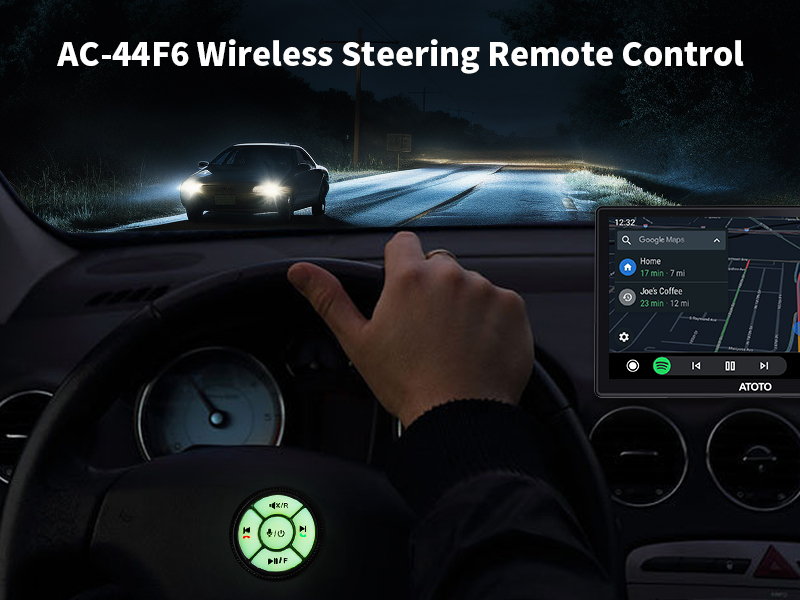
Image: A driver using the AC-44F6 wireless steering remote control to operate the ATOTO P8 screen at night, demonstrating hands-free control for safer driving.
4.6 Rear Camera Functions
The 1080P WDR Rear Recording Camera (AC-RCR01W) offers several safety features:
- Wide Dynamic Range (WDR): Provides clear vision even when blinded by high beams.
- G-Sensor: Automatically detects unusual gravity changes (e.g., collisions) and saves video footage as backup.
- Night Vision: Offers clear visibility in low-light conditions.
- Auto Start & Loop Recording: Seamlessly overwrites old footage when storage is full.
- Parking Monitor: Detects bumps and automatically starts recording when your car is parked (requires ATOTO AC-P8AC12 Fast Boot Connector, sold separately).
- IP67 Waterproof: Ensures protection against heavy rains and water exposure.

Image: An infographic detailing the ATOTO P8's backup camera features, including Parking Monitor, Anti-Glare, Night Vision, WDR, CMOS Image Sensor, Incident Detection (Gravity Sensor), Outage-Proof, Auto Start, Loop Recording, HD 1080P, 150-degree Wide Viewing Angle, Support 128G (Max.), IP67 Waterproof, and Real-time Recording.

Image: Illustrations showing the ATOTO P8's auto loop recording feature, where old footage is seamlessly overwritten, and its real-time rear view capability with parking guidelines and for lane changes.
4.7 Wireless Screen Mirroring (AutoLink)
The P8 supports Wireless Screen Mirroring (AutoLink), allowing you to project your phone's display onto the 7-inch screen. This feature may require an upgrade or additional accessories.

Image: A smartphone wirelessly mirroring its display onto the ATOTO P8 screen, showcasing the AutoLink feature for projecting phone content.
5. Maintenance
- Cleaning: Use a soft, dry cloth to clean the screen and device exterior. Avoid abrasive cleaners or solvents.
- Software Updates: The P8 supports Over-The-Air (OTA) updates. Regularly check for and install updates to ensure optimal performance and access to new features.

Image: The ATOTO P8 screen showing an OTA (Over-The-Air) update interface, with a smartphone displaying a QR code for accessing update information.
6. Troubleshooting
- No Power: Ensure the power cable is securely connected to both the P8 and the vehicle's cigarette lighter socket. Check the vehicle's fuse for the cigarette lighter.
- No CarPlay/Android Auto Connection: Verify Bluetooth and Wi-Fi are enabled on your phone and the P8. Ensure your phone is paired with the P8. Restart both the P8 and your phone.
- Poor Audio Quality (AUX): Ensure the AUX cable is fully inserted into both the P8 and your car's AUX input. Check for damage to the cable.
- Poor Audio Quality (FM): Adjust the FM frequency on the P8 and your car radio to find a clear, unused channel. Avoid areas with strong radio interference.
- Screen Glare: The P8 features a glare-suppressing QLED screen. Ensure the screen is clean. Adjust the screen angle if necessary.
- Internal Microphone Issues: If call quality is poor, ensure the microphone on the P8 is not obstructed. Consider using an external microphone if available and supported.
- Device Disconnects During Settings Adjustment: This may be a software-related issue. Ensure your device has the latest firmware updates.
7. Specifications
| Feature | Specification |
|---|---|
| Product Dimensions | 8.66 x 3.94 x 7.87 inches |
| Item Weight | 3.03 pounds |
| Screen Size | 7 Inches |
| Resolution | 1080p |
| Display Type | QLED |
| Connectivity Technology | Bluetooth, USB, Wi-Fi |
| Special Feature | Wireless CarPlay and Android Auto, Auto-Dimmer, Glare-Suppressing Screen |
| Included Components | AC-44F6 Steering Remote Control, AUX Cable, P8 On-Dash Navigator, Power Cable, Sticky Pad |
| Audio Output Mode | AUX, Stereo, FM Transmitter, Built-in Speaker |
| Mounting Type | Dashboard Mount |
| Vehicle Service Type | Car, Truck (12V/24V compatible) |
8. Warranty and Support
8.1 Warranty Information
The ATOTO P8 comes with a 12-month warranty by default. You may be eligible for an extra 180 days of warranty by contacting ATOTO customer support.

Image: An illustration showing two shields with '365' and '180' indicating 18 months of product care (365 days + 180 days extended warranty).
8.2 Customer Support
For technical assistance, troubleshooting, or warranty claims, please contact ATOTO customer support. You can reach them at support [at] myatoto. Responsive and responsible support is available.

Image: A customer support representative wearing a headset and smiling, indicating available expert assistance.
8.3 Additional Resources
Scan the QR code below for access to additional manuals and resources.

Image: A smartphone scanning a QR code on a manual, representing access to useful tools and resources.