
1. Introduction
Thank you for choosing the SANSUI ES-22F1 22-inch Full HD 75Hz Computer Monitor. This monitor is designed to provide a superior visual experience for home, office, and gaming use. Featuring an IPS panel, 1920x1080 resolution, and a 75Hz refresh rate, it delivers crisp, clear images and smooth performance. This manual will guide you through the setup, operation, and maintenance of your new monitor.

Figure 1.1: SANSUI 22-inch FHD 75Hz Computer Monitor (ES-22F1)
2. What's in the Box
Please check the contents of your package to ensure all items are present:
- 22-inch Monitor (x1)
- Stand (x1)
- Power Adaptor (x1)
- HDMI Cable (1.5m) (x1)
- User Manual (x1)
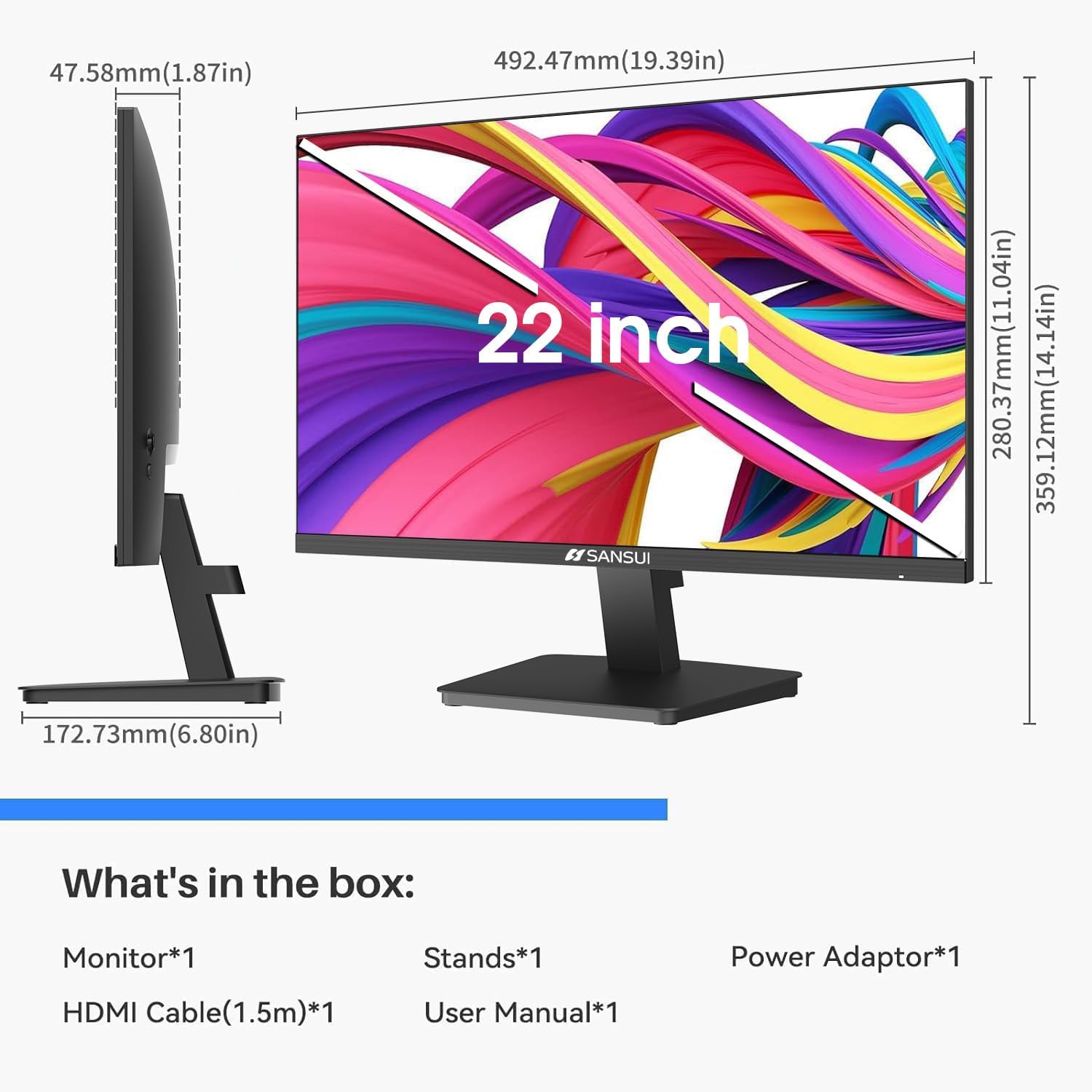
Figure 2.1: All components included in the monitor packaging.
3. Setup
3.1 Assembling the Stand
- Insert the stand neck into the base.
- Attach the assembled stand to the back of the monitor by aligning the tabs and pushing firmly until it clicks into place. No tools are required for this step.

Figure 3.1: Visual guide for quick and easy stand assembly.
3.2 VESA Mounting (Optional)
The monitor supports VESA 75x75mm mounting for wall mounts or monitor arms (bracket not included). Ensure the stand is removed before attaching a VESA mount.

Figure 3.2: Rear view of the monitor showing VESA mounting points.
3.3 Connecting to a Device
Connect the monitor to your computer, laptop, game console, or TV box using the provided HDMI cable or a VGA cable (not included). Plug the power adapter into the monitor's DC IN port and then into a power outlet.

Figure 3.3: Monitor ports for HDMI and VGA connections.
Video 3.1: An overview of the SANSUI 22 Inch FHD Monitor (ES-22F1), highlighting its features and connectivity.
4. Operating the Monitor
4.1 Power On/Off
Press the power button located on the bottom right of the monitor to turn it on or off. The power indicator light will illuminate when the monitor is active.
4.2 On-Screen Display (OSD) Menu
The OSD menu allows you to adjust various display settings. Use the buttons on the bottom right of the monitor to navigate the menu:
- M: Menu / Enter
- ▼ / ▲: Navigate Down / Up
- E: Exit
Video 4.1: A detailed review of the SANSUI 22-inch monitor, including a demonstration of its OSD menu and features.
4.3 Display Settings
Adjust settings such as Brightness, Contrast, Color Temperature, and Low Blue Light mode for optimal viewing comfort.
- Brightness & Contrast: Adjust the overall luminance and contrast ratio of the display.
- Color Temperature: Select from preset modes (e.g., Warm, Cool, User) or manually adjust Red, Green, and Blue values.
- Low Blue Light: Reduce blue light emission to minimize eye strain, especially during prolonged use.

Figure 4.1: Features designed to care for your eyes, including Anti-Bluelight, Anti-Glare, and Anti-Flicker technologies.
Video 4.2: A comprehensive video showcasing the SANSUI ES-22F1 22-inch Monitor, including its 75Hz refresh rate and connectivity options.
5. Maintenance
5.1 Cleaning the Monitor
To clean the monitor screen, gently wipe it with a soft, lint-free cloth. For stubborn marks, dampen the cloth with a small amount of screen cleaner. Avoid using abrasive cleaners or spraying liquid directly onto the screen.
5.2 General Care
Keep the monitor away from direct sunlight, excessive heat, and moisture. Ensure proper ventilation around the monitor to prevent overheating. Avoid placing heavy objects on the monitor or its cables.
6. Troubleshooting
6.1 No Image on Screen
- Ensure the power cable is securely connected to the monitor and a power outlet.
- Verify that the video cable (HDMI/VGA) is firmly connected to both the monitor and your device.
- Check if the correct input source is selected in the OSD menu.
- Confirm your device is powered on and outputting a video signal.
6.2 Image is Blurry or Distorted
- Adjust the resolution settings on your computer to match the monitor's native resolution (1920x1080).
- For VGA connections, use the 'Auto Adjust' function in the OSD menu.
- Check the video cable for any damage or loose connections.
6.3 No Sound (if applicable)
This monitor does not feature built-in speakers or an audio output port. Audio must be managed directly from your connected device or external speakers.
7. Specifications
| Feature | Specification |
|---|---|
| Screen Size | 22 Inches |
| Panel Type | IPS |
| Resolution | 1920 x 1080 (Full HD) |
| Refresh Rate | 75Hz |
| Brightness | 250 Nits |
| Viewing Angle | 178° (V/H) |
| Aspect Ratio | 16:9 |
| Connectivity | HDMI 1.4, VGA |
| Tilt Adjustment | -5° to 15° |
| VESA Compatibility | 75 x 75mm |
| Product Dimensions | 19.22 x 7.35 x 11.52 inches |
| Item Weight | 8.23 pounds |
8. Warranty and Support
SANSUI offers a 30-day money-back guarantee and free replacement warranty from the order date. Additionally, lifetime technical support is provided for your SANSUI monitor.
For technical assistance or warranty claims, please contact SANSUI customer service through the official channels provided at the time of purchase or visit the SANSUI brand store online.


