
1. Introduction
This user manual provides essential information for the safe and efficient operation of your JIGUUN 1500W Pure Sine Wave Power Inverter. Please read this manual thoroughly before installation and use. Retain this manual for future reference.
2. Product Overview
2.1 Package Contents
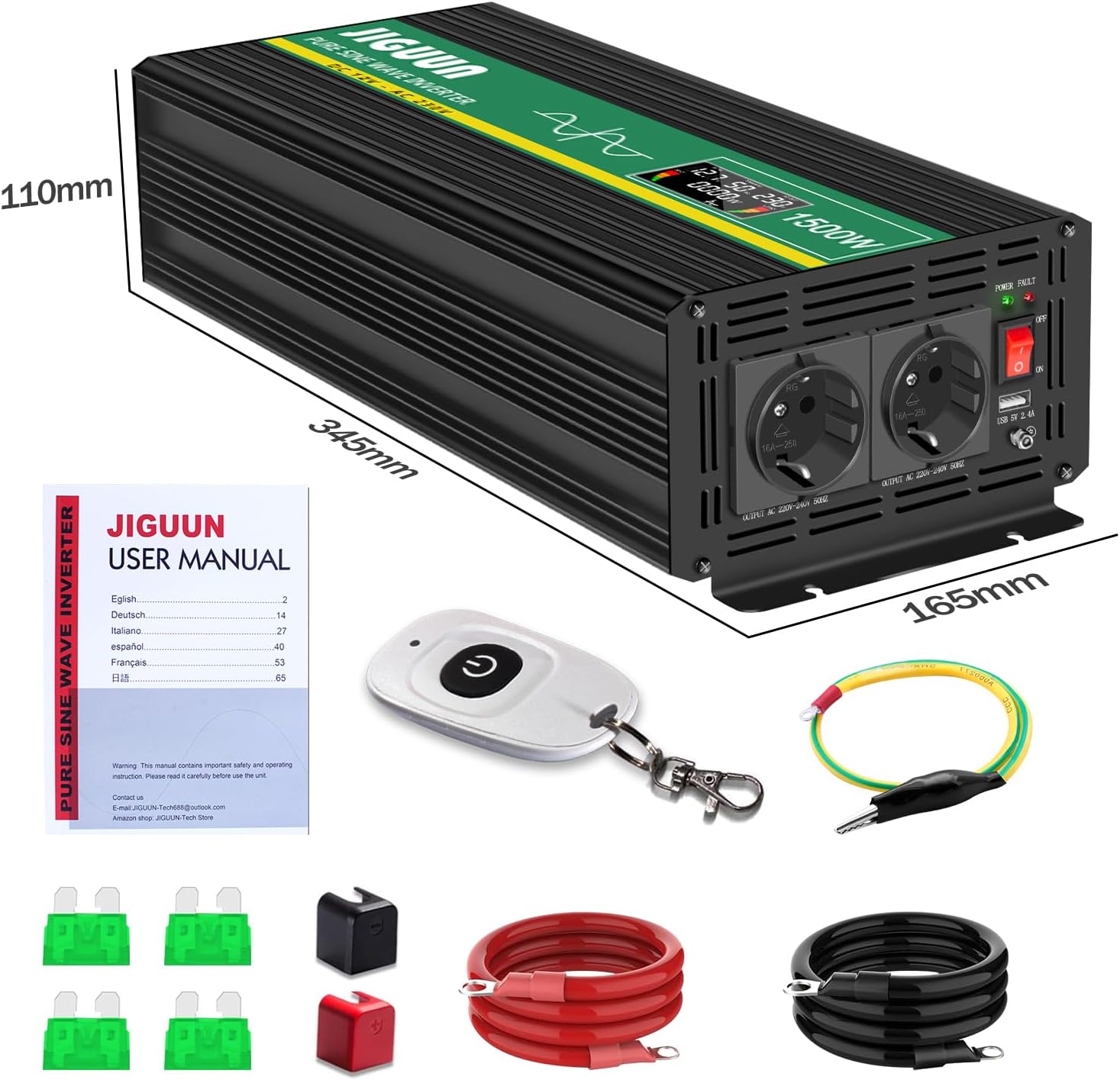
- 1 x JIGUUN 1500W Pure Sine Wave Inverter
- 1 x User Manual
- 1 x Set of Battery Cables (1 Red, 1 Black)
- 1 x Wireless Remote Control
- Additional Fuses
2.2 Key Features
- Pure Sine Wave Output: Provides stable and clean power, suitable for sensitive electronics.
- High Power Output: 1500W continuous power, 3000W peak power.
- Wireless Remote Control: Allows convenient operation from a distance.
- Intelligent LCD Display: Shows real-time input voltage, output voltage, output power, and battery level.
- Comprehensive Protection: Includes overload, overvoltage, undervoltage, short circuit, and overheat protection.
- Efficient Cooling: Integrated silent high-speed fan activates automatically above 45°C.
- Durable Construction: Made from high-quality aluminum alloy for resistance to bending, heat, and corrosion.
2.3 Component Identification
Refer to the diagram below for identification of the inverter's components.
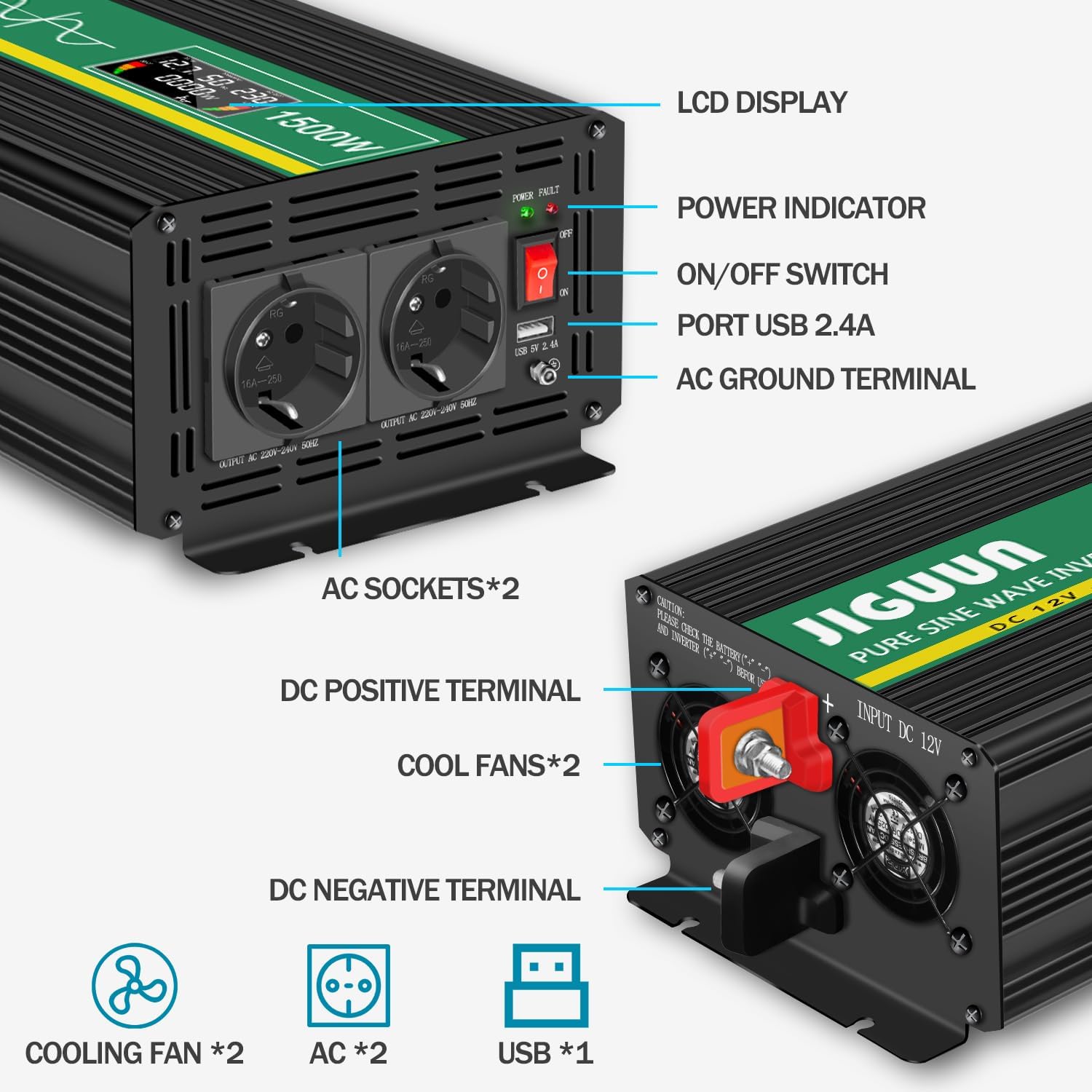
- LCD Display: Shows operational status and values.
- Power Indicator: Illuminates when the inverter is active.
- ON/OFF Switch: Controls the inverter's power.
- USB 2.4A Port: For charging USB-powered devices.
- AC Ground Terminal: For safety grounding.
- AC Sockets (x2): For connecting 220V/230V AC appliances.
- DC Positive Terminal: Connects to the positive (+) terminal of the 12V battery.
- DC Negative Terminal: Connects to the negative (-) terminal of the 12V battery.
- Cooling Fans (x2): Dissipate heat during operation.
3. Safety Instructions
Observe the following safety precautions to prevent injury and damage to the inverter or connected devices:
- Ensure the inverter is connected to a 12V DC power source only.
- Do not connect the inverter to an AC power source.
- Always connect the inverter to the battery before connecting any AC loads.
- Ensure proper ventilation around the inverter to prevent overheating.
- Do not expose the inverter to water, rain, or excessive moisture.
- Avoid operating the inverter in environments with flammable fumes or gases.
- Keep children away from the inverter during operation.
- Always disconnect the battery before performing any maintenance or troubleshooting.
- Ensure the total power consumption of connected devices does not exceed 1500W continuously.
- Properly ground the inverter using the AC ground terminal.
4. Setup
4.1 Placement
Place the inverter in a dry, well-ventilated area, away from direct sunlight, heat sources, and moisture. Ensure there is sufficient space around the cooling fans for proper airflow.
4.2 Battery Connection
- Ensure the inverter's ON/OFF switch is in the 'OFF' position.
- Connect the red battery cable to the inverter's DC Positive Terminal (+).
- Connect the other end of the red battery cable to the positive (+) terminal of your 12V battery.
- Connect the black battery cable to the inverter's DC Negative Terminal (-).
- Connect the other end of the black battery cable to the negative (-) terminal of your 12V battery.
- Ensure all connections are tight and secure to prevent loose connections and sparking.
4.3 Grounding
For safety, connect the inverter's AC Ground Terminal to a reliable earth ground. This can be the chassis of a vehicle or a dedicated grounding rod, depending on your application.

5. Operating Instructions
5.1 Powering On/Off
- After ensuring all connections are secure, press the ON/OFF switch on the inverter to the 'ON' position. The LCD display will illuminate, and the power indicator will light up.
- To turn off the inverter, press the ON/OFF switch to the 'OFF' position.
5.2 Using AC Outlets and USB Port
- Plug your 220V/230V AC appliances into the AC sockets on the inverter.
- Connect your USB-powered devices to the USB 2.4A port for charging.
- Ensure the total power draw of all connected devices does not exceed the inverter's continuous power rating of 1500W.

5.3 LCD Display Readings
The intelligent LCD display provides real-time information:
- DC IN: Displays the input DC voltage from the battery.
- Frequency: Shows the output AC frequency (typically 50Hz).
- AC OUT: Displays the output AC voltage (typically 220V/230V).
- LOAD (W): Indicates the current power consumption of connected devices in Watts.
- BAT: Battery level bar graph.
- LOAD: Output load level bar graph.

5.4 Wireless Remote Control
The wireless remote control allows you to turn the inverter ON or OFF from a distance, which is useful when the inverter is installed in an inaccessible location.

6. Maintenance
6.1 Cleaning
Regularly clean the exterior of the inverter with a dry cloth. Ensure the cooling vents are free from dust and debris to maintain optimal airflow.
6.2 Fan Operation
The internal cooling fan operates automatically when the inverter's internal temperature exceeds 45°C. This is normal operation. If the fan runs continuously at high speed without significant load, check for obstructions or excessive ambient temperature.
6.3 Fuse Replacement
The inverter contains internal replaceable fuses for protection. If the inverter stops functioning and troubleshooting steps do not resolve the issue, the fuses may need replacement. Consult a qualified technician or contact JIGUUN customer support for assistance with fuse replacement.
7. Troubleshooting
If you encounter issues with your JIGUUN inverter, refer to the table below for common problems and solutions.
| Problem | Possible Cause | Solution |
|---|---|---|
| No power output / Inverter does not turn on | Loose battery connections Low battery voltage Blown fuse Inverter switch is OFF | Check and tighten battery cables Recharge or replace battery Check and replace fuses (if applicable, by qualified personnel) Ensure ON/OFF switch is in 'ON' position |
| Overload alarm / Inverter shuts down | Connected load exceeds 1500W High surge current from appliance | Reduce the total load by disconnecting some appliances Ensure appliance starting current is within inverter's peak capacity (3000W) |
| Overheat alarm / Inverter shuts down | Poor ventilation Blocked cooling fan Excessive ambient temperature | Ensure adequate airflow around the inverter Clean cooling vents and fan Move inverter to a cooler environment |
| Low voltage alarm / Inverter shuts down | Battery voltage too low | Recharge the battery immediately |
| Remote control not working | Battery in remote is dead Out of range | Replace remote control battery Move closer to the inverter |
8. Specifications
| Feature | Specification |
|---|---|
| Model | 1500W12V |
| Continuous Power | 1500 Watts |
| Peak Power | 3000 Watts |
| Input DC Voltage | 12 Volts DC |
| Output AC Voltage | 220-230 Volts AC |
| Output Frequency | 50 Hz |
| Output Waveform | Pure Sine Wave |
| AC Outlets | 2 x EU Standard Sockets |
| USB Output | 1 x 5V 2.4A Port |
| Dimensions (L x W x H) | 34.5 cm x 16.5 cm x 11 cm |
| Weight | 4.1 kg |
| Recommended Uses | Emergency situations, camping, road trips, RVs, boats |
9. Warranty and Support
9.1 Warranty Information
JIGUUN offers a one-year free replacement warranty for this product. This warranty covers manufacturing defects and malfunctions under normal use conditions.
9.2 Customer Support
If you have any questions regarding the JIGUUN 1500W Pure Sine Wave Power Inverter, its operation, or require technical assistance, please do not hesitate to contact the JIGUUN customer support team. They are available to resolve any issues you may encounter.
Contact information can typically be found on the product packaging or the official JIGUUN website.
