1. Introduction
The S.M.S.L DA-6 is a compact, high-resolution power amplifier designed to deliver clear and powerful audio. Featuring a robust aluminum alloy chassis and a convenient remote control, it is suitable for various audio setups. This manual provides detailed instructions for the proper setup, operation, and maintenance of your DA-6 amplifier.
2. Important Safety Instructions
Failure to follow these instructions may result in damage to the unit or personal injury.
- CRITICAL WARNING: Always disconnect the power adapter from the wall outlet BEFORE unplugging the power cable from the rear of the DA-6 unit. Unplugging the power cable directly from the unit while it is still connected to the wall outlet may cause internal damage.
- Do not expose this appliance to rain, moisture, dripping, or splashing.
- Ensure adequate ventilation around the unit. Do not block any ventilation openings.
- Use only the power adapter supplied with the unit.
- Do not attempt to disassemble or modify the unit. Refer all servicing to qualified personnel.
- Keep the unit away from heat sources such as radiators, heat registers, stoves, or other apparatus (including amplifiers) that produce heat.
3. Package Contents
Please check that all items are present in the package:
- S.M.S.L DA-6 Power Amplifier
- Remote Control
- Power Adapter
- User Manual (this document)
4. Product Overview
The S.M.S.L DA-6 amplifier features a compact design with essential controls and connections for high-fidelity audio reproduction.
4.1 Key Features
- High quality gold-plated audio connectors for reliable signal transmission.
- Durable aluminum alloy CNC shell for enhanced heat dissipation and aesthetic appeal.
- Includes a remote control for convenient operation.
- Electronic volume control to minimize noise typically associated with potentiometers.
- Three options for analog stereo tunings.
4.2 Front and Rear Panel Layout
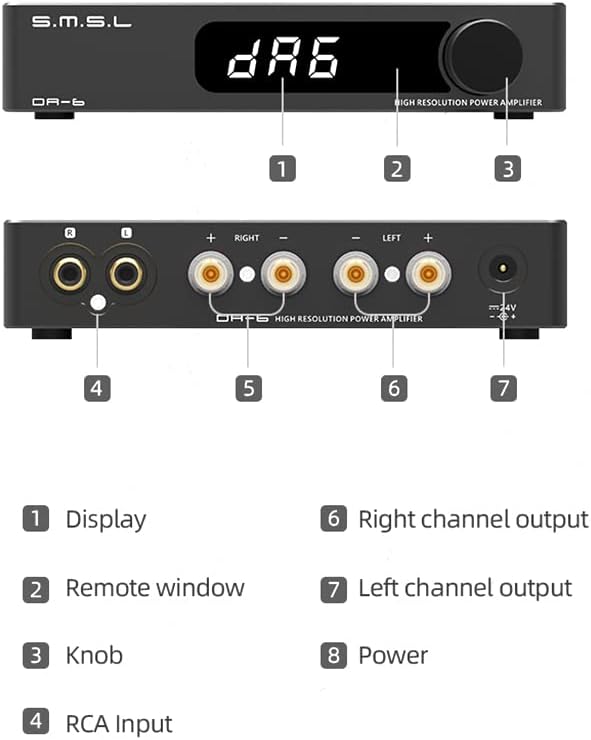
Description: This diagram illustrates the key components of the S.M.S.L DA-6 amplifier. The front panel features (1) Display, (2) Remote window, and (3) Knob. The rear panel includes (4) RCA Input, (5) Right channel output, (6) Left channel output, and (7) Power input.
- 1. Display: Shows current status, volume, and settings.
- 2. Remote Window: Infrared receiver for the remote control.
- 3. Knob: Multi-function control for power, volume, and menu navigation.
- 4. RCA Input: Connect your audio source (e.g., DAC, CD player).
- 5. Right Channel Output: Connect to the right speaker.
- 6. Left Channel Output: Connect to the left speaker.
- 7. Power Input: Connect the DC power adapter.
5. Setup
5.1 Connecting Speakers
Connect your passive speakers to the binding posts on the rear panel. Ensure correct polarity (+ to + and - to -) for both left and right channels.
- Connect the right speaker cable to the RIGHT output terminals.
- Connect the left speaker cable to the LEFT output terminals.
5.2 Connecting Audio Source
Connect your audio source (e.g., a DAC, CD player, or streamer) to the RCA input jacks on the rear panel.
- Connect the right channel of your audio source to the R (Right) RCA input.
- Connect the left channel of your audio source to the L (Left) RCA input.
5.3 Power Connection
Connect the supplied power adapter to the DA-6 unit and then to a wall outlet. Refer to the Important Safety Instructions section for critical information regarding power connection and disconnection.

Description: The rear panel of the S.M.S.L DA-6 amplifier features gold-plated RCA inputs for audio sources, speaker binding posts for right and left channels, and the DC power input.
6. Operating Instructions
6.1 Power On/Off
Press the multi-function knob on the front panel or the power button on the remote control to turn the unit on or off.
6.2 Volume Control
Rotate the multi-function knob on the front panel clockwise to increase volume and counter-clockwise to decrease volume. Alternatively, use the volume up/down buttons on the remote control.
6.3 Tone Control (Bass/Treble)
The DA-6 allows for adjustment of bass and treble gain. Refer to the display and use the knob or remote to navigate to the tone control settings. Bass and Treble gain can be adjusted from -14dB to +14dB.

Description: The front panel of the S.M.S.L DA-6 amplifier features a digital display and a multi-function knob for controlling power, volume, and settings.
7. Remote Control
The included remote control provides convenient access to various functions of the DA-6 amplifier, including power on/off, volume adjustment, and tone control. Ensure the remote is pointed towards the remote window on the front panel for proper operation.
8. Specifications
Detailed technical specifications for the S.M.S.L DA-6 Power Amplifier:
| Feature | Specification |
|---|---|
| Output Power | 70W x 2 (4Ω) |
| Frequency Response | 20Hz - 40KHz |
| Bass/Treble Gain | -14dB ~ +14dB |
| THD+N | 0.004% |
| Channel Separation | 91dB |
| Input Sensitivity | 400mVrms |
| SNR (Signal-to-Noise Ratio) | 103dB |
| Maximum Input Voltage (Low Gain) | 2Vrms |
| Maximum Input Voltage (High Gain) | 1.2Vrms |
| Power Consumption | 36W |
| Power Supply Voltage | 36 Volts |
| Dimensions (W x H x D) | 140 x 28 x 110mm (5.51 x 1.1 x 4.33 inches) |
| Weight | 0.35kg (2.18 pounds) |
| Number of Channels | 2 |
| Material | Aluminum Alloy |
| Model Number | DA-6 |

Description: This image provides the physical dimensions of the S.M.S.L DA-6 amplifier, measuring 140mm in width, 28mm in height, and 110mm in depth.
9. Troubleshooting
If you encounter issues with your S.M.S.L DA-6 amplifier, please refer to the following common problems and solutions:
- No Sound:
- Ensure the amplifier is powered on and the volume is not set to minimum.
- Check all audio cable connections (RCA, speaker wires) for secure fit and correct polarity.
- Verify that your audio source is functioning correctly and outputting sound.
- Unit Does Not Power On:
- Check if the power adapter is securely connected to both the amplifier and a working wall outlet.
- Ensure the wall outlet has power.
- Distorted Sound:
- Reduce the volume level on both the amplifier and your audio source.
- Check audio cables for damage or loose connections.
- Ensure your speakers' impedance matches the amplifier's capabilities (typically 4-8 ohms).
- Unit Stuck on 'DA6' Display:
- This can indicate an internal error, potentially caused by improper power disconnection. Refer to the Important Safety Instructions regarding power cable handling.
- Try disconnecting power from the wall outlet for a few minutes, then reconnecting it. If the issue persists, contact customer support.
10. Maintenance
To ensure the longevity and optimal performance of your DA-6 amplifier, follow these maintenance guidelines:
- Cleaning: Use a soft, dry cloth to clean the exterior of the unit. Do not use liquid cleaners or abrasive materials.
- Ventilation: Keep the ventilation openings clear of dust and obstructions to prevent overheating.
- Storage: When not in use for extended periods, store the amplifier in a cool, dry place, away from direct sunlight and extreme temperatures.
11. Warranty and Support
S.M.S.L products are designed for reliability and performance. For warranty information, please refer to the warranty card included with your product or visit the official S.M.S.L website.
If you require technical assistance or have questions not covered in this manual, please contact S.M.S.L customer support through their official channels. When contacting support, please have your product model (DA-6) and purchase information ready.


