Your guide to effective and easy floor cleaning with Swiffer WetJet.
Introduction
This manual provides detailed instructions for the proper use and maintenance of your Swiffer WetJet Mopping Refill Pack. The pack includes 32 multi-surface mopping pads and two 1.25L bottles of cleaning solution, designed for use with the Swiffer WetJet system. Follow these guidelines to achieve optimal cleaning results and ensure the longevity of your product.
Setup
Before using your Swiffer WetJet, ensure proper assembly and preparation.
1. Assemble the WetJet Mop
Connect the Pole Sections: Align the notches on the pole sections and slide them together until they securely click into place.
Insert Batteries: Slide open the battery compartment located on the mop handle. Insert the required AA batteries (not included in this refill pack, but typically included with the WetJet starter kit) according to the polarity indicators. Close the compartment securely.
Figure 1: Visual guide for Swiffer WetJet assembly and use.
2. Load Cleaning Solution
Remove the cardboard insert from the solution bottle slot on the WetJet mop (if present from initial packaging).
Align the arrow on the cleaning solution bottle with the pole of the WetJet mop.
Gently push the bottle down until it clicks firmly into place. Ensure it is seated correctly to prevent leaks.
3. Attach a Mopping Pad
Take one mopping pad from the refill pack. There is no need to remove any backing from the pad.
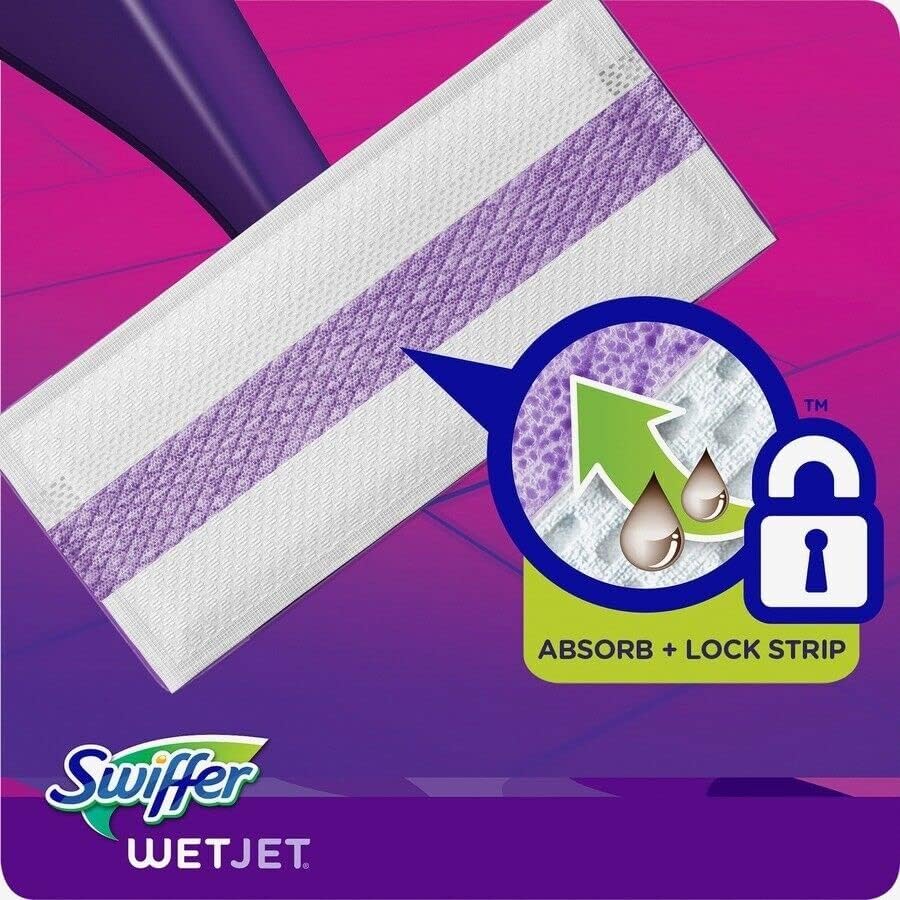
Position the pad with the purple strip side facing down, directly onto the mop head.
Press the mop head firmly onto the pad to secure it. The pad's textured surface will adhere to the mop head.
Figure 2: Swiffer WetJet mopping pad featuring the Absorb + Lock Strip.
Operating Instructions
Once your Swiffer WetJet is assembled and ready, follow these steps for effective cleaning:
1. Spray Cleaning Solution
Press the button located on the handle of the WetJet mop once.
The dual-nozzle sprayer will release the appropriate amount of cleaning solution directly onto the floor, targeting dirt and grime.
2. Mop the Floor
Glide the WetJet mop across the floor. The mopping pad is designed to absorb and lock away dirt, rather than just pushing it around.
The Swiffer WetJet is safe for virtually all finished floor types, including sealed hardwood, tile, and laminate. Do NOT use on unfinished, oiled, or waxed wooden boards, non-sealed tiles, or carpeted floors as they may be water sensitive.
Figure 3: Swiffer WetJet in use on a finished floor.
Maintenance
Proper maintenance ensures your Swiffer WetJet remains effective and ready for use.
1. Disposing of Used Pads
After cleaning, detach the used mopping pad from the mop head.
Dispose of the dirty pad in the trash. Do not attempt to wash or reuse disposable pads.
2. Storing the WetJet
Store the Swiffer WetJet mop in a dry place, away from direct sunlight and extreme temperatures.
Ensure the cleaning solution bottle is securely clicked into place to prevent leakage during storage.
3. Refill Packs
This refill pack provides 32 multi-surface mopping pads and two 1.25L bottles of cleaning solution.
For tougher cleaning tasks, consider using Swiffer WetJet Heavy Duty mopping pads, which feature a scrubby strip for enhanced cleaning power.
Troubleshooting
If you encounter any issues with your Swiffer WetJet, refer to these common solutions:
Problem
Possible Cause
Solution
No spray from nozzles
Empty solution bottle, dead batteries, clogged nozzles.
Replace solution bottle, replace batteries, or clean nozzles with a damp cloth.
Pad not adhering to mop head
Mop head or pad is dirty, pad is worn out.
Ensure mop head is clean and dry before attaching a new pad. Replace with a fresh pad.
Streaks on floor
Too much solution, dirty pad, incorrect floor type.
Use less spray, replace with a fresh pad, or ensure your floor type is compatible with WetJet.
Specifications
Brand: Swiffer
Model Number: 990004006
UPC: 030772012161
Package Dimensions: 12.32 x 10.16 x 9.21 inches; 7.74 Pounds
Item Form: Stick (referring to the mop system)
Scent: Open window fresh (for included cleaner)
Specific Uses For Product: Bottles of cleaner
Surface Recommendation: Floor
Special Features: Refill
Contains Liquid Contents?: Yes
Item Volume: 1.25 Liters (per bottle)
Unit Count: 1.0 Count (referring to the refill pack as one unit)
Number of Items: 2 (bottles of cleaner)
Material Features: Heavy Duty (referring to pads)
Material Type Free: Chlorine Free
Warranty
For information regarding product warranty, please refer to the packaging of your original Swiffer WetJet starter kit or contact Swiffer customer support directly. This refill pack is designed to replenish consumables for the existing WetJet system.
Support
For further assistance, product information, or to explore other Swiffer products, please visit the official Swiffer Store:
Ask about setup, troubleshooting, compatibility, parts, safety, or missing instructions. Manuals+ will review the question and use this page’s manual context to help answer it.