1. Introduction
This manual provides essential information for the safe and efficient use of your Samsung SWA-W510 Wireless Subwoofer. Please read these instructions thoroughly before operating the device and retain them for future reference. The SWA-W510 is designed to complement compatible Samsung S-Series Soundbars, enhancing your audio experience with powerful, deep bass.

Image: Front view of the Samsung SWA-W510 Wireless Subwoofer, showcasing its compact unibody design.
2. Safety Information
To reduce the risk of electric shock, fire, or injury, always follow these basic precautions:
- Do not expose this apparatus to rain or moisture.
- Do not expose the apparatus to dripping or splashing. Do not place objects filled with liquids, such as vases, on the apparatus.
- Do not block any ventilation openings. Install in accordance with the manufacturer's instructions.
- Do not install near any heat sources such as radiators, heat registers, stoves, or other apparatus (including amplifiers) that produce heat.
- Protect the power cord from being walked on or pinched, particularly at plugs, convenience receptacles, and the point where they exit from the apparatus.
- Only use attachments/accessories specified by the manufacturer.
- Unplug this apparatus during lightning storms or when unused for long periods of time.
- Refer all servicing to qualified service personnel. Servicing is required when the apparatus has been damaged in any way, such as power-supply cord or plug is damaged, liquid has been spilled or objects have fallen into the apparatus, the apparatus has been exposed to rain or moisture, does not operate normally, or has been dropped.
3. Package Contents
Verify that all components are included in your package:
- Samsung SWA-W510 Wireless Subwoofer
- Power Cord
- Instruction Manual (this document)
4. Setup
4.1 Subwoofer Placement
The SWA-W510 subwoofer is designed for flexible placement due to its wireless connectivity. For optimal bass performance, consider placing the subwoofer in a corner of the room or near a wall. Experiment with different locations to find the best sound for your listening environment.

Image: The SWA-W510 subwoofer positioned in a living room setting, demonstrating flexible placement options.
4.2 Connecting the Power
Connect the supplied power cord to the power input on the back of the subwoofer, then plug the other end into a wall outlet.

Image: Rear view of the SWA-W510 subwoofer, highlighting the power connection port and the ID SET button.
4.3 Wireless Connection to Soundbar
The SWA-W510 subwoofer is designed for wireless pairing with compatible Samsung S-Series Soundbars (e.g., HW-S61B, HW-S61D/ZA, HW-S60B, HW-S60D/ZA & HW-S50B). Follow these steps to establish a connection:
- Power On: Plug in the subwoofer and ensure it is powered on. The LINK LED indicator on the back of the subwoofer will blink blue.
- Soundbar Preparation: Turn off your Samsung S-Series Soundbar.
- Initiate Pairing: On your soundbar's remote control, press and hold the Up button for 5-6 seconds. The soundbar display should show "ID SET" or a similar pairing message.
- Subwoofer Pairing: While the soundbar is in pairing mode, press the ID SET button on the back of the SWA-W510 subwoofer using a pointed object (e.g., a pen tip).
- Confirmation: The LINK LED on the subwoofer will turn solid blue, indicating a successful connection. The soundbar display will also confirm the connection.
- Test: Turn on your soundbar and play audio to confirm the subwoofer is producing bass.
If the connection fails, repeat the steps. Ensure the subwoofer and soundbar are within close proximity during the pairing process.
5. Operating the Subwoofer
Once connected, the SWA-W510 subwoofer operates in conjunction with your soundbar. Its primary function is to reproduce low-frequency sounds (bass) to enrich your audio experience.
- Automatic Operation: The subwoofer will automatically power on and off with your connected soundbar.
- Bass Level Adjustment: Bass levels are typically controlled through your soundbar's remote control or its dedicated mobile application. Refer to your soundbar's manual for specific instructions on adjusting subwoofer output.
- Sound Modes: Different sound modes on your soundbar may affect the subwoofer's performance. Experiment with various modes to find your preferred audio profile.
6. Maintenance
Proper care ensures the longevity and performance of your subwoofer.
- Cleaning: Use a soft, dry cloth to clean the exterior of the subwoofer. Do not use liquid cleaners or abrasive materials.
- Ventilation: Ensure that the subwoofer's ventilation openings are not blocked to prevent overheating.
- Placement: Avoid placing the subwoofer in direct sunlight, near heat sources, or in areas with high humidity.
7. Troubleshooting
If you encounter issues with your SWA-W510 subwoofer, refer to the following common problems and solutions:
| Problem | Possible Cause | Solution |
|---|---|---|
| No sound from subwoofer. | Subwoofer not powered on or not connected. | Check power cord connection. Ensure LINK LED is solid blue. Re-pair with soundbar if necessary (refer to Section 4.3). |
| Weak or distorted bass. | Incorrect bass level setting or poor placement. | Adjust bass level via soundbar remote/app. Experiment with subwoofer placement (refer to Section 4.1). |
| Subwoofer disconnects intermittently. | Interference from other wireless devices or distance. | Move the subwoofer closer to the soundbar. Ensure no strong Wi-Fi routers or other 5GHz devices are directly next to the subwoofer or soundbar. Re-pair if disconnection persists. |
| LINK LED is blinking blue. | Subwoofer is not connected to the soundbar. | Perform the wireless connection steps (refer to Section 4.3). |
If the problem persists after trying these solutions, please contact Samsung customer support.
8. Specifications
| Feature | Detail |
|---|---|
| Model Name | SWA-W510 (E1SAMSWAW510RB) |
| Speaker Type | Subwoofer |
| Subwoofer Diameter | 6.5 Inches |
| Connectivity Technology | Wireless (Bluetooth) |
| Compatible Devices | Samsung S-Series Soundbar (HW-S61B, HW-S61D/ZA, HW-S60B, HW-S60D/ZA & HW-S50B) |
| Color | Black |
| Product Dimensions (D x W x H) | 9.4" x 9.4" x 9.5" |
| Item Weight | 14.1 Pounds |
| Power Source | Corded Electric |
| Manufacturer | SAMSUNG |
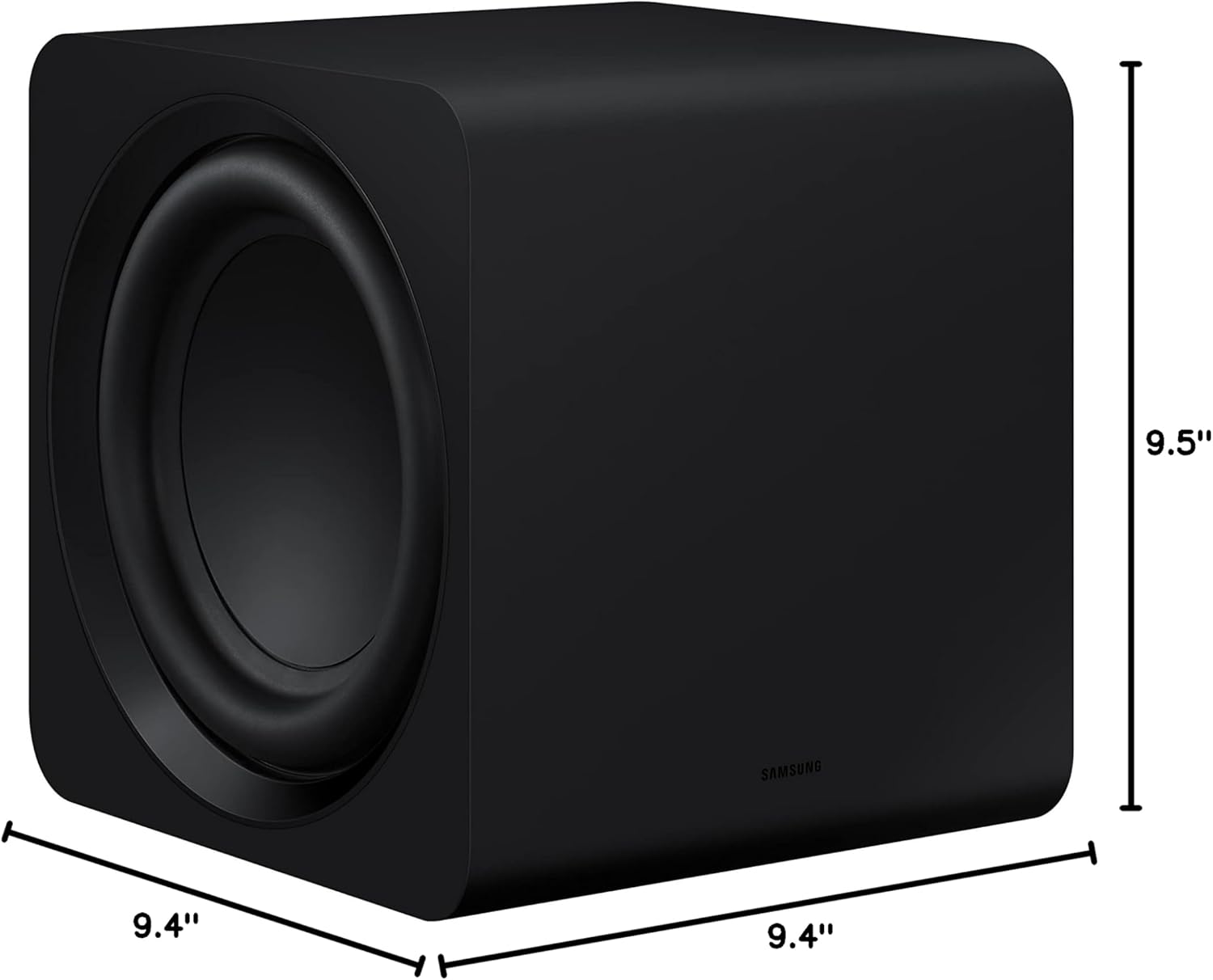
Image: Diagram showing the dimensions of the SWA-W510 subwoofer.
9. Warranty and Support
This Samsung SWA-W510 Wireless Subwoofer comes with a limited warranty. For detailed warranty terms and conditions, please refer to the warranty card included with your product or visit the official Samsung website.
For technical support, service inquiries, or to purchase replacement parts, please contact Samsung Customer Service:
- Online Support: Visit www.samsung.com/us/support/
- Phone Support: Refer to your product documentation for regional contact numbers.
Please have your model number (SWA-W510 or E1SAMSWAW510RB) and serial number ready when contacting support.