
Introduction
This manual provides detailed instructions for the installation, operation, and maintenance of your LIT-PaTH Under Cabinet Light. This LED light features a PIR motion sensor, Dusk-to-Dawn (D2D) functionality, and selectable color temperatures (3000K, 4000K, 5000K). Designed for convenience, it is battery-operated and rechargeable, suitable for various indoor applications.

Image: The LIT-PaTH Under Cabinet Light, a sleek silver-finished LED strip with an integrated motion sensor and control button at one end.
Package Contents
Please verify that all items are present in your package:
- 1 x LIT-PaTH Under Cabinet Light
- 1 x USB Type-C Charging Cable
- 2 x Mounting Brackets with Adhesive
- 2 x Screws (for optional screw fixing)

Image: The LIT-PaTH Under Cabinet Light shown alongside its included accessories: a USB Type-C charging cable, two adhesive-backed mounting brackets, and two small screws.
Product Features
- PIR Motion Sensor: Automatically detects human movement within 10 feet and a 120-degree angle.
- Dusk-to-Dawn (D2D) Functionality: The motion sensor activates only when ambient brightness is below 30 lux, conserving battery during daylight.
- Selectable Color Temperature (CCT): Choose between 3000K (Warm White), 4000K (Neutral White), and 5000K (Cool White).
- Always ON Mode: Option to keep the light continuously illuminated.
- Rechargeable Battery: Integrated battery recharges via USB Type-C.
- Easy Installation: Magnetic attachment to included brackets, with optional screw fixing.
- Durable Construction: Aluminum housing with a silver finish.

Image: A diagram illustrating the dimensions of the LIT-PaTH Under Cabinet Light (approximately 11.81 inches long, 1.57 inches wide, 0.39 inches thick) and visual representations of the three selectable color temperatures: 3000K, 4000K, and 5000K.
Setup and Installation
- Prepare the Surface: Ensure the desired installation surface is clean, dry, and smooth.
- Attach Brackets:
- Adhesive Method: Peel the protective film from the back of the two mounting brackets. Press them firmly onto the chosen surface, ensuring they are spaced appropriately for the light fixture.
- Screw Fixing Method (Optional): If a more permanent fixture is desired, remove the light from the brackets. Use the holes in the brackets as a guide to mark and drill pilot holes. Secure the brackets with the provided screws.
- Mount the Light: The LED light has built-in magnets. Simply align the light with the installed brackets, and it will magnetically attach. This allows for easy removal for recharging.

Image: A close-up view of the end of the LIT-PaTH Under Cabinet Light, highlighting its aluminum housing, PC cover, and the "Humanized Design For Easy Attachment/Detachment" with visible screw points for mounting brackets.
Operating Instructions
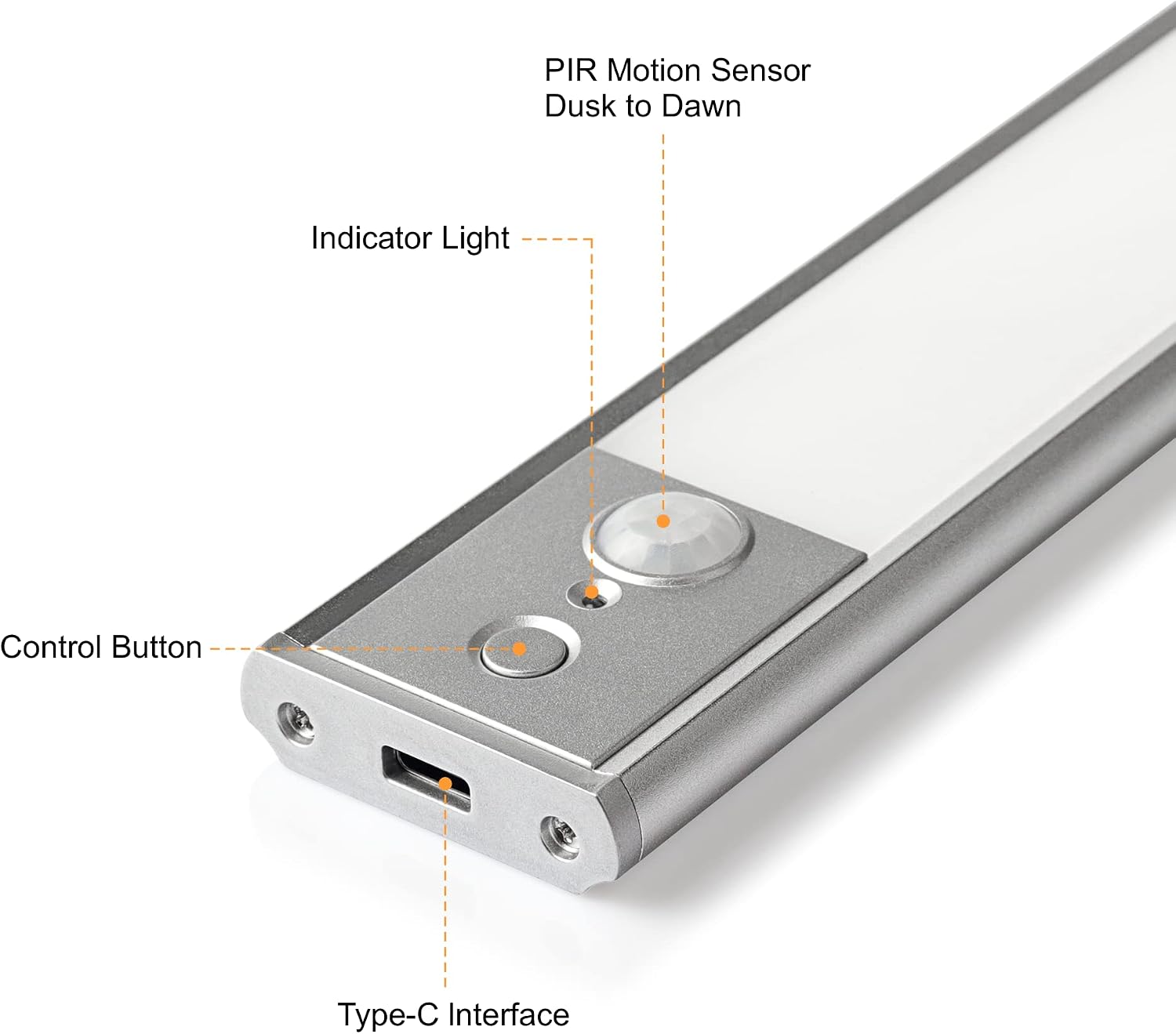
Image: A detailed view of the control end of the LIT-PaTH Under Cabinet Light, labeling the PIR Motion Sensor, Indicator Light, Control Button, and Type-C Interface.
Motion Sensor Mode (PIR Mode)
- Activate PIR Mode: Press the control button once. The indicator light will illuminate red for approximately 20 seconds, confirming the light is now in PIR (motion sensor) mode.
- Automatic Operation: In PIR mode, the light will automatically turn on when motion is detected within 10 feet (3 meters) and the ambient brightness is less than 30 lux.
- Automatic Shut-off: The light will automatically turn off after 20 seconds if no further motion is detected.
- Daylight Inhibition: The light will not activate automatically during the daytime (when ambient brightness is over 50 lux), even if motion is detected.
- Sensing Angle: The motion sensor has a detection angle of 120 degrees.
Changing Color Temperature (CCT)
- While the light is in PIR mode and currently ON, press and hold the control button for 2 seconds. The color temperature will cycle through 3000K, 4000K, and 5000K. Release the button when your desired color temperature is displayed.
Always ON Mode
- While the light is in PIR mode and currently ON, quickly double-press the control button. The indicator light will flash for 10 seconds, and the light will switch to Always ON mode.
- In Always ON mode, the color temperature cannot be changed by long-pressing the button.
- To turn off the light from Always ON mode, press the control button once.
Charging Instructions
The LIT-PaTH Under Cabinet Light is equipped with a rechargeable battery. When the battery is low, the light's performance may diminish.
- Locate the USB Type-C charging port on the side of the light fixture.
- Connect the Type-C end of the provided charging cable to the light.
- Connect the USB-A end of the charging cable to a compatible power source, such as a laptop, power bank, or a mobile phone charger (not included).
- The indicator light will glow red while charging is in progress.
- Once fully charged, the indicator light will turn blue.
- After charging, you can easily reattach the light to its magnetic mounting brackets.
Maintenance
- Cleaning: Use a soft, dry cloth to wipe the surface of the light. Do not use abrasive cleaners or solvents, as they may damage the finish or electronic components.
- Battery Care: To prolong battery life, avoid fully discharging the battery frequently. Recharge the light when the indicator suggests low power or when you notice dimming.
- Storage: If storing the light for an extended period, ensure it is fully charged and store it in a cool, dry place. Recharge periodically to maintain battery health.
Troubleshooting
| Problem | Possible Cause | Solution |
|---|---|---|
| Light does not turn on in PIR mode. |
|
|
| Light turns off too quickly or stays on too long. |
|
|
| Battery life is shorter than expected. |
|
|
| Cannot change color temperature. |
|
|
Specifications
| Model Number | LT-CB002SL-1PK |
| Brand | LIT-PaTH |
| Dimensions | 30 x 3.99 x 1.09 cm (approx. 11.81 x 1.57 x 0.43 inches) |
| Weight | 163.29 g |
| Material | Aluminum, PS |
| Color | Silver |
| Power Source | Battery Powered (Rechargeable via USB Type-C) |
| Motion Sensor Range | Up to 10 feet (3 meters) |
| Motion Sensor Angle | 120 degrees |
| Color Temperatures | 3000K, 4000K, 5000K (Selectable) |
| Installation Type | Surface Mount (Magnetic with optional screws) |
| Usage | Indoor use only |
Warranty and Support
For warranty information and customer support, please refer to the product packaging or contact LIT-PaTH customer service directly. Keep your purchase receipt for warranty claims.
You can often find support information on the manufacturer's official website or through the retailer where the product was purchased.