
iCover 768481824514
Smart Watch Charger Cable User Manual
Model: 768481824514
1. Introduction
This user manual provides essential information for the safe and effective use of your iCover Universal 2 Pin 7.62mm Magnetic Suction USB Charging Cable. Please read this manual thoroughly before using the product.
The iCover Smart Watch Charger Cable is designed for convenient, safe, and fast charging of smartwatches and children's watches that utilize a 2-pin, 7.62mm pitch magnetic adsorption charging interface. It features a gold-plated pure copper pin and a high-strength suction head for reliable connection, along with five-fold safety protection.
2. Product Overview

The image displays the iCover Smart Watch Charger Cable, featuring a standard USB-A connector on one end and a magnetic 2-pin charging head on the other. This design allows for easy connection to various power sources and secure attachment to compatible smartwatches.

This image highlights the precise 7.62mm pin pitch of the magnetic charging head, which is crucial for compatibility with specific smartwatch models. Users should verify their device's charging port specifications before use.

The diagram illustrates the internal components of the charging head, emphasizing the use of an N52 strong magnet for secure attachment and pure copper material for efficient and stable current transmission.
3. Setup
Before using the charging cable, ensure your smartwatch is compatible with a 2-pin, 7.62mm magnetic charging interface.

This image serves as an important reminder to measure the distance between the two charging pins on your smartwatch. The cable is designed specifically for devices with a 7.62mm (0.3 inch) pin spacing to ensure proper magnetic connection and charging.
- Verify Compatibility: Confirm that your device requires a 2-pin, 7.62mm magnetic charging cable.
- Inspect Cable: Before first use, visually inspect the cable for any signs of damage. Do not use if damaged.
4. Operating Instructions
Follow these steps to charge your device:
- Connect to Power Source: Insert the USB-A end of the charging cable into a compatible power source. This can include:
- A computer's USB port (PC or Laptop)
- A USB wall adapter (e.g., phone charger)
- A power bank
- A car USB charger
- Attach to Device: Align the magnetic charging head with the charging contacts on your smartwatch. The magnetic suction will automatically secure the connection. Ensure the pins are correctly aligned with the contacts on your device.
- Monitor Charging: Your device should indicate that it is charging. Refer to your smartwatch's user manual for specific charging indicators.
- Disconnect: Once charging is complete, gently pull the magnetic head away from your device and then disconnect the USB end from the power source.

This visual demonstrates the versatility of the charging cable, highlighting its compatibility with various USB power sources such as personal computers, laptops, portable power banks, and standard USB-C power adapters (when used with a USB-A to USB-C adapter, if applicable, or directly if the adapter has a USB-A port). This "Plug & Play" functionality ensures convenient charging in diverse environments.
5. Maintenance
- Cleaning: Use a soft, dry cloth to wipe the cable and magnetic contacts. Do not use liquid cleaners or abrasive materials.
- Storage: Store the cable in a cool, dry place away from direct sunlight and extreme temperatures. Avoid bending or kinking the cable excessively.
- Handling: Always grasp the connectors when plugging or unplugging the cable, rather than pulling on the cable itself, to prevent damage.
6. Troubleshooting
| Problem | Possible Cause | Solution |
|---|---|---|
| Device not charging. |
|
|
| Slow charging. |
|
|
7. Specifications
- Model: 768481824514
- Brand: iCover
- Connector Type: USB Type A (Input), 2-Pin Magnetic (Output)
- Pin Pitch: 7.62mm
- Cable Type: USB
- Special Feature: Magnetic Adsorption
- Material: High-quality ABS + PVC, Copper Wire, Zinc Alloy, Gold-plated pure copper pin, N52 Strong magnet
- Safety Protection: Five-fold safety protection
- Compatible Devices: Smartwatches, children's smart bracelets, smart positioning devices, wearable phones, Bluetooth headsets with 2-pin 7.62mm magnetic charging interface.
- Dimensions (Package): 4.49 x 2.8 x 0.51 inches
- Weight: 0.32 ounces
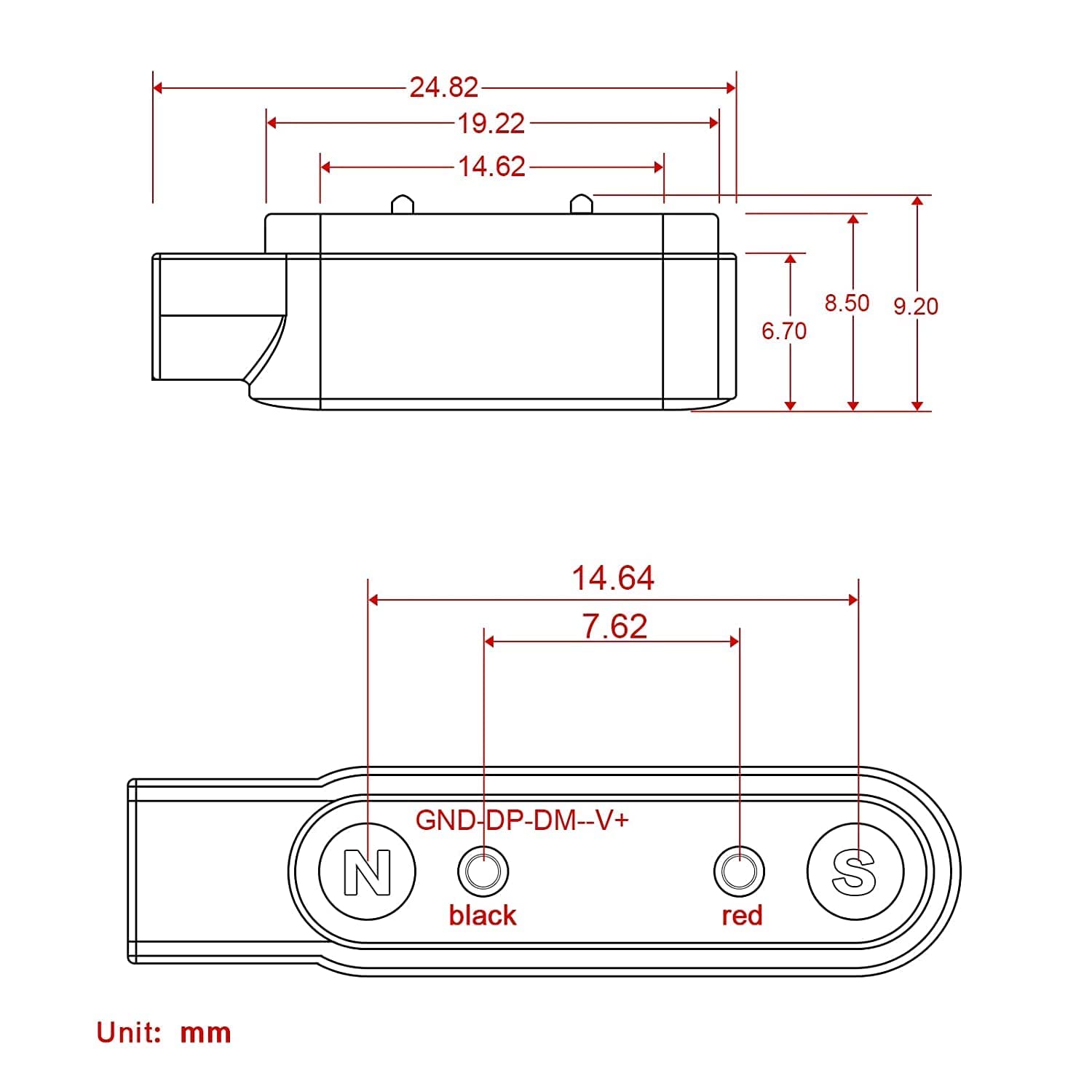
This technical drawing provides precise dimensions of the magnetic charging head in millimeters, including the 7.62mm pin spacing. This detailed view is useful for confirming compatibility with specific device charging ports.
8. Warranty and Support
Specific warranty details for this product are not provided in the available information. For any product-related inquiries, technical support, or warranty claims, please contact the manufacturer, iCover, or your point of purchase.
Manufacturer: iCover
Ask a question about this manual
Ask about setup, troubleshooting, compatibility, parts, safety, or missing instructions. Manuals+ will review the question and use this page’s manual context to help answer it.