
Introduction
Thank you for choosing the artika Imperium Flush Mount Ceiling Light Fixture. This manual provides essential information for the safe installation, operation, and maintenance of your new lighting fixture. Please read these instructions thoroughly before beginning installation and retain them for future reference.
Safety Information
- WARNING: Risk of electric shock. Turn off power at the main circuit breaker or fuse box before installation or any maintenance.
- All electrical connections must be in accordance with local and National Electrical Code (NEC) standards. If you are unfamiliar with proper electrical wiring connections, consult a qualified electrician.
- Do not install this fixture in wet or damp locations. This fixture is designed for indoor use only.
- Ensure the mounting surface can support the weight of the fixture.
- Use only the specified bulb type and wattage to avoid overheating or damage.
- Do not touch the bulbs immediately after they have been on, as they will be hot.
What's in the Box
Your artika Imperium light fixture package includes the following components:
- Imperium Flush Mount Ceiling Light Fixture
- Mounting Hardware (screws, wire nuts, mounting bracket)
Note: Bulbs are not included. This fixture requires 6 E12 base incandescent bulbs, maximum 40 watts each.
Specifications
| Brand | artika |
| Model Number | IMPERIUM |
| Color | Black and Gold |
| Material | Metal, Glass |
| Dimensions (L x W x H) | 10.51" x 10.51" x 12.56" (26.7 cm x 26.7 cm x 31.9 cm) |
| Item Weight | 5.15 Pounds |
| Bulb Base | E12 |
| Number of Light Sources | 6 |
| Max Wattage (per bulb) | 40 watts (Incandescent) |
| Total Wattage | 240 watts |
| Dimmable | Yes (with compatible dimmer switch) |
| Installation Type | Flush Mount |
| Indoor/Outdoor Usage | Indoor |
Setup and Installation
Follow these steps carefully to install your artika Imperium light fixture.
1. Preparation
- IMPORTANT: Before starting installation, turn off the electricity at the main fuse box or circuit breaker.
- Gather necessary tools: screwdriver, wire strippers, electrical tape, ladder.
- Unpack all components and inspect for any damage. Keep all packaging until you are sure all parts are present and undamaged.
2. Mounting Bracket Installation
- Attach the mounting bracket to the electrical junction box in the ceiling using the provided screws. Ensure it is securely fastened.
3. Wiring Connections
- Connect the fixture's ground wire (usually bare copper or green) to the house supply ground wire using a wire nut.
- Connect the fixture's neutral wire (usually white) to the house supply neutral wire (white) using a wire nut.
- Connect the fixture's live wire (usually black) to the house supply live wire (black) using a wire nut.
- Carefully tuck all wires into the junction box.
4. Attaching the Fixture
- Align the fixture base with the mounting bracket.
- Secure the fixture to the mounting bracket using the decorative nuts or screws provided. Ensure the fixture is flush against the ceiling and stable.
5. Bulb Installation
- Carefully screw 6 E12 base incandescent bulbs (max 40W each) into the sockets. Do not overtighten.
6. Power Restoration
- Restore power at the main circuit breaker or fuse box.
- Test the light fixture to ensure proper operation.

The artika Imperium flush mount ceiling light fixture installed in a modern bedroom, showcasing its elegant design.

Diagram showing the dimensions of the artika Imperium light fixture: 10.51 inches (26.7 cm) wide, 10.51 inches (26.7 cm) deep, and 12.56 inches (31.9 cm) high.
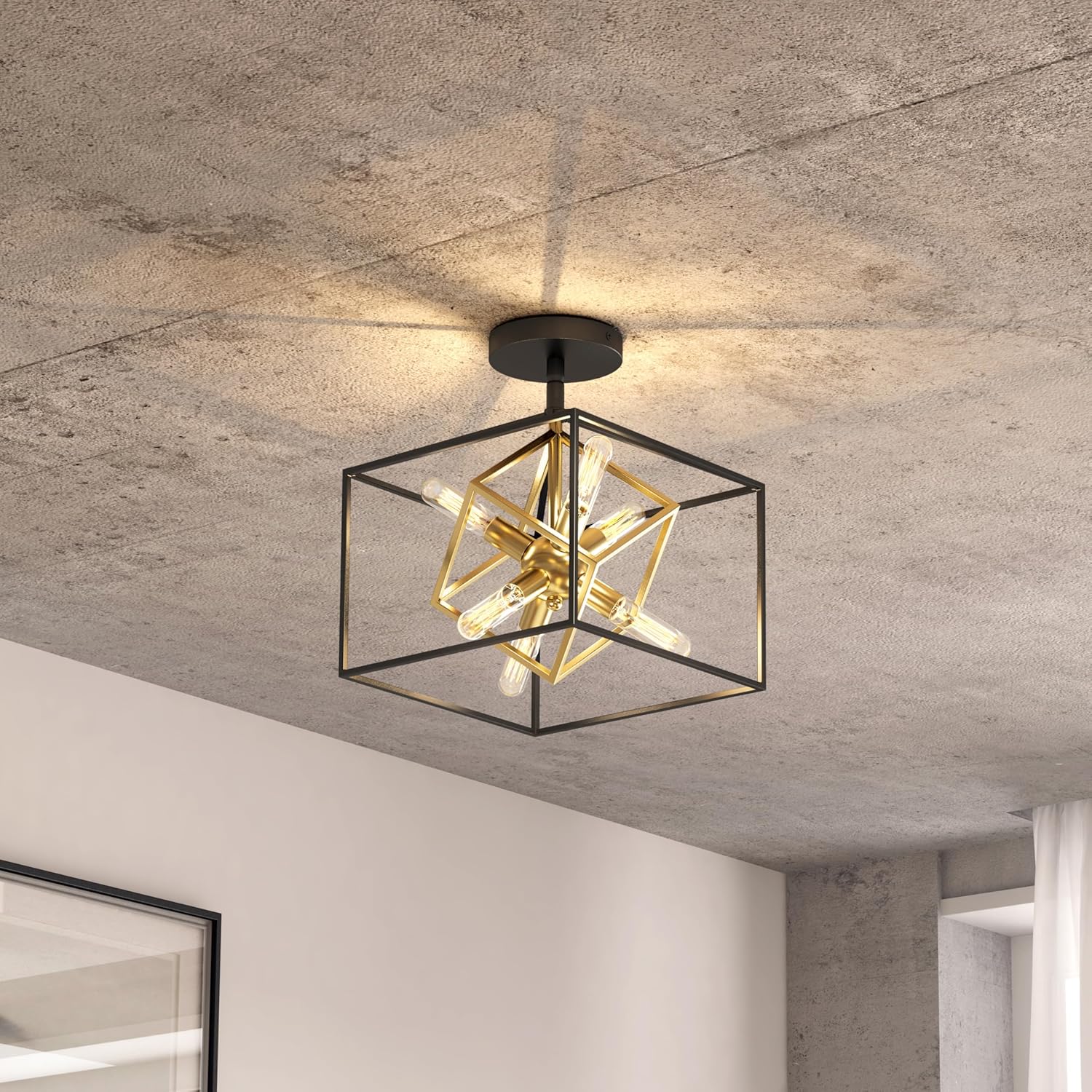
Close-up view of the artika Imperium light fixture from below, highlighting the gold internal cube structure and the six E12 bulb sockets.

The artika Imperium flush mount ceiling light fixture illuminating a hallway, demonstrating its light distribution.
Official product video demonstrating the design and features of the artika Imperium Flush Mount Ceiling Light.
Operating Instructions
The artika Imperium light fixture operates via a standard wall switch. If connected to a compatible dimmer switch, the light output can be adjusted to create various ambiances.
- Turning On/Off: Use your existing wall switch to turn the fixture on or off.
- Dimming: If a dimmer switch is installed, rotate or slide the dimmer control to adjust the brightness level. Ensure your E12 bulbs are dimmable compatible for optimal performance.
Maintenance
Cleaning
- Always turn off the power supply before cleaning.
- Wipe the fixture with a soft, dry cloth.
- Do not use abrasive cleaners, solvents, or polishes as they may damage the finish.
Bulb Replacement
- Ensure the power is turned off and the bulbs have cooled completely before attempting to replace them.
- Unscrew the old bulb counter-clockwise.
- Screw in a new E12 base incandescent bulb (max 40W) clockwise until snug. Do not overtighten.
Troubleshooting
If you experience issues with your light fixture, refer to the following common problems and solutions:
| Problem | Possible Cause | Solution |
|---|---|---|
| Light does not turn on. | No power supply. Loose wiring. Faulty bulb. | Check circuit breaker. Ensure all wire connections are secure (power off first). Replace bulb. |
| Light flickers. | Loose bulb. Incompatible dimmer switch. Loose wiring. | Tighten bulb. Ensure dimmer is compatible with incandescent bulbs. Check wiring connections (power off first). |
| Dimming does not work. | Non-dimmable bulbs. Incompatible dimmer switch. | Use dimmable E12 bulbs. Ensure dimmer switch is compatible with incandescent bulbs. |
Warranty and Support
The artika Imperium Flush Mount Ceiling Light Fixture comes with a 5-year limited warranty from the date of purchase. This warranty covers defects in materials and workmanship under normal use.
For warranty claims, technical support, or any questions regarding your product, please contact Artika for Living Inc. customer service. Keep your proof of purchase for warranty validation.
Manufacturer: Artika for living inc

