
Introduction
Thank you for choosing the KERDOM Ergonomic Office Chair. This manual provides essential information for the proper assembly, operation, and maintenance of your new chair. Please read it thoroughly before use to ensure optimal comfort and longevity of the product.
Safety Information
For your safety and to prevent damage to the product, please adhere to the following guidelines:
- Ensure the chair is used on a stable, level surface.
- Maximum weight capacity is 250 LB. Do not exceed this limit.
- Improper use of adjustable or reclining features may result in injury. Always adjust slowly and carefully.
- Keep hands and fingers clear of moving parts during adjustment.
- Do not stand on the chair.
- Do not use the chair if any parts are damaged or missing. Contact customer support for replacement parts.
Package Contents
Before assembly, please verify that all components are present and undamaged. Refer to the included assembly guide for a detailed parts list and diagrams.
- Chair Backrest (Mesh)
- Seat Cushion (Padded)
- Armrests (Flip-up)
- Headrest
- Gas Lift Cylinder
- Star Base
- Casters (Wheels)
- Mechanism/Control Unit
- Hardware (Screws, Washers, Allen Wrench)
Assembly Instructions
Assembly typically takes 20-30 minutes. It is recommended to assemble the chair on a soft, clean surface to prevent scratches. Follow the step-by-step instructions provided in the separate assembly manual included with your product. A general overview of the process is as follows:
- Attach the casters to the star base.
- Insert the gas lift cylinder into the center hole of the star base.
- Secure the control mechanism to the underside of the seat cushion.
- Attach the armrests to the seat cushion.
- Connect the backrest to the seat cushion and armrests.
- Mount the assembled seat and backrest onto the gas lift cylinder.
- Install the headrest onto the top of the backrest.
- Ensure all screws are tightened securely before use.

Figure 1: Fully assembled KERDOM Ergonomic Office Chair.
Features and Adjustments
Your KERDOM Ergonomic Office Chair is designed with multiple adjustable features to provide personalized comfort and support.
1. Adjustable Seat Height
Use the lever located under the right side of the seat to adjust the chair's height. Pull the lever up while seated to lower the chair, or pull it up while standing to raise it. Release the lever at your desired height.
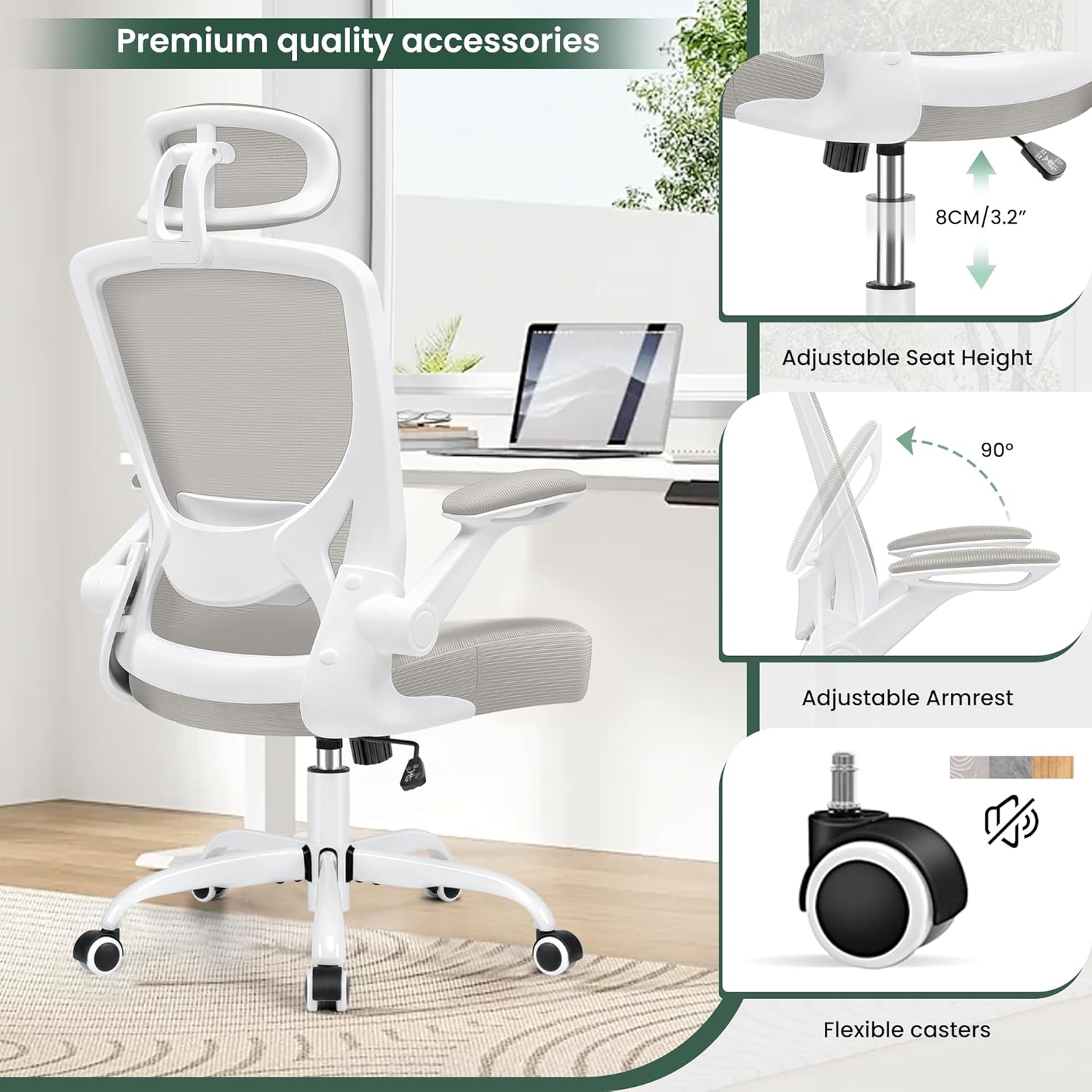
Figure 2: Adjustable Seat Height mechanism.
2. Lumbar Support
The chair features a manually adjustable lumbar support. Gently push or pull the lumbar support pad on the backrest to find the optimal position for your lower back. It can also be adjusted vertically by 1.2 inches and has a ±15° angle adjustment.

Figure 3: Lumbar Support adjustment.
3. Adjustable Headrest
The headrest can be adjusted for height and angle. Lift or lower the headrest to align with your neck and head. Tilt it forward or backward to achieve the most comfortable angle for support. It offers 2.8 inches of height adjustment and 30° angle adjustment.
4. Flip-up Armrests
The armrests can be flipped up 90 degrees, allowing you to push the chair closer to your desk or save space when not in use. Simply lift the armrests upwards until they lock into the vertical position. To lower, pull them down.
Figure 4: Flip-up Armrests feature.
5. Rocking and Tilt Function
The chair features a rocking function for relaxation. Use the lever under the left side of the seat to engage or disengage the rocking motion. The tilt tension can be adjusted by rotating the knob located under the front of the seat, allowing you to control the resistance of the rocking motion.

Figure 5: Rocking and Tilt Function controls.
6. Swivel and Casters
The chair offers a full 360-degree swivel for easy movement and access to your workspace. The smooth-gliding casters are designed for use on hard floors and allow for effortless mobility.
Operating Instructions
To operate your KERDOM Ergonomic Office Chair effectively, utilize its adjustable features to suit your body and work style:
- Sitting Posture: Adjust the seat height so your feet are flat on the floor and your knees are at a 90-degree angle. Your forearms should be parallel to the floor when typing.
- Back Support: Position the lumbar support to fit the natural curve of your lower back.
- Head and Neck Support: Adjust the headrest to comfortably support your head and neck, especially during periods of rest or reclining.
- Armrest Use: Use the armrests to support your arms and shoulders, reducing strain. Flip them up when you need to get closer to your desk or for space-saving.
- Reclining: Engage the rocking function for a comfortable recline. Adjust the tilt tension to control the ease of recline.
Maintenance
Regular maintenance will help prolong the life and appearance of your office chair:
- Cleaning: For the breathable mesh and padded seat, use a soft, damp cloth with mild soap and water. Avoid harsh chemicals or abrasive cleaners.
- Casters: Periodically check the casters for hair or debris and clean them to ensure smooth rolling.
- Hardware: Every few months, check all screws and bolts to ensure they are tight. Re-tighten if necessary.
- Avoid Direct Sunlight: Prolonged exposure to direct sunlight can cause fading and material degradation.
Troubleshooting
If you encounter any issues with your chair, refer to the following common problems and solutions:
| Problem | Possible Cause | Solution |
|---|---|---|
| Chair does not adjust height. | Gas lift cylinder issue or control lever not fully engaged. | Ensure the lever is pulled up completely. If issue persists, the gas lift may need replacement. |
| Chair wobbles or feels unstable. | Loose screws or uneven floor. | Check and tighten all assembly screws. Ensure the chair is on a flat surface. |
| Casters not rolling smoothly. | Debris (hair, lint) caught in casters. | Turn the chair over and remove any obstructions from the caster wheels. |
| Rocking function is too stiff or too loose. | Tilt tension not adjusted correctly. | Rotate the tilt tension knob under the seat to increase or decrease resistance. |
If you experience problems not listed here, or if the suggested solutions do not resolve the issue, please contact KERDOM customer support.
Specifications
| Feature | Detail |
|---|---|
| Brand | KERDOM |
| Model Name | Charles (Model 9060H) |
| Color | Lightgrey |
| Material | Mesh, Foam, Plastic |
| Product Dimensions (L x W x H) | 23.6 x 11.2 x 20.7 inches |
| Item Weight | 30.3 pounds |
| Maximum Weight Capacity | 250 LB |
| Special Features | Ergonomic, Lumbar Support, Headrest, Flip-up Arms, Swivel, Adjustable Height |
| Back Style | Solid Back (Mesh) |
| Recommended Uses | Office, Gaming |

Figure 6: Detailed dimensions of the chair.
Warranty and Support
KERDOM stands behind the quality of its products. For information regarding warranty coverage, technical support, or to purchase replacement parts, please refer to the warranty card included with your product or visit the official KERDOM website. Please have your model number (9060H) and purchase date ready when contacting support.
For further assistance, you may also refer to the KERDOM brand store on Amazon: Visit the KERDOM Store


