
Introduction
Thank you for choosing the ErGear EGESD6N Electric Standing Desk. This manual provides essential information for the safe and efficient assembly, operation, and maintenance of your new height-adjustable desk. Please read all instructions carefully before use and retain this manual for future reference.
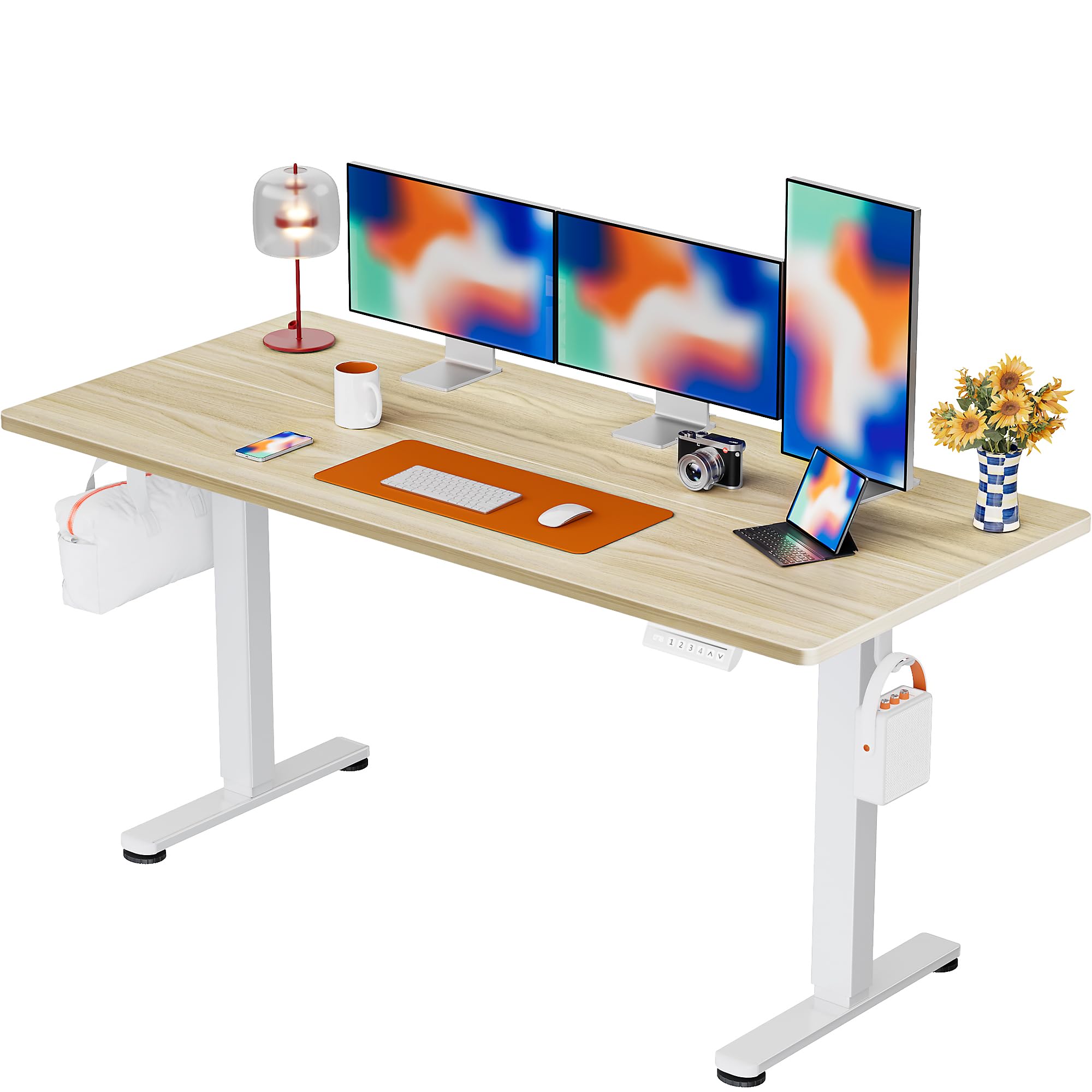
The ErGear EGESD6N Electric Standing Desk provides a versatile workspace.
Safety Information
To ensure safe operation and prevent damage, please observe the following safety guidelines:
- Do not exceed the maximum weight recommendation of 176 pounds (80 kg).
- Ensure the desk is placed on a level surface to maintain stability.
- Keep children and pets away from the desk during height adjustment.
- Avoid placing hands or objects near moving parts during operation.
- Regularly check all screws and connections to ensure they are secure.
- Do not sit or stand on the desk frame.
- Use only the provided power adapter and avoid overloading electrical outlets.
- If any parts are damaged or missing, contact customer support before assembly or use.
Package Contents
Verify that all components are present in your package:
- Standing Desk Frame (Alloy Steel)
- Desktop (Particle Board, 55x28 Inch, Natural finish)
- Control Panel with Memory Presets
- Power Adapter and Cables
- Assembly Instructions with Diagram (1)
- Basic Assembly Tools (including spare parts)
- Storage Hook (2pcs)
Setup and Assembly
Assembly of the ErGear EGESD6N desk is designed to be straightforward. It is recommended that 1 person perform the assembly. All necessary tools are included.
Simplified assembly process with clear instructions.
Assembly Steps:
- Unpack all components and verify against the package contents list.
- Attach the lifting columns to the desktop using the provided screws and tools.
- Secure the foot supports to the bottom of the lifting columns.
- Install the control panel and connect all necessary cables according to the diagram in the assembly instructions.
- Attach the storage hooks to the underside of the desktop as desired.
- Connect the power adapter to the desk and a suitable power outlet.
Refer to the included Assembly Instructions with Diagram for detailed visual guidance.
Operating Instructions
Your ErGear Electric Standing Desk features smooth and quiet height adjustment with convenient memory presets.

Intuitive smart controls for easy height adjustment.
Height Adjustment:
- Use the Up (^) and Down (v) arrow buttons on the control panel to manually adjust the desk height.
- The desk can be adjusted from a minimum height of 28.35 inches (72 cm) to a maximum height of 46.46 inches (118 cm).
Memory Presets:
The desk features 3 programmable height positions for quick adjustments:
- Adjust the desk to your desired height using the Up/Down buttons.
- Press the 'S' (Save) button, then immediately press one of the number buttons (1, 2, or 3) to save the current height to that position.
- To recall a saved height, simply press the corresponding number button (1, 2, or 3). The desk will automatically move to the saved position.
Maintenance
Proper care will extend the life of your ErGear standing desk:
- Cleaning: Clean the desktop and frame with a damp cloth. Avoid using abrasive or corrosive substances, as these can damage the finish.
- Inspections: Periodically inspect all connections and moving parts for any signs of wear or loosening. Tighten screws as needed.
- Cable Management: Utilize the integrated cable slots and storage hooks to keep cables organized and prevent them from interfering with desk movement.

Integrated cable management features help keep your workspace tidy.
Troubleshooting
If you encounter any issues with your ErGear standing desk, refer to the following common troubleshooting tips:
- Desk Not Moving: Check if the power cable is securely connected to both the desk and the power outlet. Ensure the outlet is functional.
- Uneven Movement: Verify that the desk is on a level surface and that all feet are properly adjusted. Check for any obstructions under the desk.
- Error Codes: If the control panel displays an error code, consult the detailed troubleshooting section in the full assembly manual or contact customer support.
- Noise During Operation: A slight motor sound is normal. Excessive or unusual noise may indicate a loose connection or obstruction. Inspect the lifting columns and frame.
For persistent issues, please contact ErGear customer support.
Specifications
Key specifications for the ErGear EGESD6N Electric Standing Desk:
| Feature | Detail |
|---|---|
| Model Number | EGESD6N |
| Brand | ErGear |
| Product Dimensions (D x W x H) | 28"D x 55"W x 28.35"H |
| Size | 55*28 Inch |
| Color | Natural |
| Minimum Height | 28.35 Inches |
| Maximum Height | 46.46 Inches |
| Number of Height Positions | 3 (Programmable) |
| Maximum Weight Recommendation | 176 Pounds |
| Top Material Type | Wood (Particle Board) |
| Base Material | Alloy Steel |
| Lifting Mechanism | Electric |
| Required Assembly | Yes |
| Includes All Assembly Tools | Yes |

Detailed dimensions of the ErGear EGESD6N desk.

The desk features a sturdy steel frame and aerospace-grade lifting system for enhanced stability.
Warranty and Support
The ErGear EGESD6N Electric Standing Desk comes with a limited warranty. For specific details regarding warranty coverage (parts, labor, duration), please refer to the warranty information provided with your product or contact ErGear customer support.
Customer Support:
For any questions, technical assistance, or warranty claims, please contact ErGear customer support through the official channels provided in your product documentation or on the ErGear website.