
ErGear EGESD7N
ErGear Height Adjustable Electric Standing Desk User Manual
Model: EGESD7N
Product Overview
The ErGear Height Adjustable Electric Standing Desk is designed to provide a versatile and ergonomic workspace. It allows users to seamlessly switch between sitting and standing positions, promoting better posture and comfort throughout the day. Featuring a robust steel frame and an efficient electric lifting system, this desk offers stability and reliable performance for various home and office applications.

Figure 1: The ErGear Electric Standing Desk in a typical office setup, showcasing its spacious natural wood desktop and white frame, accommodating multiple monitors, laptops, and other office essentials.
Important Safety Information
This product is a height-adjustable electric standing desk. Users should be cautious when standing on the desk or using it with excessive weight, as it may lead to instability. Always follow recommended uses and weight limits for safe and proper operation.
Ensure all cables are managed properly to prevent tripping hazards or damage during height adjustments. Keep children and pets away from the desk during operation. Do not place hot items directly on the desktop without protection.
Setup and Assembly
The ErGear Electric Standing Desk is designed for simplified assembly with fewer steps. For detailed, step-by-step instructions, please refer to the official Installation Manual PDF available online.
- Unpack all components and verify against the packing list.
- Assemble the desk frame according to the provided diagrams, ensuring all screws are securely tightened.
- Attach the two-piece desktop to the assembled frame.
- Connect the motor and control panel cables as indicated.
- Place the desk on a level surface and plug it into a grounded power outlet.

Figure 2: Key components of the ErGear Electric Standing Desk, including the sturdy steel frame and desktop sections, ready for assembly. Ensure all parts are present before beginning.
For a comprehensive guide, download the Installation Manual (PDF).
Operating Instructions
Height Adjustment
The desk features smooth electric height adjustment, allowing you to freely select a height from 28.35 inches to 46.46 inches.
- Manual Adjustment: Use the Up and Down arrow buttons on the control panel to raise or lower the desk to your desired height.
- Memory Presets: The control panel allows you to save up to three favorite height settings.
- Adjust the desk to your preferred height using the arrow buttons.
- Press the "M" button, then press one of the numbered preset buttons (1, 2, or 3) within 3 seconds to save the current height.
- To recall a saved height, simply press the corresponding numbered preset button.
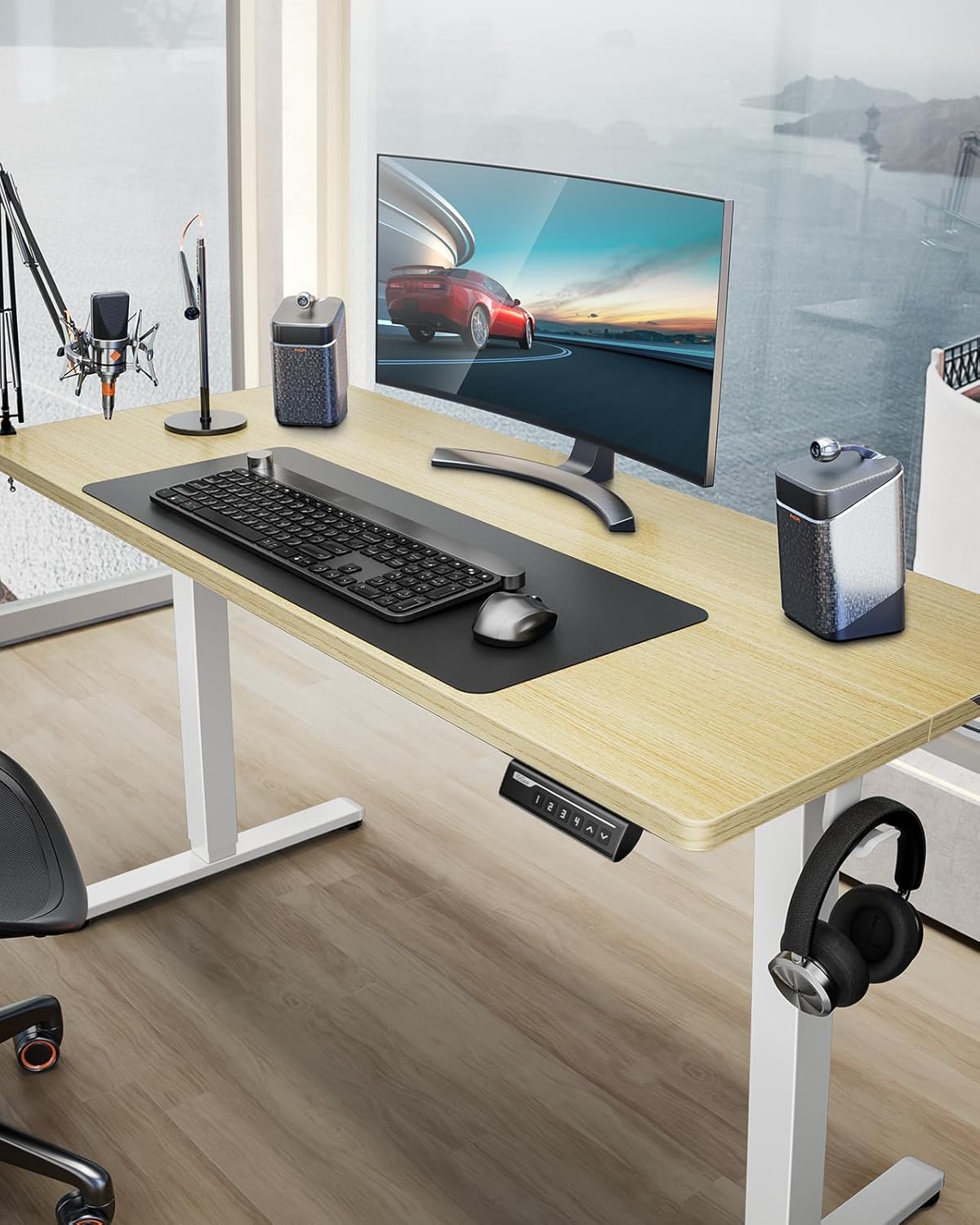
Figure 3: Close-up of the desk's control panel, showing the up/down arrows and memory preset buttons (1, 2, 3, 4) for convenient height adjustments.
Load Capacity and Stability
The desk boasts a powerful lifting performance with a maximum load capacity of 176 lbs. Its sturdy solid steel frame with aerospace-grade lifting column connectors ensures stability even at full height.

Figure 4: An illustration of the desk's robust 176 lbs load capacity, demonstrating its ability to support significant weight without compromising stability.
Cable Management
The desk includes integrated cable management features such as cable slots and holes to help keep your workspace tidy and organized.

Figure 5: Details of the desk's cable management system, featuring convenient cable slots and holes to route and organize power cords and peripheral cables, maintaining a clean and safe workspace.
Maintenance
Regular maintenance will ensure the longevity and optimal performance of your ErGear Electric Standing Desk.
- Cleaning: Wipe the desktop surface with a soft, damp cloth. For stubborn marks, use a mild, non-abrasive cleaner. Avoid harsh chemicals that may damage the engineered wood finish.
- Frame Care: Periodically check the steel frame and lifting columns for any loose screws or connections. Tighten as necessary. Keep the motor and electrical components free from dust and moisture.
- Cable Inspection: Regularly inspect all cables for wear, fraying, or damage. Ensure they are not pinched or stretched during height adjustments.
- Weight Distribution: Distribute weight evenly across the desktop to prevent undue stress on the lifting mechanism.
Troubleshooting
If you encounter any issues with your ErGear Electric Standing Desk, please refer to the following common troubleshooting steps:
| Problem | Possible Cause | Solution |
|---|---|---|
| Desk does not move. | Power cable disconnected; Overload; Motor error. | Check power connection. Reduce weight on desk. Unplug for 10 seconds, then plug back in to reset. |
| Uneven height adjustment. | Obstruction; Unbalanced load. | Clear any obstructions. Redistribute weight evenly. Perform a reset (refer to manual for specific reset procedure). |
| Noise during operation. | Normal motor sound; Loose components. | A slight motor sound is normal. Check and tighten any loose screws on the frame. |
| Control panel unresponsive. | Power issue; Cable connection issue. | Ensure power is connected. Check all cable connections between the motor and control panel. |
If the problem persists after attempting these solutions, please contact ErGear customer support for further assistance.
Specifications
| Feature | Detail |
|---|---|
| Brand | ErGear |
| Model Number | EGESD7N |
| Product Dimensions (D x W x H) | 28"D x 63"W x 28.35"H |
| Color | Natural |
| Style | Modern |
| Base Material | Alloy Steel |
| Top Material Type | Engineered Wood |
| Minimum Height | 28.35 Inches |
| Maximum Height | 46.46 Inches |
| Maximum Weight Recommendation | 176 Pounds |
| Lifting Mechanism | Electric |
| Number of Height Positions | 3 (Memory Presets) |
| Included Components | Storage Hook (2pcs) |
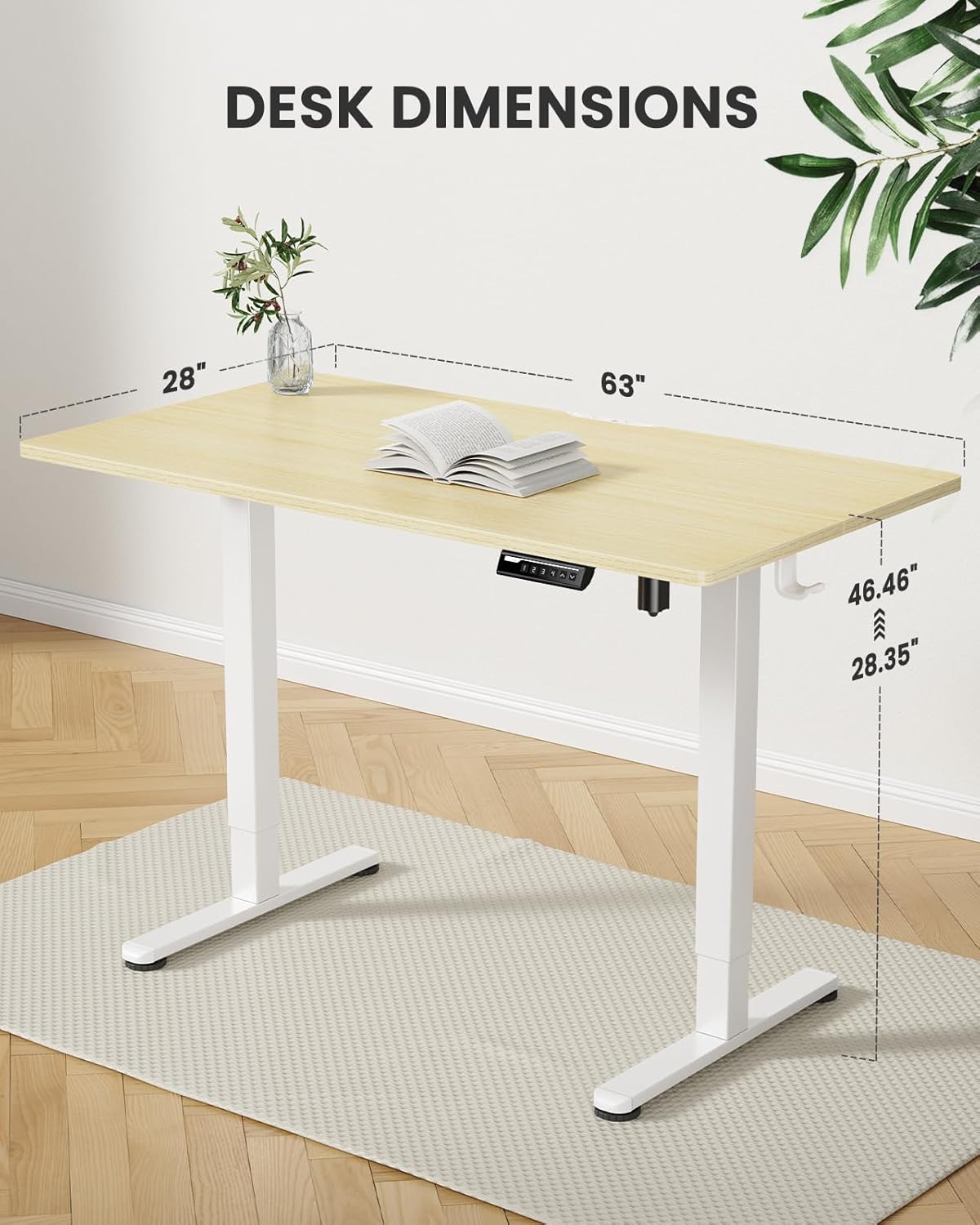
Figure 6: Detailed dimensions of the ErGear Electric Standing Desk, illustrating its length, width, and adjustable height range.
Warranty and Support
Warranty Information
The ErGear Height Adjustable Electric Standing Desk comes with a Full Warranty. For specific terms and conditions, please refer to the warranty card included with your product or contact ErGear customer support.
Additionally, protection plans are available for purchase:
- 2-Year Protection Plan
- 3-Year Protection Plan
Return Policy
This product is eligible for 30-day easy returns from the date of purchase. Please retain your proof of purchase for any return or warranty claims.
Customer Support
For any questions, technical assistance, or warranty claims, please contact ErGear customer support.
- Visit the official ErGear Store on Amazon.
- Refer to the Installation Manual (PDF) for detailed assembly and operational guidance.
- Contact the seller, Yunsheng Qiang US, for purchase-related inquiries.
Related documentsEGESD7N


Ask a question about this manual
Ask about setup, troubleshooting, compatibility, parts, safety, or missing instructions. Manuals+ will review the question and use this page’s manual context to help answer it.