
Product Overview
This manual provides instructions for the FITUEYES Mobile Floor TV Stand, Model B0B4212QW6. This stand is designed to support most flat or curved televisions ranging from 32 to 70 inches, with a maximum load capacity of 88 lbs (40 kg). It features a swivel mount, adjustable height, and three shelves for media components. The integrated wheels allow for easy repositioning, and a cable management system helps maintain an organized appearance.

Image: The FITUEYES Mobile Floor TV Stand in a living room setting, showcasing its design and functionality.
Safety Information
- Ensure all components are securely fastened before placing a television on the stand.
- Do not exceed the maximum weight capacity of 88 lbs (40 kg) for the TV or the individual shelf capacities.
- Verify that your TV's VESA mounting pattern is compatible with the stand (200x100mm to 600x400mm).
- When moving the stand, ensure the TV is stable and move slowly to prevent tipping. Lock the wheels once the stand is in its desired position.
- Keep children and pets away from the stand during assembly and when moving it.
- Avoid placing the stand on uneven surfaces.
Package Contents
Before beginning assembly, please verify that all parts listed in the included parts diagram are present and undamaged. All screws, bolts, nuts, and tools are typically provided in labeled bags for easy identification.
Setup Instructions
Follow the step-by-step instructions provided in the assembly guide included with your product. General steps include:
- Assemble the Base: Attach the wheels to the wooden base. Ensure they are securely tightened.
- Install the Main Column: Secure the main support column to the base.
- Attach Shelves: Position and secure the three plastic shelves to the main column at your desired heights.
- Mount TV Brackets: Attach the TV mounting brackets to the back of your television, ensuring the correct VESA pattern is used.
- Mount TV to Stand: Carefully lift and attach the television (with brackets) to the main column's mounting plate. Secure the TV using the provided locking mechanisms. This step may require two people.
- Adjust Height: Adjust the TV height on the column to your preferred viewing level.

Image: VESA compatibility and dimensional measurements for TV mounting.

Image: Illustration of the TV stand's swivel capability (±30°) and vertical height adjustment.
Operating Instructions
- Swivel Function: The TV bracket allows for a ±30° swivel to the left or right, providing a total of 60° viewing angle adjustment. Gently rotate the TV to achieve the desired angle.
- Height Adjustment: The TV can be adjusted vertically along the main column. Loosen the securing mechanism, slide the TV to the desired height between 50" and 57.8" (127cm to 147cm), and re-secure the mechanism.
- Mobility: To move the stand, unlock the wheels. Push or pull the stand carefully to its new location. Once positioned, lock the wheels to ensure stability.
- Shelf Usage: The two flexible plastic shelves can hold A/V components, cable boxes, DVD players, or game systems. Ensure items do not exceed the shelf's weight limit.
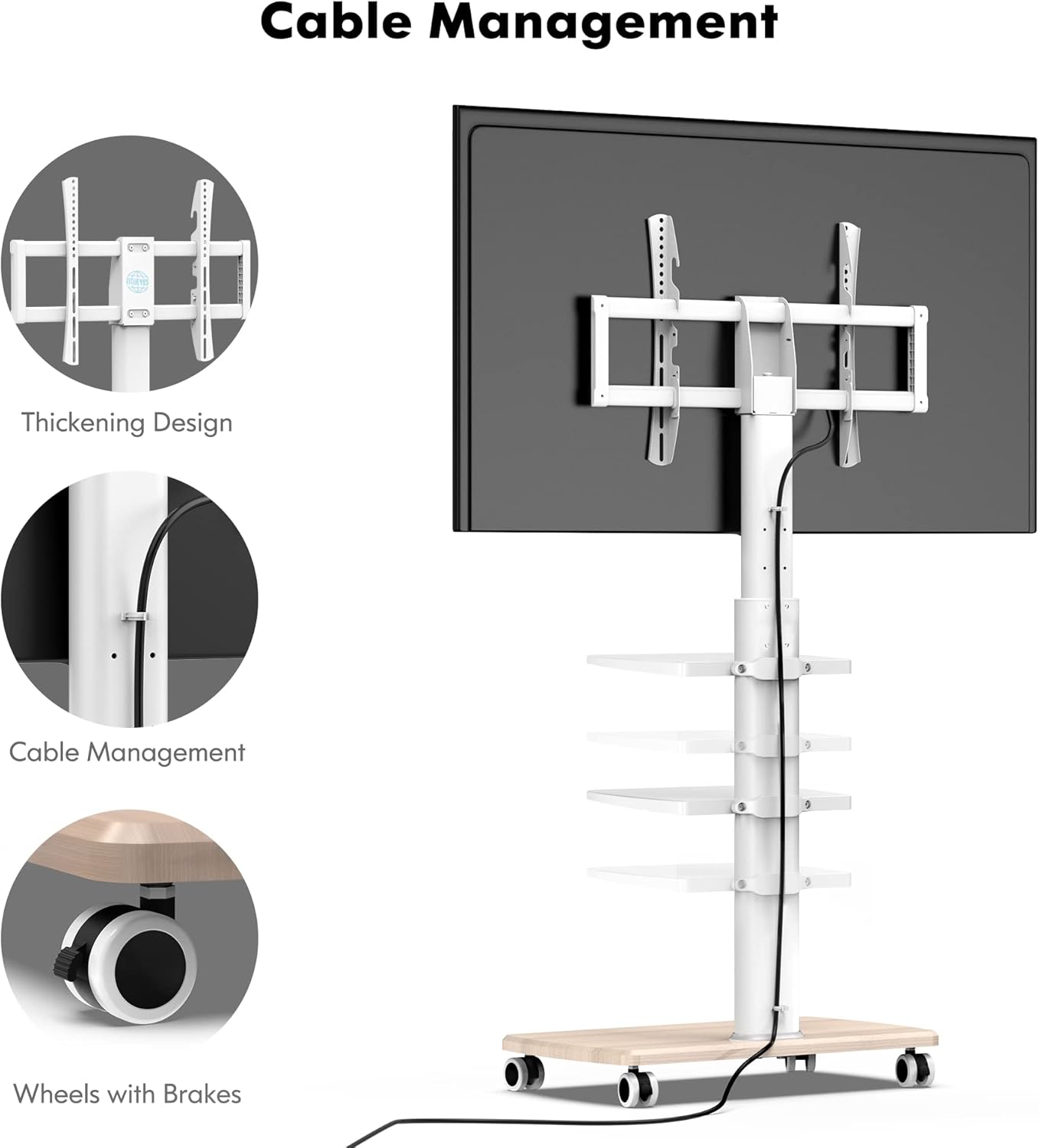
Image: Details on cable management features and the locking wheels.
Maintenance
- Cleaning: Wipe the stand with a soft, dry cloth. For stubborn marks, a slightly damp cloth can be used, followed by drying. Avoid abrasive cleaners or solvents.
- Cable Management: Utilize the integrated cable management system along the main pole to keep wires and cables neat and organized. This prevents tangles and reduces tripping hazards.
- Periodic Checks: Periodically check all screws and connections to ensure they remain tight and secure.
Troubleshooting
- Stand is Unstable: Ensure all assembly screws are tightened. Verify the stand is on a flat, level surface. Lock all wheels.
- TV Not Level: Check that the TV mounting brackets are installed evenly on the TV and securely attached to the stand. Adjust if necessary.
- Difficulty Moving Stand: Ensure all wheels are unlocked. Check for any obstructions on the floor.
- Missing Parts: If any parts are missing upon unboxing, contact customer support immediately.
Specifications
| Model Number | B0B4212QW6 |
| TV Compatibility | 32 to 70 inches |
| Maximum Load Capacity | 88 lbs (40 kg) |
| VESA Patterns Supported | 200x100, 200x200, 300x200, 300x300, 400x200, 400x300, 400x400, 600x400mm |
| Height Adjustment Range | 50" to 57.8" (127cm to 147cm) |
| Swivel Angle | ±30° (total 60°) |
| Number of Shelves | 3 (flexible plastic) |
| Material | Steel, Wood |
| Color | White |
| Mounting Type | Floor Mount |
| Movement Type | Swivel, Rolling |
Warranty and Support
FITUEYES products typically come with a warranty. Please refer to the warranty card included in your package for specific terms and conditions. This product may include up to a 10-year warranty.
For technical assistance, missing parts, or warranty claims, please contact FITUEYES customer support. The brand offers 24-hour global service.

24 Hours Global Service

Up to 10-year warranty


