
ErGear EGESD4B
ErGear Small Height Adjustable Electric Standing Desk
Instruction Manual
Model: EGESD4B
Introduction
Thank you for choosing the ErGear Small Height Adjustable Electric Standing Desk. This manual provides essential information for the setup, operation, and maintenance of your new desk. Designed for comfort and productivity, this desk allows you to seamlessly switch between sitting and standing positions, promoting a healthier work environment.

Image: The ErGear Electric Standing Desk in a home office setup, showcasing its spacious black desktop and sturdy black legs.
Key Features
- Outstanding Stability: Features a sturdy solid steel frame with aerospace-grade lifting column connectors, ensuring stability and security even after extensive use (tested 100,000 times).
- Smooth Height Adjustment: Freely select desk height from 28.35 inches to 46.46 inches. Save up to three favorite settings for quick and smooth transitions.
- Uprated Motor: Equipped with a powerful motor for efficient lifting performance and reliable long-term operation (tested 50,000 times).
- Safe Low-VOC Materials: Constructed with materials that sharply reduce formaldehyde and other VOC emissions, meeting US federal and state safe air standards.

Image: A man working at the standing desk with a dog leaning on it, illustrating the desk's ultimate stability.
Setup (Assembly Instructions)
For detailed assembly instructions, please refer to the official Installation Manual (PDF) provided with your product. The desk is designed for straightforward assembly, typically requiring one person.
General Assembly Tips:
- Unpack all components and verify against the parts list in the manual.
- Follow the step-by-step instructions carefully. Avoid using power drills for screwing into the desktop to prevent stripping holes; a hand screwdriver is recommended.
- Ensure all connections are secure before use.

Image: Various components of the ErGear standing desk, including the desktop pieces, legs, and control panel, ready for assembly.
Operating Instructions
Your ErGear Electric Standing Desk features an intuitive control panel for easy height adjustment and memory settings.
Height Adjustment:
- Use the Up (▲) and Down (▼) arrow buttons on the control panel to manually adjust the desk height. The current height is displayed on the digital screen.
- The desk adjusts smoothly and quietly, allowing for seamless transitions between sitting and standing positions.
Memory Presets:
- To save a preferred height, adjust the desk to your desired level, then press the 'S' button followed by one of the numbered preset buttons (1, 2, or 3). The height will be saved to that number.
- To recall a saved height, simply press the corresponding numbered preset button (1, 2, or 3). The desk will automatically move to the saved position.

Image: A detailed view of the desk's control panel, showing the digital height display and buttons for manual adjustment and memory presets.
Smart Anti-Collision System:
- The desk is equipped with a smart anti-collision system that automatically stops and slightly reverses if it encounters an obstacle during height adjustment, preventing damage to the desk or other objects.
Handy Features:
- Integrated cable access holes help manage wires for a clean and organized workspace.
- Two included storage hooks provide convenient places to hang headphones or bags.
Video: An official ErGear video demonstrating the smooth and quiet height adjustment of the standing desk, showcasing its functionality in a home office setting.
Maintenance
To keep your ErGear Electric Standing Desk in optimal condition, follow these simple maintenance guidelines:
- Cleaning: Wipe the desk surfaces with a damp cloth, then dry thoroughly with a clean, dry cloth. Avoid harsh chemicals or abrasive cleaners.
- Regular Checks: Periodically check all screws and connections to ensure they remain tight and secure.
Troubleshooting
If you encounter any issues with your ErGear Electric Standing Desk, please refer to the following common solutions:
| Problem | Possible Cause / Solution |
|---|---|
| Desk is wobbly or unstable. | Ensure all assembly screws are tightened. Check that the adjustable feet are evenly balanced on the floor. |
| Motor makes humming noise or is not responding. | Unplug the desk from the power outlet for a few minutes, then plug it back in. This can reset the motor. Ensure all cables are securely connected. |
| Desktop holes are stripped during assembly. | Avoid using power drills for assembly, especially when attaching the desktop. Use a hand screwdriver and do not overtighten screws. |
| Desk does not lift or lowers with heavy items. | Ensure the total weight on the desk does not exceed the maximum weight recommendation of 176 pounds. |
Specifications
| Specification | Detail |
|---|---|
| Brand | ErGear |
| Model Number | EGESD4B |
| Product Dimensions | 24"D x 40"W x 46.46"H |
| Color | Black |
| Style | Modern |
| Base Material | Alloy Steel |
| Finish Type | Steel |
| Special Feature | Sit and Standing Desk |
| Recommended Uses | Working, Drafting, Writing, Indoor, Gaming |
| Mounting Type | Floor Mount |
| Maximum Weight Recommendation | 176 Pounds |
| Tabletop Thickness | 0.67 Inches |
| Maximum Height | 46.46 Inches |
| Minimum Height | 28.35 Inches |
| Number of Height Positions | 3 |
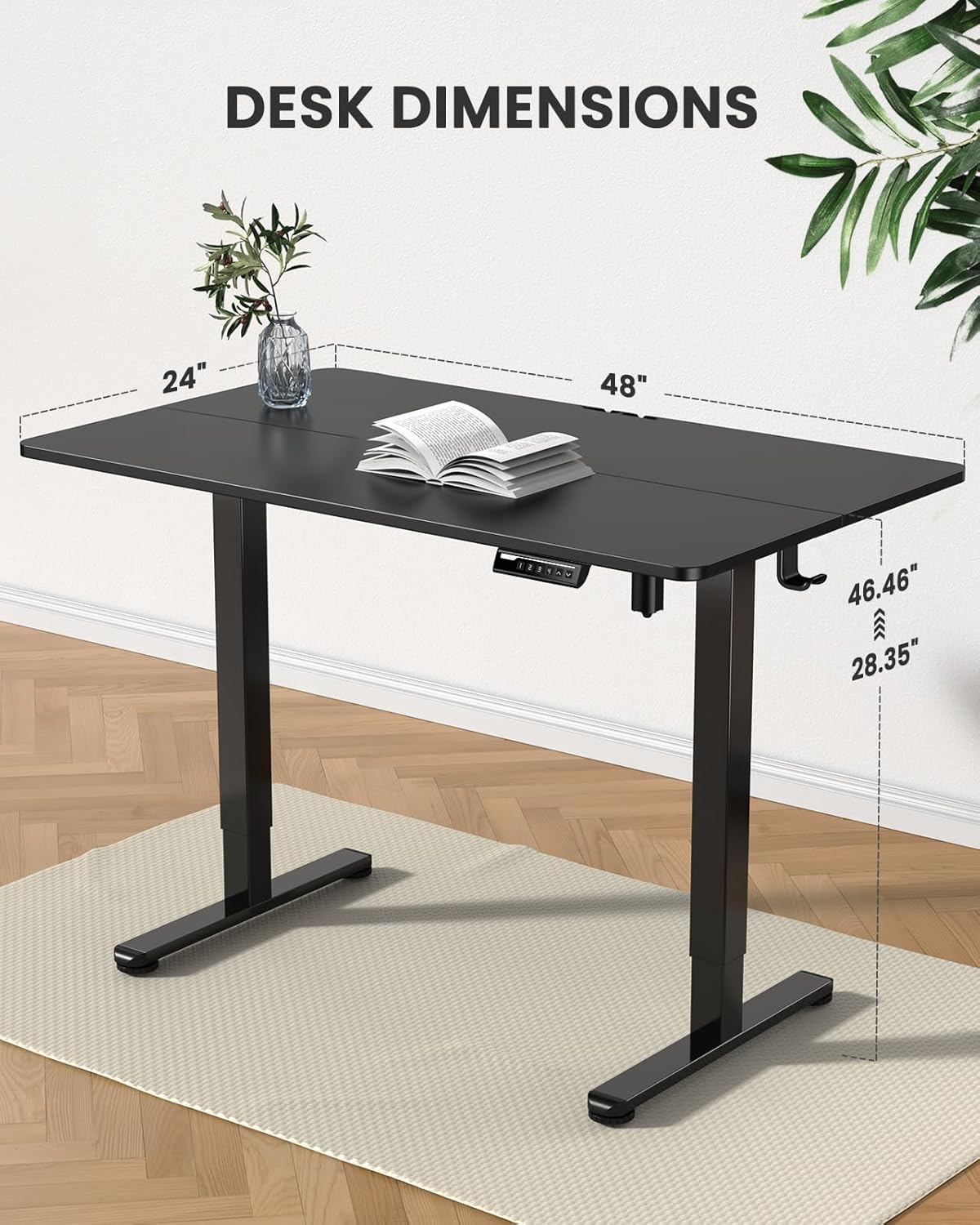
Image: A visual representation of the desk's dimensions, including height range and desktop size.
Safety Information
Please adhere to the following safety guidelines to ensure safe operation and longevity of your desk:
- Ensure proper assembly as per the instruction manual.
- Do not exceed the maximum weight limit of 176 pounds.
- Manage cables securely to prevent tripping hazards and ensure smooth movement of the desk.
- Keep children and pets away from the moving parts of the desk during operation.
Warranty & Support
The ErGear Electric Standing Desk comes with a Limited Warranty. For specific terms and conditions, please refer to the warranty information included with your purchase.
For further assistance, technical support, or to access the full installation manual, please refer to the official PDF document:
For any other inquiries, please contact ErGear customer support.
Related documentsEGESD4B


Ask a question about this manual
Ask about setup, troubleshooting, compatibility, parts, safety, or missing instructions. Manuals+ will review the question and use this page’s manual context to help answer it.