
Introduction
This manual provides comprehensive instructions for the Nathan Hydration Vest, model NS5026-00001-OSFM. Designed for active individuals, this vest offers a versatile hydration solution with a 2-liter bladder, a drinking bite valve, and secure storage for essentials. Please read this manual thoroughly to ensure proper setup, operation, and maintenance of your hydration vest.

Image: Front view of the Nathan Hydration Vest, showcasing its compact design and front storage.
Setup
1. Hydration Bladder Preparation
- Clean the Bladder: Before first use, rinse the 2-liter hydration bladder thoroughly with warm water and a mild soap. Ensure all soap residue is removed.
- Fill the Bladder: Open the bladder's fill port and fill with your desired liquid. Do not overfill.
- Remove Air: To minimize sloshing and bouncing, invert the bladder and gently squeeze to remove any excess air before sealing the fill port.
- Insert Bladder: Carefully slide the filled bladder into the dedicated hydration compartment of the vest. Ensure the hose exits through the designated port.
- Attach Bite Valve: Connect the drinking tube to the bite valve. Secure the bite valve to the vest's shoulder strap using the integrated clip for easy access during activity.
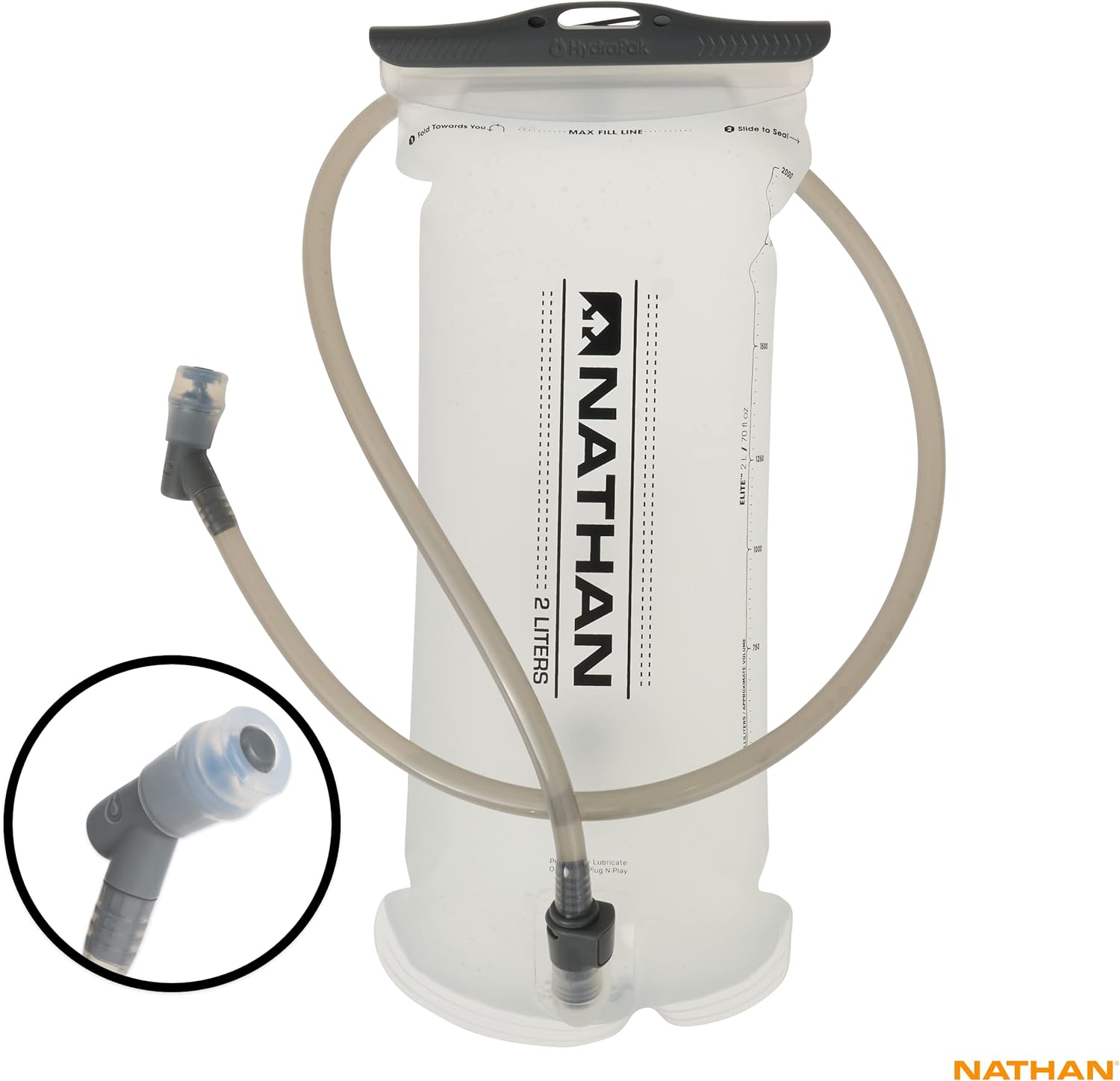
Image: The 2-liter hydration bladder with its attached drinking tube and bite valve, ready for insertion into the vest.

Image: Close-up of the bite valve securely attached to the vest's shoulder strap for convenient access.
2. Vest Adjustment
The Nathan Hydration Vest features a "One Size Fits Most" design with adjustable straps to ensure a secure and comfortable fit for various body types. Proper adjustment is crucial for preventing bounce and chafing.
- Initial Loosening: Loosen all chest and side straps before putting on the vest.
- Positioning: Put on the vest as you would a backpack. Ensure the main compartment sits comfortably on your upper back.
- Chest Strap Adjustment: Begin by tightening the adjustable chest straps. These straps can also slide up or down to position them comfortably around your chest, avoiding pressure points.
- Side Strap Adjustment: Gradually tighten the side straps, alternating between sides, until the vest feels snug against your body without restricting breathing or movement. The patented 3-way harness system helps distribute weight evenly.
- Test Fit: Perform a few movements (e.g., light jogging, arm swings) to check for any bouncing or discomfort. Re-adjust as necessary. The goal is a bounce-free ride.

Image: Rear view of the Nathan Hydration Vest, showing the hydration tube path and mesh shoulder straps.

Image: Close-up of the lower adjustable straps on the Nathan Hydration Vest, demonstrating the fit system.
Operating Instructions
1. Hydration Use
- Accessing Water: Bring the bite valve to your mouth. Gently bite down on the valve and suck to draw water.
- Securing the Valve: After drinking, return the bite valve to its clip on the shoulder strap to prevent it from swinging or getting caught.
2. Storage Pockets
The vest is equipped with multiple pockets for organizing your essentials:
- Main Compartment: Located at the back, this compartment primarily houses the hydration bladder. It also offers additional space for lightweight items such as a jacket or extra nutrition.
- Smartphone Compatible Pocket: A dedicated pocket on the front is designed to securely hold most smartphones, allowing for quick access.
- Additional Stash Pockets: Smaller pockets are available for gels, keys, or other small personal items.

Image: Interior view of the main compartment, showing ample space for the bladder and additional gear.
Maintenance
1. Cleaning the Hydration Bladder
- After Each Use: Empty any remaining liquid. Rinse the bladder and drinking tube thoroughly with warm water.
- Deep Cleaning: For a more thorough clean, use a bladder cleaning kit (sold separately) or a mixture of warm water and a small amount of baking soda or lemon juice. Scrub the interior with a bladder brush.
- Drying: Ensure the bladder is completely dry before storage to prevent mold and mildew. Use a bladder dryer or hang upside down with the opening propped open.
2. Cleaning the Vest
- Hand Wash Recommended: Hand wash the vest with mild soap and cold water. Avoid harsh detergents or bleach.
- Air Dry: Hang the vest to air dry completely. Do not tumble dry or expose to direct heat, as this can damage the materials.
3. Storage
Store the vest and bladder in a cool, dry place away from direct sunlight when not in use. Ensure both are completely dry before storage.
Troubleshooting
- Vest Bounces During Activity:
- Ensure all straps (chest and side) are tightened appropriately for a snug fit.
- Remove excess air from the hydration bladder after filling.
- Difficulty Drawing Water from Bite Valve:
- Check if the bite valve is in the open position (some valves have a twist-lock mechanism).
- Ensure the bladder hose is not kinked or pinched inside the vest.
- Verify there is sufficient liquid in the bladder.
- Bladder Leaks:
- Ensure the fill port cap is securely closed and sealed.
- Check the connection point between the hose and the bladder for a tight seal.
- Inspect the bladder for any punctures or damage. If damaged, the bladder may need replacement.
- Chafing or Discomfort:
- Re-adjust all straps to ensure an even and comfortable fit, avoiding overtightening in one area.
- Ensure the vest is worn over appropriate clothing to minimize skin friction.
Specifications
| Feature | Detail |
|---|---|
| Model Name | RUNNING vest |
| Part Number | NS5026-00001-OSFM |
| Brand | Nathan |
| Material | Nylon |
| Color | Black |
| Suggested Users | Unisex-adult |
| Product Dimensions (W x H) | 13.79"W x 3.15"H |
| Item Dimensions (L x W x H) | 13.79 x 13.79 x 3.15 inches |
| Item Weight | 14.4 Ounces (0.41 Kilograms) |
| Strap Type | Adjustable, Shoulder, Waist Strap |
| Total Capacity | 15 Liters |
| Tank Volume (Bladder) | 2 Liters |
| Number Of Pockets | 2 (plus additional stash pockets) |
| Included Components | Hydration vest, 2-liter bladder |
| UPC | 717064949359 |
| Manufacturer | SHOCK DOCTOR NATHAN |
Warranty Information
The Nathan Hydration Vest is covered by a lifetime warranty. This warranty covers defects in materials and workmanship under normal use. For warranty claims or further details, please contact Nathan customer support.
Support & Contact
For additional assistance, product inquiries, or support, please visit the official Nathan website or contact their customer service department.
- Official Website: www.nathansports.com
- Customer Service: Refer to the official website for current contact methods (phone, email, or contact form).