
1. Introduction
The eppfun AK3040R is a versatile Bluetooth 5.3 audio receiver designed to upgrade your existing wired audio systems, such as home speakers or car stereos, with wireless Bluetooth capabilities. It allows you to stream music from your smartphone or other Bluetooth-enabled devices. Featuring NFC for quick pairing, multiple audio output options (3.5mm AUX, RCA), and a TF card slot for direct music playback, the AK3040R offers a convenient and enhanced audio experience.
2. Product Features
- Bluetooth 5.3 Technology: Incorporates the latest low-energy Bluetooth Ver 5.3 chip, providing a longer transmission distance and faster speed compared to Bluetooth 4.0, while maintaining compatibility with older versions.
- NFC Function: Supports one-touch pairing with NFC-enabled mobile phones for quick and convenient connection.
- Multiple Audio Outputs: Equipped with 3.5mm AUX and RCA ports for broad compatibility with various audio systems.
- TF Card Slot: Allows direct playback of music files from a TF (MicroSD) card.
- Compact and Lightweight Design: Portable and easy to integrate into any audio setup.
3. Package Contents
Please check the package for the following items:
- eppfun AK3040R Bluetooth 5.3 Audio Receiver
- USB Charging Cable (Type-C)
- 3.5mm Audio Cable
- RCA Audio Cable
- User Manual
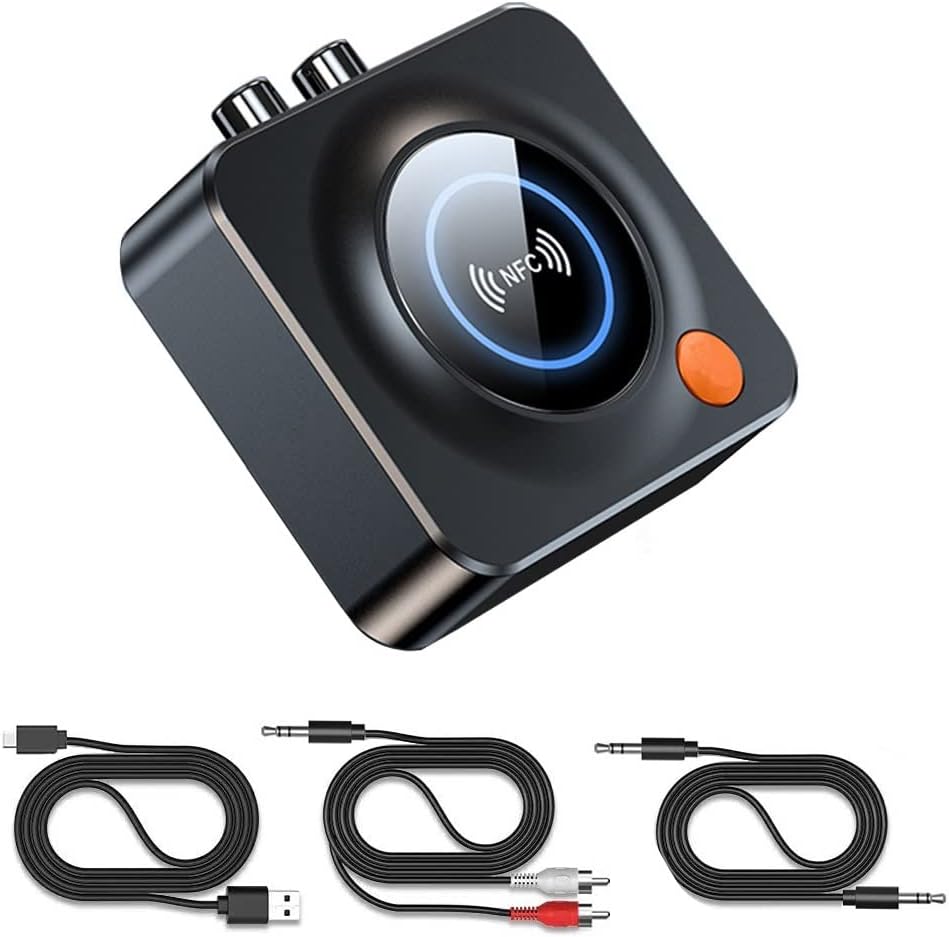
Image: The eppfun AK3040R Bluetooth receiver shown with its included USB charging cable, 3.5mm audio cable, and RCA audio cable.
4. Device Layout

Image: A top-down view of the eppfun AK3040R Bluetooth receiver. The top surface features a circular NFC sensing area with an NFC logo and a blue LED ring. An orange power button is visible on the side. The rear panel shows RCA (red and white) audio output ports, a 3.5mm AUX output, and a USB-C power input. A TF card slot is on the right side.
Familiarize yourself with the device's ports and controls:
- NFC Sensing Area: For quick pairing with NFC-enabled devices.
- Power Button: To turn the device on/off and initiate pairing.
- 3.5mm AUX Output: Connects to speakers or headphones via a 3.5mm audio cable.
- RCA Output: Connects to home stereo systems or amplifiers via RCA cables.
- TF Card Slot: Insert a TF (MicroSD) card for local music playback.
- USB-C Power Input: For connecting the power cable.
5. Setup
Follow these steps to set up your eppfun AK3040R Bluetooth receiver:
- Connect Power: Plug the USB charging cable into the USB-C power input on the AK3040R and connect the other end to a USB power adapter (not included) or a powered USB port. The device will automatically power on and enter pairing mode.
- Connect to Audio System:
- For speakers or headphones with a 3.5mm input, use the provided 3.5mm audio cable to connect the AK3040R's 3.5mm AUX output to your audio device's input.
- For home stereo systems or amplifiers with RCA inputs, use the provided RCA audio cable to connect the AK3040R's RCA outputs to your audio system's RCA inputs.

Image: A diagram illustrating the connection process. It shows a USB-C cable and RCA/3.5mm audio cables being plugged into the receiver's ports. A smartphone is shown pairing with the device, and the receiver is connected to a home theater system.
6. Operating Instructions
6.1. Bluetooth Pairing
The AK3040R will automatically enter pairing mode when powered on. The LED indicator will flash, indicating it's ready to pair.
- Standard Bluetooth Pairing:
- Enable Bluetooth on your smartphone or other audio source device.
- Search for available Bluetooth devices and select "AK3040R" from the list.
- Once connected, the LED indicator on the receiver will turn solid blue.
- NFC One-Touch Pairing:
- Ensure NFC is enabled on your mobile phone.
- Gently tap your NFC-enabled phone on the NFC sensing area of the AK3040R.
- Confirm the pairing request on your phone. The devices will connect automatically.
6.2. Playing Music
Once successfully paired, you can start playing music:
- From a Bluetooth Device: Play music on your paired smartphone or tablet. The audio will be streamed wirelessly to the AK3040R and output through your connected speakers.
- From TF Card: Insert a TF (MicroSD) card containing music files into the TF card slot. The receiver will automatically detect and begin playing music from the card.

Image: A visual representation of a smartphone streaming music wirelessly via Bluetooth to the eppfun AK3040R receiver, which is then connected to a pair of wired speakers, enhancing the audio experience.
7. Maintenance
To ensure the longevity and optimal performance of your AK3040R:
- Keep the device dry and away from moisture.
- Clean the device with a soft, dry cloth. Do not use harsh chemicals or abrasive cleaners.
- Avoid extreme temperatures.
- Do not attempt to disassemble or repair the device yourself. This will void the warranty.
8. Troubleshooting
| Problem | Possible Cause | Solution |
|---|---|---|
| Device does not power on. | No power supply or faulty cable. | Ensure the USB-C cable is securely connected to a working power source. Try a different cable or power adapter. |
| Cannot pair with Bluetooth device. | Bluetooth is off on your device; AK3040R is not in pairing mode; too many devices connected. | Ensure Bluetooth is enabled on your phone/tablet. Confirm the AK3040R LED is flashing (pairing mode). Disconnect other Bluetooth devices from your phone. Restart both devices. |
| No sound after connecting. | Incorrect audio cable connection; volume too low; wrong input selected on audio system. | Check that audio cables are firmly connected to the correct input/output ports. Increase volume on both the AK3040R and your audio system. Select the correct input source on your amplifier/speakers. |
| NFC pairing fails. | NFC is off on your phone; phone not placed correctly. | Ensure NFC is enabled on your phone. Place your phone directly over the NFC sensing area on the AK3040R. |
| TF card music not playing. | TF card not inserted correctly; unsupported file format; card corrupted. | Ensure the TF card is fully inserted. Check if music files are in a supported format (e.g., MP3). Try a different TF card. |
9. Specifications
| Feature | Detail |
|---|---|
| Model | AK3040R |
| Bluetooth Version | 5.3 |
| Audio Output Modes | Stereo |
| Connectivity Technology | Bluetooth, 3.5mm AUX, RCA |
| Special Features | NFC, Hands-free calling, Low latency |
| Compatible Devices | Android Smartphones, iPhones, iPads, Laptops, Wired Speakers |
| Reception Distance | Up to 10m (indoors) |
| Input Voltage | 4.8V ~ 5.25V |
| Product Dimensions | 6.9 x 6.9 x 2.4 cm (2.7 x 2.7 x 0.94 inches) |
| Item Weight | 45 g (1.59 ounces) |
| Material | ABS, Metal |
10. Warranty and Support
eppfun provides a 12-month warranty for this product. We are committed to ensuring a positive customer experience.
If you encounter any issues or have questions regarding your eppfun AK3040R Bluetooth 5.3 Audio Receiver, please do not hesitate to contact our customer support. You can typically reach us through your purchase platform via your order history (e.g., on Amazon: [Order History] - [Contact Seller]). We aim to resolve your concerns as quickly as possible.

