

1. Product Overview
The ARES iSmart-2 Full Body Massage Chair is designed to provide a comprehensive massage experience using advanced 4D SL-Track technology and AI integration. It features 12 automatic programs, full-body airbags, zero-wall design, and built-in heating therapy for enhanced relaxation.

Image: The ARES iSmart-2 Full Body Massage Chair in black and gray, showcasing its ergonomic design.
2. Important Safety Information
Please read and follow all instructions before use. This chair is designed for adults and may not be suitable for users under 160 cm tall or weighing over 136 kg. Always use the 'Zero Gravity Position' feature with caution and ensure the chair is stable before use.
- Ensure the power cord is not damaged and is properly connected to a grounded outlet.
- Do not use the chair in damp or wet environments.
- Keep children and pets away from the chair during operation.
- Consult a physician before use if you have any medical conditions, are pregnant, or have a pacemaker.
- Do not attempt to disassemble or repair the chair yourself. Contact customer support for assistance.
3. Setup Guide
3.1 Unpacking and Placement
Carefully remove the massage chair from its packaging. Ensure all components are present. Place the chair on a flat, stable surface. Allow sufficient space around the chair for recline and movement.
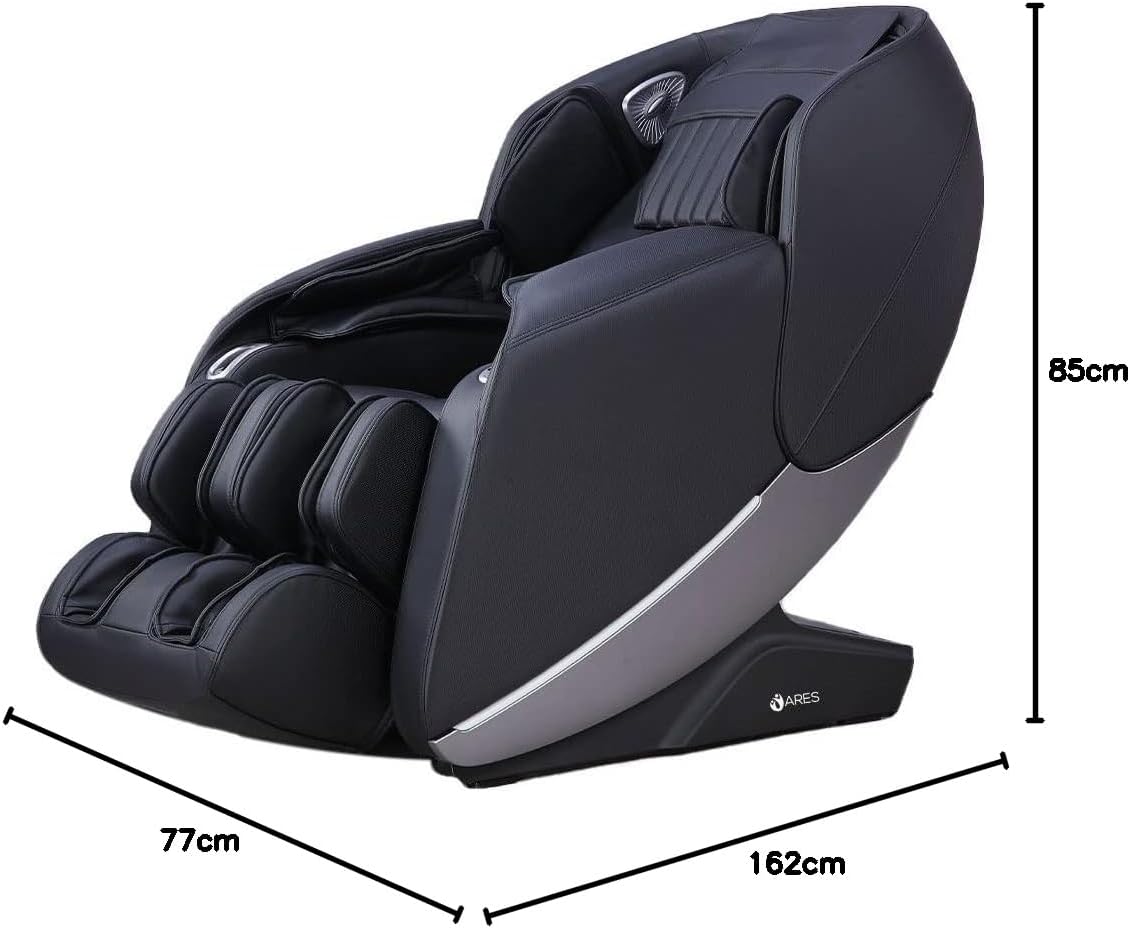
Image: Dimensions of the ARES iSmart-2 massage chair, showing a length of 162cm, width of 77cm, and height of 85cm.
3.2 Zero Wall Design
The iSmart-2 features a Zero Wall Design, requiring only 5 cm of space from the wall. When reclining, the chair slides forward, saving significant room compared to traditional massage chairs.

Image: Illustration of the Zero Space design, showing the chair requiring only 5cm from the wall when reclining.
4. Operating Your Massage Chair
4.1 Control Panel and Remote
The massage chair can be operated using the integrated control panel or the wireless remote control. Familiarize yourself with the buttons and their functions for optimal use.

Image: The remote control for the ARES iSmart-2 massage chair, displaying various program and adjustment buttons.
4.2 Intelligent Voice Control
The iSmart-2 features an intelligent voice recognition system, allowing hands-free control of various massage functions. Simply speak commands to adjust settings or select programs.

Image: The massage chair with an overlay indicating voice control commands for functions like stretch massage, back and waist massage, open air pressure, and relax massage.
4.3 Automatic Programs
The chair offers 12 pre-programmed automatic massage routines designed for various needs, including full-body, back and waist, shoulder and neck, relaxation, and fatigue recovery.

Image: Icons representing the 12 automatic massage programs, including Back and Waist Massage, Relaxing Massage, Shoulder and Neck Massage, Full-Body Massage, Traction Massage, Protection of Vertebral Massage, Comfortable Massage, Full Air Pressure, Fatigue Recovery, Beautiful Buttock Shaping, Soothing Sleep, and Stretching Muscles and Activating Collaterals.
4.4 Specialized Massage Functions
- Zero Gravity Position: Elevates the legs and torso to approximately 118 degrees, distributing body weight evenly and reducing pressure on the spine.

Image: Diagram illustrating the SL Shape Curved Rail, Zero Gravity position (118-degree elevation), and Leg Stretch function.
- Heating Therapy: Carbon fiber far infrared heating elements provide warmth to the back (40°C-50°C), which can help relieve coldness and muscle pain.
- Rollers Foot Massage: Features specialized sole raised dots for a professional scraping massage, targeting the Yongquan acupoint on the feet.
- Full Body Airbag Massage: Equipped with 24 airbags for comprehensive air pressure massage on the upper arms, under arms, legs, and feet. The air pressure intensity is adjustable.

Image: Diagram showing the distribution of 24 airbags for upper arm, under arm, leg, and foot massage, along with the back heating function and foot rolling massage.
- AI Intelligent 4D Core Massage Manipulator: Mechanical massage hands collect back curve data and mimic professional masseur skills for multi-dimensional and stereo massage.
- 4D Motion SL-Track Massage Mechanism: A 135cm super long SL-shaped curved rail provides massage from the head to the legs, maintaining the body's natural S-shaped curve.
- Backrest Scanning: Upon activation, the chair performs an auto body scan to measure key back areas and height, ensuring a customized and effective massage.
4.5 Connectivity
- USB Charging Port: Conveniently located USB port for charging mobile devices during your massage.

Image: Close-up of the USB charging port integrated into the massage chair's armrest.
- Bluetooth Speaker: Built-in Bluetooth speakers allow you to connect your device and enjoy music or audio during your massage.

Image: Close-up of the Bluetooth speaker located near the headrest of the massage chair.
- Shortcut Buttons: Easily accessible shortcut buttons for quick adjustments to recline and other common functions.

Image: Close-up of the shortcut buttons on the side of the massage chair for quick adjustments.
5. Care and Maintenance
Regular maintenance ensures the longevity and optimal performance of your massage chair.
- Cleaning: Wipe the chair's surface with a soft, damp cloth. For faux leather, use a mild, non-abrasive cleaner. Avoid harsh chemicals or solvents.
- Storage: When not in use for extended periods, unplug the chair and store it in a cool, dry place away from direct sunlight.
- Inspection: Periodically check the power cord and connections for any signs of wear or damage.
- Moving the Chair: If relocating the chair, ensure it is unplugged and use proper lifting techniques or assistance to prevent injury or damage.
6. Troubleshooting Guide
Refer to this guide for common issues. If the problem persists, contact customer support.
| Problem | Possible Cause | Solution |
|---|---|---|
| Chair does not power on. | Power cord unplugged; power outlet malfunction; main power switch off. | Ensure power cord is securely plugged in. Test outlet with another device. Check the main power switch on the chair. |
| Massage intensity is too weak/strong. | Incorrect program selected; manual adjustment needed. | Adjust intensity settings using the remote control. Try a different automatic program. |
| Voice control not responding. | Microphone obstructed; voice commands unclear; feature disabled. | Ensure no obstructions near the microphone. Speak clearly and at a normal volume. Check if voice control is enabled in settings. |
| Unusual noises during operation. | Loose component; normal operational sound. | Some operational sounds are normal. If the noise is loud or unusual, discontinue use and contact customer support. |
7. Technical Specifications
| Brand | ARES |
| Model Number | RS-K902-BL |
| Color | Black/Gray |
| Product Dimensions (L x W x H) | 162 x 77 x 85 cm |
| Item Weight | 92 Kilograms |
| Material | Faux Leather |
| Special Features | Space Saving (Zero Wall Design) |
| Massage Technology | 4D SL-Track, AI Intelligent Manipulator |
| Auto Programs | 12 |
| Airbags | Full Body Airbags (24 PCS) |
| Heating Function | Carbon fiber far infrared (40°C-50°C) |
| Control | Intelligent Voice Control, Remote Control |
| Connectivity | USB, Bluetooth Speaker |
8. Warranty and Customer Support
8.1 Warranty Information
The ARES iSmart-2 Massage Chair comes with a 3-year warranty, ensuring reliability and protection against manufacturing defects. This warranty can be extended up to 7 years. Each chair undergoes 100% performance testing before shipping to ensure quality.
8.2 Customer Support
For any questions, technical assistance, or warranty claims, please contact ARES customer support. Our team is dedicated to providing exceptional after-sales support to ensure your satisfaction.
Please refer to your purchase documentation for specific contact details or visit the official ARES website.