1. Introduction
This manual provides comprehensive instructions for the safe and efficient operation of your RUYAGE UV58 Two-Way Radio. Please read this manual thoroughly before using the device to ensure proper function and to prevent damage.
The RUYAGE UV58 is a versatile two-way radio featuring a 5000 mAh battery, NOAA weather alerts, an LED screen, and USB fast charging. It supports a wide range of frequencies and is designed for reliable communication.
2. What's in the Box
Carefully unpack the box and ensure all items are present:
- RUYAGE UV58 Host (Radio Unit) x 1
- Lithium Ion Battery (5000 mAh) x 1
- Antenna x 1
- User Manual x 1
- Back Clip x 1
- Lanyard x 1
- Charger (USB Fast Charging Cable and Adapter) x 1
3. Product Overview
Familiarize yourself with the components of your RUYAGE UV58 Two-Way Radio.
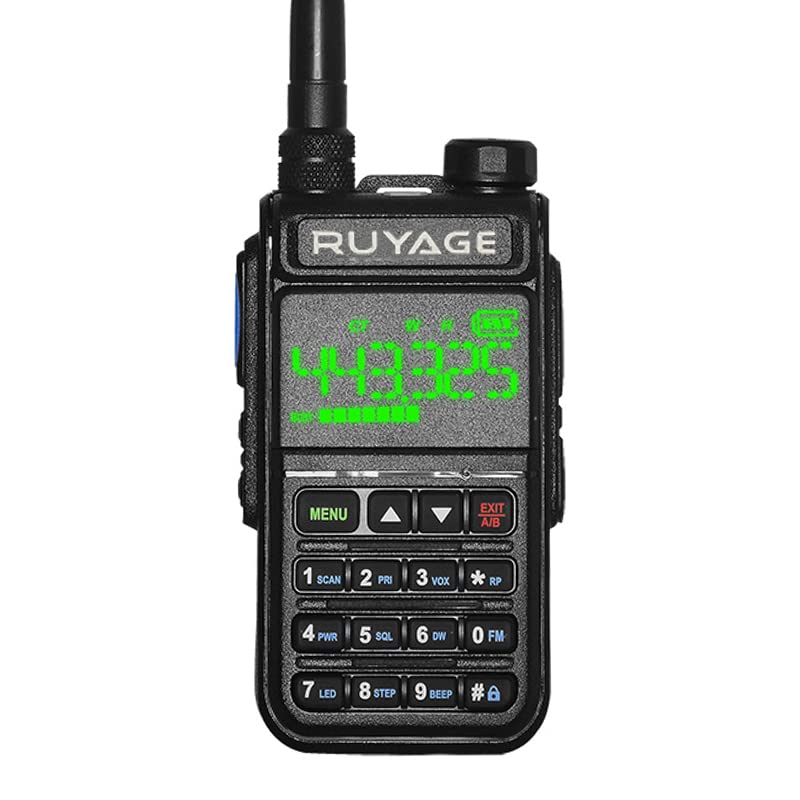
Figure 3.1: Front view of the RUYAGE UV58 Two-Way Radio, showing the display, keypad, and antenna connection.

Figure 3.2: All components included in the RUYAGE UV58 Two-Way Radio package: radio unit, battery, antenna, manual, back clip, lanyard, and charger.

Figure 3.3: Close-up of the RUYAGE UV58's LED screen, displaying frequency and status indicators.

Figure 3.4: Left side view of the RUYAGE UV58, highlighting the Push-To-Talk (PTT) button and other side controls.

Figure 3.5: Right side view of the RUYAGE UV58, showing the accessory ports for external microphone/speaker.
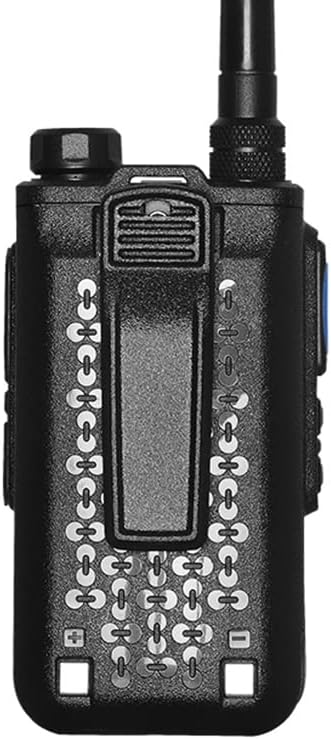
Figure 3.6: Back view of the RUYAGE UV58, illustrating the battery compartment and attached belt clip.
Keypad Functions:
- MENU: Accesses the radio's menu settings.
- UP/DOWN Arrows: Navigate through menu options or change channels/frequencies.
- EXIT/AB: Exits menu or switches between A/B frequency bands.
- 1 SCAN: Initiates channel scanning.
- 2 PR: Program function (refer to detailed manual for specific programming).
- 3 VOX: Activates Voice Operated Exchange.
- 4 PWR: Power setting (High/Low).
- 5 SQL: Squelch level adjustment.
- 6 DW: Dual Watch function.
- 0 FM: Activates FM radio mode.
- 7 LED: Toggles the LED flashlight.
- 8 STEP: Frequency step adjustment.
- 9 #: Toggles keypad lock or other special functions.
4. Setup
4.1 Battery Installation
- Ensure the radio is powered off.
- Align the battery pack with the grooves on the back of the radio.
- Slide the battery pack upwards until it clicks into place.
- To remove, press the battery release latch (if present) and slide the battery downwards.
4.2 Charging the Battery
The UV58 radio uses a 5000 mAh Lithium Ion battery and supports USB fast charging.
- Connect the USB charging cable to the charging port on the radio or the charging cradle.
- Connect the other end of the USB cable to a compatible USB power adapter (included) or a powered USB port.
- The LED indicator on the radio or charger will show the charging status (e.g., red for charging, green for fully charged).
- A full charge typically takes several hours. Do not overcharge the battery.
4.3 Antenna Attachment
- Screw the antenna clockwise into the connector on the top of the radio until it is finger-tight.
- Do not overtighten.
4.4 Belt Clip Attachment
- Align the belt clip with the screw holes on the back of the radio (above the battery).
- Secure the belt clip using the provided screws.
5. Operating Instructions
5.1 Power On/Off and Volume
- Power On: Rotate the power/volume knob clockwise until you hear a click. The LED screen will illuminate.
- Volume Adjustment: Continue rotating the knob clockwise to increase volume, counter-clockwise to decrease.
- Power Off: Rotate the power/volume knob counter-clockwise until you hear a click.
5.2 Channel Selection
The UV58 supports 128 channels and a frequency range of 65-108/108-136/136-174/200-290/300-400/400-520MHz.
- Use the UP and DOWN arrow buttons to cycle through available channels.
- Alternatively, you can directly input a channel number using the keypad.
- Press MENU to confirm channel selection or access frequency input mode.
5.3 Transmitting and Receiving
- Receiving: When a signal is detected on the selected channel, the radio will automatically open the squelch and you will hear the transmission.
- Transmitting: To transmit, press and hold the PTT (Push-To-Talk) button on the left side of the radio. Speak clearly into the microphone. Release the PTT button to stop transmitting and return to receive mode.
5.4 NOAA Weather Radio Function
The UV58 can receive NOAA weather alerts.
- Access the menu and navigate to the NOAA weather function (refer to the detailed manual for specific menu navigation).
- Select the desired NOAA weather channel.
- The radio will monitor for weather alerts.
5.5 LED Screen Interpretation
The large LED screen displays various indicators:
- Frequency/Channel Number: Shows the currently selected operating frequency or channel.
- Battery Level Indicator: Displays the remaining battery charge.
- Signal Strength Indicator: Shows the strength of the received signal.
- TX/RX Indicator: Indicates when the radio is transmitting (TX) or receiving (RX).
- Function Icons: Icons for VOX, Dual Watch, Keypad Lock, etc.
5.6 Additional Functions
- FM Radio: Press the 0 FM button to enter FM radio mode. Use arrow keys to tune.
- Alarm Function: The radio includes an alarm function (local/remote). Refer to the full manual for activation and settings.
- LED Flashlight: Press the 7 LED button to turn the built-in flashlight on or off.
6. Maintenance
6.1 Cleaning
- Wipe the radio's surface with a soft, damp cloth.
- Do not use harsh chemicals or abrasive cleaners.
- Ensure the radio is powered off and dry before cleaning.
6.2 Battery Care
- Charge the battery fully before first use.
- Avoid completely draining the battery regularly to prolong its lifespan.
- Store the battery in a cool, dry place when not in use for extended periods.
- Do not expose the battery to extreme temperatures or direct sunlight.
6.3 Storage
- Store the radio in a dry, dust-free environment.
- Remove the battery if storing for long periods.
6.4 Water Resistance
The RUYAGE UV58 has an IP55 water resistance rating, meaning it is protected against dust ingress and low-pressure water jets from any direction. It is not designed for submersion. Avoid exposing the radio to heavy rain or direct water spray.
7. Troubleshooting
| Problem | Possible Cause | Solution |
|---|---|---|
| Radio does not power on. | Battery is dead or not installed correctly. | Charge the battery. Reinstall the battery correctly. |
| Cannot transmit or receive. | Incorrect channel/frequency, low battery, antenna not attached, or out of range. | Verify channel/frequency. Charge battery. Attach antenna securely. Move closer to other radios. |
| Poor audio quality or static. | Weak signal, high squelch level, or interference. | Adjust squelch level (SQL). Move to an area with better reception. Check antenna connection. |
| Battery life is shorter than expected. | Frequent transmission, high power setting, or aging battery. | Use low power setting when possible. Ensure battery is fully charged. Consider replacing old batteries. |
8. Specifications
| Feature | Detail |
|---|---|
| Brand | RUYAGE |
| Model Number | UV58 |
| Number of Channels | 128 |
| Frequency Range | 65-108/108-136/136-174/200-290/300-400/400-520MHz |
| Battery Capacity | 5000 mAh Lithium Ion |
| Battery Average Life | 8-36 hours (normal use), 8-12 hours (continuous use) |
| Charging | USB Fast Charging |
| Talking Range Maximum | 3 Kilometers (approx. 1.86 miles) |
| Water Resistance Level | IP55 (Water Resistant) |
| Voltage | 7.4 Volts (DC) |
| Special Features | LED Screen, NOAA Weather, FM Radio, Alarm Function, LED Flashlight |
| Dimensions | 4.5 inches height (radio unit only) |
| Weight | 8.6 Oz (approx. 244 grams) |
9. Warranty Information
Based on available product information, there is no explicit warranty description provided for the RUYAGE UV58 Two-Way Radio. Please refer to your point of purchase or contact the seller for specific warranty terms and conditions.
10. Customer Support
If you encounter any issues or have questions regarding your RUYAGE UV58 Two-Way Radio that are not covered in this manual, please contact the seller or manufacturer directly for assistance.
For general inquiries, you may visit the RUYAGE Store on Amazon.