1. Product Overview
The BOBOVR M2 Plus Head Strap is designed to enhance the comfort and stability of your Meta Quest 2 VR headset. Its suspension design and multi-point adjustment system aim to distribute the headset's weight evenly, reducing pressure on the face and improving overall wearing experience during extended use.

Image 1.1: The BOBOVR M2 Plus Head Strap attached to a Meta Quest 2 VR headset, showcasing its design and how it integrates with the headset.
2. What's in the Box
Verify that all components are present in your package:
- Headstrap (1)
- PU leather pad (1)
- Honeycomb pad (1)
- Instructions (1)

Image 2.1: A visual representation of the BOBOVR M2 Plus Head Strap package contents, including the head strap, two types of pads, and the instruction manual.
3. Installation Guide
Follow these steps to correctly install the BOBOVR M2 Plus Head Strap onto your Meta Quest 2 headset:
- Remove the original face interface: Carefully detach the existing face interface from your Quest 2 headset.
- Align and attach side arms: Position the side arms of the M2 Plus strap with the corresponding sides of the Quest 2 headset. Press firmly until they click into place.
- Align their ends: Ensure the ends of the side arms are properly aligned with the headset's attachment points.
- Pass the middle webbing: Thread the middle webbing strap through the Quest 2's fixing ring, maintaining a distance of approximately 1-2 cm from the headset.
- Install the face interface: Reinstall the face interface onto the Quest 2 headset.
Video 3.1: Step-by-step installation guide for the BOBOVR M2 Plus Head Strap on a Meta Quest 2 headset. This video demonstrates how to remove the original strap, attach the new head strap, and secure all components for a proper fit.
4. Operating and Adjustment
Achieving optimal comfort and stability is crucial for an immersive VR experience. The M2 Plus Head Strap offers multiple adjustment points:
- Initial Placement: First, place the Quest 2 headset in a suitable position on your face, ensuring your eyes can see the screen clearly.
- Secure the Back Half: Pull down the back half of the M2 Plus strap and tighten the knob located at the rear to secure it in a comfortable position.
- Level and Straight Alignment: Verify that the front and rear sections on both sides of the strap are level and straight for balanced weight distribution.
- Head Shape Adaptation: The flexible frame design supports adjustment of the up and down inclination angle, allowing it to adapt to various head shapes.
- Optional Honeycomb Pad: If you desire more grip on the back of your head, you can replace the standard PU leather pad with the included honeycomb silicone pad. This pad also offers enhanced ventilation and is easier to clean.

Image 4.1: A user demonstrating the multi-point adjustment feature of the head strap, highlighting its adaptability for different head sizes.

Image 4.2: An individual wearing the Meta Quest 2 with the BOBOVR M2 Plus Head Strap, illustrating how the design helps to distribute the headset's weight, thereby reducing facial pressure.
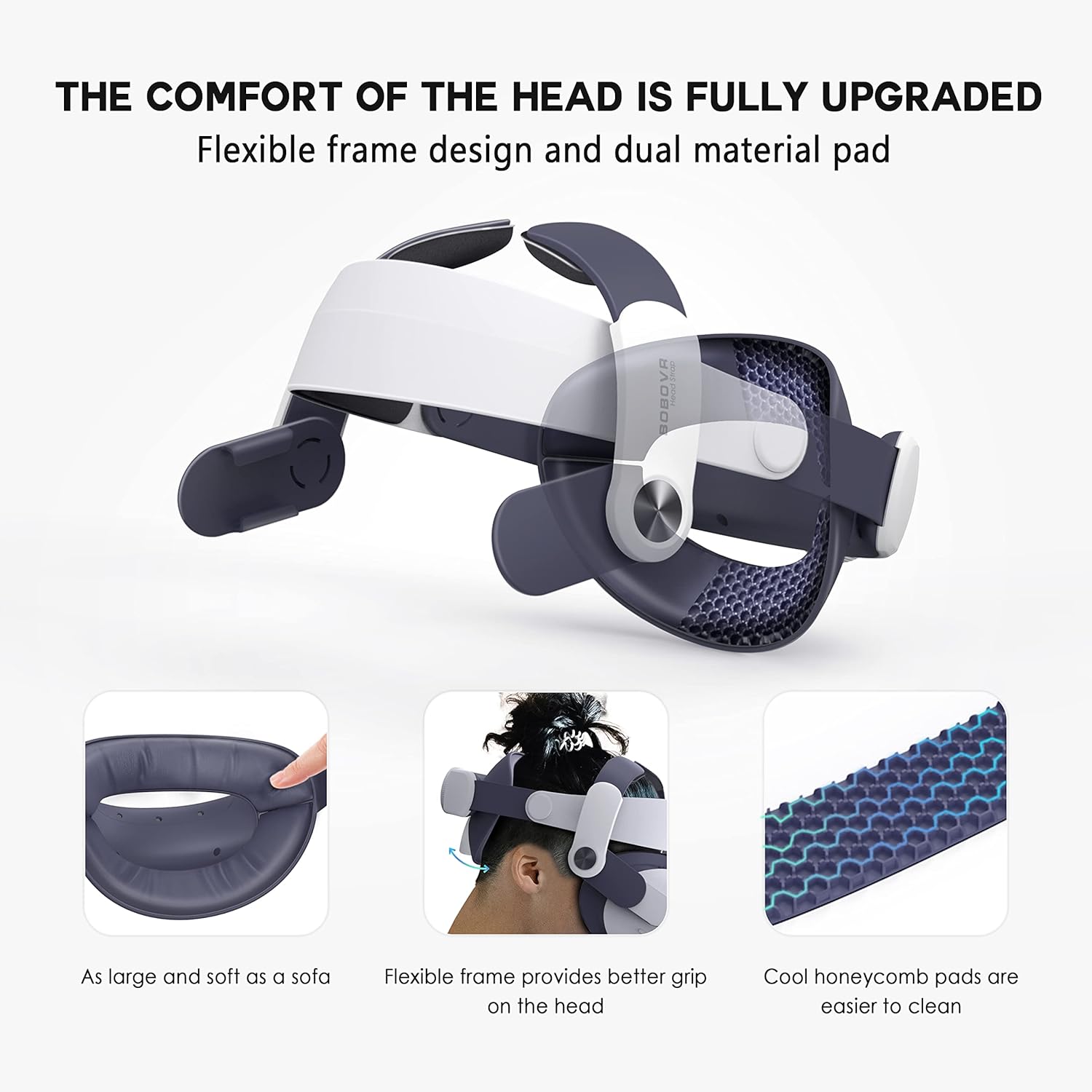
Image 4.3: A detailed view of the head strap's flexible frame and the two types of pads (PU leather and honeycomb silicone), emphasizing the comfort and grip features.
Video 4.1: This video demonstrates the adjustment process of the BOBOVR M2 Plus Head Strap, showing how to achieve a secure and comfortable fit on the head.
5. Maintenance
To ensure the longevity and hygiene of your BOBOVR M2 Plus Head Strap:
- Cleaning Pads: The honeycomb silicone pad is designed for easy cleaning. Regularly wipe down both the PU leather and honeycomb pads with a damp cloth and mild soap, then allow them to air dry completely before reattaching.
- General Care: Avoid exposing the head strap to extreme temperatures or direct sunlight for prolonged periods. Store it in a cool, dry place when not in use.
6. Specifications
| Feature | Detail |
|---|---|
| Product Dimensions | 8.54 x 5.28 x 7.76 inches |
| Item Weight | 14.8 ounces |
| Model Name | M2 Plus |
| Brand | BOBOVR |
| Color | Black, White |
| Special Feature | Reduce facial pressure |
| Connectivity Technology | Wireless |
| Compatible Devices | Quest2 |
| Specific Uses For Product | Improve the wearing comfort of Quest2 |
7. Optional Battery Upgrade
The BOBOVR M2 Plus Head Strap is designed to be compatible with an optional battery pack for extended usage. Please note that the B2 battery pack and battery dock are sold separately and are not included with the M2 Plus strap.

Image 7.1: A visual guide demonstrating the process of attaching an optional B2 battery pack to the M2 Plus Head Strap via its extension interface, enhancing playtime.
8. Troubleshooting
No specific troubleshooting information is provided for this product. For general issues, please ensure all components are correctly installed and adjusted according to the instructions. If problems persist, refer to the manufacturer's official support channels.