
NEXPEAK NC175
NEXPEAK 1.75-Amp Smart Battery Charger User Manual
Model: NC175
Your comprehensive guide to intelligent battery care.

Image: NEXPEAK 1.75-Amp Smart Battery Charger with included accessories.
1. Product Overview
The NEXPEAK NC175 is a versatile 4-in-1 intelligent battery charger, maintainer, trickle charger, and battery desulfator. Designed for optimal battery health and longevity, it is compatible with all types of 6-volt and 12-volt lead-acid batteries, including flooded, gel, AGM, SLA, VRLA, and maintenance-free batteries.
This device is ideal for a wide range of vehicles and equipment, ensuring your batteries are always ready for use.
- Versatile Compatibility: Supports 6V and 12V lead-acid batteries.
- Multi-functional: Acts as a charger, maintainer, trickle charger, and desulfator.
- Wide Application: Suitable for cars, golf carts, motorcycles, boats, lawn mowers, marines, ATVs, and UTVs.
- Intelligent LCD Display: Provides real-time charging status, percentage, voltage, and current.
- Advanced Protection: Features comprehensive safety mechanisms including short circuit, overload, low-voltage, high-voltage, overcharge, over-temperature, reverse-connection, and over-current protection.

Image: The NEXPEAK NC175 charger is suitable for a wide range of 6V and 12V lead-acid batteries in various vehicles.
2. Setup and Connection
Before connecting the charger, ensure the battery type and voltage match the charger's capabilities (6V or 12V lead-acid). The charger comes with a 6.6ft SAE standard cord and detachable alligator clips and ring terminals.
- Choose Connector: Select either the alligator clips for temporary connections or the ring terminals for more permanent, long-term maintenance.
- Connect to Charger: Attach the chosen connector to the charger's output cable via the SAE connector.
- Connect to Battery: Connect the positive (RED) battery clamp/ring terminal to the positive (+) battery terminal. Then, connect the negative (BLACK) battery clamp/ring terminal to the negative (-) battery terminal.
- Power On: After the positive and negative clips are connected, plug the charger into a standard AC power outlet. The LCD screen will light up, displaying the battery's voltage, current, and remaining capacity.
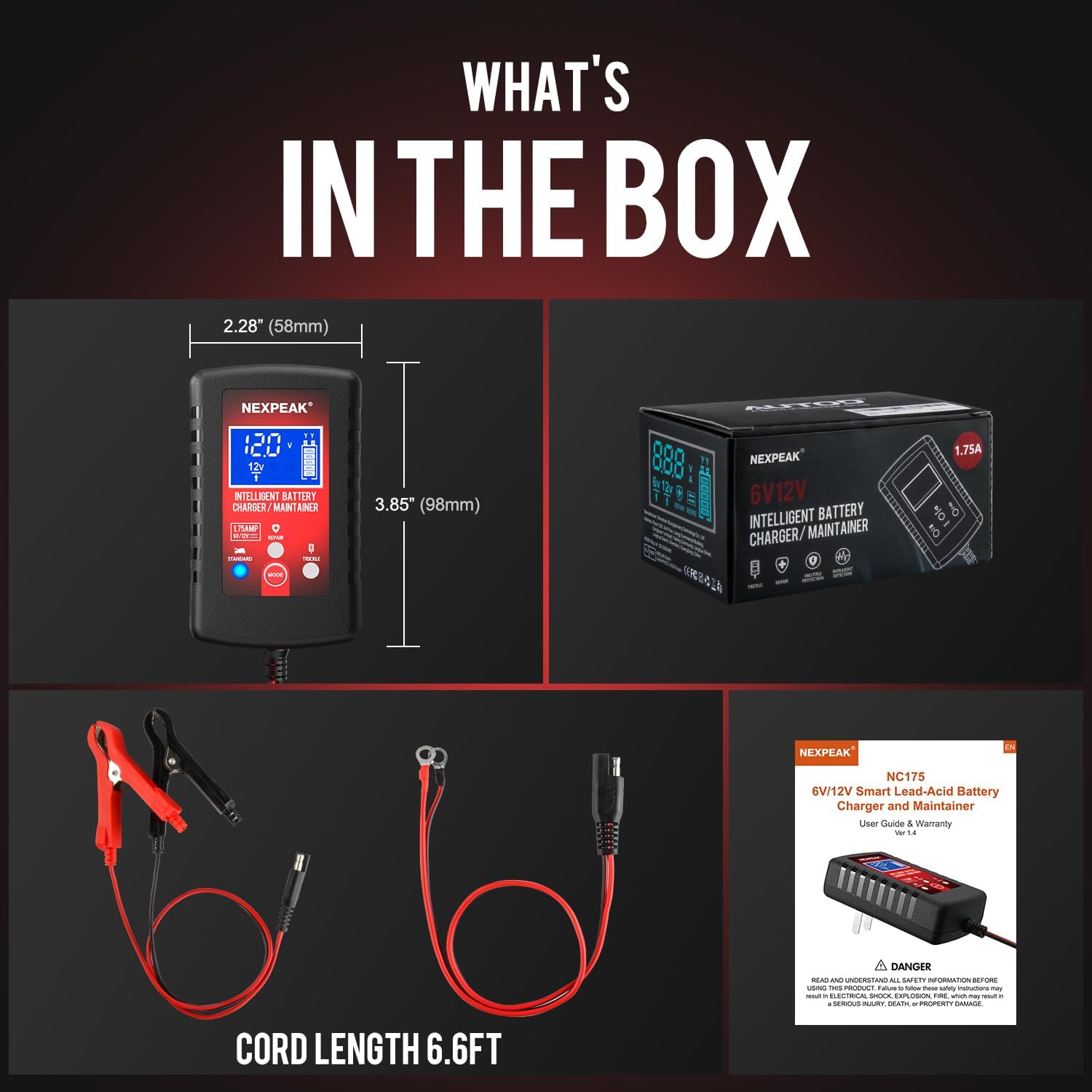
Image: The package includes the NEXPEAK NC175 charger unit, a 6.6ft cord, detachable alligator clips, and ring terminals.
Important Safety Warnings:
- Lithium batteries are prohibited for charging. This charger is designed for lead-acid batteries only.
- Do not attempt to use the product with any other types of batteries.
- CANNOT charge totally dead batteries (0V) or bad cells (damaged).
- Do not submerge the charger in water or use in wet environments.
- Stop charging immediately if the battery is found to be abnormal or damaged.
- Charging batteries in the vehicle is not allowed if you are going to use the repairing mode, which may result in damages.
3. Operating Modes and Features
The NEXPEAK NC175 offers three primary operating modes: Standard, Repair, and Trickle. Use the MODE button to switch between them.

Image: The intelligent digital LCD screen provides real-time display of charging status, voltage, and current.
3.1 Standard Charging Mode
This mode is suitable for charging batteries with a voltage above 0.1V. The charger will automatically cut off power once the battery is fully charged. It follows a 7-stage charging program:
- Desulfurization
- Trickle Charging
- Constant Current Charging
- Constant Voltage Charging
- Battery Current Detection
- Compensation Charging
- Floating Charging

Image: Visual representation of the 7-stage charging process for optimal battery health.
3.2 Trickle Charging Mode
This mode is designed for long-term battery maintenance. The charger will maintain your battery voltage at 12.5V, preventing overcharge and ensuring the battery remains optimally charged over extended periods. This is ideal for vehicles stored for long durations.
3.3 Repair Function (Pulse Repair)
The built-in advanced battery REPAIR technology helps to restore the performance of old or idle batteries and extend their lifespan. This function uses pulse technology to desulfate and recondition the battery. To activate, press and hold the MODE button for 5 seconds.

Image: The charger can bring batteries back to life and restore lost performance, even for those with long idle times.
3.4 Automatic Operation
The charger is fully automatic. Simply plug it in, connect to the battery, and select your desired mode. The charger will handle the rest, providing optimal charging and protection.

Image: The fully automatic operation includes long-time charging, normal charging, auto detection, and auto repair functions.
3.5 Official Product Videos
NEXPEAK 1.75 A Battery Charger Overview
Video: An official overview of the NEXPEAK 1.75 Amp battery charger, demonstrating its features and functions.
NEXPEAK Car Battery Charger - Excellent 6-12V Charger
Video: A detailed look at the NEXPEAK 6-12V car battery charger, highlighting its excellent performance and ease of use.
4. Maintenance
The NEXPEAK NC175 is designed for minimal maintenance. Its intelligent features ensure optimal battery health without constant supervision.
- Long-Term Charging: The charger supports long-term charging, making it suitable for maintaining batteries over several months without worry.
- Automatic Restart: In case of a power outage, the charger will lock in the current mode and automatically restart into trickle charging mode or standard mode once power is restored.
- Battery Health: Regularly check battery terminals for corrosion and ensure clean connections for efficient charging.
5. Troubleshooting
If you encounter issues with your NEXPEAK NC175 charger, refer to the following common problems and solutions:
| Problem | Possible Cause | Solution |
|---|---|---|
| Screen displays "Error" | Incorrect battery connection (reverse polarity) | Disconnect immediately and reconnect positive to positive, negative to negative. |
| Charger not turning on | No power from AC outlet or loose connection | Check AC outlet, ensure charger is firmly plugged in. |
| Battery not charging | Battery is completely dead (0V) or has bad cells; incorrect mode selected | This charger cannot revive completely dead batteries. Ensure correct mode (Standard/Trickle) is selected. |
| Charger gets hot | Normal operation; excessive heat may indicate issue | Slight warmth is normal. If excessively hot, disconnect and contact support. |
Safety Protections:
- Short Circuit Protection
- Overload Protection
- Low-Voltage Protection
- High-Voltage Protection
- Overcharge Protection
- Over-Temperature Protection
- Reverse-Connection Protection
- Over-Current Protection

Image: The charger is equipped with multiple safety protections for secure operation.
6. Technical Specifications
| Feature | Detail |
|---|---|
| Brand | NEXPEAK |
| Model Number | NC175 |
| Input Voltage | 100-240V AC (50-60Hz) |
| Output Voltage | 6V / 12V DC |
| Output Current | 1.75 Amps |
| Battery Types | All types of 6V and 12V Lead-Acid Batteries (Flooded, Gel, AGM, SLA, VRLA, Maintenance-Free) |
| Working Temperature | -4°F to 122°F (-20°C to 50°C) |
| Item Weight | 9.1 ounces (0.26 Kilograms) |
| Product Dimensions | 3.8 x 2.2 x 1.02 inches |
| Cord Length | 6.6 ft (SAE standard) |
7. Warranty and Support
NEXPEAK offers a 2-Year 100% SATISFACTION SERVICE for this product.
If you are not pleased with the product for any reason, please contact NEXPEAK directly for hassle-free return and refund assistance. Our customer support team is dedicated to ensuring your satisfaction.
For further assistance or inquiries, please refer to the contact information provided with your product packaging or visit the official NEXPEAK website.
Related documentsNC175


Ask a question about this manual
Ask about setup, troubleshooting, compatibility, parts, safety, or missing instructions. Manuals+ will review the question and use this page’s manual context to help answer it.