
1. Introduction
The JEKCA Budgie 01S-M02 is a plastic building block set designed for constructing a detailed budgie model. This manual provides essential information for assembling and maintaining your JEKCA model, ensuring a sturdy and enjoyable building experience. Please read all instructions carefully before beginning assembly.
2. Safety Information
- This product contains small parts. Keep out of reach of small children to prevent choking hazards.
- Recommended for individuals aged 14 years and above.
- Always use the provided tools for assembly.
3. What's in the Box
Verify that all components are present before starting assembly:
- Building Bricks (over 610 pieces)
- Instruction Manual (detailed step-by-step guide)
- Pin Driver (screwdriver tool)
- Pins (screws for interlocking bricks)
- Quick Guide
4. Setup and Assembly Instructions
The JEKCA building system utilizes a unique interlocking brick-through technology, ensuring a sturdy and durable model. Follow the detailed steps in the included instruction manual for proper assembly.
4.1 Understanding the Interlocking System
Unlike traditional building blocks, JEKCA bricks are secured using pins (screws) and a pin driver. This method creates a strong bond between bricks, preventing the model from easily falling apart.
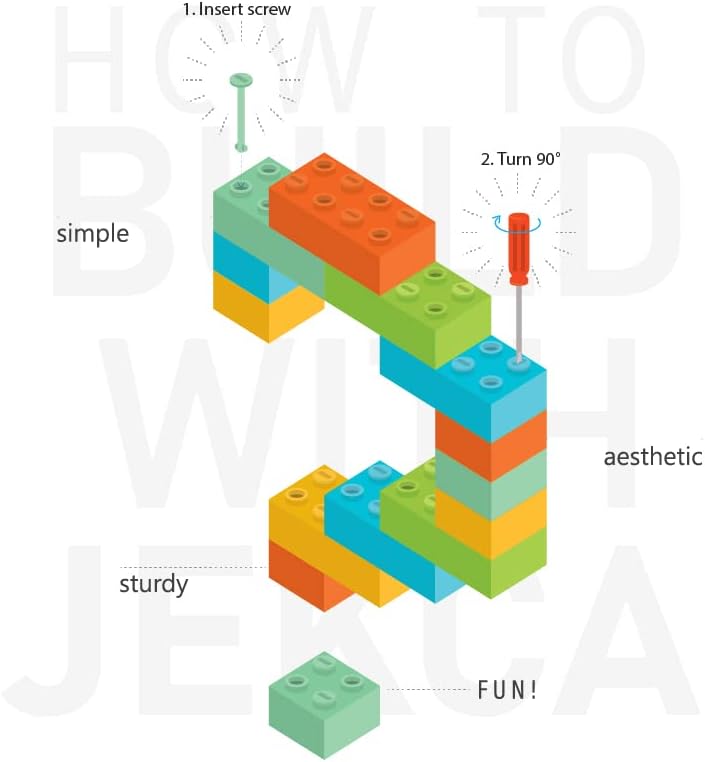
Image: Illustration of the JEKCA interlocking mechanism. Step 1: Insert the screw. Step 2: Turn the screw 90 degrees with the pin driver to secure the bricks.
4.2 General Assembly Steps
- Unpack Components: Carefully remove all bricks, pins, and tools from the packaging. Organize bricks by color and size if helpful.
- Consult the Manual: Refer to the included detailed instruction manual for step-by-step visual guides specific to the Budgie 01S-M02 model. Each step will indicate which bricks and pins to use.
- Connect Bricks: Place the designated bricks together according to the manual.
- Insert Pins: Use the provided pin driver to insert the appropriate size pin (screw) into the designated holes. Some reviews indicate that pins come in different sizes (e.g., size 2 for smaller, size 3 for larger connections); pay attention to the manual's guidance on pin selection.
- Secure Connection: Turn the pin 90 degrees using the pin driver to lock the bricks firmly in place. Ensure each connection is tight to maintain the model's stability.
- Repeat: Continue following the manual's instructions, step by step, until the model is complete.

Image: Example of JEKCA model assembly, demonstrating the detailed construction process.
4.3 Completed Model Views
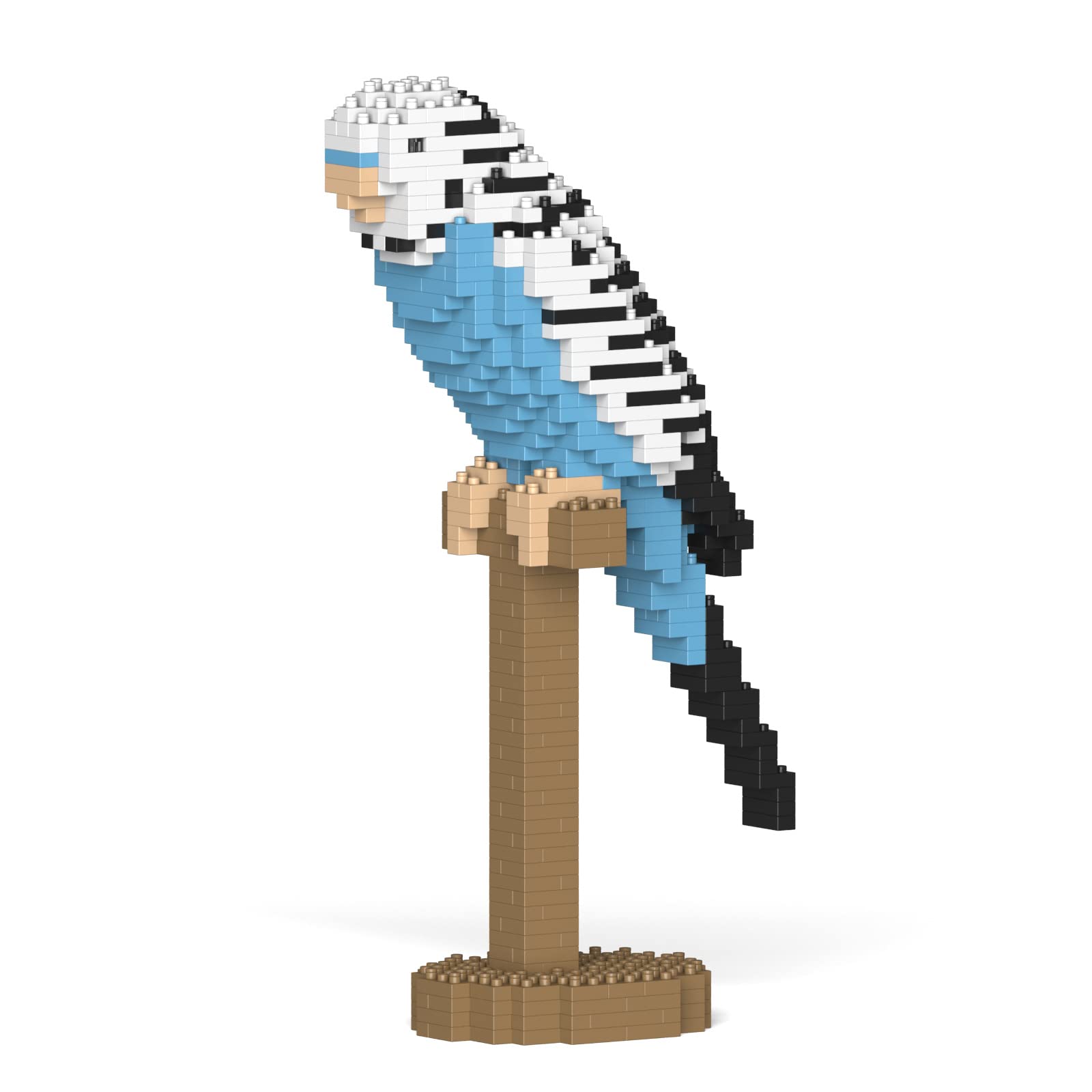
Image: Front view of the completed Budgie 01S-M02 model.

Image: Side view of the completed Budgie 01S-M02 model.

Image: Back view of the completed Budgie 01S-M02 model.
5. Usage
Once assembled, your JEKCA Budgie 01S-M02 model is designed for display. The interlocking system ensures the model is sturdy and resistant to accidental disassembly, making it suitable for placement on shelves, desks, or other stable surfaces.
6. Maintenance
To keep your JEKCA model in optimal condition:
- Cleaning: Gently dust the model with a soft brush or cloth. For more stubborn dirt, lightly dampen a cloth with water and wipe the surface, then dry immediately. Avoid harsh chemicals or abrasive cleaners.
- Storage: Store the model away from direct sunlight to prevent color fading. Avoid extreme temperatures or high humidity.
- Handling: While sturdy, avoid dropping the model or applying excessive force, which could damage individual bricks or connections.
7. Troubleshooting
If you encounter issues during or after assembly, consider the following:
- Bricks not staying together: Ensure pins are fully inserted and rotated 90 degrees to lock the bricks. Double-check the instruction manual for correct brick placement and pin usage for that specific step.
- Difficulty understanding instructions: The included instruction manual provides detailed visual steps. Take your time to carefully review each diagram and text. Online resources or community forums might also offer additional tips.
- Missing or damaged parts: If you find any missing or damaged bricks or pins, please contact JEKCA customer support for assistance.
8. Specifications
| Brand Name | JEKCA |
| Model Name | Budgie 01S-M02 |
| Model Number | ST19MA27-M02 |
| Number of Pieces | 610 |
| Item Dimensions (L x W x H) | 5.91 x 2.72 x 10.83 inches (15.0 x 6.9 x 27.5 cm) |
| Item Weight | 1.2 pounds |
| Material Type | Plastic |
| Age Range Description | Recommended for 14 years or above |
9. Warranty Information
No specific warranty information is provided with this product. For details regarding returns or defects, please refer to the retailer's policy or contact JEKCA customer support.
10. Support
For further assistance, inquiries about parts, or general support, please utilize the following resources:
- Visit the official JEKCA Store: JEKCA Amazon Store
- Refer to the product page for additional details: JEKCA Budgie 01S-M02 Product Page