
1. Introduction and Overview
The HUAWEI Watch FIT 2 is a versatile smartwatch designed to enhance your daily life and fitness journey. Featuring a vibrant 1.74-inch AMOLED display, it offers clear visuals and intuitive touch control. This smartwatch supports Bluetooth calling, allowing you to answer calls directly from your wrist. With an impressive battery life of up to 10 days, it minimizes the need for frequent charging. Integrated quick-workout animations provide guidance for various exercises, making your fitness routines more engaging and effective. Advanced health monitoring capabilities, including SpO2 and heart rate tracking, help you stay informed about your well-being.

Figure 1: HUAWEI Watch FIT 2 Smartwatch (Pink Edition)
This manual provides detailed instructions on setting up, operating, maintaining, and troubleshooting your HUAWEI Watch FIT 2 Smartwatch to ensure you get the most out of its features.
2. What's in the Box
Upon unboxing your HUAWEI Watch FIT 2 Smartwatch, you should find the following components:
- HUAWEI Watch FIT 2 Smartwatch (with pre-attached watch band)
- Charging Cable (magnetic)
- Quick Start Guide / Safety Information
3. Product Features
3.1. Display
The HUAWEI Watch FIT 2 features a large 1.74-inch AMOLED FullView display, offering a vibrant and clear visual experience. The high screen-to-body ratio and larger display area provide ample space for information and interaction.
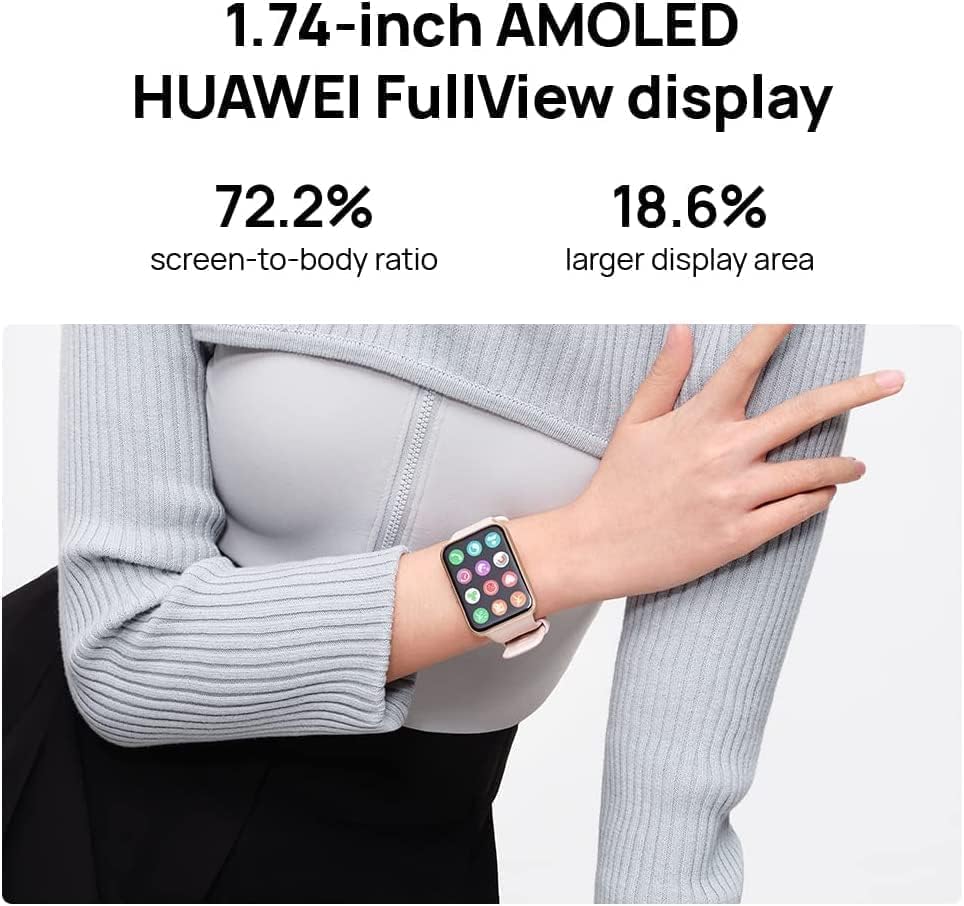
Figure 2: Detailed view of the 1.74-inch AMOLED FullView display
3.2. Health Monitoring
The smartwatch is equipped with advanced sensors for comprehensive health tracking:
- Automatic SpO2 Monitoring: Continuously tracks your blood oxygen saturation levels.
- Accurate Heart Rate Monitoring: Provides real-time heart rate data and alerts for potential arrhythmias.
- Sleep Tracking: Monitors sleep stages (REM, light, deep) and provides insights into sleep quality.
- Stress Monitoring: Tracks stress levels and offers breathing exercises to help manage stress.

Figure 3: SpO2 and Heart Rate Monitoring Interface
3.3. Battery Life
Enjoy extended usage with up to 10 days of battery life on a single charge under typical usage conditions. Heavy usage may result in approximately 7 days of battery life. The watch supports fast charging, allowing for quick power-ups.
3.4. Bluetooth Calling
Make and receive calls directly from your wrist when connected to your smartphone via Bluetooth, offering convenience on the go.
3.5. Quick-Workout Animations
The smartwatch provides animated guides for various workouts, making it easier to follow exercises and maintain proper form.
3.6. Music Storage
Store approximately 4GB of music directly on the watch, allowing you to listen to your favorite tunes without needing your phone. Music can be played through the watch's built-in speakers or paired Bluetooth headphones.
4. Setup
4.1. Charging Your Smartwatch
Before initial use, fully charge your HUAWEI Watch FIT 2. Connect the magnetic charging cable to the charging contacts on the back of the watch and plug the USB-A end into a compatible power adapter (not included) or a computer's USB port. The watch screen will indicate charging status. A full charge typically takes a short period, allowing for quick readiness.
4.2. Attaching/Removing Watch Straps
The watch straps are designed for easy attachment and removal, allowing for customization. To remove a strap, locate the small button on the underside of the watch where the strap connects. Press this button firmly and slide the strap away from the watch body. To attach a strap, align it with the slot and slide it in until it clicks securely into place.
4.3. Initial Pairing with Your Smartphone
- Download and install the HUAWEI Health app from your smartphone's app store (Google Play Store or Apple App Store).
- Open the HUAWEI Health app and follow the on-screen instructions to create an account or log in.
- Ensure Bluetooth is enabled on your smartphone.
- In the HUAWEI Health app, navigate to the 'Devices' section and tap 'Add device'.
- Select 'Smartwatches' and choose 'HUAWEI Watch FIT 2' from the list.
- Follow the prompts on both your phone and watch to complete the pairing process. A confirmation code may appear on both devices; verify they match.
5. Operating the Smartwatch
5.1. Basic Navigation
- Swipe Up/Down: Scroll through menus, notifications, or quick settings.
- Swipe Left/Right: Access different feature cards (e.g., heart rate, weather, activity rings).
- Tap: Select an item or open an application.
- Press Side Button: Return to the home screen or open the app list.
- Press and Hold Side Button: Power on/off the watch or access restart options.
5.2. Changing Watch Faces
You can customize your watch face directly from the watch or through the HUAWEI Health app. On the watch, press and hold the current watch face to enter the selection mode, then swipe left or right to browse available faces and tap to select. More watch faces can be downloaded and applied via the HUAWEI Health app.
5.3. Notifications and Calling
Once paired with your smartphone, the watch will display incoming call alerts, text messages, and notifications from various apps. You can answer or reject calls directly from the watch. Quick replies for messages are also supported.
5.4. Music Playback
Control music playing on your phone or play music stored directly on the watch. Access the music player from the app list. You can adjust volume, skip tracks, and manage playlists. For music stored on the watch, pair Bluetooth headphones for a phone-free listening experience during workouts.
5.5. Workout Modes
The HUAWEI Watch FIT 2 offers a wide range of workout modes, including outdoor run, indoor walk, cycling, swimming, and custom options. Select your desired workout from the app list. Many modes provide real-time metrics, GPS tracking (for outdoor activities), and post-workout summaries. You can customize workout goals and plans through the HUAWEI Health app.
6. Specifications
| Feature | Detail |
|---|---|
| Product Dimensions | 0.43 x 1.32 x 1.81 inches |
| ASIN | B0B3MLJ8NM |
| Item model number | 55028896 |
| Standing screen display size | 1.74 Inches |
| Connectivity Technology | Bluetooth |
| Wireless Communication Standard | Bluetooth |
| GPS | No GPS (relies on phone's GPS) |
| Shape | Rectangular |
| Screen Size | 1.74 Inches |
| Brand | HUAWEI |
| Model Name | watch |
| Manufacturer | Huawei |
| Date First Available | October 30, 2022 |
7. Maintenance
7.1. Water Resistance
The HUAWEI Watch FIT 2 is water-resistant. It is suitable for activities like hand washing and light rain exposure. However, it is not recommended for showering, swimming, or diving. If the watch gets wet, use the water button feature to help expel water from the speakers.
7.2. Cleaning
Regularly clean your watch and strap to prevent skin irritation and maintain performance. Use a soft, lint-free cloth to wipe the screen and watch body. For the strap, follow the material-specific cleaning instructions. Ensure the charging contacts and sensors on the back of the watch are clean and dry before charging.
8. Troubleshooting
8.1. Connectivity Issues (Bluetooth)
If your watch is not connecting to your phone:
- Ensure Bluetooth is enabled on both your watch and smartphone.
- Make sure the watch is within the Bluetooth range of your phone.
- Restart both your watch and smartphone.
- Try unpairing and re-pairing the devices through the HUAWEI Health app.
8.2. App Synchronization Problems
If data is not syncing correctly to the HUAWEI Health app:
- Check your internet connection on your smartphone.
- Ensure the HUAWEI Health app is updated to the latest version.
- Verify that the app has all necessary permissions enabled in your phone's settings.
- Close and reopen the HUAWEI Health app.
8.3. Weather App Not Working
If the weather app on your watch is not displaying information:
- Ensure location services are enabled on your smartphone and granted to the HUAWEI Health app.
- Verify that the weather information is correctly displayed in the HUAWEI Health app on your phone.
- Check if the weather app on your watch requires a manual refresh or specific settings within the HUAWEI Health app.
9. Warranty and Support
Your HUAWEI Watch FIT 2 Smartwatch is covered by a manufacturer's warranty. Please refer to the warranty card included in your product packaging for specific terms and conditions. For further assistance, technical support, or to access the full user manual, visit the official HUAWEI support website or contact their customer service. Regular software updates are released to improve functionality and add new features, so ensure your watch and the HUAWEI Health app are kept up-to-date.


