
E-flite EFL15950
E-flite Cirrus SR22T 1.5m BNF Basic RC Airplane Instruction Manual
Model: EFL15950
Introduction
This manual provides essential information for the safe and effective operation of your E-flite Cirrus SR22T 1.5m BNF Basic RC Airplane. Please read this entire manual before assembly, setup, or use to ensure proper function and to prevent damage or injury. This model is a Bind-N-Fly (BNF) Basic version, meaning it comes with a receiver but requires a compatible Spektrum DSMX/DSM2 transmitter, battery, and charger, which are sold separately.

The E-flite Cirrus SR22T 1.5m BNF Basic RC Airplane, showcasing its detailed scale appearance.
Safety Information
Read the ENTIRE instruction manual to become familiar with the features of the product before operating. Failure to operate the product correctly can result in damage to the product, personal property and cause serious injury. This is a sophisticated hobby product. It must be operated with caution and common sense and requires some basic mechanical ability. Failure to operate this product in a safe and responsible manner could result in injury or damage to the product or other property. This product is not intended for use by children. Do not use with incompatible components or alter this product in any way outside of the instructions provided by Horizon Hobby, LLC. This manual contains instructions for safety, operation and maintenance. It is essential to read and follow all the instructions and warnings in the manual, prior to assembly, setup or use, in order to operate correctly and avoid damage or serious injury.
What's Included and Needed to Complete
Included in the Box:
- E-flite Cirrus SR22T 1.5m BNF Basic with Smart, AS3X and SAFE Select
Items Required for Operation (Sold Separately):
- Full-range 6–7+ channel Spektrum DSMX/DSM2 compatible transmitter
- 3S 2200–3200mAh or 4S 2200–3200mAh LiPo flight battery
- Compatible LiPo charger

Visual representation of additional components required for flight: Battery, Charger, and Transmitter.
Setup and Assembly
The E-flite Cirrus SR22T 1.5m is designed for quick and easy assembly. Follow these general steps:
- Unpacking: Carefully remove all components from the packaging. Inspect for any damage.
- Wing Installation: Attach the main wings to the fuselage. Ensure all connections are secure and control linkages move freely.
- Tail Assembly: Secure the horizontal and vertical stabilizers. Verify rudder and elevator linkages are correctly installed and move without obstruction.
- Landing Gear: Ensure the landing gear is properly seated and secured.
- Propeller Installation: Attach the propeller and spinner according to the instructions. Ensure it is balanced and securely fastened.
- Battery Installation: Install your charged flight battery into the designated compartment. Secure it with the provided strap or hook-and-loop fastener to prevent shifting during flight.
- Binding: Bind the aircraft's Spektrum AR637TA receiver to your compatible Spektrum DSMX/DSM2 transmitter. Refer to your transmitter's manual for specific binding procedures.
- Control Surface Check: After binding, power on the aircraft and transmitter. Verify that all control surfaces (ailerons, elevator, rudder, flaps) respond correctly to transmitter inputs and move in the appropriate direction. Adjust servo directions as needed in your transmitter.

Top view of the Cirrus SR22T, illustrating the overall layout for assembly reference.

Bottom view of the Cirrus SR22T, highlighting landing gear and underwing components.
Operating Instructions
Pre-Flight Checks:
- Ensure your flight battery is fully charged and securely installed.
- Verify your transmitter battery is fully charged.
- Perform a range check of your radio system.
- Check all control surfaces for correct movement and direction.
- Inspect the propeller for any damage.
- Confirm the flight area is clear of obstacles and people.
AS3X and SAFE Select Technology:
Your Cirrus SR22T 1.5m is equipped with Spektrum's AS3X (Artificial Stabilization – 3-aXis) and optional-use SAFE Select technologies. AS3X works behind the scenes to smooth out the effects of wind and turbulence, providing a locked-in feel. SAFE Select offers flight envelope protection, including:
- Pitch and Bank Angle Limits: Prevents the aircraft from over-pitching or over-banking.
- Automatic Self-Leveling: Returns the wings to level when the controls are released.
- Panic Recovery: Instantly returns the aircraft to level flight with the press of a button.
Refer to the detailed receiver manual for instructions on enabling and disabling SAFE Select, and for configuring your transmitter for these features.
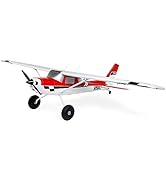
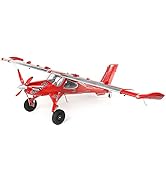
The Cirrus SR22T features SAFE Select, AS3X, and Smart Technology for enhanced flight experience and telemetry.
Flight Tips:
- Take-off: Apply throttle smoothly and maintain a straight path. Use gentle elevator input to lift off once sufficient speed is gained.
- Flight: The Cirrus SR22T offers both scale-like and sport flying characteristics. Experiment with different throttle settings and control inputs to understand its flight envelope.
- Flaps: Utilize the functional flaps for slower flight and shorter landings. Deploying flaps will increase lift and drag, requiring a slight increase in throttle to maintain altitude.
- Landing: Approach into the wind. Reduce throttle and deploy flaps as needed to control descent rate. Maintain a slight nose-up attitude for a smooth touchdown.

The Cirrus SR22T in stable flight, demonstrating its aerodynamic profile.

The Cirrus SR22T approaching for landing, with landing gear deployed.
Maintenance
Regular maintenance ensures the longevity and safe operation of your aircraft.
- Post-Flight Inspection: After each flight, check the airframe for any damage, loose connections, or worn parts. Inspect control linkages, hinges, and the propeller.
- Cleaning: Clean the aircraft with a soft, damp cloth. Avoid using harsh chemicals that could damage the foam or paint.
- Battery Care: Always store LiPo batteries at a storage charge and in a fire-safe container. Follow all manufacturer guidelines for charging and discharging.
- Storage: Store the aircraft in a cool, dry place, away from direct sunlight and extreme temperatures. If disassembling for storage, ensure components are protected.
Troubleshooting
| Problem | Possible Cause | Solution |
|---|---|---|
| Aircraft does not respond to transmitter | Unbound receiver, dead transmitter/receiver battery, incorrect model memory selected | Re-bind receiver, check/charge batteries, select correct model on transmitter |
| Control surfaces move in wrong direction | Incorrect servo direction settings in transmitter | Reverse servo direction in transmitter settings |
| Aircraft flies erratically or is unstable | Incorrect CG, damaged control surface, loose propeller, AS3X/SAFE settings issue | Check Center of Gravity (CG), inspect for damage, ensure propeller is secure, verify AS3X/SAFE settings |
| Motor runs but propeller does not spin | Loose propeller, damaged motor shaft, stripped gearbox (if applicable) | Tighten propeller, inspect motor/gearbox for damage and replace if necessary |
Specifications
| Feature | Detail |
|---|---|
| Product Dimensions | 41.38 x 12.25 x 10 inches |
| Item Weight | 3.83 pounds |
| Model Number | EFL15950 |
| Manufacturer Recommended Age | 14 months and up (Note: RC aircraft typically require adult supervision and skill) |
| First Available | June 9, 2022 |
| Receiver | Spektrum AR637TA with AS3X and SAFE Select |
| Motor Compatibility | 3S and 4S LiPo batteries |
Warranty and Support
For warranty information, technical support, or replacement parts, please contact E-flite customer service or visit the official E-flite website. Keep your proof of purchase for any warranty claims.
E-flite is a brand of Horizon Hobby, LLC. For the most up-to-date information and support resources, please refer to the Horizon Hobby website.
Related documentsEFL15950


Ask a question about this manual
Ask about setup, troubleshooting, compatibility, parts, safety, or missing instructions. Manuals+ will review the question and use this page’s manual context to help answer it.