
1. Safety Information
Please read all instructions carefully before assembly and use. Keep this manual for future reference.
- Weight Capacity: Do not exceed the maximum weight recommendation of 220 lbs (100 kg) for the desktop. Each shelf can support up to 45 lbs (20 kg).
- Assembly: Ensure all parts are correctly assembled and fasteners are securely tightened before use. Do not overtighten screws.
- Stability: Place the desk on a flat, stable surface. Use the adjustable leveling feet to compensate for uneven floors and prevent wobbling.
- Children: Keep small parts away from children during assembly.
- Tools: Use only the tools provided or recommended for assembly.
2. Package Contents
Before beginning assembly, verify that all components listed below are present and undamaged. If any parts are missing or damaged, please contact customer support.
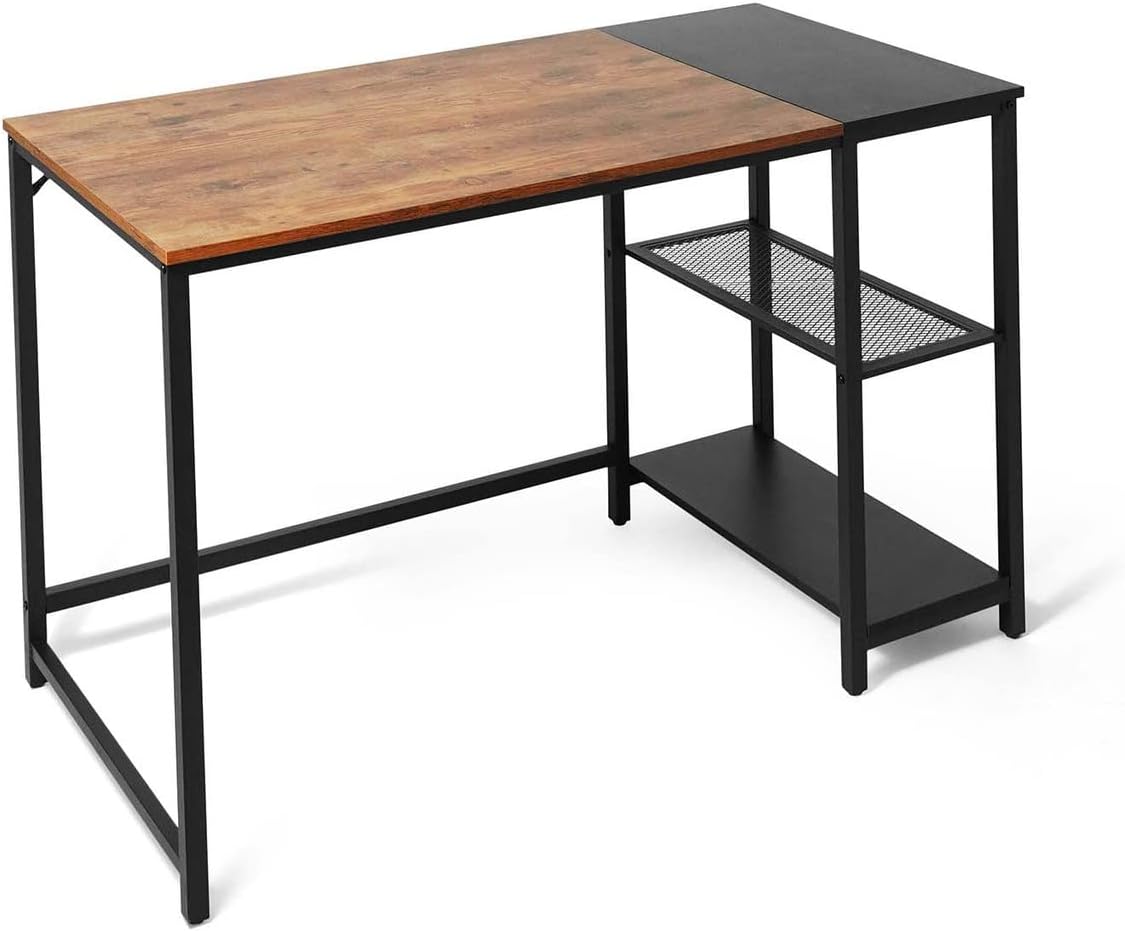
Image: Overview of the CAPHAUS 47-Inch Computer Desk, showing the desktop and integrated two-tier storage shelves.
The package includes all necessary parts and hardware for assembly, along with a detailed instruction manual.
3. Setup and Assembly
Assembly is designed to be straightforward and can typically be completed by one person in under 20 minutes. Follow the numbered steps in the included assembly guide.
- Unpack and Identify Parts: Carefully unpack all components and lay them out on a clean, soft surface (e.g., a blanket or carpet) to prevent scratches. Refer to the parts list in your separate assembly guide to identify each piece.
- Initial Fastening: When attaching screws and bolts, only tighten them about 70% of the way. This allows for minor adjustments during assembly to ensure all parts align correctly.
- Assemble Frame: Begin by assembling the metal frame components according to the instructions. Ensure the support structures are correctly oriented.
- Attach Shelves: Secure the two-tier storage shelves to the frame. The middle shelf can be removed if space is needed for a larger computer tower.
- Attach Desktop: Carefully place the desktop onto the assembled frame and secure it with the provided fasteners.
- Final Tightening: Once all parts are in place and aligned, fully tighten all screws and bolts.
- Adjust Leveling Feet: Turn the adjustable leveling feet at the bottom of the desk legs to ensure the desk is stable and does not wobble on your floor.

Image: Detailed view highlighting the P2 Grade wooden board, 15mm thickened table top, and the robust 25x25mm strong metal legs, indicating durable construction.

Image: Close-up showing key features including the adjustable leveling foot for stability, an extra support structure for durability, and the practical metal mesh shelves for storage.
4. Operating and Usage
The CAPHAUS 47-Inch Computer Desk is designed for versatile use in various settings.
- Placement: Suitable for home offices, study rooms, bedrooms, living rooms, or kids' rooms.
- Functionality: Ideal as a computer desk, study table, writing desk, or gaming table.
- Storage: Utilize the two-tier storage shelves to organize books, office supplies, and other essentials. The middle shelf can be removed to accommodate larger items like a computer tower.
- Desktop Space: The spacious 47-inch desktop provides ample room for monitors, keyboards, and other work-related items.

Image: The CAPHAUS 47-Inch Computer Desk set up in a contemporary home office, featuring a computer monitor, keyboard, and an office chair, demonstrating its functional use.
5. Maintenance
Proper care will ensure the longevity and appearance of your CAPHAUS Computer Desk.
- Cleaning: Wipe the desktop and frame with a soft, damp cloth. Avoid harsh chemicals or abrasive cleaners that could damage the finish.
- Spills: Clean up spills immediately to prevent staining or damage to the wooden surface.
- Fasteners: Periodically check all screws and bolts to ensure they remain tight. Retighten if necessary to maintain stability.
- Heat and Moisture: Avoid placing hot items directly on the desktop. Use coasters for drinks to protect against moisture rings.
6. Troubleshooting
If you encounter any issues with your desk, refer to the following common solutions:
- Desk is Wobbly:
- Ensure all assembly screws are fully tightened.
- Adjust the leveling feet on each leg to stabilize the desk on uneven floors. - Parts Don't Align:
- Loosen all screws slightly, realign the parts, then retighten them evenly. Ensure you are following the assembly steps in the correct order. - Missing Parts or Damaged Components:
- Review the package contents list. If parts are genuinely missing or damaged upon arrival, contact CAPHAUS customer support for assistance.
7. Specifications
Detailed specifications for the CAPHAUS 47-Inch Computer Desk.

Image: A diagram illustrating the key specifications of the desk, including its length (120 cm / 47.2 inches), depth (60 cm / 23.6 inches), height (75 cm / 29.5 inches), desktop weight capacity (220 lbs), and individual shelf weight capacity (45 lbs).
| Feature | Detail |
|---|---|
| Brand | CAPHAUS |
| Model Number | FOT-CH4724M2-RUOK |
| Desk Design | Computer Desk with Storage |
| Product Dimensions (L x W x H) | 120 cm x 60 cm x 75 cm (47.2 in x 23.6 in x 29.5 in) |
| Color | Rustic Oak and Black |
| Materials | P2 Grade Engineered Wood (Desktop), Steel (Frame) |
| Desktop Thickness | 15 mm |
| Number of Shelves | 2 (removable middle shelf) |
| Desktop Weight Capacity | 220 lbs (100 kg) |
| Shelf Weight Capacity (each) | 45 lbs (20 kg) |
| Special Features | Adjustable Leveling Feet, Metal Mesh Shelves |
| Assembly Required | Yes (approx. 20 minutes, 1 person recommended) |
8. Warranty and Support
CAPHAUS is committed to providing quality products and customer satisfaction. While specific warranty details are not provided in this manual, we encourage you to contact our customer service team for any inquiries or issues.
For support, please send us a message through your Buyer Center on the platform where you purchased the product. Our customer service is available to offer assistance and solutions for any problems you may encounter.
Please have your purchase details and model number (FOT-CH4724M2-RUOK) ready when contacting support to expedite the process.

