1. Introduction
The Denon PMA-1700NE is an integrated amplifier designed to deliver high-fidelity audio performance. Featuring an Ultra High Current (UHC) single push-pull circuit and Advanced AL32 Processing Plus, this amplifier is engineered to reproduce music with rich detail and immersive sound, maintaining faithfulness to the original recording. With 140 Watts per channel, it can effectively drive a variety of speakers while preserving exceptional sound quality.
This unit includes multiple digital inputs, a rear USB-B input, and built-in Moving Magnet (MM) and Moving Coil (MC) phono inputs, allowing for high-resolution audio playback from vinyl and computer files up to 384 kHz/32-bit and DSD up to 11.2 MHz. It supports various audio formats including MP3, ALAC, WAV, FLAC HD, and DSD. The PMA-1700NE can also function as a stereo pre-amplifier for integration with additional power stages.
2. Key Features
- High-Power 2-Channel Amplification: Delivers 140W per channel, capable of driving a wide range of speakers with detailed, distortion-free audio.
- Advanced AL32 Processing Plus: Ensures precise audio reproduction up to 384 kHz/32-bit resolution.
- Ultra-High Current Single Push-Pull Circuit: Balances high power with intricate music details for clean, rich, and immersive sound.
- Integrated Phono Equalizer: Supports both MM and MC cartridges, bringing vinyl collections to life.
- Analog Mode: Allows for pure analog playback by disabling digital power sources.
- Versatile Connectivity: Includes 3 digital inputs (Optical, Coaxial), a USB-B DAC input for high-resolution computer audio, and various analog inputs.
- Wide Audio Format Support: Compatible with MP3, ALAC, WAV, FLAC HD, and DSD formats.
- Quality Construction: Built with premium components, reflecting Denon's 110-year legacy in audio innovation.
3. Setup
3.1 Unpacking
Carefully remove the PMA-1700NE from its packaging. Ensure all accessories, including the Quick Start Guide and remote control, are present. Place the amplifier on a stable, level surface with adequate ventilation around the unit to prevent overheating.
3.2 Connecting Speakers
Connect your speakers to the speaker terminals on the rear panel. Ensure correct polarity (positive to positive, negative to negative) for optimal sound. The PMA-1700NE supports two sets of speakers (A and B).
3.3 Connecting Audio Sources
Refer to the rear panel diagram for connection points.
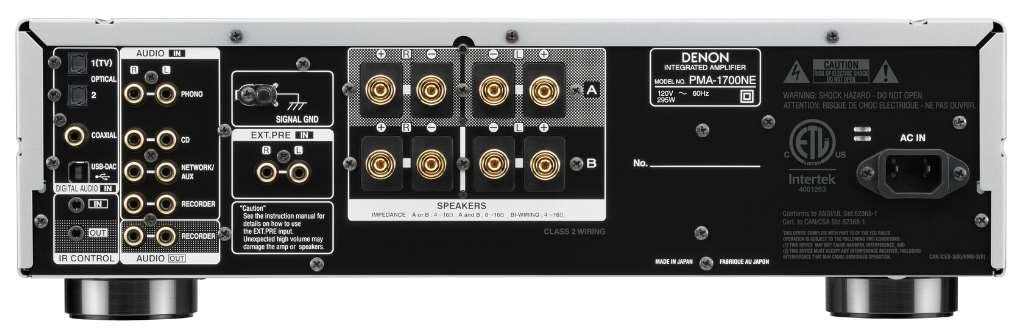
Figure 1: Rear Panel Connections
- Digital Inputs (Optical/Coaxial): Connect digital audio sources like CD players, Blu-ray players, or TVs using optical or coaxial cables.
- USB-B Input: Connect your computer for high-resolution audio playback. You may need to install a specific driver for your operating system (refer to Denon's support website).
- Phono Input (MM/MC): Connect your turntable. Select the appropriate cartridge type (MM or MC) using the selector on the front panel. Ensure the turntable's ground wire is connected to the amplifier's SIGNAL GND terminal.
- Analog Inputs (CD, Network/Aux, Recorder): Connect other analog audio devices using RCA cables.
- Pre-amp Output: For connecting to an external power amplifier.
3.4 Power Connection
After all audio connections are made, connect the power cord to the amplifier and then to a wall outlet.
4. Operating Instructions
4.1 Power On/Off
Press the POWER button on the front panel or the remote control to turn the unit on or off.

Figure 2: Front Panel Overview
4.2 Source Selection
Use the INPUT SELECTOR knob on the front panel or the corresponding buttons on the remote control to choose your desired audio source (e.g., CD, Phono, USB-DAC, Optical, Coaxial).
4.3 Volume Control
Adjust the listening volume using the large VOLUME knob on the front panel or the volume buttons on the remote control.

Figure 3: Volume Control
4.4 Tone Controls (Bass, Treble, Balance)
The amplifier features dedicated knobs for BASS, TREBLE, and BALANCE adjustments. These allow you to fine-tune the sound to your preference or room acoustics. To bypass these controls for the purest signal path, activate the SOURCE DIRECT mode.
4.5 Analog Mode
For optimal analog audio playback, press the ANALOG MODE button. This function turns off power to the digital audio circuitry, reducing interference and enhancing the purity of analog signals.
4.6 Headphone Output
Connect headphones to the PHONES jack on the front panel for private listening. When headphones are connected, speaker output is automatically muted.
4.7 Remote Control
The included remote control provides convenient access to most amplifier functions from your listening position.
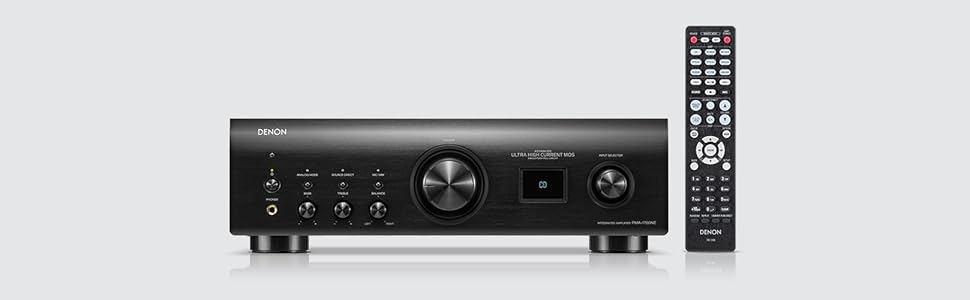
Figure 4: Amplifier with Remote Control
5. Maintenance
To ensure long-term performance and appearance of your PMA-1700NE, follow these maintenance guidelines:
- Cleaning: Wipe the unit with a soft, dry cloth. Do not use abrasive cleaners, waxes, or solvents.
- Ventilation: Ensure proper airflow around the amplifier. Do not block ventilation openings or place the unit in an enclosed space without adequate air circulation.
- Power Cord: Disconnect the power cord from the wall outlet if the unit will not be used for an extended period.
6. Troubleshooting
If you experience issues with your PMA-1700NE, consult the following basic troubleshooting steps:
- No Power: Check if the power cord is securely connected to both the amplifier and the wall outlet. Ensure the power button is pressed.
- No Sound:
- Verify that the correct input source is selected.
- Check all audio cable connections between the source device and the amplifier.
- Ensure speaker cables are correctly connected and not short-circuited.
- Confirm that the volume is turned up and not muted.
- If headphones are connected, disconnect them to restore speaker output.
- Distorted Sound:
- Check speaker connections for loose wires or incorrect polarity.
- Reduce the volume level.
- Ensure source devices are not outputting a distorted signal.
- USB-DAC Issues: Ensure the correct USB driver is installed on your computer. Check the USB cable connection.
For more complex issues, please refer to the full owner's manual or contact Denon customer support.
7. Specifications
| Feature | Specification |
|---|---|
| Output Power | 140 Watts per channel (4 Ohms) |
| Number of Channels | 2 |
| Item Dimensions (L x W x H) | 17.1 x 16.2 x 5.3 inches (43.4 x 41.1 x 13.5 cm) |
| Item Weight | 43.9 pounds (19.9 kg) |
| USB-DAC Support | Up to 384 kHz/32-bit PCM, DSD up to 11.2 MHz |
| Phono Input | MM/MC (Moving Magnet/Moving Coil) |
| Supported Audio Formats | MP3, ALAC, WAV, FLAC HD, DSD |
8. Official Product Video
Video 1: Denon PMA-1700NE Shortened Product Overview. This video provides a brief visual overview of the amplifier's design and key features, including its powerful sound, USB-DAC capabilities, Hi-Res Audio certification, and build integrity with selected components.
9. Warranty and Support
The Denon PMA-1700NE Integrated Amplifier typically comes with a 3-year factory warranty when purchased from an authorized seller. For detailed warranty terms, service, or technical support, please refer to the warranty card included with your product or visit the official Denon website.
For the latest drivers, firmware updates, and additional support resources, please visit the Denon support page.


