
Yavor DPC-331
Contents
Yavor Replacement Optical Pickup Unit for Kenwood DPC-331 CD Player
Installation Guide
Introduction
This manual provides essential information and step-by-step instructions for the safe and correct installation of the Yavor replacement optical pickup unit, designed specifically for the Kenwood DPC-331 CD Player. This component is a direct replacement for the original laser lens assembly, crucial for reading CDs.
Compatibility: This optical pickup unit is compatible exclusively with the Kenwood DPC-331 CD Player model.
Safety Precautions
- Always disconnect the CD player from the power source before beginning any installation or repair work.
- Handle the optical pickup unit with care. Avoid touching the laser lens directly, as oils and dust can impair performance.
- Wear anti-static gloves or use an anti-static wrist strap to prevent electrostatic discharge (ESD), which can damage sensitive electronic components.
- Keep small parts away from children.
- If you are unsure about any step, consult a qualified technician.
Installation Guide
The following steps outline the process for replacing the optical pickup unit in your Kenwood DPC-331 CD Player. Please proceed carefully.
Required Tools:
- Small Phillips head screwdriver
- Soldering iron and desoldering wick/pump (for solder bridge removal)
- Anti-static wrist strap or gloves
Procedure:
- Prepare the CD Player:
Ensure the Kenwood DPC-331 CD player is unplugged from all power sources. Carefully remove the outer casing of the CD player to access the internal components. Refer to your CD player's service manual for specific instructions on opening the unit.
- Locate the Original Optical Pickup Unit:
Identify the existing optical pickup unit within the CD mechanism. It is typically mounted on a sliding rail system.
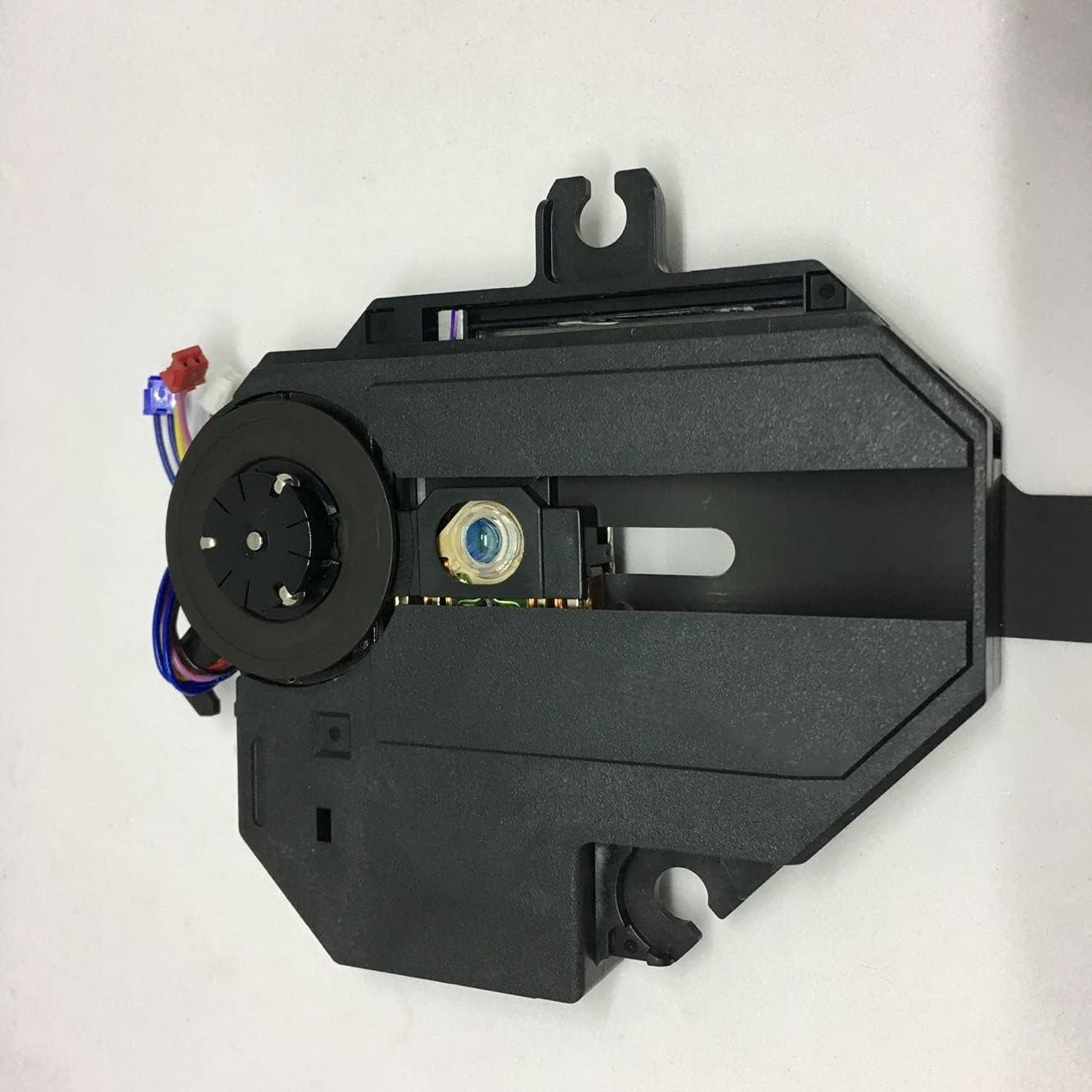
Image 1: The Yavor replacement optical pickup unit, showing its overall structure and components.
- Disconnect and Remove the Old Unit:
Carefully disconnect any ribbon cables or power connectors attached to the old optical pickup unit. Note their orientation for reinstallation. Unscrew any mounting screws holding the unit in place and gently remove it from the CD mechanism.
- Remove the Anti-Static Solder Bridge:
Crucial Step: New optical pickup units often come with an anti-static solder bridge to protect the laser diode during shipping. This bridge must be removed before installation. Locate the solder point on the flexible ribbon cable, as indicated in Image 2. Using a fine-tipped soldering iron, carefully desolder and remove this bridge. Failure to remove this bridge will prevent the unit from functioning.

Image 2: Close-up view of the optical pickup unit's flexible ribbon cable, highlighting the anti-static solder bridge that must be removed prior to installation.
- Install the New Optical Pickup Unit:
Carefully place the new Yavor optical pickup unit into the CD mechanism, ensuring it aligns correctly with the mounting points and rails. Secure it with the screws removed earlier.
- Reconnect Cables:
Reconnect all ribbon cables and power connectors to the new unit, ensuring they are seated firmly and in the correct orientation.
- Test the Unit:
Before reassembling the entire CD player, perform a preliminary test. Connect the CD player to power (with caution, as internal components are exposed) and insert a CD. Observe if the unit powers on, the laser moves, and if it attempts to read the disc. If successful, disconnect power again.
- Reassemble the CD Player:
Once testing is complete and satisfactory, carefully reattach the outer casing of the CD player.
Troubleshooting
If you encounter issues after installation, consider the following:
- Unit does not power on or laser does not move:
Check all cable connections for proper seating. Ensure the anti-static solder bridge was completely removed (refer to Step 4 of Installation Guide).
- Disc not reading or skipping:
Verify the laser lens is clean and free of dust or fingerprints. Ensure the unit is correctly seated and aligned within the CD mechanism. Recheck cable connections.
- No sound or distorted audio:
This is less likely to be directly related to the optical pickup unit itself, but ensure all audio output connections of the CD player are secure.
If problems persist, it is recommended to consult a professional electronics repair technician.
Specifications
| Attribute | Detail |
|---|---|
| Model Compatibility | Kenwood DPC-331 CD Player |
| Type | Optical Pickup Unit / Laser Lens Assembly |
| Manufacturer | Yavor |
| Item Weight | 233 Grams |
Warranty and Support
For warranty information and technical support regarding this Yavor replacement part, please contact the seller directly through your purchase platform. Keep your proof of purchase for any warranty claims.
Ask a question about this manual
Ask about setup, troubleshooting, compatibility, parts, safety, or missing instructions. Manuals+ will review the question and use this page’s manual context to help answer it.